

Contents
On this page
Languages, WPML and Polylang - Plugixa PDF Vouchers for WooCommerce
A gift bought on the English site for a French friend should arrive in French. The free plugin already writes each voucher in the language the buyer shopped in. Pro lets the buyer choose the language, gives each language its own design, and translates the words in your designs.
What the free plugin does
Each voucher stores the language the buyer was shopping in (WPML and Polylang set it on the storefront). Its PDF and its emails are always produced in that language, whoever sends them: an admin pressing Resend email in English does not turn a French gift into an English one.
The plugin’s own texts (on the PDF, in the email) are translated by its language files. A language that is not installed in WordPress falls back to the site language.
The buyer picks the language
With Pro and more than one language on your site, the gift form has a Voucher language field: The voucher and its email are written in this language. It starts on the language the buyer is shopping in. The cart line and the order show the Voucher language.

The languages offered are your Polylang or WPML languages, or else the languages installed in WordPress. With a single language, Settings > Languages says Only one language is installed. Add a language in Settings > General, or use WPML or Polylang.
A design per language
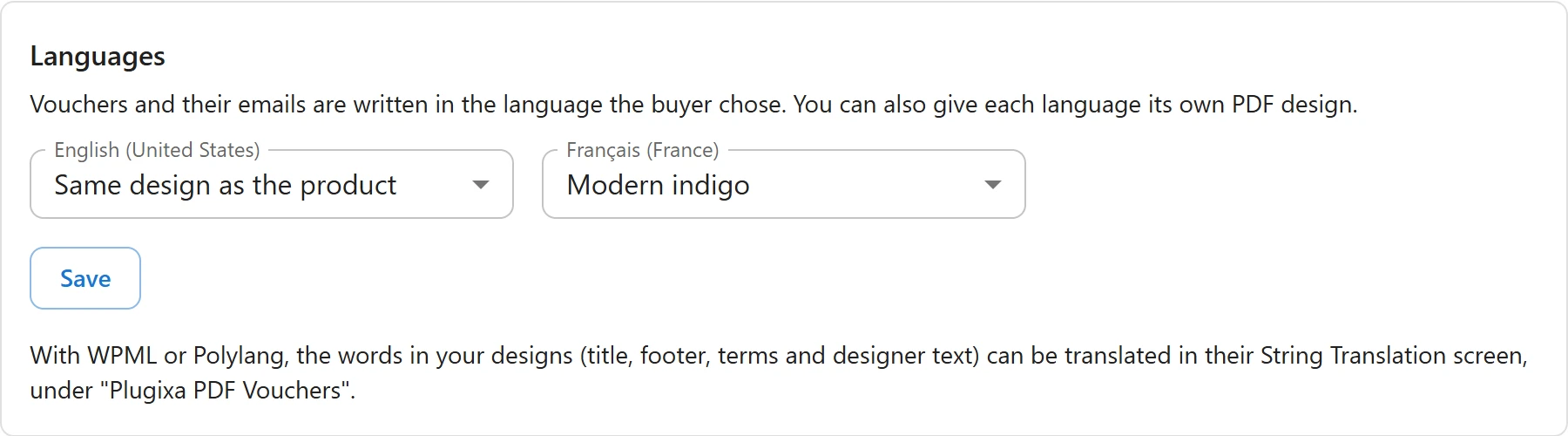
Go to Plugixa PDF Vouchers > Settings, box Languages: Vouchers and their emails are written in the language the buyer chose. You can also give each language its own PDF design.
For each language, choose a design, or Same design as the product, and click Save.
Translate the texts of your designs
With WPML or Polylang, the words in your designs (title, footer, terms and designer text) can be translated in their String Translation screen, under “Plugixa PDF Vouchers”.
- Save each design once, so its texts are registered.
- Open WPML > String Translation, or Languages > Translations in Polylang.
- Filter on Plugixa PDF Vouchers and translate the texts.
Each PDF then prints the texts in the voucher’s language. Placeholders such as {amount} stay as
they are in the translation.
Quick Links
Share