

Contents
On this page
Webhooks - Plugixa POS for WooCommerce
Webhooks post what happens at your registers to another tool as it happens: your accounting, an
ERP, Zapier, Make, Slack or your own script. Each message is a signed JSON POST to an https
address you choose. If your tool is down, the message waits and is sent again.
Webhooks are outgoing HTTP calls to other systems. To run your own PHP inside WordPress when something happens, use the plugin’s actions and filters instead: see Hooks.
Open Plugixa POS > Webhooks. The screen needs the right to manage the POS settings.
Add a webhook
- Click Add a webhook.
- Give it a Name, for example
Accounting. - Type the Address (https): “Where to post the messages. It must be a public https address.”
- Under Send these events, tick the events this tool needs. Pick at least one.
- Leave Active on and click Save.
- The Signing secret dialog opens. Copy the secret into your receiving tool now: “Copy it now: it is not shown again. Make a new one if you lose it.”
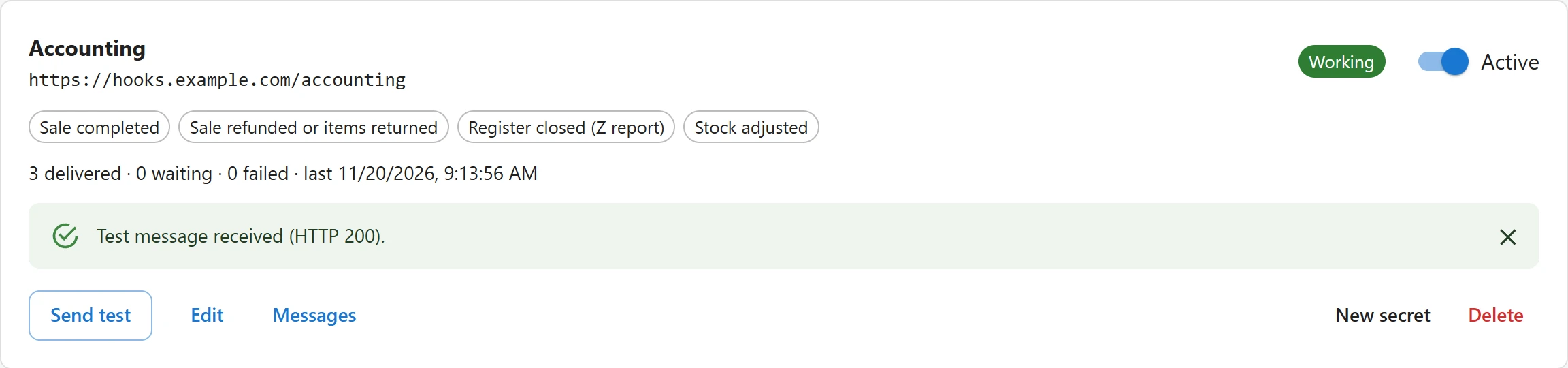
Then click Send test on the card. The plugin sends a webhook.test message at once and shows
“Test message received (HTTP 200).” or “Test message not accepted”, with the answer it got.
Which addresses are accepted
The address is checked when you save it and again before every send:
| Message | Why |
|---|---|
| “Enter a full web address, such as https://example.com/hook.” | Not a full http or https address, or it contains a user name. |
| “Use an https:// address: webhooks carry customer details.” | A plain http:// address. |
| “This address cannot be found (DNS).” | The host name does not resolve. |
| “This address is on a private or local network.” | The host resolves to a private, local or reserved IP address. |
Redirects are not followed: point the webhook at the final address. A site that needs to post to
an internal system can allow it with the plugixa_pos_webhook_allow_http and
plugixa_pos_webhook_destination_allowed filters.
Events
| Event | Label on the screen | Sent when |
|---|---|---|
sale.completed |
Sale completed | A sale is written to the fiscal journal. |
sale.refunded |
Sale refunded or items returned | A refund or return is written to the journal. |
layaway.payment |
Layaway deposit or instalment received | A layaway deposit or instalment is paid. |
layaway.refunded |
Layaway deposit refunded | A layaway deposit is refunded. |
register.opened |
Register opened | A cash session is opened. |
register.closed |
Register closed (Z report) | A cash session is closed, with its Z report. |
cash.movement |
Cash put in or taken out | Cash is put in or taken out of the drawer. |
quote.created |
Quote made | A quote is made at a register. |
quote.converted |
Quote sold | A quote is turned into a sale. |
stock.adjusted |
Stock adjusted | A stock adjustment is logged. |
The first seven come straight from the fiscal journal. A message is queued in the same database transaction as the journal row: a sale that fails is never announced, and a sale that is saved is always announced, even if your tool is down at that moment.
A webhook never stops a sale. If building a message goes wrong, the sale goes through and the error is written to the PHP error log.
The message
Every message has the same envelope:
{
  "id": "jr_812",
  "event": "sale.completed",
  "created_at": "2026-11-19T13:01:53+00:00",
  "site": "https://example.com/",
  "currency": "EUR",
  "data": {
    "order_id": 4463,
    "order_number": "4463",
    "register": {
      "id": 1,
      "code": "R1",
      "name": "Front counter",
      "outlet": { "id": 1, "name": "Maison Plugixa Marais" }
    },
    "session_id": 85,
    "sold_at": "2026-11-19T13:01:52+00:00",
    "lines": [
      {
        "product_id": 3728,
        "variation_id": 0,
        "name": "French press 1 L",
        "sku": "COF-PRESS",
        "qty": "1",
        "subtotal": "22.50",
        "total": "18.00",
        "tax": "3.60",
        "adjustments": [{ "label": "Coffee happy hour -20%", "amount": "5.40" }]
      }
    ],
    "taxes": { "8": { "label": "TVA", "rate": "20.0000", "amount": "3.60" } },
    "payments": [{ "method": "cash", "label": "Cash", "amount": "21.60" }],
    "totals": { "subtotal": "22.50", "discount": "4.50", "tax": "3.60", "total": "21.60" },
    "order": { "id": 4463, "number": "4463", "status": "completed", "url": "https://example.com/wp-admin/..." },
    "customer": null,
    "journal": { "seq": 812, "ticket": 565, "hash": "9f2c..." },
    "cashier": { "id": 87, "name": "Emma Laurent" }
  }
}
| Field | What it holds |
|---|---|
id |
The event id. The same event has the same id for every webhook and every retry: use it to ignore a message you already have. |
event |
The event name from the table above. |
created_at |
When the message was queued (UTC). |
site, currency |
Your site address and WooCommerce currency. |
data |
The event’s content. |
For the journal events, data is the journal entry itself (lines, taxes, payments, totals, as
the books hold them), plus:
| Key | Content |
|---|---|
order |
id, number, status and the order’s admin url, when the event has an order. |
customer |
id, email, first_name, last_name, company; null for a walk-in sale. |
register |
id, code, name and its store (outlet). |
journal |
seq (position in the journal), ticket (document number) and hash. |
cashier |
id and name of the user who did it. |
report |
register.closed only: the Z report (totals, tax by rate, takings by method). |
direction |
cash.movement only: in or out. |
The other events carry quote (and the order it became, for quote.converted), or
adjustment (as listed in Stock adjustments), plus
cashier.
The message is stored when it is queued. A retry sends exactly the same body, not a fresh copy of the order.
Headers and signature
| Header | Value |
|---|---|
Content-Type |
application/json; charset=utf-8 |
User-Agent |
PlugixaPOS/<version>; <your site address> |
X-Plugixa-Event |
The event name. |
X-Plugixa-Delivery |
The delivery number. It stays the same across retries. |
X-Plugixa-Webhook |
The webhook’s id. |
X-Plugixa-Timestamp |
When this attempt was sent, in Unix seconds. |
X-Plugixa-Signature |
sha256= followed by the signature. |
The signature is the HMAC-SHA256, in hexadecimal, of the timestamp, a dot and the raw body, keyed with the webhook’s secret. Compute it on your side and refuse a message that does not match. The timestamp is part of what is signed, so you can also refuse old messages.
$body      = file_get_contents( 'php://input' );
$timestamp = $_SERVER['HTTP_X_PLUGIXA_TIMESTAMP'] ?? '';
$signature = $_SERVER['HTTP_X_PLUGIXA_SIGNATURE'] ?? '';
$expected  = 'sha256=' . hash_hmac( 'sha256', $timestamp . '.' . $body, 'whsec_your_secret' );

if ( ! hash_equals( $expected, $signature ) || abs( time() - (int) $timestamp ) > 300 ) {
	http_response_code( 401 );
	exit;
}
http_response_code( 200 );
Sign the raw body exactly as received, before any JSON decoding.
Delivery and retries
Messages are sent in the background by WP-Cron, never during a sale. Right after a sale the plugin asks cron to send at once; a check also runs every five minutes.
- Your tool accepts a message by answering with any 2xx status within 10 seconds.
- Anything else (an error status, a redirect, a timeout) is a failed attempt.
- A failed message is tried again 1, 4, 9, 16 and 25 minutes after each failed attempt, at the next cron run. After the 6th failed attempt it is marked failed.
- Failed messages are not lost: you can send them again by hand.
WP-Cron runs when your site gets visits. On a quiet site, or with DISABLE_WP_CRON set, make
sure a real cron job calls wp-cron.php, or messages wait.
Watch and fix deliveries
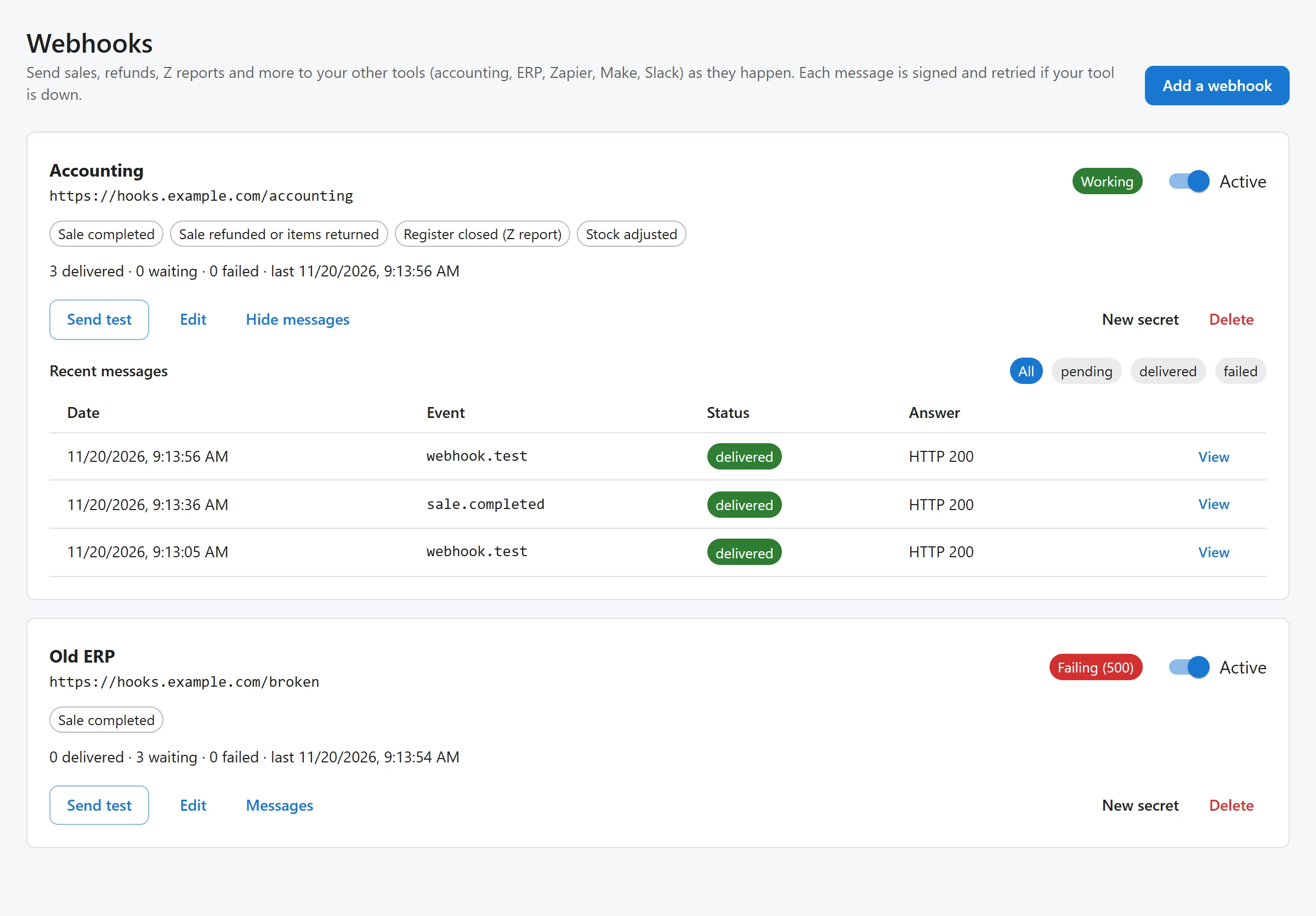
The card’s status chip says how the webhook is doing: Nothing sent yet, Working, Failing with the last answer (orange, then red after 3 failures in a row) or Paused when Active is off. The counts show messages delivered, waiting and failed.
Click Messages to see Recent messages: Date, Event, Status, Answer (the HTTP code, the error and the number of tries) and the next try for a waiting message. Filter by status, click View to read the exact body sent, and Send again to queue one message with a fresh set of attempts. Send failed ones again does it for every failed message of the webhook, once your tool is fixed.
Delivered and failed messages are kept for 30 days.
Pause, change the secret, delete
- Active off pauses a webhook: no new message is queued for it.
- New secret makes a new signing secret and shows it once. “The current one stops working at once: update your receiver.”
- Delete removes the webhook and its message log.
The secret is stored encrypted with your site’s security keys. If those keys change, the card says “The secret cannot be read on this server any more (security keys changed). Make a new secret: nothing is sent until then.” Messages are never sent unsigned.
Quick Links
Share