

Contents
On this page
Fiscal journal - Plugixa POS for WooCommerce
Every register keeps a fiscal journal: a record of each sale, refund, session opening, cash movement, receipt reprint and closing, in the order they happened. Each entry is linked to the one before it by a hash, so changing, inserting or deleting an entry afterwards is detected when the journal is checked. This page explains exactly what the plugin records and checks.
The free plugin does not claim compliance with any country’s cash register law. For France, see France fiscal pack PRO, which adds signatures and archives on top of what is described here.
The Fiscal journal screen
Open Plugixa POS > Fiscal journal. It needs the fiscal audit permission
(plugixa_pos_fiscal_audit); administrators have it.
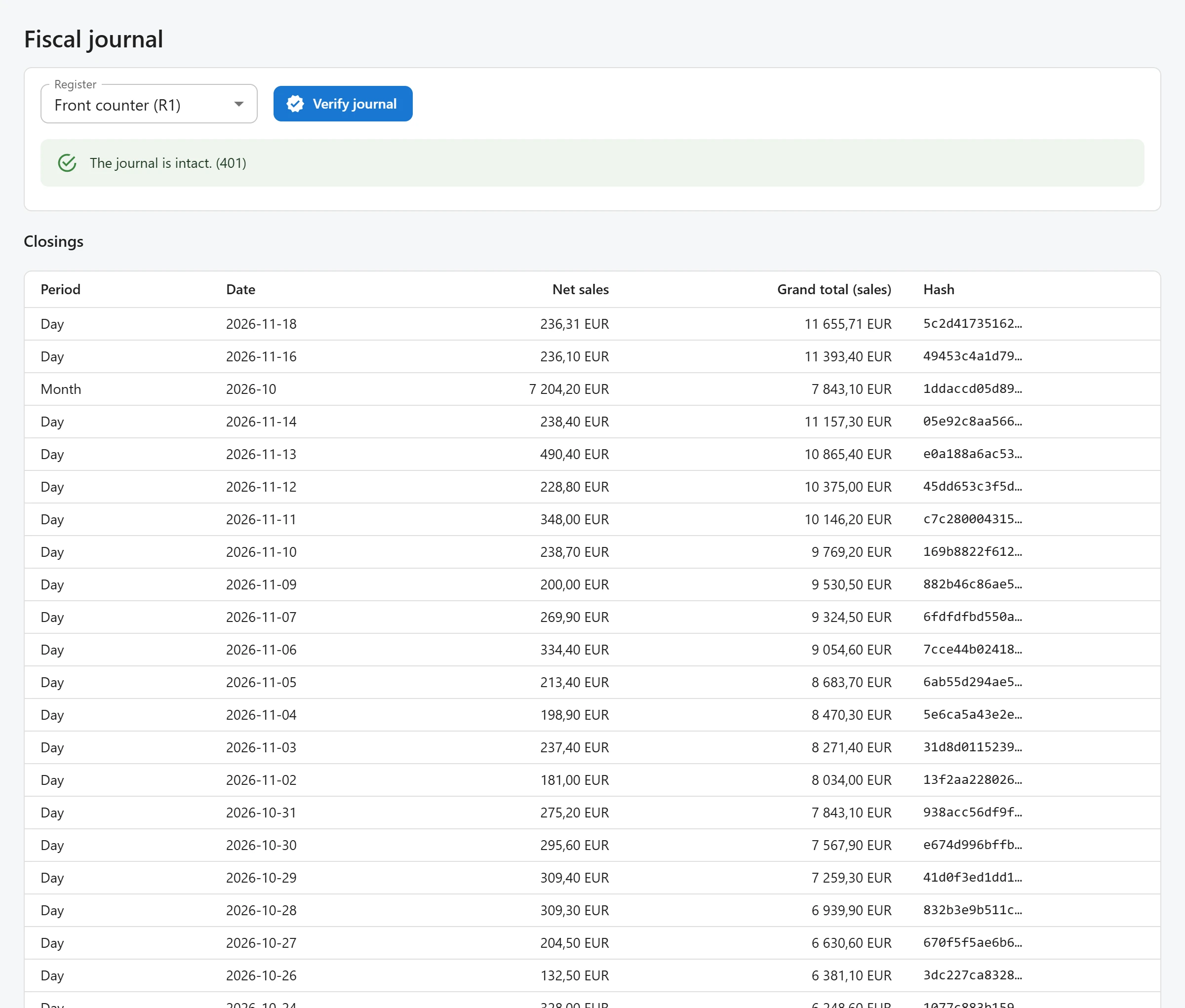
- Pick a register in Register. The first register is selected when the screen opens.
- Click Verify journal to check its chain (see below).
The screen then shows two tables for that register:
- Closings: the register’s closings, newest first (up to 200), with Period, Date, Net sales, Grand total (sales) and the start of the closing’s Hash.
- Journal entries: the register’s entries from the first one, up to 200, with the entry number (#), Ticket, Event, Order, Date and the start of the entry’s Hash.
What is recorded
Each journal entry belongs to one register and holds:
| Field | What it is |
|---|---|
| Sequence number | 1, 2, 3… per register, for every entry, without gaps. |
| Ticket number | Only for documents given to a customer (sales, refunds, and with Layaways PRO deposits and deposit refunds): a second sequence per register, also without gaps. It is the ticket number printed on the receipt. |
| Event | sale, refund, session_open, session_close, cash_in, cash_out, duplicate, and with Pro modules a few more, such as deposit. |
| Order | The WooCommerce order, when the entry is about one. |
| Date and time | In UTC. |
| Payload | The business data: lines, totals, taxes per rate, discounts, payments, customer, cash amounts. |
| Previous hash and hash | The link to the previous entry, see below. |
The user who made the entry and the cash session are stored with it too.
Entries are only ever added. The plugin has no code that edits or deletes a journal entry.
How the chain works
Each entry’s hash is a SHA-256 of the previous entry’s hash followed by the entry itself: the register, the sequence number, the ticket number, the event, the order, the date and time, and the payload. The first entry of a register is chained to a hash made of 64 zeros.
Before hashing, the payload is put in a fixed form: keys sorted, amounts and quantities written as
decimal text such as 12.50, never as floating-point numbers. The same sale always gives the same
bytes, so the hash can be recomputed later.
Because each hash includes the one before, editing any past entry changes its hash, which no longer matches the next entry’s “previous hash”. Every entry after it breaks too.
Two sales on the same register at the same moment cannot take the same number: the next number is taken while the register’s last entry is locked, inside a database transaction. If saving the entry fails, the sale fails with it, so a number is never skipped.
Continuous ticket numbers
The ticket number on a receipt is the register’s document sequence: 1 for its first sale, then 2, 3 and so on, never reused and without gaps, refunds included. Each register has its own sequence, which is one reason each till needs its own register (more registers are a Pro feature). The Orders screen shows each sale’s ticket number. See Orders.
Numbered duplicates
A receipt is printed as an original once, at the sale. Every reprint, from the register’s
orders list (Reprint), is a duplicate: it is numbered per sale (1, 2, 3…), recorded in the
journal of the register that made the sale as a duplicate entry, and the printed copy carries
Duplicate No. and its number. See Receipts.
Closings
A closing summarises a period of one register. All closings of a register form a second chain: each closing’s hash covers the previous closing’s hash (of any kind), the register, the period, its totals and the grand totals.
| Period | Shown as | When it is written |
|---|---|---|
| Session | Z (session) with the session number | When a cash session is closed with its Z report. |
| Day | Day with the date | Automatically, once the day is over, for each day the register recorded a sale or refund. |
| Month | Month with YYYY-MM |
Automatically, once the month is over. |
| Year | Year with the fiscal year | Automatically, once the fiscal year is over. |
Day, month and year closings are written by a WordPress scheduled task that runs every hour. It catches up: if it did not run for a while, the next run writes every missing closing. A period is never closed twice. Days and months follow your WordPress time zone.
Grand totals are running totals that never restart: the sales, refunds and tax of the register from its first entry up to the end of the period. A day, month or year closing computes them from the journal itself; a session closing adds its session to the previous session closing.
A session closing also stores the totals per tax rate and per payment method, and the expected and counted amounts with the difference. A day, month or year closing stores the number of documents, sales, refunds, net sales, tax and the payments per method.
Fiscal year end
The yearly closing covers the twelve months up to the end of the month set in Fiscal year ends
in in Settings (December by default, a calendar year). A
fiscal year is named after the year it ends in: with a year that ends in March, April 2026 to
March 2027 is fiscal year 2027. Change this setting only before your first yearly closing.
The audit log
Alongside the journals, the plugin keeps one audit log for the whole site. It records, among other things:
- each refused attempt to change or delete a register order (see Orders);
- each invoice and credit note issued (Pro);
- each run of Verify journal, with its result.
Pro modules add their own events. Each row stores the user, the event, what it concerns, details,
the IP address (REMOTE_ADDR only) and the time. The audit log is chained like the journal: one
chain for the site, with a gap-free sequence and a SHA-256 hash over the previous hash and the row.
The free plugin has no screen for it; it is readable through the
REST API (GET /wp-json/plugixa-pos/v1/audit-log) with the
fiscal audit permission.
Verify journal
Verify journal recomputes the chain of the selected register from its first entry:
- the sequence numbers must follow on from 1 without a gap;
- each entry’s “previous hash” must equal the hash of the entry before;
- each entry’s hash must equal the hash recomputed from its content.
It then checks the audit log chain the same way. When everything matches you see The journal is
intact. with the number of journal entries checked. Otherwise you see The journal has been
altered at entry with the first entry that fails and the reason: gap (a missing number),
prev_hash (the link to the previous entry is wrong) or hash (the entry’s content changed).
The check reads the database and changes nothing in the journal. The run itself is recorded in the audit log. It covers the journal and the audit log; the closings are not recomputed by this button.
What uninstalling does to fiscal records
Fiscal records are never deleted by the plugin, even when you choose to erase all its data on uninstall: the journal, the closings and the audit log tables are kept. See Privacy and uninstall.
Quick Links
Share