

Contents
On this page
Staff access - Plugixa POS for WooCommerce
Plugixa POS decides who may do what with ordinary WordPress capabilities. A cashier usually needs only the right to sell; a manager also opens and closes the register, refunds and gives discounts. This page lists every capability, what it opens, and how to grant them.
Administrators have everything
A user who can manage the site (the WordPress manage_options capability, which administrators
have) holds every Plugixa POS capability, always. Activation also writes them onto the
Administrator role, so role editors show them. Nobody else gets anything by default: other
users, shop managers included, have no access until you grant it.
The capabilities
| Capability | What it allows |
|---|---|
plugixa_pos_sell |
Open the register at /pos, choose a register, sell, hold and resume sales, read the X report, list the register’s orders, print receipts and numbered duplicates, and with Pro, make A4 invoices and open their PDFs. |
plugixa_pos_discount |
Give a discount on a line or on the whole sale, and sell custom items that are not in the catalog. |
plugixa_pos_refund |
Refund a sale at the register. |
plugixa_pos_manage_sessions |
Open the register with its float, record cash in and out, and close with the Z report. |
plugixa_pos_view_reports |
The Dashboard and the Cash sessions screen. |
plugixa_pos_fiscal_audit |
The Fiscal journal screen, Verify journal, the closings and the audit log. |
plugixa_pos_manage_settings |
Save Settings, and the Store & registers screen (store details and registers). |
plugixa_pos_view |
Read the settings and, with Pro, see the Invoices list. |
plugixa_pos_create, plugixa_pos_edit, plugixa_pos_delete, plugixa_pos_export |
General record permissions. No screen of the free plugin checks them. |
Every one of these is checked again on the server for each request, so hiding a button is never the only protection.
Opening the POS at all
Holding any one of the capabilities above gives the user the Plugixa POS menu in
WordPress and lets them open /pos. That is a separate, derived capability,
plugixa_pos_access, which the plugin works out on the fly and never stores. A user with none of
them who opens /pos sees You do not have access to the register. Ask a store manager to give
you access. A visitor who is not signed in is sent to the WordPress login page first.
The menu shows every screen to everyone who can open it. A screen the user has no capability for loads but cannot fetch its data.
What a cashier sees without a capability
- Without
plugixa_pos_manage_sessions, the opening screen says Ask a manager to open the register. and its fields are disabled, and Cash in / out and Close register (Z) are greyed out in the register menu. The X report stays available.
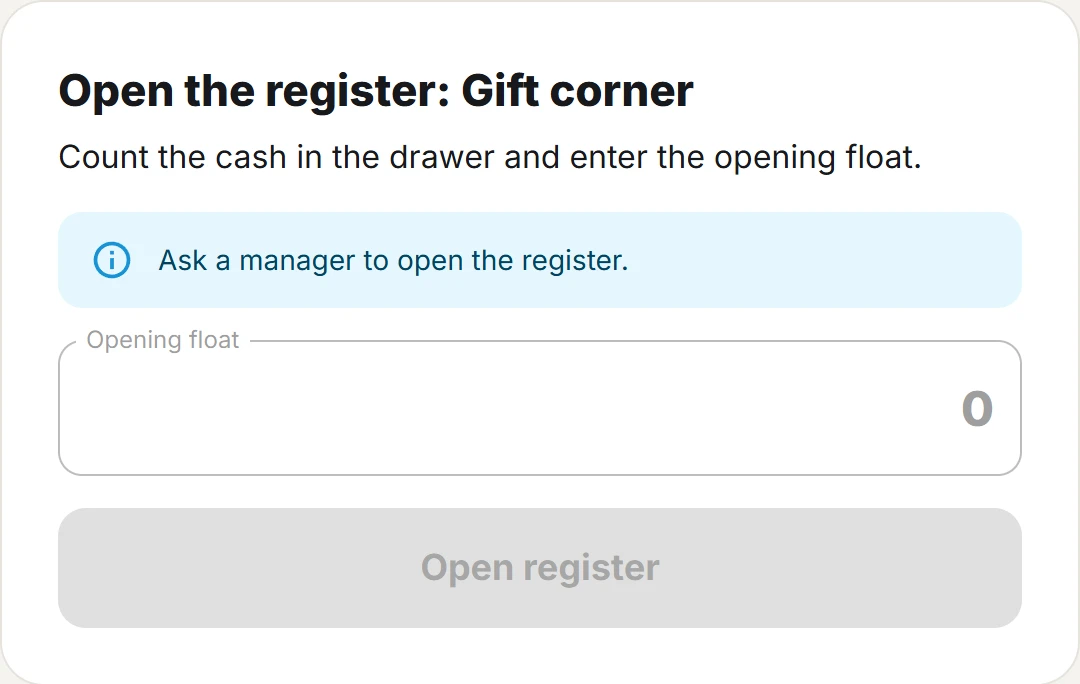
- Without
plugixa_pos_discount, a sale with a discount or a custom item is refused with You are not allowed to give discounts. or You are not allowed to sell custom items.
Typical set-ups
| Person | Capabilities |
|---|---|
| Cashier | plugixa_pos_sell |
| Senior cashier | plugixa_pos_sell, plugixa_pos_discount, plugixa_pos_refund, plugixa_pos_manage_sessions |
| Store manager | The above, plus plugixa_pos_view_reports, plugixa_pos_view and plugixa_pos_manage_settings |
| Accountant | plugixa_pos_view, plugixa_pos_view_reports and plugixa_pos_fiscal_audit |
The Fiscal journal screen fills its register list from the registers endpoint, which needs
plugixa_pos_manage_settings. Give an accountant that capability too if they must pick a
register there.
Granting capabilities
The free plugin has no screen for this. Because these are standard WordPress capabilities, any of these works:
- A role editor plugin. Add the capabilities to a role (for example Shop manager) or to one user.
- WP-CLI. For a role:
wp cap add shop_manager plugixa_pos_sell plugixa_pos_refund. For one user:wp user add-cap lea plugixa_pos_sell. - Code, for example in a small plugin:
add_action( 'init', function () {
	$role = get_role( 'shop_manager' );
	if ( $role && ! $role->has_cap( 'plugixa_pos_sell' ) ) {
		foreach ( array( 'plugixa_pos_sell', 'plugixa_pos_discount', 'plugixa_pos_refund', 'plugixa_pos_manage_sessions' ) as $cap ) {
			$role->add_cap( $cap );
		}
	}
} );
Granting a capability to a role changes it for everyone in that role. To give access to one person only, add the capability to that user.
Which registers a user may use
In the free plugin, every user with plugixa_pos_sell may use every active register. Each request
that names a register checks this, through the plugixa_pos_user_can_use_register filter, which
a developer can use to restrict it (see Hooks). With
Multi-store PRO, staff are limited to the
stores they are assigned to.
Shared tills
Cashier PINs, switching cashier on a shared register, an automatic lock, a discount limit and manager approval by PIN are Staff PRO.
On uninstall
When the plugin’s data is kept on uninstall (the default), the capabilities stay on roles and
users, so staff keep their access after a reinstall. When you choose to erase the data, every
plugixa_pos_ capability is removed from all roles and users. See
Privacy and uninstall.
Quick Links
Share