

Contents
On this page
France (NF525) - Plugixa POS for WooCommerce
French tax law (article 286, I, 3° bis of the tax code) asks till software to keep sales data unalterable, secured, kept and archived, so the tax administration can check it. The free plugin already chains every sale, refund and closing in the Fiscal journal. The Pro France pack adds digital signatures, signed archives and the attestation document.
The screen describes itself as: “Inalterability, security, conservation and archiving of your sales data, as French tax law requires.” This page describes exactly what the plugin does. Whether your shop meets its legal obligations is for you and your accountant to confirm.
When the pack is on
The pack switches itself on when the store address in WooCommerce > Settings > General is in
France. Otherwise the screen says “The France pack is off because your store is not in France
(WooCommerce > Settings > General > Store address).” A developer can force it either way with the
plugixa_pos_fiscal_france filter. See Hooks.
Open Plugixa POS > France (NF525) (in the Compliance group). The screen needs the fiscal audit permission. Saving your company details and opening the attestation need the right to manage the settings.
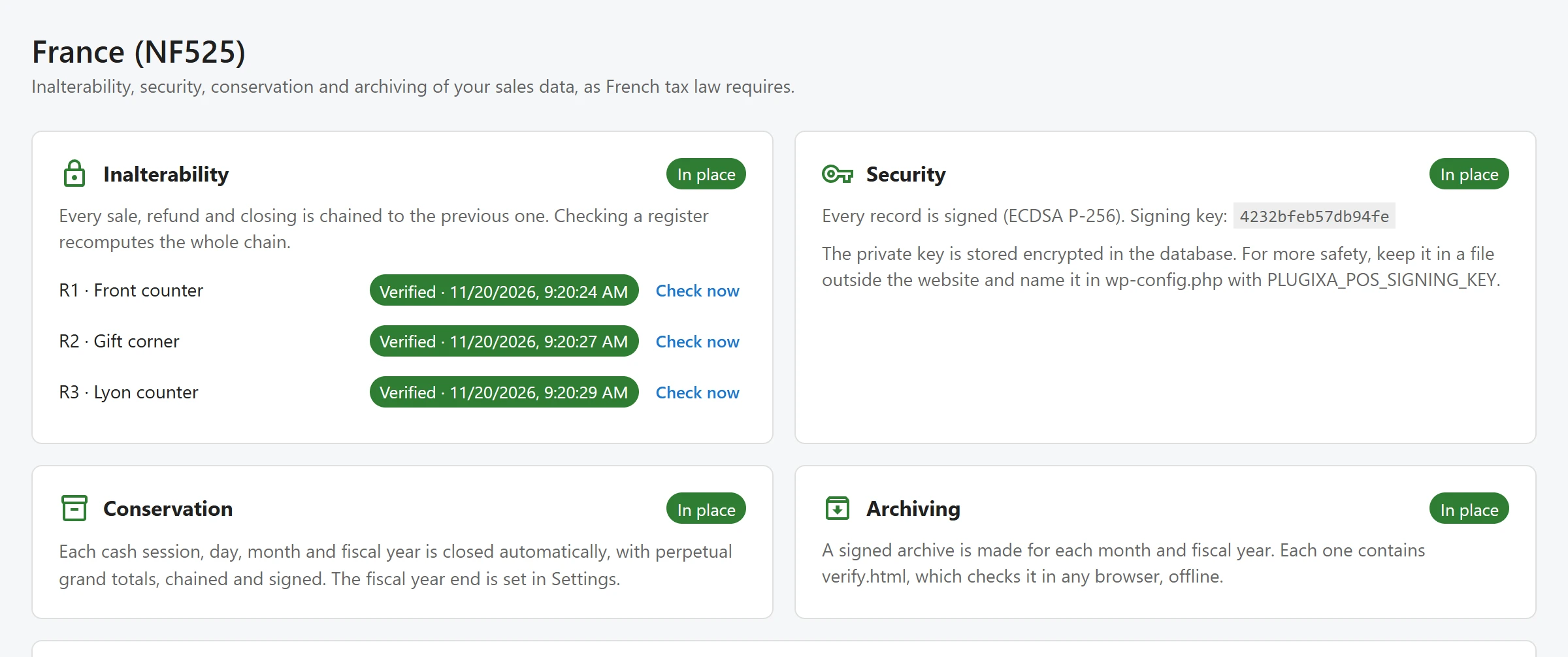
The four requirements
Each card shows In place in green or To check in orange.
Inalterability
“Every sale, refund and closing is chained to the previous one. Checking a register recomputes the whole chain.”
Each register is listed with the result of its last check: Verified with the date, Broken with the date, or Never checked. Click Check now to check a register again. With the pack on, the check also verifies every signature (see below). The card turns green when the last check of every register passed.
Security
“Every record is signed (ECDSA P-256).” With the pack on, every row of the fiscal journal, every closing and every row of the technical log (the audit log) is signed as it is written. The signature covers the row’s chain hash, so it proves both the row’s content and its place in the chain. The receipt prints the last eight characters of the sale’s signature.
The signing key is made automatically the first time the pack is on. The card shows its id. Where the private key lives:
| Setup | What the card says |
|---|---|
| Default | “The private key is stored encrypted in the database. For more safety, keep it in a file outside the website and name it in wp-config.php with PLUGIXA_POS_SIGNING_KEY.” |
| Key file | “The private key is read from the file set in wp-config.php (PLUGIXA_POS_SIGNING_KEY).” |
To use a key file, put an EC P-256 private key in PEM format in a folder outside your web root
and name it in wp-config.php:
define( 'PLUGIXA_POS_SIGNING_KEY', '/home/shop/keys/plugixa-pos-fiscal.pem' );
A copy of the database alone then cannot sign anything. Every public key ever used is kept, so signatures made before a key change can still be checked years later.
When a register is checked, a chain may start with unsigned rows written before the pack was on. Once a row is signed, every later row must be signed too: an unsigned row after that, or a signature that does not verify, marks the check as failed.
Conservation
“Each cash session, day, month and fiscal year is closed automatically, with perpetual grand totals, chained and signed. The fiscal year end is set in Settings.” The month that ends the fiscal year is the Fiscal year ends in field of Settings.
Archiving
“A signed archive is made for each month and fiscal year. Each one contains verify.html, which checks it in any browser, offline.”
An archive is made for each register right after each month and each fiscal year is closed. A period closed before the pack was on has no archive yet: the card lists it as No archive yet: with the register code and the period, and a Make archive button.
Archives
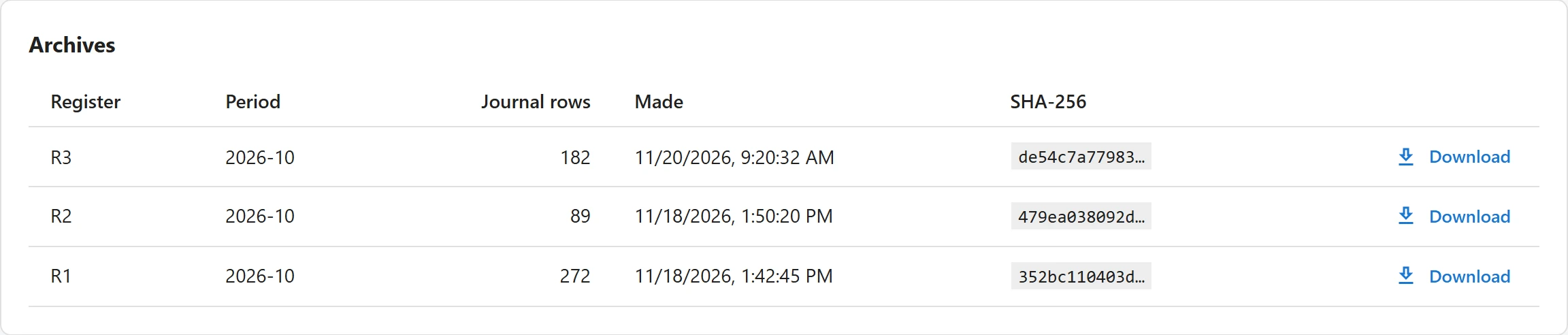
The Archives card lists every archive with its Register, Period, Journal rows, the date it was Made and the start of its SHA-256. Click Download to get the ZIP file. “No archive yet. The first one is made when the current month is closed.”
Each ZIP holds one folder with:
| File | Contents |
|---|---|
journal.json, journal.csv |
The register’s fiscal journal rows of the period. The CSV has one line per event with its total, tax, hash and signature. |
closings.json |
The register’s closings, up to the period’s own closing. |
audit.json |
The technical log rows of the period. |
public-keys.json, device-keys.json |
The public keys that check the signatures, the site’s and the offline devices’. |
manifest.json, signature.json |
Every file’s SHA-256, where each chain starts and ends, and the signature of the manifest. |
verify.html |
The checker. |
Open verify.html in any browser, without a connection. It recomputes every hash of the chains
and checks every signature with the keys stored in the archive, then shows “This archive is
complete and unaltered.” or a list of the failed checks. You can also drop the archive’s other
files onto it to compare them with the signed manifest. Nothing is sent anywhere.
Archives never change once written. They are stored in a folder of your uploads directory with a random name and rules that deny web access, are downloaded only by a signed-in user with the fiscal audit permission, and are kept when the plugin is uninstalled. On an nginx server, the deny rules are not read: the random folder name is the protection.
Your company and the attestation
The screen prepares the editor’s individual attestation for your shop. Its wording follows the individual attestation model published by the French tax administration.
- In Your company (“Printed on the attestation the software editor delivers to you.”), fill in Company name, Legal form (SARL, SAS…), SIREN or SIRET, Address and Postcode and city, then click Save. Company name and SIREN are required: until they are set, the card says “Fill in your company name and SIREN first.”
- In Editor attestation, click Open the attestation. It opens in a new tab, in French, with a button to print it or save it as a PDF.
The attestation names Plugixa POS by its major version and your company. Keep it: in the screen’s words, “the tax administration may ask for it.”
The attestation prints as a draft, with a red BROUILLON box saying the document does not count as an attestation, while your company name or SIREN is missing, or while the screen shows “The editor details are not final yet: the attestation prints as a draft.”
Offline sales
With the pack on, a register that sells offline numbers and signs each ticket on the device, so the printed receipt is final, and the site checks those signatures when the sales sync. See Offline mode.
Related
Quick Links
Share