

Contents
On this page
Returns and exchanges - Plugixa POS for WooCommerce
The free plugin refunds a whole sale. Pro adds two things to the register’s Orders screen:
- Return items: refund some lines of a sale, or part of a line’s quantity.
- Exchange: take items back and sell others against their value, in one step.
Both are real WooCommerce refunds, and both are written to the register’s fiscal journal as refund documents. For a full refund, see Refunds.
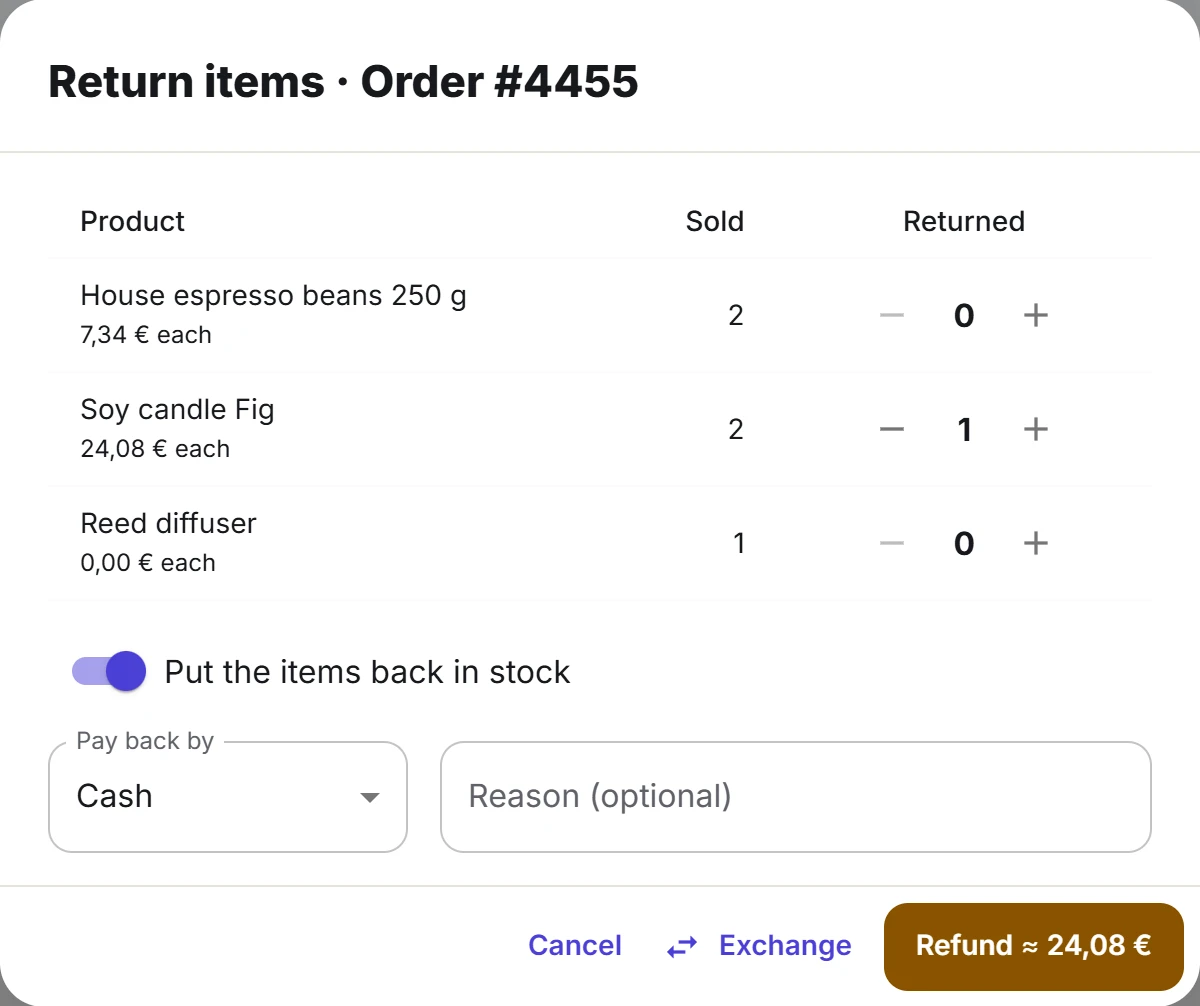
Return some items
- On the register, open Orders and find the sale (search by order or ticket number).
- Tap Return items on its row.
- For each line to return, set the quantity with the plus and minus buttons. Each line shows its options, what one unit cost the customer (“each”) and how many were already returned.
- Leave Put the items back in stock on, or switch it off for damaged goods.
- Check Pay back by. It starts with the way the sale was paid; choose another method if needed.
- Add a Reason (optional).
- Tap Refund. The button shows an estimate of the amount, for example “Refund ≈ 18.50”.
The register then shows Paid back with the exact amount and the method. Tap Print receipt for the refund receipt, then Done.
The button is not shown on a sale that is already fully refunded. A refund needs an open cash session on the register.
How the amount is worked out
Each line is refunded in proportion to what the customer actually paid for it: after discounts and promotions, tax included. When the last units of a line are returned, they take whatever is left of that line, so a line returned in several goes adds up exactly to what was paid. You cannot return more units than are left: “Only 1 of … can still be refunded.”
Returned items go back into the stock of the refunding register’s store (with multi-store, that can be another store than the one that sold them).
Ways to pay back
Pay back by lists the register’s payment methods in your shop’s currency, with these limits:
| Method | Offered when |
|---|---|
| Cash, Card (terminal) | Always |
| Gift card | The sale was paid with a gift card: the money goes back onto that card |
| Points | The sale was paid with points |
| Card reader (Stripe) | The sale was paid with it |
| Store credit | The sale was made for a customer |
| Pay by QR code methods | Always listed; the refund goes through the provider and works only if the sale was paid with it |
Foreign cash is never offered: money goes back in your shop’s currency. See Gift cards, Store credit, Loyalty and Pay by QR code.
Exchange items
An exchange refunds the returned items and sells the new ones together. If any part fails, nothing is recorded.
- In Return items, choose the items coming back, the stock switch and Pay back by (used only if money is left over), as for a return.
- Tap Exchange instead of Refund. The register goes back to the sell screen.
- A chip in the top bar shows the exchange in progress: “Exchange #4455 · credit 18.50”. Tap its cross to cancel it: nothing has been refunded yet.
- Add the new items to the cart and tap Pay.
- The payment screen starts with the Exchange credit already applied, up to the new sale’s total. Take the rest with any method.
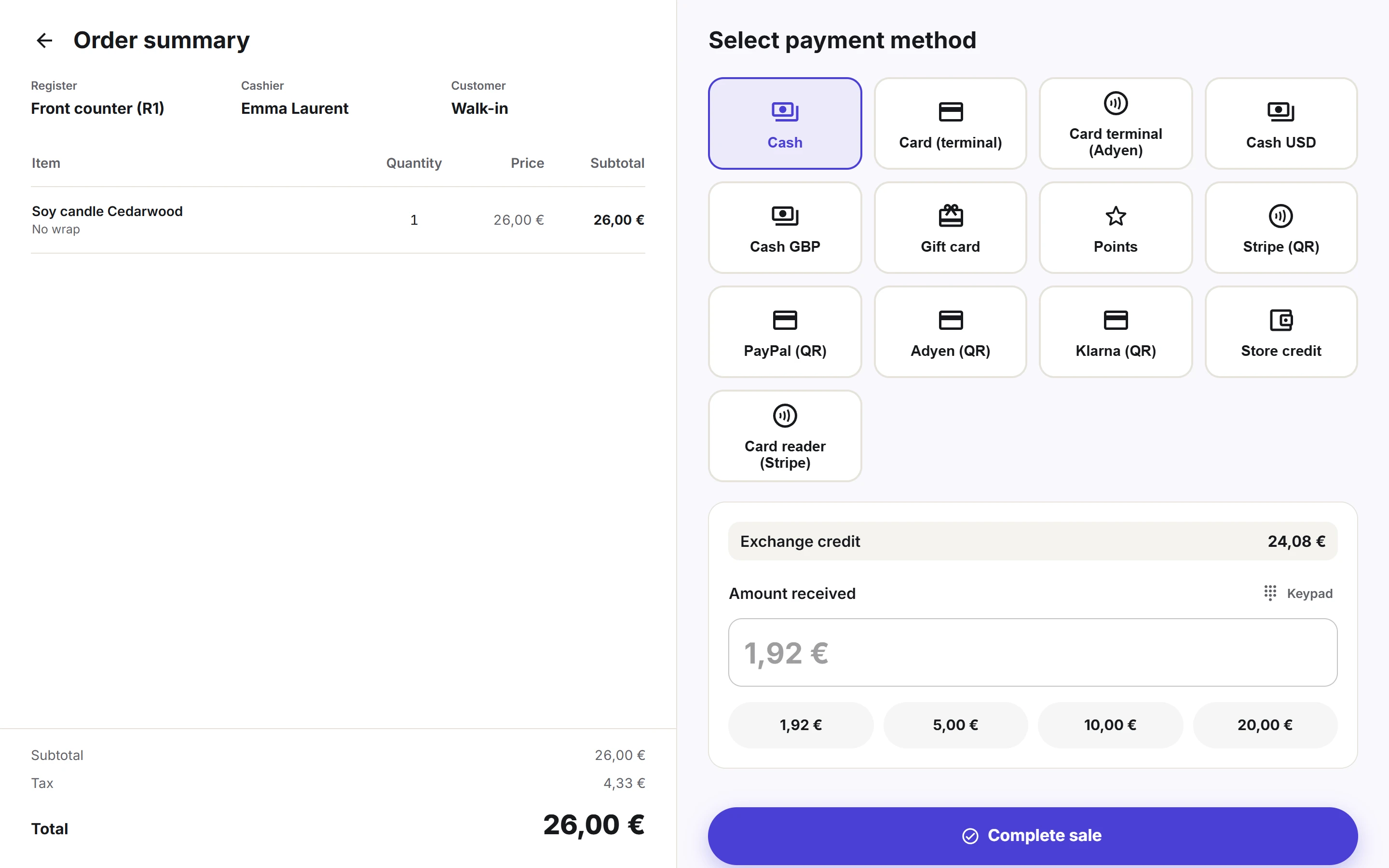
If the returned items are worth more than the new sale, the register shows Give back to the customer with the amount and the Pay back by method once the sale is recorded. Tap Done.
Only the real difference moves money in the cash drawer: the exchange credit appears on both the refund and the new sale, and cancels out in the session.
An exchange needs a connection: it cannot be queued offline.
Who can do what
Returns need the permission to refund. An exchange needs both the permission to sell and to refund. With Pro staff, a cashier without the refund permission sees the button and a manager can approve it on the spot with their PIN. See Staff access.
Quick Links
Share