

Contents
On this page
Plugixa POS
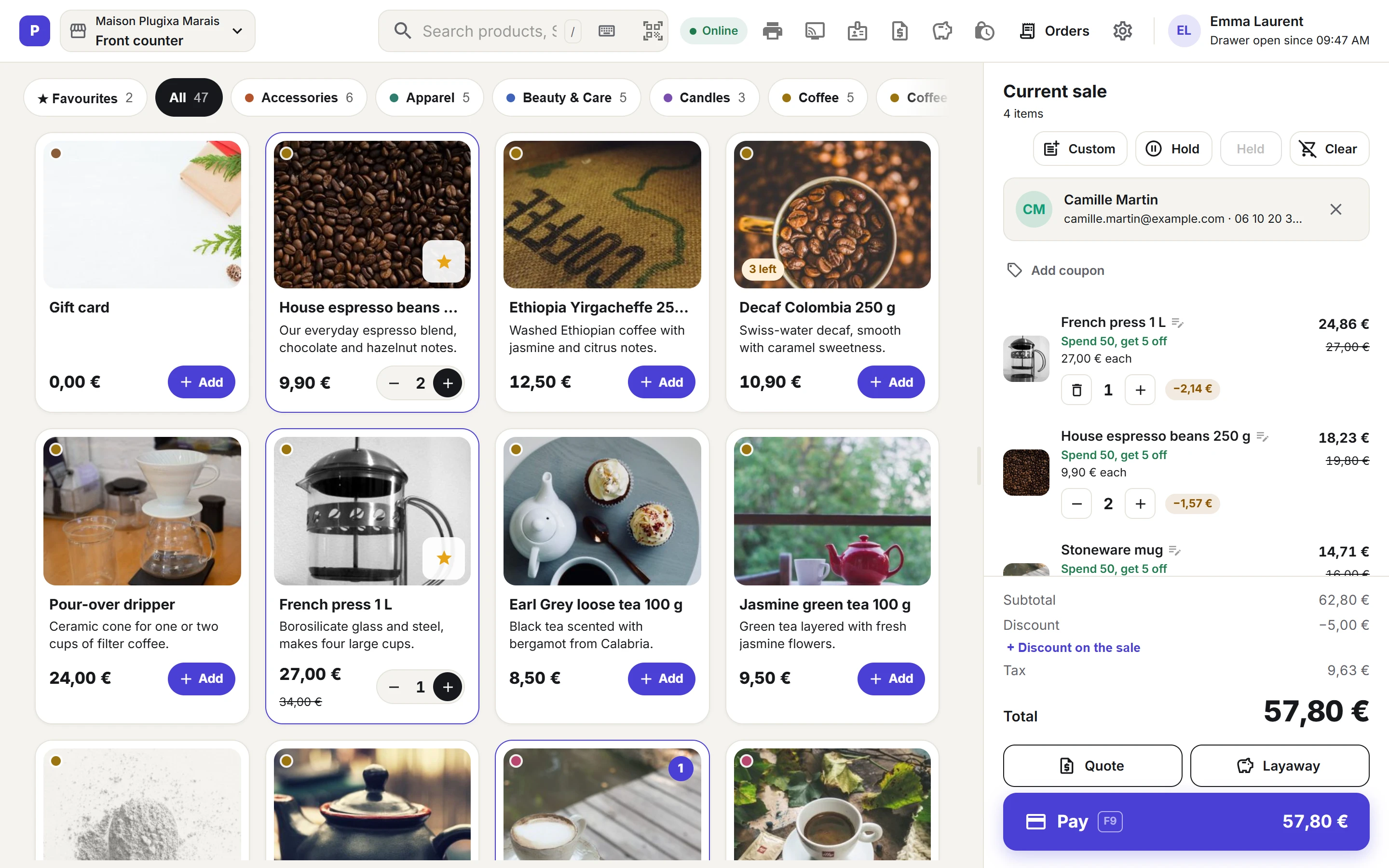
Welcome to the documentation for Plugixa POS, a point of sale for WooCommerce that runs in
the browser. You open the register at /pos on a computer, tablet or phone, tap or scan
products, take the payment and hand over a receipt. Every sale is a real WooCommerce order, so
your stock, taxes, coupons and reports stay in one place.
Who it is for
- Shops that already sell online with WooCommerce and now want to sell at the counter too.
- Boutiques, cafés and pop-up stands that need a till without buying a separate system.
- Owners with one store and one till, or several tills and stores with Pro.
How it works
The register is a full-screen page of your own site at /pos, open to WordPress users who have
access to the POS. A device first says which register (till) it is, and a manager opens a cash
session with the opening float. The cashier then adds products from the grid or with a barcode
scanner, adds a customer or a discount if needed, and presses Pay. The payment screen takes
cash with change, a card on an external terminal, or several methods at once. When the sale is
complete, WooCommerce gets a completed order, the stock goes down, the sale is written to the
register’s fiscal journal, and the cashier prints the receipt or sends it by email or WhatsApp.
At the end of the day the manager closes the session with a Z report. The register sees stock and
price changes from the online shop within seconds.
The plugin ships in two editions:
- Free - the register with search, categories, favourites, barcode scanners and variations, customers, WooCommerce coupons, discounts, custom items, held sales, cash, card and split payments, printed, emailed and WhatsApp receipts, full refunds, cash sessions with X and Z reports, and a fiscal journal, for one store and one register.
- Pro PRO - everything in Free, plus more registers, A4 invoices and credit notes, several stores, stock per store, transfers and purchasing, gift cards, store credit, loyalty, promotions, card readers, returns and exchanges, offline selling, a customer display, staff PINs and reports.
See the complete Free vs Pro comparison.
Start in 3 steps
- Install and activate Plugixa POS next to WooCommerce. Activation creates your store and a first register. See Getting started.
- Open the register at
/pos, count the cash in the drawer and click Open register. - Make a sale: tap a product, press Pay, then Complete sale.
Key concepts
| Term | What it is |
|---|---|
| Store | A shop, with the name, address and tax ID printed on receipts. Free has one store. |
| Register | A till inside a store, such as Front counter. Each has its own cash session and ticket numbers. |
| Cash session | The time between opening a register with its float and closing it with a Z report. Sales need an open session. |
| Ticket | The receipt number of a sale, continuous per register, printed as register code and number, for example R1-42. |
| Held sale | A cart put aside to finish later, from any register of the same store. |
| Fiscal journal | The tamper-evident record of every sale, refund and reprint of a register. |
Selling
| Section | Description |
|---|---|
| Getting started | Requirements, install, what activation sets up, the first session and the first sale |
| The register | The /pos screen: top bar, products, cart, switching till, phones |
| Products and search | The product grid, search, categories, variations, favourites and barcode scanners |
| Customers and discounts | Customers, WooCommerce coupons, line and sale discounts, notes and custom items |
| Held sales | Put a sale aside and resume it later |
| Payments | Cash with change, card on a terminal and split payments |
| Receipts | Print, email or WhatsApp a receipt, and numbered reprints |
| Refunds | Refund a whole sale from the register |
| Keyboard shortcuts | Every key the register answers to |
Back office
| Section | Description |
|---|---|
| Dashboard | Sales, products and registers at a glance |
| Stores and registers | Your store details and its tills |
| Cash sessions | Opening float, cash in and out, X and Z reports |
| Orders | Every register sale in the back office |
| Invoices PRO | A4 invoices and credit notes as PDF |
| Fiscal journal | The chained record of each register and its verification |
| Settings | Receipt text and how the register behaves |
| Staff access | Who may sell, refund, discount and manage sessions |
| Privacy and uninstall | What is stored, and what deleting the plugin removes |
| Troubleshooting | Fixes for common problems |
| Free vs Pro | What each edition contains |
| Hooks | WordPress actions and filters for developers |
Pro selling
| Section | Description |
|---|---|
| Gift cards PRO | Sell gift cards and take them as payment |
| Store credit PRO | A balance customers spend later |
| Loyalty PRO | Points earned on sales and spent at the register |
| Promotions PRO | Automatic discounts at the register |
| Modifiers PRO | Options chosen when a product is added |
| Bundles PRO | Products sold together as one |
| Layaways PRO | Keep goods for a customer against a deposit |
| Quotes PRO | Save a cart as a quote and sell it later |
| Pay links PRO | Let the customer pay online for a register sale |
| Returns and exchanges PRO | Take back part of a sale or swap an item |
| Receipt templates PRO | Design the printed receipt |
| Invoice designer PRO | Design the A4 invoice |
Pro stock and team
| Section | Description |
|---|---|
| Multi-store PRO | Several stores, each with its own registers |
| Store stock PRO | Stock and prices per store |
| Stock adjustments PRO | Correct stock with a reason |
| Transfers PRO | Send goods from one store to another |
| Purchasing PRO | Suppliers, purchase orders and deliveries |
| Serial numbers PRO | Record the serial number of each unit sold |
| Lots PRO | Batches with their own stock |
| Labels PRO | Print shelf and product labels |
| Staff PRO | Cashier PINs, switching cashier and manager approval |
| Reports PRO | Sales by day, store, register and cashier |
| Webhooks PRO | Send register events to another system |
Pro hardware and compliance
| Section | Description |
|---|---|
| Stripe Terminal PRO | Card payments on a Stripe reader |
| Adyen Terminal PRO | Card payments on an Adyen terminal |
| Customer display PRO | The basket and total on a second screen |
| Scale PRO | Products sold by weight and scale labels |
| Foreign cash PRO | Accept cash in another currency |
| Offline mode PRO | Keep selling when the connection drops |
| France fiscal pack PRO | Signed archives for French tills |
Developers
| Section | Description |
|---|---|
| REST API | The endpoints the register and back office use |
| Hooks | WordPress actions and filters |
| Webhooks PRO | Outgoing HTTP calls on register events |
Quick Links
Share