

Contents
On this page
Members only (tagDiv) - Plugixa Exam
If you sell monthly or yearly plans with tagDiv Opt-In Builder (the subscription plugin that ships with the Newspaper theme), you can make exams members only. A visitor who is not a member sees the exam page with a Subscribe button instead of Start. Members only arrived in Plugixa Exam Pro 1.4.3.
Why a tagDiv locker on the page is not enough
A tagDiv locker locks a WordPress post or page. An exam page such as
/exams/chapter-8-hydrocarbons/ is not a post, so there is nowhere to put the
locker. A locker on your exam list page hides the list but not the exams behind
it: anybody with a direct link could still take them.
Members only checks membership in the exam’s own access check instead. It covers the exam page, direct links, the exam screen and the app, all at once.
Setting it up
- In tagDiv Opt-In Builder > Lockers, create a locker (or use one you already have) and set its Locker Type to Subscription. Tick the plans that should open it, and choose its plans page.
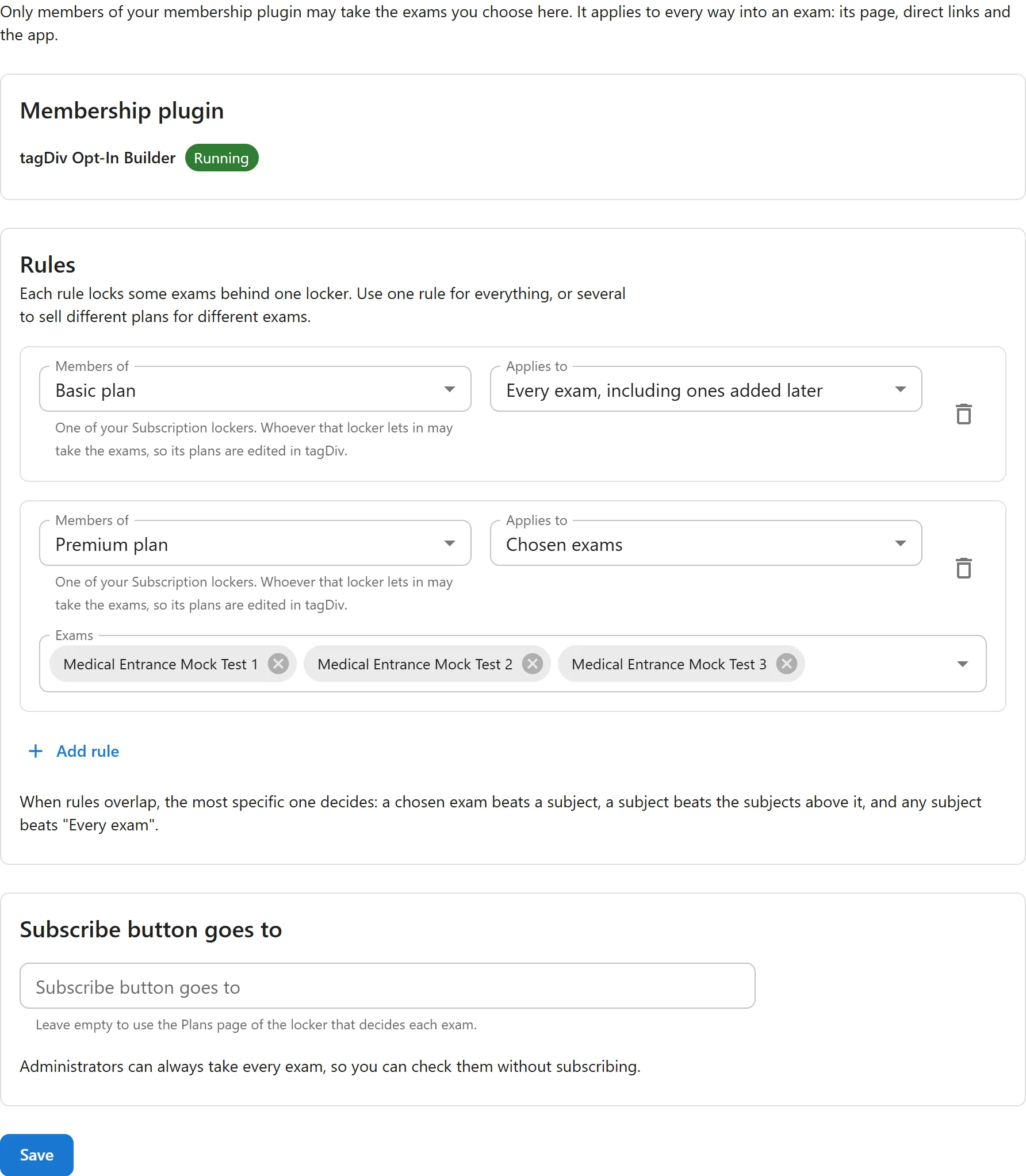
- In Plugixa Exams > Settings > Members only, press Add rule and choose that locker under Members of.
- Choose what the rule applies to:
- Every exam, including ones added later
- Every exam in chosen subjects (subjects beneath them are included)
- Chosen exams
- Save.
Whoever that locker lets in may take the exams, so you keep editing plans in tagDiv only. Add a plan to the locker and its subscribers get in straight away.
Different plans for different exams
Add one rule per plan. For example, chapter tests on a Basic plan and full mock tests on a Premium plan:
| Rule | Members of | Applies to |
|---|---|---|
| 1 | Basic locker | Every exam |
| 2 | Premium locker | Chosen exams: the mock tests |
When rules overlap, the most specific one decides: a chosen exam beats a subject, a subject beats the subjects above it, and any subject beats “Every exam”. So in the example, a Basic member can take the chapter tests but not the mock tests, and Subscribe on a mock test goes to the Premium locker’s Plans page.
Should Premium members also get the Basic exams? Tick the Premium plan on the Basic locker in tagDiv. That is how tagDiv lockers already say “these plans open this content”.
Two rules at the same level (for example two rules naming the same exam) are alternatives: being a member of either is enough.
Who counts as a member
The same people tagDiv’s own locker lets in, for the plans ticked on the locker:
| tagDiv subscription | Can take the exams |
|---|---|
| Free plan | Yes |
| Active, paid for the current period | Yes, until the period ends |
| Trial | Yes, until the trial days run out |
| Unlimited or credits plan | Yes |
| Waiting for payment (for example a bank transfer not yet confirmed) | No |
| Blocked or closed | No |
Administrators can always take every exam, so you can check them without subscribing.
What visitors see
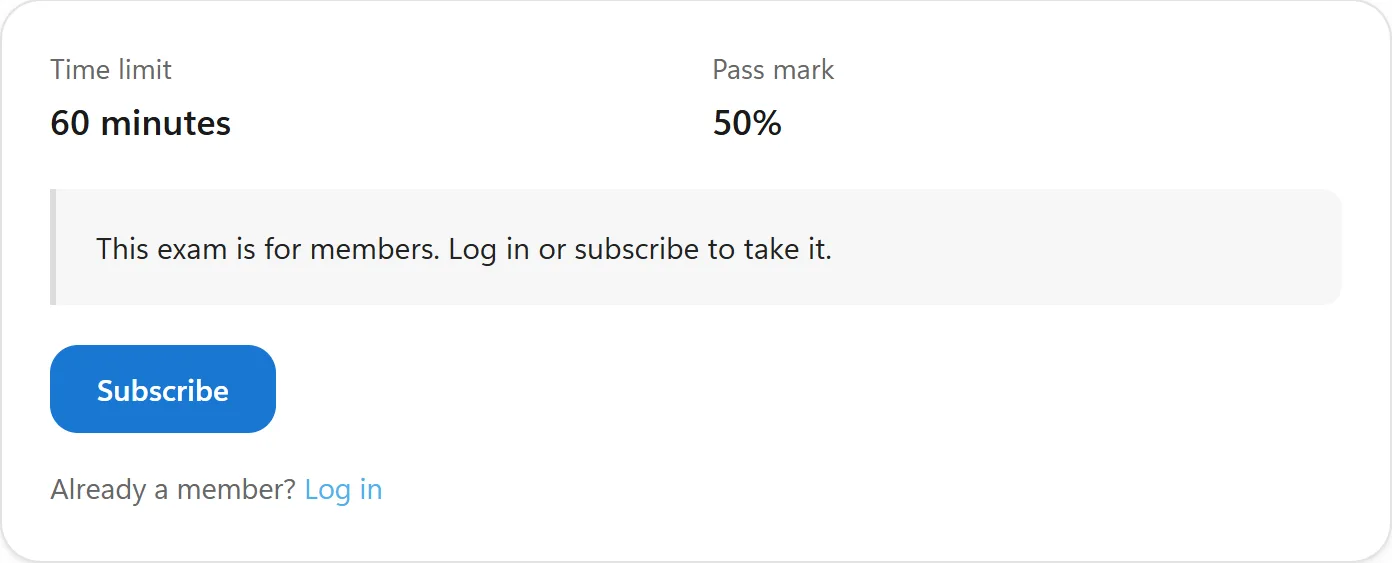
- Signed out: “This exam is for members. Log in or subscribe to take it.”, a Subscribe button and an Already a member? Log in link.
- Signed in, not a member: “This exam is for members. Subscribe to take it.” and the Subscribe button.
Subscribe goes where tagDiv’s own locker sends people: the Plans page set on the locker. The visitor picks a plan there, pays at tagDiv’s checkout, and is brought back to the exam afterwards.
- If the locker has no Plans page but only one plan, Subscribe goes straight to the checkout with that plan already chosen.
- If it has no Plans page and several plans, there is no Subscribe button, because there is no way to know which plan to offer. The settings screen warns you; set a Plans page on the locker, or fill in Subscribe button goes to.
To send Subscribe somewhere else entirely, fill in Subscribe button goes to.
Somebody who is part way through an exam when their subscription ends can still finish it. The check applies when an attempt starts.
It works alongside your other access rules
Members only is one more requirement, not a replacement:
- An exam that is also sold through WooCommerce still has to be bought, even by a member.
- Prerequisites, opening dates and attempt limits still apply.
If tagDiv is not running
tagDiv Opt-In Builder only runs with the tagDiv Composer plugin and the Newspaper (11.2 or later) or Newsmag theme. If you switch theme, the settings screen shows Not running, and members-only exams are open to everyone until it runs again. This is on purpose: your members’ subscriptions are stored by tagDiv, so without it nobody could be shown to be a member, and locking everyone out would hurt your paying members most.
For developers
Other membership plugins can be added with the
plugixa_exam_membership_providers filter. Give it an object implementing
PlugixaExam\Pro\Modules\Membership\Contracts\ProviderInterface. See
Hooks.
The template for the Subscribe box can be overridden in your theme at
yourtheme/plugixa-exam/parts/membership.php.
Quick Links
Share