

Contents
On this page
REST API and API keys - Plugixa Boat Rental
This page is for developers. The plugin has one REST namespace, pbr/v1, used by its own
admin app and booking widget. You can call it from code on the same site, from another app with
an API key PRO, or extend it with routes of your own.
Every route lives under:
https://example.com/wp-json/pbr/v1/
Who can call what
| Caller | How it is recognised | What it reaches |
|---|---|---|
| A visitor’s browser | Nothing: the routes are public | The booking widget’s routes: availability, departures, a quote and making a booking. |
| A signed-in WordPress user | The usual WordPress cookie and REST nonce (X-WP-Nonce) |
Every route their capabilities allow, as in the admin app. |
| An outside app | An API key PRO | The routes the key’s access level allows. |
Signed-in users are checked against the plugin’s capabilities (see Roles and staff access), and with Roles and permissions on, against their role and marinas too. A route of an app that is switched off in the App manager does not answer.
API keys PRO
API keys let another app use the booking API without a WordPress account. They need a Pro licence for unlimited sites.
Making a key
- Switch on the API keys app in the App manager. It is off by default.
- Open Plugixa Boat Rental -> Configuration -> API keys. Only people who may manage the settings see it.
- Click New key, give it a Name (which app or person will use it), choose its Access and, optionally, the last day it Works until. Click Make key.
- Copy the key straight away. It is shown once and never again: the site keeps only a fingerprint of it.
Make one key for each app, so you can revoke one without stopping the others.
| Access | What the key may do |
|---|---|
| Read only | GET bookings, boats, units and locations (the list and one record), and GET /availability and /slots. |
| Read and write | Also POST /bookings, PUT or PATCH /bookings/{id}, and POST /payments. |
No key can delete, refund, export, read payments or settings, or reach the key screen.
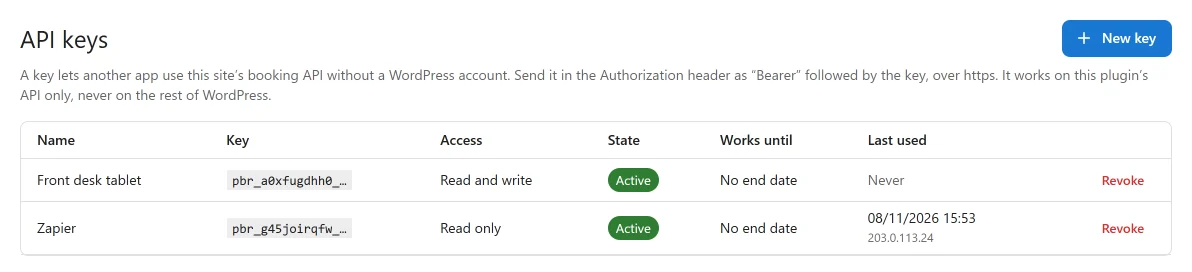
The list shows each key’s start, its access, its state (Active, Revoked, Expired), its last day and when and from where it was last used. Revoke stops a key from its next request and cannot be undone. A key that no longer works can then be removed.
Below the unlimited sites licence, making a key is refused, but keys made earlier keep working and can still be revoked.
Sending a key
Send the key in the Authorization header, after Bearer:
curl -H "Authorization: Bearer pbr_xxxxxxxxxx_xxxxxxxxxxxxxxxxxxxxxxxxxxxxxxxxxxxxxxxx" \
  https://example.com/wp-json/pbr/v1/bookings
If your server strips the Authorization header, send it as X-PBR-Key: pbr_... instead.
- Over https only. A key sent over plain http is refused, unless the site itself is local
(
localhost, an address with no dot, or a name ending in.localhost,.testor.local). - This plugin only. A key is read on
pbr/v1routes only. On WordPress’s own routes or another plugin’s, it is ignored and the request stays anonymous. - No user is signed in. The request runs as nobody, and the key’s access level answers every permission check.
- Per site. On a WordPress network, a key made on one site is unknown on another.
- Changing the WordPress salts in
wp-config.phpstops every key.
Refusals
| Status | Code | Why |
|---|---|---|
| 403 | plugixa_boatrental_key_https |
The request came over plain http. |
| 401 | plugixa_boatrental_key_invalid |
The key is malformed, unknown, revoked or expired. One answer for all four. |
| 429 | plugixa_boatrental_key_rate_limited |
More than 120 requests in a minute with this key. The Retry-After header says when to try again. |
| 403 | plugixa_boatrental_key_scope |
The route is not allowed for this key’s access level. |
Lists and records
The records an app works with follow one pattern:
| Request | What it does |
|---|---|
GET /bookings |
A page of bookings. |
GET /bookings/{id} |
One booking. |
POST /bookings |
Create a booking. |
PUT or PATCH /bookings/{id} |
Change a booking. |
/boats, /units and /locations (the marinas) work the same way. A list takes these query
parameters:
| Parameter | Default | What it does |
|---|---|---|
page |
1 | The page to return. |
per_page |
50 | Records per page, at most 200. |
search |
Words to search for. | |
orderby, order |
id, desc |
Sort column, and asc or desc. |
Every answer has the same shape. A list carries the total in meta:
{
  "success": true,
  "data": [ { "id": 12, "booking_ref": "..." } ],
  "meta": { "total": 37, "pages": 1 }
}
An error is a standard WordPress REST error with a code, a message and the HTTP status in
data.status. A refused field also names it in data.field.
Creating a booking
A booking created through POST /bookings is priced and checked for availability like one made
in the office, and is recorded as made by the office.
curl -X POST https://example.com/wp-json/pbr/v1/bookings \
  -H "Authorization: Bearer pbr_..." \
  -H "Content-Type: application/json" \
  -d '{
    "location_id": 1,
    "boat_id": 3,
    "start": "2026-07-14 10:00",
    "end": "2026-07-14 12:00",
    "guests": 2,
    "customer_name": "Ana Silva",
    "customer_email": "ana@example.com",
    "customer_phone": "+351 912 345 678"
  }'
| Field | What it is |
|---|---|
location_id, boat_id |
The marina and the boat. |
start, end |
Departure and return as YYYY-MM-DD HH:MM, on the marina’s clock. |
guests, quantity |
People on board, and how many boats. |
customer_name, customer_email, customer_phone, notes |
The customer. |
unit_id |
Optional: one particular unit. |
status |
Optional: the status to start in. |
If the boat is not free, the answer is an error that says why, and nothing is written.
Recording a payment
POST /payments records money taken outside the plugin, as the office does by hand:
| Field | What it is |
|---|---|
booking_id |
The booking. |
amount |
More than 0. |
type |
full, deposit or balance. |
gateway |
The payment method it was taken with, such as offline. |
The booking widget’s routes
These public routes are what the booking widget calls. They are rate limited per visitor, and
/booking also needs the nonce the widget’s page prints, so it is not meant for outside apps:
use POST /bookings with a key instead.
| Route | What it answers |
|---|---|
GET /availability |
What is free at a marina in a window, with a price for one boat of each kind. Takes location_id, start, end, and optionally boat_id and guests. |
GET /slots |
A boat’s departures on one day. Takes boat_id, location_id, date (YYYY-MM-DD) and optionally guests. |
POST /quote |
The full price of a booking, line by line. |
POST /booking |
Make the booking. |
With an API key, GET /availability and GET /slots are allowed for both access levels.
Payment providers send their notices to /payment/webhook/{gateway}. The payment pages give
you the exact address to enter at each provider, for example
Stripe.
Adding your own routes
The plugixa_boatrental_register_rest_routes action fires when the plugin registers its own
routes. It passes the namespace, so your routes sit beside the plugin’s:
add_action( 'plugixa_boatrental_register_rest_routes', function ( string $namespace ) {
	register_rest_route( $namespace, '/my-shop/stats', array(
		'methods'             => 'GET',
		'callback'            => 'my_shop_stats',
		'permission_callback' => function () {
			return current_user_can( 'plugixa_boatrental_view' );
		},
	) );
} );
The plugin’s capabilities are plugixa_boatrental_view, plugixa_boatrental_create,
plugixa_boatrental_edit, plugixa_boatrental_delete, plugixa_boatrental_export and
plugixa_boatrental_manage_settings. An API key’s access level answers the plugin’s own
permission checks only: a route of yours that asks current_user_can() sees an API key request
as signed out.
For events you can react to without a route, such as a booking created or a payment recorded, see Hooks and Webhooks.
Quick Links
Share