

Contents
On this page
Plugixa Boat Rental - User Documentation
Welcome to the official documentation for Plugixa Boat Rental, a booking plugin for boat rental, charter and jet ski businesses. You describe your fleet once, say which marina each boat leaves from and what it costs, and customers book online through a step-by-step widget on your own site. You run the day, from the first booking to the boat coming back, from a single admin app in WordPress.
The plugin ships in two editions:
- Free - boats and boat categories, marinas with their own timezone, opening hours and closures, units per marina, three booking modes (free duration, fixed departures and full day), buffer time, prices per hour, half day, day, week or seat, your own booking forms, search, a boat grid, boat pages and a marina map, Elementor widgets, pay on arrival and bank transfer, payments and refunds on record, a payment link, confirmation emails with a calendar file, the message log, the booking calendar, CSV import and export, and the App manager.
- Pro PRO - everything in Free, plus Stripe, PayPal, Mollie, Adyen and Klarna, deposits, monthly payments and security holds, pricing rules and customer groups, extras, fuel, coupons, tax rates and PDF invoices, multi-day charters, seats on shared trips, sunset departures, request to book, skippers, waivers and a passenger manifest, the dock app with walk-up sales, self check-in codes, maintenance, weather warnings, gift cards, SMS, Telegram and WhatsApp, calendar sync, webhooks, reports, roles and staff access, agent sales and demo data. Boat owners and payouts, boat clubs, WooCommerce checkout, white label and API keys need a Pro licence for unlimited sites.
Nothing in the free edition is switched off or limited. See the complete Free vs Pro comparison.
What makes it different
A few decisions shape how the plugin behaves. They are worth knowing before you take your first booking.
| Decision | What it means for you |
|---|---|
| A boat is never sold twice | Availability is checked again under a lock at the moment a booking is written, so the second of two requests for the same boat is refused. Buffer before and Buffer after, set on each boat, block the minutes around every booking for refuelling, cleaning or a safety check, and the buffers of two bookings never share the same minutes. |
| Every booking is on the marina’s clock | Customers book on the marina’s clock, whichever timezone they are in. Opening hours and closures are read on that clock, and times are stored as UTC, so a daylight saving change cannot move a booking. |
| Three ways to sell a boat, one engine | Free duration by the hour, fixed departures on a weekly timetable, and full day are modes of the same booking engine. Each boat has one, and all three use the same availability check, buffers and lock. There is no booking commission, and WooCommerce is not needed. |
Key concepts
| Term | What it is |
|---|---|
| Marina | A place boats leave from, with its address, timezone, currency, billing unit, opening hours and closures. The admin app lists marinas under Locations. |
| Boat category | The list a boat’s type is chosen from, such as Motorboat, RIB or Jet ski. You can rename, add, reorder or switch them off. |
| Boat | What a customer books, with its guests, cabins, berths, engine power, fuel, licence rule, prices and its own public page. |
| Unit | What a booking holds. A marina can have several units of one boat, such as three jet skis of the same kind. |
| Booking mode | How a boat is sold: Free duration, Fixed departures or Full day. |
| Departure | A start time on a boat’s weekly timetable, used by fixed departures. A departure can carry its own price. |
| Buffer | Minutes before and after a booking when the boat cannot be booked by anybody else. |
| Pending hold | The time a pending booking keeps its boat, 30 minutes by default, before it expires. |
| Booking status | Where a booking stands: Pending, Confirmed, Paid, Completed, Cancelled, Refunded, No-show or Expired. |
| Reference | The booking number given to the customer: a prefix and six random characters, such as BOAT-3F9A1C. The prefix is a setting. |
| App | A feature you can switch off and on in the App manager. An app that is off keeps its data. |
Getting started
| Section | Description |
|---|---|
| Getting started | Install, set up a marina, a boat and its price, and take a first test booking |
| Free vs Pro | What each edition contains |
| Demo data PRO | Try the plugin as a jet ski hire, sunset cruises or weekly yacht charters, and remove it in one click |
Fleet and marinas
| Section | Description |
|---|---|
| Marinas | Where boats leave from: timezone, opening hours, closures and currency |
| Boats | Boats, boat categories, prices and buffer time |
| Units | How many of each boat a marina has, and numbered units in Pro |
| Maintenance PRO | Engine hours, service intervals and time off sale for a service |
How boats are sold
| Section | Description |
|---|---|
| Booking modes | Free duration, fixed departures and full day |
| Multi-day charters PRO | Weekly and multi-day charters with a check-in day and a minimum of nights |
| Shared trips sold by the seat PRO | Seats on a boat’s departures, with a minimum to run and child fares |
| Sunset departures PRO | Departures timed from the sunset at each marina |
| Request to book PRO | Boats the customer asks for and you approve before anything is paid |
| Skippers PRO | Skippers and crew, their schedules and run sheets |
The booking widget on your site
| Section | Description |
|---|---|
| Booking forms | The form builder, and the public booking widget step by step |
| Shortcodes and blocks | Every shortcode and block, and their attributes |
| Boat pages, search and the boat grid | Photos, what is on board, the licence note and similar boats |
| The customer’s account | Where customers see their bookings, cancel and reschedule |
| Elementor widgets | The four Elementor widgets |
| Multilingual | WPML, Polylang, right-to-left layouts and translations |
Running the day
| Section | Description |
|---|---|
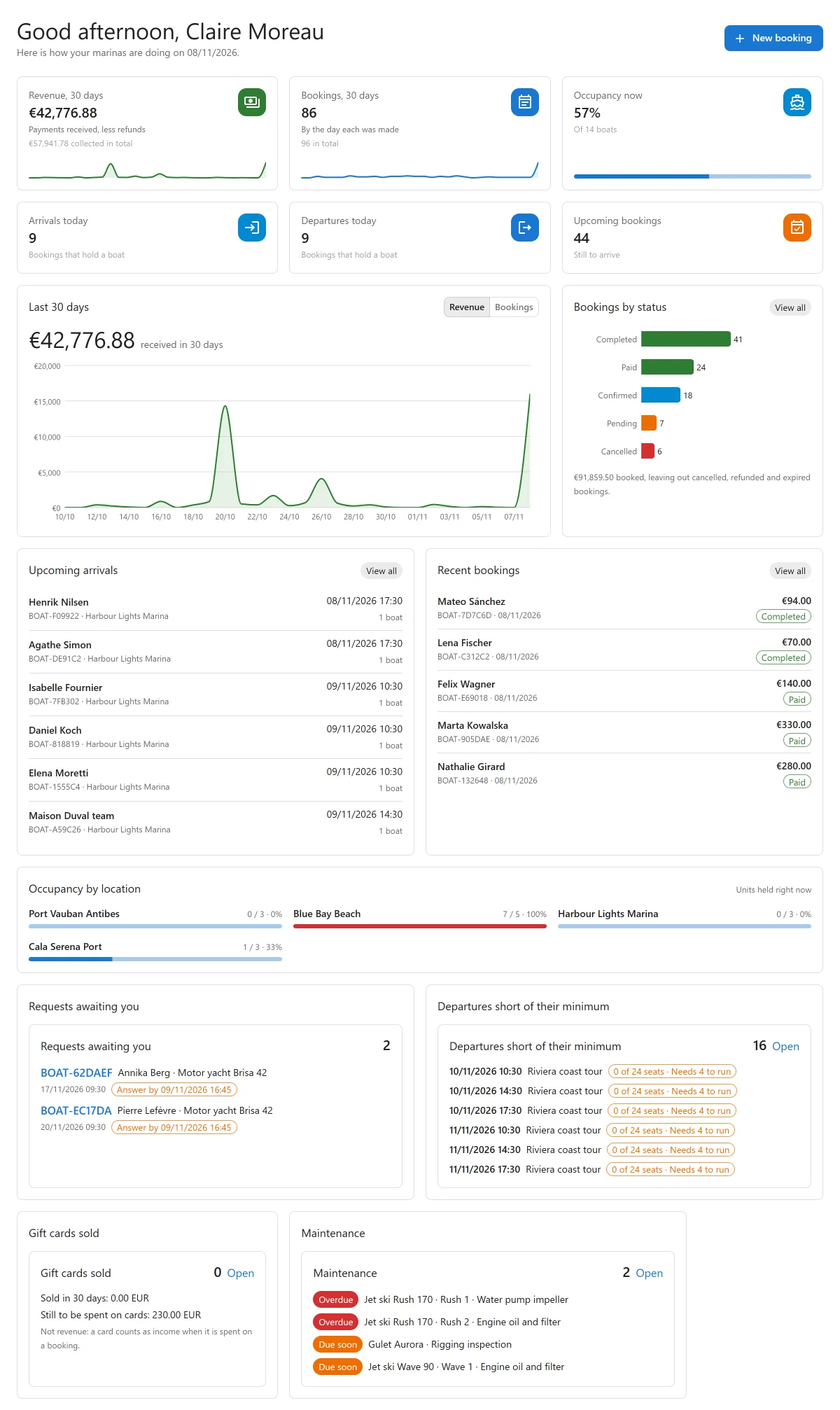
| Dashboard | Today’s departures and arrivals, occupancy and the last 30 days |
| Bookings | The list, filters, a booking’s page, statuses, the trash and CSV |
| Booking calendar | Every booking by month or week, and the Pro timeline |
| The dock app PRO | Check-out and check-in on a phone |
| Walk-up sales and damage reports PRO | Selling a boat at the dock, and the damage report PDF |
| Waivers, documents and the passenger manifest PRO | A signed waiver, ID and licence before the guest arrives |
| Self check-in codes PRO | A code for the key box or the boat’s lock |
| Weather PRO | Wind and wave forecasts, warnings on bookings and weather cancellations |
| Reports PRO | Revenue, how busy each boat was, and CSV downloads |
Pricing
| Section | Description |
|---|---|
| Pricing rules PRO | Seasons, weekends, peak hours and customer groups |
| Extras and fuel PRO | Add-ons on a booking, and how fuel is charged |
| Coupons PRO | Discount codes and the log of their use |
| Tax and PDF invoices PRO | Tax rates on top of a booking, and the invoice as a PDF |
| Gift cards and credit PRO | Cards and credit customers spend on bookings, and selling cards online |
Payments
| Section | Description |
|---|---|
| Payments | Pay on arrival, recording a payment, how a price is made and the payment link |
| Stripe PRO | Card payments through Stripe Checkout |
| PayPal PRO | Payments through PayPal |
| Mollie, Adyen and Klarna PRO | Payments on each provider’s hosted page |
| Deposits and balance PRO | Deposits, the balance schedule, monthly payments and security holds |
| WooCommerce checkout PRO | Taking booking payments through your WooCommerce cart |
Customers and messages
| Section | Description |
|---|---|
| Emails and alerts | Notifications, placeholders, the message log and browser alerts |
| SMS, Telegram and WhatsApp PRO | Messages to customers and your team, and the unfinished booking follow-up |
| Verified reviews PRO | Ratings from guests who sailed, on boat pages and in search results |
Partners
| Section | Description |
|---|---|
| Boat owners and payouts PRO | Renting out boats that belong to other people |
| Agent sales and commissions PRO | Travel agents, hotels and concierges selling on commission |
| Boat clubs and memberships PRO | Members who book out of the hours or days their plan includes |
Configuration
| Section | Description |
|---|---|
| Settings | Every settings section, in short |
| App manager | Switching features off and on |
| Roles and staff access PRO | Who may see and change what, and at which marinas |
| White label and multisite PRO | Your own name and logo, and WordPress networks |
| Import and export | Bringing boats, marinas and bookings in from CSV, and downloading them |
| Privacy and uninstall | What is stored, what is sent, and what uninstalling removes |
Connecting other systems
| Section | Description |
|---|---|
| Calendar sync PRO | Sharing busy dates with booking sites through iCal |
| Webhooks PRO | Signed messages to Zapier, Make, n8n or your own system |
| REST API and API keys | The pbr/v1 routes, and keys for outside apps |
| Hooks reference | Actions and filters |
Support
| Section | Description |
|---|---|
| Troubleshooting | Common problems and their causes |
System requirements
- WordPress: 6.5 or higher
- PHP: 8.2 or higher
- WooCommerce: not needed. Pro can take payment through it if you use it.
- Browsers: a current version of Chrome, Firefox, Safari or Edge. The admin app and the booking widget need JavaScript switched on.
- REST API: the booking widget talks to your site through the WordPress REST API, so it must be reachable by visitors who are not signed in.
- WP-Cron: pending bookings whose hold ran out are marked Expired by an hourly scheduled job. The boat is free again the moment the hold runs out, whether or not the job has run.
Bookings, boats, marinas and payments are stored in the plugin’s own database tables. They stay in place when the plugin is deactivated, and by default when it is deleted. See Privacy and uninstall.
Getting help
- Check Troubleshooting first.
- Read the page for the screen you are using.
- Email support at support@plugixa.com.
License
Plugixa Boat Rental is licensed under the GPL v2 or later. Pro features are part of the Pro build of the plugin.
Quick Links
Share