

Contents
On this page
Privacy and uninstall - Plugixa Boat Rental
A boat rental desk holds personal data by nature: the name, email address and phone number of everyone who books. This page lists what the plugin keeps, how you answer a customer’s data request, which outside services it contacts, and what happens to the data when the plugin is deactivated or deleted.
What is kept
Everything is stored in your own WordPress database. Nothing is sent to Plugixa.
| What | Personal data |
|---|---|
| Bookings | The customer’s name, email address, phone number, billing details, notes, the answers to your booking form’s extra questions, and the WordPress account of a signed-in customer. |
| Payments | Linked to a booking: method, amount, status, the provider’s transaction ID. |
| Message log | The address each message was sent to, and when. |
| Imports | The values of a CSV file while its import runs. They are emptied when it finishes, is discarded, or a day later. The file itself is never stored. |
| Marinas, boats, prices, forms, settings | No personal data. |
Pro apps keep more, each only while it is used PRO:
- Waivers and documents: signed waivers, ID and licence documents and passenger lists. The files are kept in a private folder of their own, not in the media library. A daily job deletes them after the retention periods in that app’s settings: by default ID and licence files 30 days after the trip, passenger lists after 365 days, and signed waivers after 7 years. See Waivers and documents.
- Dock app: check-out and check-in reports, with their photos kept in the same private folder.
- Gift cards and gift card orders: who bought a card and who it is for.
- Request to book: the customer’s request.
- Unfinished booking follow-up: the details of a booking that was never paid, for the one reminder email.
- WhatsApp: whether a customer agreed to messages on WhatsApp.
- Verified reviews: a review is stored with the guest’s first name and last initial only, never their full name or email.
- Browser alerts: each staff member’s own alert choices.
What is not kept
- Card details. With a Pro payment app the customer pays on the provider’s own page or form; card numbers never reach your site.
- Visitor IP addresses. To slow down abuse, the public booking routes count requests per visitor for a short time. The count is stored under a one-way hash of the address, never the address itself.
- Cookies. The booking form, the boat pages and the booking summary set none. With Pro, an agent’s referral link sets one first-party cookie that remembers the agent PRO.
Who can see it
In the admin, only people with the plugin’s permissions; on activation only administrators have them. See Roles and staff access.
On the site, a customer reaches their booking through the link in their email. The link carries a token that only your site can make, so knowing a booking reference is not enough to open somebody’s booking.
Answering a customer’s data request
The plugin works with WordPress’s own privacy tools, under Tools -> Export Personal Data and Tools -> Erase Personal Data. The bookings are listed there as Boat rental bookings.
Bookings are found by the email address on the booking, and by the WordPress account with that email when the customer had one. Trashed bookings are included, because a trashed booking still holds the customer’s details.
Export
The export gives the customer each booking’s reference, status, departure and return, name, email, phone, billing details, notes, total and form answers, and under Boat rental payments every payment with its date, method, type, amount, status and transaction ID.
Erase
Erasing works booking by booking:
| The booking | What happens |
|---|---|
| The trip is still to come, or the booking still holds a boat and is not over | Nothing. The result says the booking was kept because the trip is not over and the marina may need to reach the customer. Erase again once it is. |
| Anything else | Anonymised: the name, email, phone, billing details, notes, form answers and account link are removed, and so is the address in its message log. |
A booking and its payments are never deleted. They are accounting records: tax law in most countries requires them for several years, and removing them would break your revenue figures. What is left names nobody. The plugin does not delete the anonymised records later; how long you must keep them is for you to confirm with your accountant.
Pro apps register their own entries in the same tools PRO: Boat rental waivers and documents, Boat rental check-out and check-in reports, Boat rental gift cards, Boat rental gift card orders, Boat rental booking requests, Boat rental booking follow-ups and Boat rental WhatsApp opt-ins. The bookings are erased last, after the others have found what they need by the customer’s email.
Outside services
The free plugin contacts one outside service, and only on a page that shows the marina map.
OpenStreetMap. The marina map ([plugixa_boat_rental_map] and the Marina Map
block) loads its map images from tile.openstreetmap.org. The visitor’s browser requests
them directly, so OpenStreetMap receives the visitor’s IP address, browser details and the
area being viewed. Nothing is sent on a page without a map, and no booking or customer data
is ever sent.
- Service: OpenStreetMap
- Terms of use: osmfoundation.org/wiki/Terms_of_Use
- Tile usage policy: operations.osmfoundation.org/policies/tiles
- Privacy policy: osmfoundation.org/wiki/Privacy_Policy
Mention the map in your site’s privacy policy if you use it.
Services Pro contacts PRO
Pro apps contact a service only once you switch the app on and enter your own account details for it:
| App | Service | What is sent |
|---|---|---|
| Weather | Open-Meteo (on a commercial key) or Storm Glass | Each marina’s coordinates and your key, from the server, hourly or when staff press refresh. No booking or customer data. |
| Stripe, PayPal, Mollie, Adyen, Klarna | The payment provider | What the provider needs to take or refund the payment. |
| SMS, Telegram, WhatsApp | Twilio or Vonage, Telegram, the WhatsApp Cloud API | The message and the number or chat it goes to. |
| Webhooks | Addresses you enter | The booking and payment events you choose. |
Open-Meteo’s terms: open-meteo.com/en/terms, licence open-meteo.com/en/license. Its data is CC BY 4.0 and the plugin shows the attribution. Storm Glass: terms and privacy policy.
Deactivating
Deactivating the plugin stops its scheduled jobs and never touches the data. Activate it again and everything is where you left it.
Deleting the plugin
By default, deleting the plugin removes its files and keeps all of its data: bookings, payments, marinas, boats, forms, settings and permissions. Installing it again picks up where you left off. This protects you from the usual accident, which is deleting the free copy after installing Pro “because it is the old one”: Pro runs on the same data.
To erase the data as well:
- Open Plugixa Boat Rental -> Settings -> Advanced (shown to site administrators only).
- Turn on Erase all data when the plugin is deleted. A warning appears: every booking, payment, location, form and setting will be permanently erased, with no undo.
- Click Save.
- Deactivate and delete the plugin from Plugins.
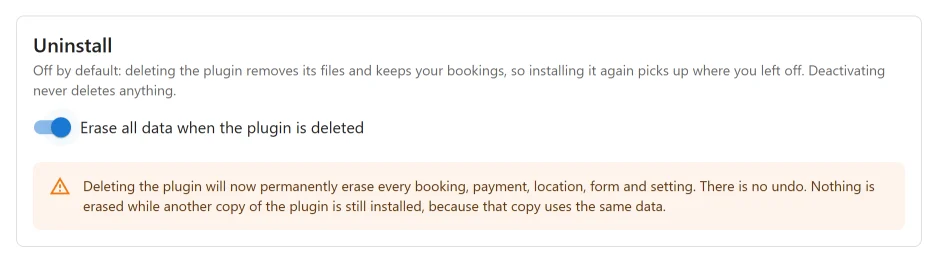
With the switch on, deleting the plugin removes:
- all of the plugin’s database tables, with every booking, payment and record,
- the boats’ public pages,
- the private files of the Pro documents and dock apps PRO,
- its settings, the app switches and its temporary data,
- the plugin’s permissions from every role and user,
- each staff member’s browser alert choices PRO,
- its scheduled jobs.
Nothing is erased while another copy of the plugin is still installed, active or not, because that copy uses the same data. Delete the other copy first. Only a user who may manage plugins can trigger the erase.
On a WordPress network, each site decides for itself by its own switch: a site that left it off keeps its bookings when the plugin is deleted from the network.
The plugin does not remove the media library images you chose for boats, or the pages you created for the booking form and the summary. Delete those yourself if you no longer need them.
Quick Links
Share