

Contents
On this page
Coupons - Plugixa Boat Rental
Coupons PRO are codes a customer types on the booking form to get money off. A coupon lowers the price of the booking. It is not the same as a gift card, which is money the customer pays with and leaves the price as it is.
Find them under Plugixa Boat Rental -> Coupons, in the Sales group of the menu. Coupons is an app in the App manager, on by default in Pro.
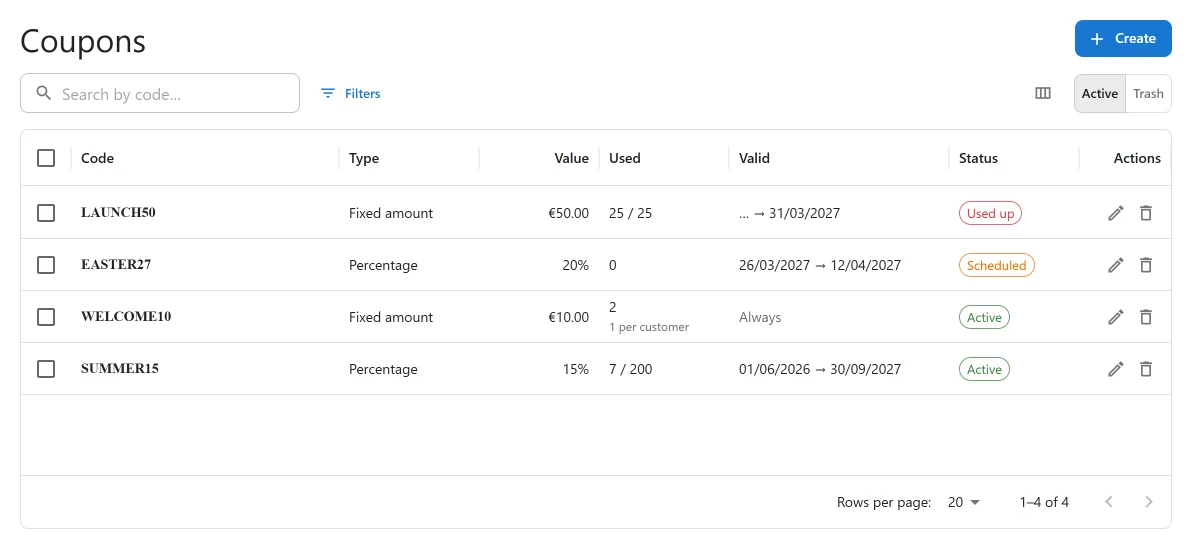
Making a coupon
Press the add button on the list to open New coupon.
| Field | Default | What it does |
|---|---|---|
| Status | Active | “An inactive coupon is refused when a customer types it.” |
| Code | Empty | “What the customer types when booking.” Up to 60 characters, unique. The button beside the field (Generate a code) makes one for you. |
| Discount type | Percentage | Percentage or Fixed amount. |
| Amount | Empty | A percentage is “The share of the price taken off, up to 100.” A fixed amount is “Taken off the price. Never more than there is to pay.” |
Limits
| Field | What it does |
|---|---|
| Minimum spend | “The price a booking must reach. Empty for none.” |
| Usage limit | “How many bookings may use it in all. Empty for no limit.” |
| Usage limit per customer | “Applies to signed-in customers only. Empty for no limit.” |
Validity
| Field | What it does |
|---|---|
| Valid from | “On the site’s clock. Empty to start at once.” |
| Valid until | “On the site’s clock. Empty to never end.” Must be on or after the start. |
Limited to
| Field | What it does |
|---|---|
| Locations | “Empty for any location.” |
| Boats | “Empty for any boat.” |
On an existing coupon the form also shows Redeemed: how many times it has been used, out of its limit.
The coupon list
Each coupon’s state is worked out from its settings, and the list explains it:
| State | Why |
|---|---|
| Active | “Can be redeemed now.” |
| Inactive | “Switched off.” |
| Scheduled | It starts later: “Starts …” |
| Expired | Its end date has passed: “Ended …” |
| Used up | “Redeemed … of … times.” |
Search the list by code. A coupon you move to the trash keeps its code taken: restore it, or delete it permanently to free the code for a new coupon.
What the customer sees
On the booking form, below the choice of boat, there is a Coupon code field with an Apply button. A code that works shows “Coupon applied.” and a line “Coupon …” with the amount off appears in the price breakdown. A code that does not work, for any reason, shows “That code cannot be used on this booking.” The answer never says why, so it cannot be used to guess which codes exist. Checking codes is also limited per visitor.
How the discount is worked out
A coupon is taken off the subtotal: the rental after any pricing rules, plus extras and fuel. The Minimum spend is checked against that same subtotal. Tax is then charged on what is left, so a percentage tax is lower on a discounted booking.
A booking keeps the coupon it was made with. If it is moved to other dates later, the same coupon is applied to the new price, whatever has happened to the coupon since.
Usage limits under load
A use is counted the moment the booking is saved. If two customers try to take the last use at the same time, only one gets it; the other is told “That coupon has just been used up. Please try without it.” and can book without the code.
Coupons and WooCommerce
If you take payment through the WooCommerce checkout, these coupons are the way to discount a booking. WooCommerce’s own coupons do not apply to a booking unless you allow them in its settings.
Quick Links
Share