

Contents
On this page
Calendar sync (iCal) - Plugixa Boat Rental
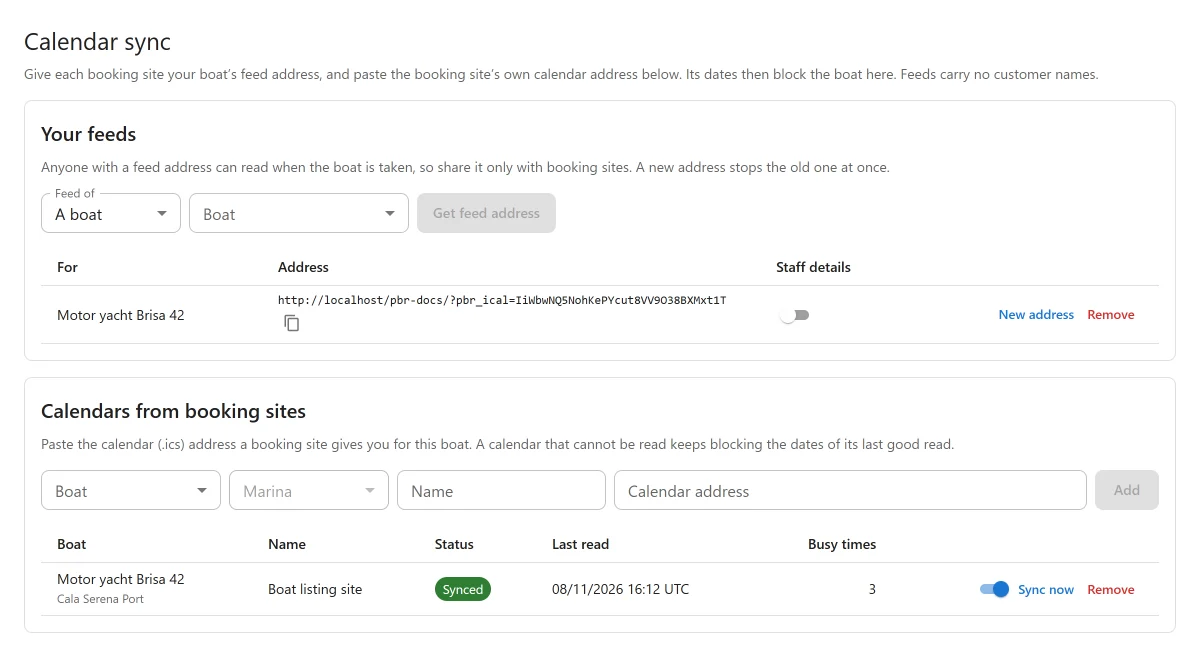
Calendar sync PRO keeps your boats in step with other booking sites that list them. You give each booking site a feed address for the boat, so it sees when the boat is taken. You paste the booking site’s own calendar address here, so its bookings block the boat on your site.
It is an app called Calendar sync (iCal), off by default. Switch it on in the App manager. The screen is Plugixa Boat Rental -> Calendar sync, in the Marinas menu group.
Your feeds
A feed is a calendar (.ics) address that a booking site reads. Under Your feeds, choose
A boat or A whole marina, pick it, and press Get feed address. Copy the address with
Copy and give it to the booking site, in its calendar import setting.
A feed address looks like this:
https://your-site.com/?pbr_ical=Xk3v9QmT2pLr8sWb4nYc7dHf1gJa6eZu
What a feed holds:
- every booking that holds the boat, as Booked, including the boat’s buffers;
- blocks from the Timeline (maintenance, owner use, closures) as Unavailable;
- from 30 days back to two years ahead.
A feed carries no customer names. A marina feed adds the boat’s name to each entry. A boat with several units is listed as taken only while all of its units are, because a booking site sells the boat, not a unit.
Staff details
Each feed has a Staff details switch, off by default. It adds the booking reference and the customer’s first name, for your own calendar app. Never give a staff feed to a booking site.
Keeping the address private
Anyone with a feed address can read when the boat is taken, so share it only with booking sites. New address replaces it: the old one stops working at once. Remove deletes the feed.
Calendars from booking sites
Under Calendars from booking sites, add the calendar address a booking site gives you for the boat:
| Field | What it does |
|---|---|
| Name | For you, for example “Click&Boat”. |
| Boat and Marina | Which boat it blocks, at which marina. All-day dates are read on that marina’s clock. |
| Calendar address | The .ics address, starting with https://. A webcal:// address is read as https://. |
| On | Switch the calendar off to stop it blocking. |
The calendar is read when you add it, then every 15, 30 or 60 minutes, and whenever you press Sync now. Its busy times block every unit of that boat at that marina, on the booking form and in the office. Staff can still force a booking over them.
Each calendar shows its status: Synced, Failing, Not read yet or Off, with when it was Last read. Busy times lists the dates it blocks.
When a calendar cannot be read
A calendar that cannot be read keeps blocking the dates of its last good read, so a broken link never frees a boat. The screen shows the error. After 3 failed reads in a row, the office is emailed once, until the calendar reads again.
What is read
- All-day dates, timed events in UTC or a named time zone, and events with no time zone (read on the marina’s clock).
- Daily and weekly repeating events, with their exceptions, up to 400 days ahead. Other repeat rules are skipped, with a warning on the screen.
- Cancelled events are skipped.
Only times are kept. An event’s title is never stored, because it can be a guest’s name.
Clashes
When an imported busy time falls over a booking already on your site, the clash is recorded, the office is emailed, and it is listed at the top of the Calendar sync screen. Nothing is changed: check both sides, move or cancel one booking, then press Dealt with.
Settings
Under Plugixa Boat Rental -> Settings -> Calendar sync:
| Setting | Default | What it does |
|---|---|---|
| Read outside calendars every | 15 minutes | 15, 30 or 60 minutes. |
| Include dates imported from other calendars in your feeds | Off | Off by default: two booking sites reading each other through you would echo each other’s dates back and forth. |
Booking sites read your feeds on their own schedule, often every few hours. A double booking is still possible in between, which is why you are emailed about any clash.
Who can do what
The Calendar sync screen has its own permissions: read to see it, create to add a feed or calendar, edit to sync, change one or mark a clash dealt with, and delete to remove one. See Roles and staff access.
Current limits
- No two-way Google Calendar sync.
- Imported dates block the boat and are listed per calendar, but the Timeline does not draw them.
- Self check-in codes and customer details are never put in a feed.
Quick Links
Share