

Contents
On this page
Self check-in codes - Plugixa Boat Rental
Self check-in codes PRO let customers take a boat without staff at the dock. Each customer is given a code for the key box or the boat’s lock shortly before departure, once the booking is confirmed, paid in full and its papers are done. The code is never in the confirmation email, and it is cleared after the trip.
It is an app called Self check-in codes, off by default. Switch it on in the App manager.
Choosing how each unit is opened
Open the boat. The panel Self check-in has one line per unit, with a Self check-in choice:
| Choice | Code the customer gets |
|---|---|
| Off | None. |
| One fixed code (key box) | The same code for every booking. Type it in Key box code. |
| A new code for each booking | New random digits each time. Set the number of Digits, from 4 to 8 (default 6). |
| Codes from a list I paste | The next unused code from a list, one booking each. Use this for a smart lock whose app gives you a batch of codes. |
A stored code is never shown again on the boat’s form. It says “A code is stored. It is not shown here.” Type a new one to change it.
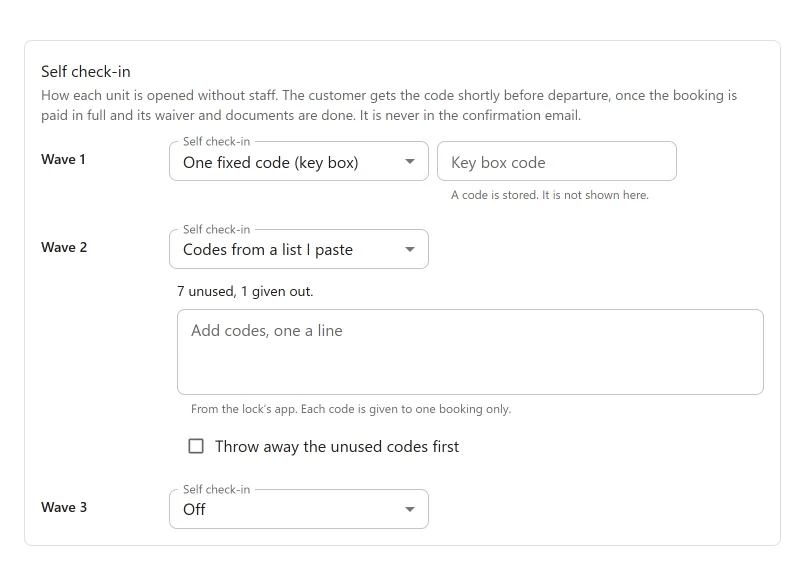
A pasted list of codes
In Add codes, one a line, paste the codes from the lock’s app. Commas and semicolons also
separate codes. Each code is 3 to 20 letters, digits, #, * or -, and you can paste up to
500 at a time. A code already on the list, used or not, is not added again, and the panel says
how many were skipped. Throw away the unused codes first empties the unused ones before
adding; used codes stay as the record.
The panel shows how many codes are unused and how many were given out. Below 5 unused codes it warns, and the office is emailed once. When the list is empty, customers of that unit get no code and the office is told; the code goes out as soon as you add more.
When the code is given
The code goes out a set time before departure, once all of these are true:
- the booking is confirmed or paid, and not in the trash;
- it is paid in full;
- with Waivers and documents on, the waiver is signed and the ID and licence it needs are verified;
- the unit is known (the booking’s own unit, or the only unit of that boat at its marina);
- a code is available for that unit;
- the trip has not ended.
Set the time under Plugixa Boat Rental -> Settings -> Self check-in:
| Setting | Default | What it does |
|---|---|---|
| Give the code this many minutes before departure | 30 | From 0 to 1440. |
The plugin checks every 5 minutes. Each booking gets one code, sent once.
How the customer gets it
- Email: “Your access code for booking {booking_ref}”.
- SMS, when the SMS app is set up: “Booking {booking_ref}: your access code is {access_code}. It works until {end_datetime}.”
- WhatsApp, when a template is chosen for the event Self check-in code.
- The booking’s summary page: a card that says when the code will appear and what is still missing, then shows the code in large type once released.
The Telegram staff chat is only told that a code was sent, never the code itself. With the Notifications app off nothing is sent, but the summary page still shows the code.
In the customer’s account, each booking has an Access code button. It says when the code will appear and what is missing, or links to the booking page. The account list never shows the code itself.
The {access_code} placeholder has a value only in the access code message. In any other email
it is empty, so a code cannot leak into a confirmation.
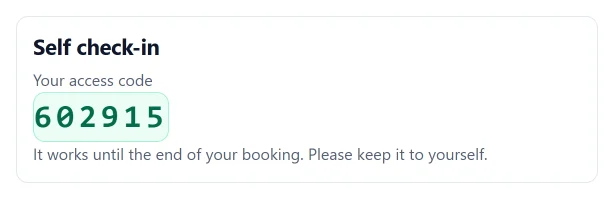
On the booking
The side panel Self check-in on a booking shows the state (“Goes to the customer at 09:30, once nothing below is left”, “Given to the customer at 09:30” or “The code was cleared”), any condition still missing, and:
- Show code and Hide code: shows the code to staff. Each view is logged.
- Send again: sends the code to the customer again.
- Release now: sends it at once, when every condition holds, without waiting for the time before departure.
- Who did what: released, viewed, sent again, cleared; who and when. The code itself is never in the log.
Showing the code needs the dock capability or permission to read bookings. Sending it again and releasing it need permission to edit bookings.
In the dock app, the booking has the same card, and the day’s list marks self check-in bookings with a green Self check-in tag.
When the code is cleared
The booking’s copy of the code is wiped after a dock check-in, when the booking leaves confirmed or paid (completed, cancelled, refunded, no-show, expired), when it is cancelled, and when it has ended or been trashed. A used code from a pasted list stays used.
Smart locks and webhooks
There is no built-in smart lock driver. A developer can connect a lock to the actions
plugixa_boatrental_access_code_released and plugixa_boatrental_access_code_cleared. See
Hooks.
The webhook event access_code.released tells
another system a code was given. It carries the code only to an endpoint that also ticks
access_code.with_code.
Codes are never put in calendar feeds. They are stored encrypted.
Current limits
- A code is not sent again automatically when a booking moves. Use Send again.
- A booking moved to another unit after its code was released keeps that code.
Quick Links
Share