

Contents
On this page
Shared trips sold by the seat - Plugixa Boat Rental
Shared trips sold by the seat PRO let several parties share one boat on one departure: a sunset cruise, a dolphin trip, a ferry run. Each party buys seats. You can set a minimum number of seats for the trip to run, a child fare, and let a group book the whole boat as a private trip.
It is an app called Shared trips by the seat, on by default in Pro. It does nothing until a boat’s booking mode is Sold by the seat. While an active boat uses that mode, the App manager will not switch the app off.
Setting up a boat
- Open the boat and set its booking mode to Sold by the seat. See Booking modes.
- Add the weekly departures in the Departure timetable panel, as for a fixed-departure boat. A timetable row’s price is that departure’s adult seat price.
- Fill in the Sold by the seat panel (below).
- Optionally add one-off departures and days off.
The boat’s seat rate is the adult seat price when neither the timetable row nor a one-off date sets one.
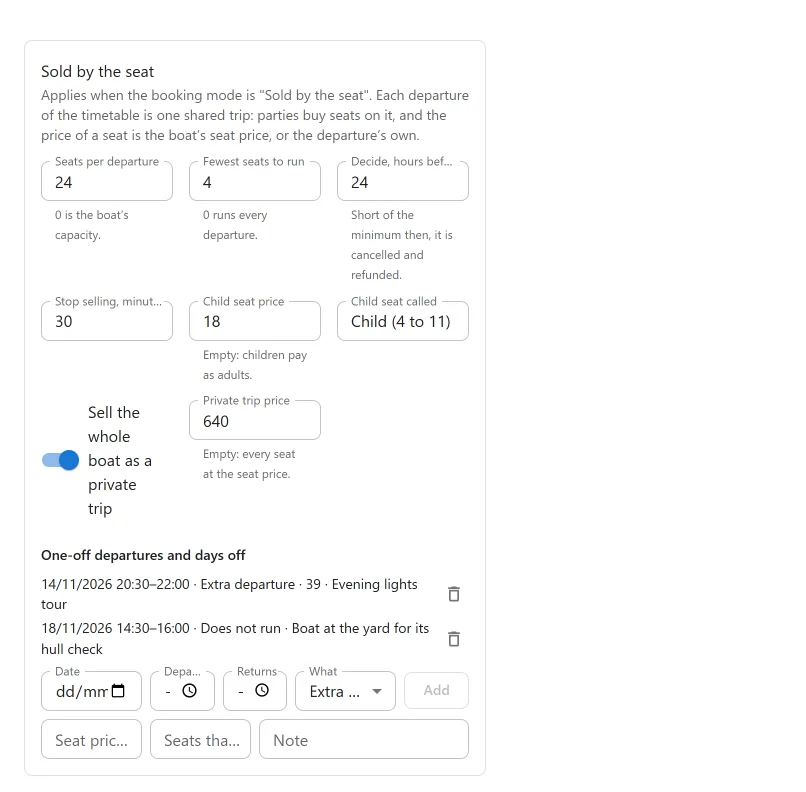
The Sold by the seat panel
| Setting | Default | What it does |
|---|---|---|
| Seats per departure | 0 | Seats on sale on each departure. 0 is the boat’s capacity. |
| Fewest seats to run | 0 | The minimum to run. 0 runs every departure. |
| Decide, hours before | 24 | When the minimum is judged, from 0 to 168 hours before departure. Short of the minimum then, the departure is cancelled and refunded. |
| Stop selling, minutes before | 60 | Sales close this long before departure. |
| Sell the whole boat as a private trip | On | Lets one party book the whole boat on a departure. |
| Private trip price | Empty | Empty: every seat at the seat price. |
| Child seat price | Empty | Empty: children pay as adults. |
| Child seat called | Empty | The wording of the child line, for example “Under 12”. |
One-off departures and days off
The list One-off departures and days off on the same panel changes the timetable for one date. Each row has a Date, Departs, Returns and What:
- Extra departure adds a departure on that date. It can have its own Seat price that day and Seats that day, and a Note.
- Does not run takes a weekly departure away on that date.
With no rows, the panel says “None. The timetable runs every week.”
A boat sold by the seat is sold only on its departures. Any other time is refused, by the booking form and by the office.
How seats are counted
Seats are counted from the bookings on a departure, never stored as a figure. A cancelled booking, a hold that ran out or a booking in the trash gives its seats back at once. Every child takes a seat, and a party needs at least one adult.
Two people buying the last seat at the same moment cannot both get it: the second is told the departure is sold out.
All the seats of one departure are on one unit (hull) of the boat. A private trip takes a unit nobody is on. On a boat with two units, a private trip can sail beside the shared one. On a boat with one unit:
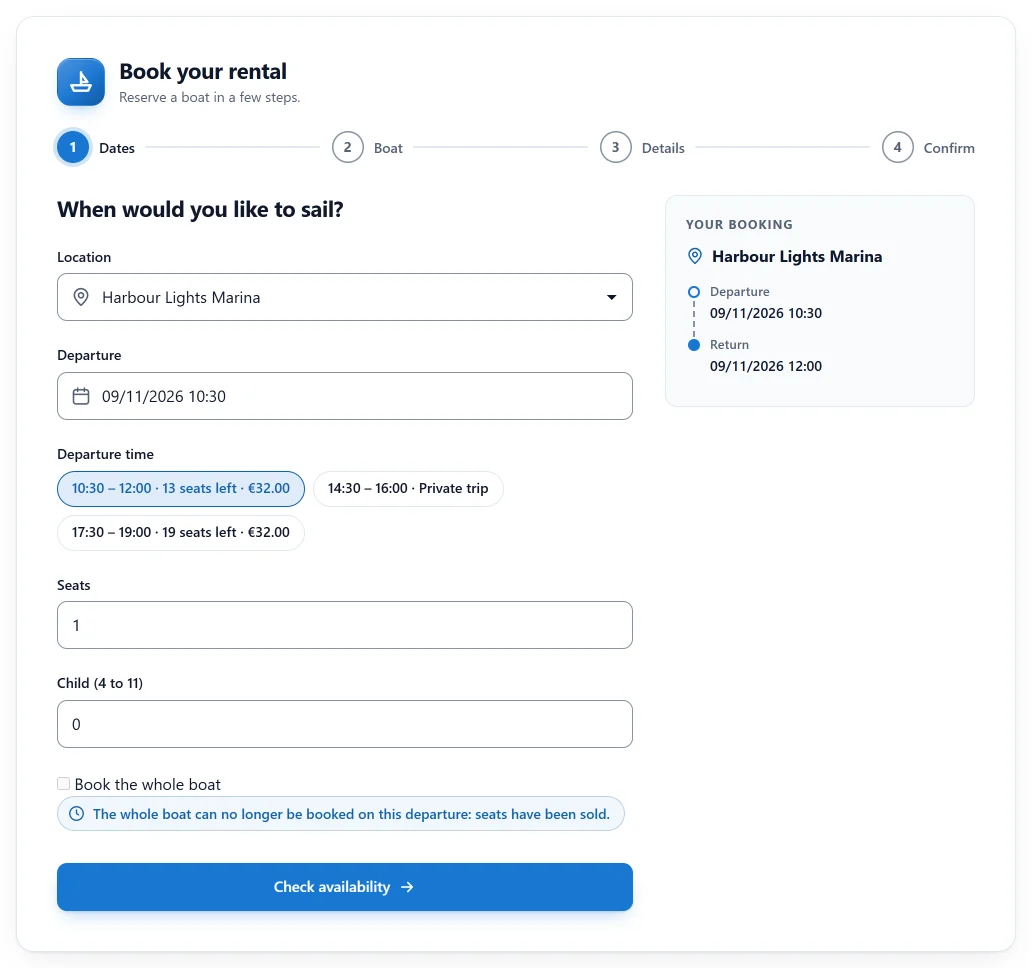
- once a seat is sold, the whole boat can no longer be booked on that departure;
- once the whole boat is booked, no seats are sold.
What the customer sees
On the boat’s page, the booking form asks for a day, then lists that day’s departures. Each shows how many seats are left and the price, or Sold out, Private trip, Sales closed or Cancelled. A departure with fewer seats left than the party asks for reads, for example, “Only 2 seats left” and cannot be chosen.
The guests field reads Seats. With a child fare, a second field, named after the child seat (for example Child (4 to 11)), asks how many are children. Book the whole boat is offered, with its price, while a unit is free, and is greyed out once seats are sold on a one-unit boat.
In the general booking form, a boat sold by the seat is offered only for a time that is one of its departures.
Prices
| What | Price |
|---|---|
| Adult seat | The one-off date’s seat price, else the timetable row’s price, else the boat’s seat rate |
| Child seat | Child seat price, a line of its own. With none, children pay as adults |
| Whole boat | Private trip price, else the adult seat price times the seats |
Pricing rules, coupons, gift cards, tax, deposits and instalments work on a seat booking as on any other. An extra charged per person is charged per seat.
The Departures screen
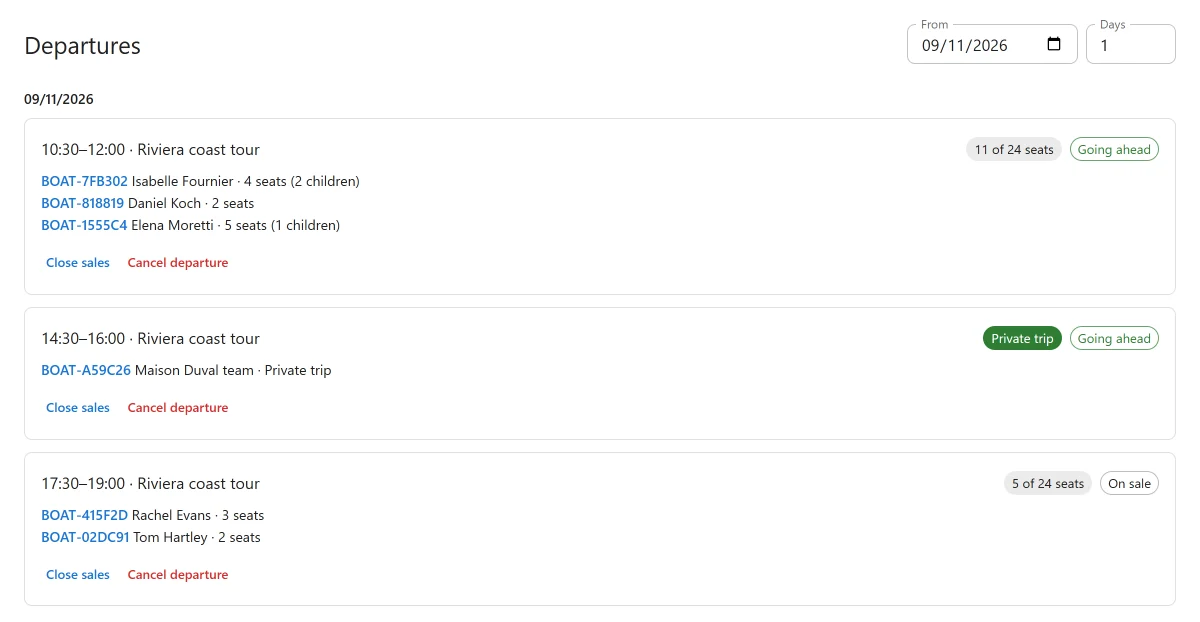
Plugixa Boat Rental -> Departures (in the Bookings menu group) lists each day’s departures with the seats sold of capacity, the minimum, the state and the parties on it. The states are On sale, Sales closed, Going ahead and Cancelled. A departure short of its minimum says “Needs 6 to run”.
For each departure you can:
- Close sales and Open sales again;
- Cancel departure, with a Reason for the customers.
Cancelling a departure
When you cancel a departure, every booking on it is cancelled and refunded in full, and each customer is emailed once, with your reason. A payment made online is refunded through its payment method. Money paid in cash or by another offline method is shown as owed, for you to return by hand. A party that had already cancelled keeps what its own cancellation gave it.
If a refund fails, cancelling the departure again tries only what is still pending, so nobody is refunded twice.
The minimum
At Decide, hours before the departure:
- if it has sold its minimum, or the whole boat was booked, it is marked Going ahead and each party is emailed that the trip is going ahead;
- if it is short, it is cancelled as above, refunded in full, and each party is emailed with the reason.
A day before that decision, the office is emailed once about each departure still short.
The Dashboard widget Departures short of their minimum lists this week’s departures that have not reached it.
Changing a booking
- The office can move a booking to another departure of the same boat. It is repriced, and a full departure is refused.
- The office can change a booking’s guests. More guests are checked against the seats left; fewer is always allowed. A party that drops seats is refunded by hand.
- A customer cancels the whole booking only, under the boat’s cancellation policy.
- A booking from the trash cannot be brought back into a departure that is now full.
- A boat cannot be switched to another booking mode while a departure still to come has a booking on it.
On a booking’s page, the side panel Shared trip shows the departure, how full it is, the other parties on it (Also on this departure) and any refund. On the Timeline, the parties of one departure are drawn as one bar, for example “7/12 seats, 2 parties”.
Emails
These placeholders work in any booking email: {departure}, {seats}, {children},
{private_trip}, {tour_reason} and {tour_refund}. The “going ahead” and “cancelled”
messages are also sent by SMS and Telegram when
those apps are set up.
With other apps
- Request to book: a seat request holds its seats until the deadline; a private trip request holds the departure.
- Skippers: one skipper per departure. A party joining a departure that already has its skipper needs nobody of its own.
- Sunset departures: a weekly timetable row can be timed from sunset.
Current limits
- At the dock app, each party is checked out as its own booking.
- Passenger lists stay per booking; there is no merged list per departure.
- The skipper is shown on the first party’s booking only.
- A one-off date cannot be timed from sunset.
- A boat kept at two marinas is not supported for shared trips.
Quick Links
Share