

Contents
On this page
Import and export - Plugixa Boat Rental
Moving from another booking system, or from a spreadsheet, is done with the Import screen: marinas, boats and bookings come in from CSV files, and every row is checked before anything is written. The Export screen does the opposite, for a spreadsheet or your accountant. Both are free apps.
Import
Import is the Import app. It is off by default, because a move to the plugin happens once: switch it on in the App manager. Then open Plugixa Boat Rental -> Import, in the Configuration group.
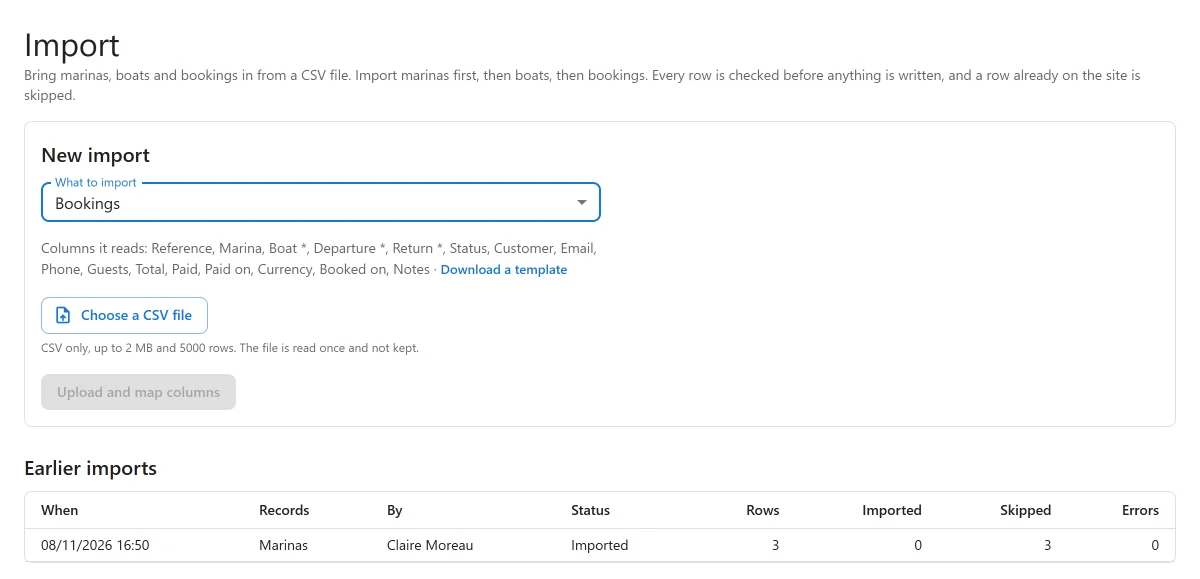
Import in this order: marinas first, then boats, then bookings. A boat names the marina it is kept at, and a booking names its marina and boat, so each needs the one before it.
The file
- A
.csvfile only, up to 2 MB (or less, if your server’s upload limit is lower) and 5,000 rows. Split a bigger file and import each part. - The first row holds the column names.
- A file saved by Excel in the Windows Western encoding is converted for you.
- The file is read once and not kept: only the rows’ values are held while the import runs, and they are emptied when it finishes, when you discard it, or a day later for an import nobody finished.
Under each kind, Columns it reads lists its columns (a * marks a required one), and
Download a template gives you an empty CSV with the right headings.
Step by step
- Under What to import, choose Marinas, Boats or Bookings (and with Pro, Extras PRO).
- Choose a CSV file, then click Upload and map columns.
- Under Which column holds what, check the column picked for each field. The plugin suggests them from your column names and their usual alternatives, such as “pax” for guests or “harbour” for marina. Not in the file leaves a field empty. The first rows of the file shows what you are mapping.
- Click Check the file. Every row is checked and nothing is written. The result counts the rows ready to import, already on the site, and with errors, and Rows with something to say lists them by Line with a Message.
- Fix the file if needed and Check again, or click Import N rows.
Checking and importing run in steps of 100 rows, with a progress bar, so a large file never meets a server time-out. If a step fails, Carry on picks up where it stopped. Discard abandons an import.
Earlier imports lists every import with what was imported, by whom and when, and the counts. No file name is kept.
Marinas
| Column | Notes |
|---|---|
| Name * | |
| Time zone | For example Europe/Lisbon. Empty uses the site’s. |
| Currency | Three letters, such as EUR. |
| City | |
| Country | Two letters, such as PT. |
| Phone, Email | |
| Meeting point |
Boats
| Column | Notes |
|---|---|
| Name * | |
| Type | A boat type the site has, by name, such as Catamaran. |
| Guests | How many people it takes. |
| Cabins, Berths | |
| Engine (hp) | |
| Length (m) | |
| Marina | Where it is kept: a marina’s name or ID. Leave empty to add the boat without putting it anywhere yet. |
| How many | Identical boats of this kind at the marina. Empty means one. |
| Price per hour, Price per half day, Price per day, Price per week | The first one given sets how the boat is priced. |
Each imported boat gets its public page, its prices and its units, exactly as if you had created it in Boats.
Bookings
| Column | Notes |
|---|---|
| Reference | The booking number in your old system. Kept as the booking’s reference, and used to skip rows imported before. |
| Marina | A marina’s name or ID. May be left out when the site has one marina. |
| Boat * | A boat’s name or ID. It must be kept at that marina. |
| Departure * | Date and time on the marina’s clock, such as 2027-07-03 09:30. A date alone starts at midnight. |
| Return * | A date alone ends at the end of that day. |
| Status | Pending, Confirmed, Paid, Completed, Cancelled and so on. Empty means Confirmed. |
| Customer, Email, Phone | |
| Guests | |
| Total | What the booking cost. Empty prices it at the boat’s current rates. |
| Paid | What the customer has paid. Recorded as one payment, marked as imported. |
| Paid on | The day it was paid, for revenue by day. Empty uses the departure. |
| Currency | Empty uses the marina’s. |
| Booked on | |
| Notes |
Past and future bookings can both be imported. For dates written with slashes, choose Dates like 03/07/2027 are: Day first (3 July) or Month first (March 7). The plugin never guesses.
What the import will not do
- Change what you already have. A marina or boat whose name is already on the site is skipped, never updated. A booking whose reference an earlier import brought in is skipped, so importing the same file twice adds nothing. A reference another booking already uses is an error.
- Double-book a boat silently. A booking that would take a boat already booked at that time is refused, and the message says “X is already booked between … and …”. The check covers bookings on the site and rows earlier in the same file.
- Email anybody. Imported bookings send no booking email and no payment email, and browser alerts PRO never announce them.
Rules meant for a customer booking now are not applied to an import: the booking window, opening hours, shortest and longest trip, and the guest limit.
If you really need overlapping bookings in, tick Import overlapping bookings anyway. They are then imported on the boat’s first unit and listed as notes after the check, and the boat is double-booked for those times. This needs permission to edit bookings.
Who can import
Each kind needs permission to create that kind of record. A person whose role is limited to some marinas (Pro, with the unlimited-sites licence) can import only into those: a row for another marina says “You may not add this record here.” See Roles and staff access.
Export
Export is the Export app, on by default. Open Plugixa Boat Rental -> Export, in the Configuration group. It needs permission to export.
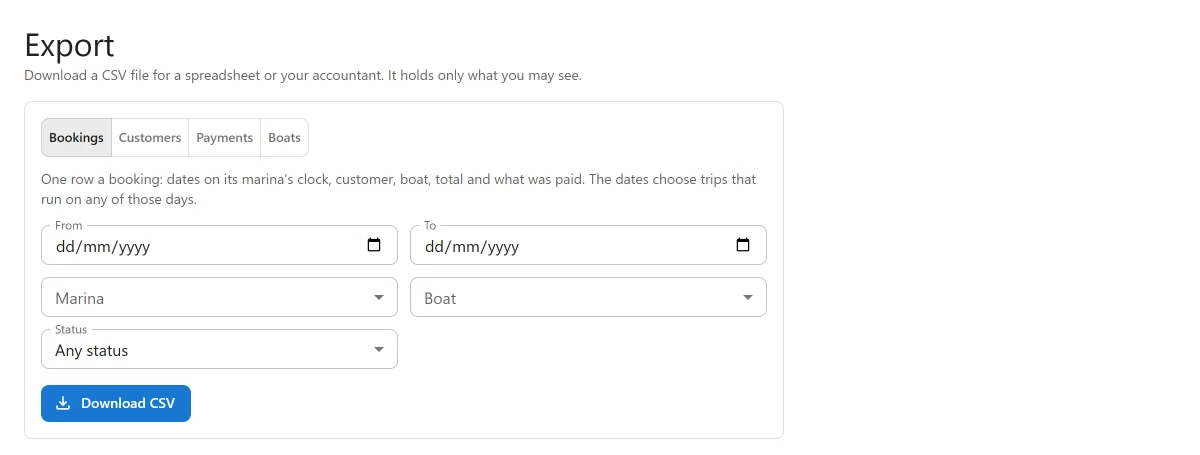
Under What to export, choose one:
| Export | One row per |
|---|---|
| Bookings | Booking: dates on its marina’s clock, customer, boat, total and what was paid. The dates choose trips that run on any of those days. |
| Customers | Customer, by email (or phone, when there is no email), from the bookings the filters reach: how many bookings, first and last trip, and what they paid. |
| Payments | Payment or refund, by the day the money moved on the site’s clock. Refunds are negative. Payments brought in by an import are marked. |
| Boats | Boat: its details, the marinas it is kept at and its base prices. |
Narrow it with From and To (not for boats), Marina, Boat (bookings and customers) and Status, then click Download CSV.
The file holds only what you may see: a person limited to some marinas exports only theirs. An export holds at most 50,000 rows.
The files open cleanly in Excel and other spreadsheets: UTF-8 with the marker Excel needs,
every cell quoted. A cell that starts with =, +, - or @ is written so a spreadsheet
reads it as text, not as a formula, while a plain negative number such as a refund of -40
stays a number.
For a quick export of the bookings list as filtered on screen, use Export CSV on the Bookings list.
Quick Links
Share