

Contents
On this page
Extras and fuel - Plugixa Boat Rental
Extras and fuel PRO add lines to a booking’s price beyond the boat itself. An extra is something the customer chooses to add, such as snorkelling gear, a hostess or a paddle board. Fuel is set per boat: included, sold as a package, or charged on return.
Extras and Fuel are two apps in the App manager, both on by default in Pro.
Extras
Find them under Plugixa Boat Rental -> Extras, in the Sales group of the menu.
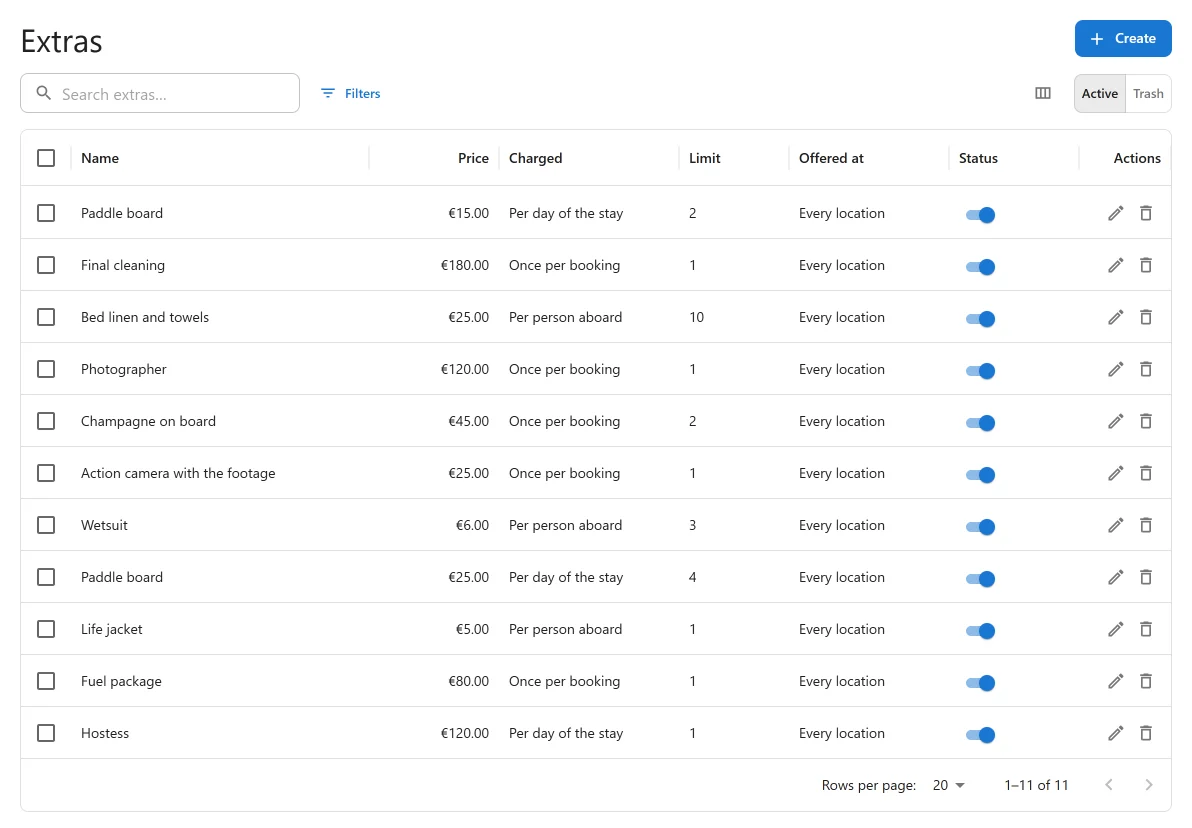
Making an extra
Press the add button on the list to open New extra.
| Field | Default | What it does |
|---|---|---|
| Status | Active | “Only an active extra is offered on the booking form.” |
| Order | 0 | “Lower numbers are listed first.” |
| Name | Empty | Required. Shown to the customer and on the price breakdown. |
| Description | Empty | “Shown to the customer under the name.” |
| Price | 0 | Zero or more. |
| Charged | Once per booking | What the price is multiplied by: Once per booking, Per person aboard, Per hour of the stay or Per day of the stay. |
| Most per booking | 1 | “How many one booking can add. 0 means no limit.” |
| Stock | Empty | “How many you have for any one time. Empty means no limit.” |
| Offered at | Every location | “Leave empty to offer the extra at every location.” |
How the price is worked out, for a quantity of one:
| Charged | Price times |
|---|---|
| Once per booking | 1 |
| Per person aboard | The number of guests on the booking |
| Per hour of the stay | The hours of the booking |
| Per day of the stay | The days of the booking. On a multi-day charter, a day means a night |
The quantity the customer picks multiplies that again.
Stock
Stock is how many of an extra you have at any one time, at a location. It is counted across every booking that overlaps the same dates, so two customers cannot both take the last paddle board. If the last one goes while a customer is still on the form, they are told “Sorry, … is no longer available for those dates.” when they book.
Leave Stock empty for things you cannot run out of, such as a fuel package.
Demo extras
When the app first runs on a site with no extras, it adds four, so you can see how they work. Change or delete them.
| Extra | Price | Charged | Most per booking | Stock |
|---|---|---|---|---|
| Hostess | 120 | Per day of the stay | 1 | 1 |
| Fuel package | 80 | Once per booking | 1 | No limit |
| Life jacket | 5 | Per person aboard | 1 | No limit |
| Paddle board | 25 | Per day of the stay | 4 | 6 |
What the customer sees
On the booking form, below the choice of boat, an Add-ons section lists the active extras offered at the location, with their price (“… per day“, “… per hour”, “… per person”) and a quantity where more than one can be added. The extras step shows on every booking form unless you switch it off in the form builder.
Each extra the customer adds becomes its own line on the price breakdown. Staff can add extras too, when they create or edit a booking in the admin.
Importing extras
Extras can be imported from a spreadsheet on the Import screen. See Import and export.
Fuel
How a boat’s fuel is paid for is set on the boat’s form, in the Fuel panel.

How fuel is paid for:
| Choice | Fields | What the customer pays |
|---|---|---|
| Included in the price | None | Nothing extra. |
| Prepaid package | Package price | A “Fuel package” line is added to every quote for this boat. |
| Charged on return | Measured in (Litres or Engine hours), Price per unit | Nothing up front. The booking form notes the rate: “Fuel is charged on return, at … per litre.” (or “per engine hour”). |
Charging fuel on return
When the boat comes back, open the booking. Its Fuel on return panel asks for the Litres used or Engine hours used. Enter the figure and press Save.
- A line, “Fuel used (litres)” or “Fuel used (engine hours)”, is added to the booking and its total goes up by that amount. The panel confirms: “Entered: …, charged …”.
- A new entry replaces the last one, so you can correct a figure.
- Entering zero removes the line.
The booking then owes the difference. Collect it like any balance: at the dock, or with the payment link from the booking’s payments panel (see Payments).
The panel is shown only on bookings of boats set to Charged on return.
Tax on extras and fuel
A tax rate can be limited to some kinds of line. Extras and Fuel package are two of them, so you can charge a different rate on the rental than on the add-ons.
Quick Links
Share