

Contents
On this page
Locations - Plugixa Boat Rental
A location is a marina, beach or port that customers can book a boat at. Every boat is kept at one location, and every booking is made at one. The screen is Locations, the first item in the Marinas section of the app’s sidebar.
A new site starts with one location, Main Marina, open around the clock every day. Rename it and change it to your own rather than adding a second one.
Locations are part of the core of the plugin and cannot be switched off.
The Locations list
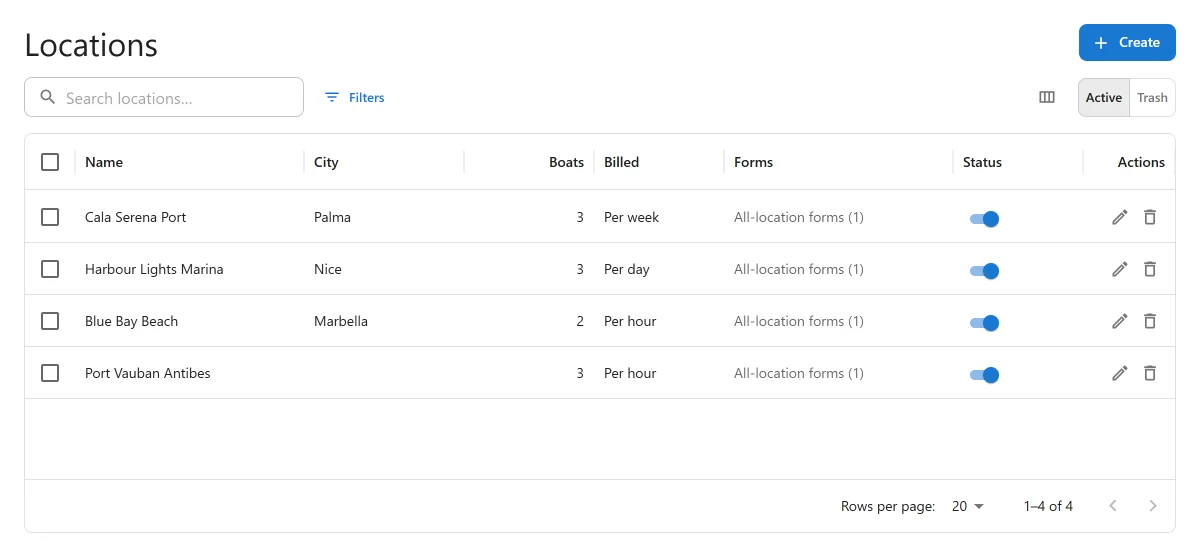
| Column | What it shows |
|---|---|
| Name | The location’s name. Click a row to edit it. |
| City | From the address. |
| Boats | How many boats the location offers. |
| Billed | The location’s Billing unit. |
| Forms | The booking forms that name this location, then a count of the forms that book at every location, such as “All-location forms (1)”. A switched-off form is shown faded. |
| Order | Lower numbers are listed first. |
| Status | Active or Inactive. |
Search with “Search locations…”. Tick rows to change the status of several locations at once or move them to the trash. Click New location to add one.
The location form
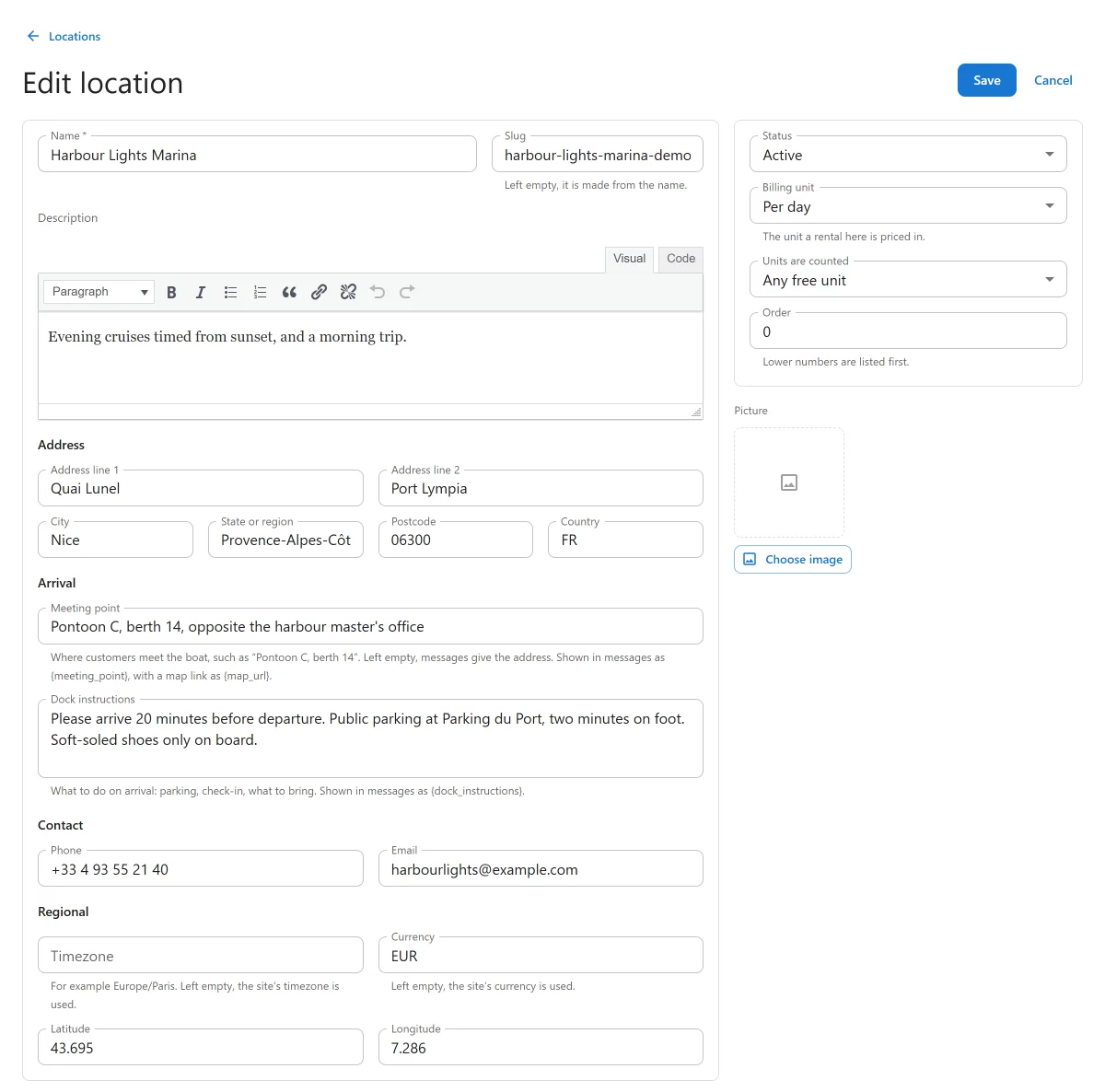
Main fields
| Field | Notes |
|---|---|
| Name | Required. What customers see. |
| Slug | Left empty, it is made from the name. A shortcode can name the location by it, for example location="main-marina". |
| Description | Rich text. |
| Address | Address line 1, Address line 2, City, State or region, Postcode and Country. |
| Meeting point | Where customers meet the boat, such as “Pontoon C, berth 14”. Left empty, messages give the address. Shown in messages as {meeting_point}, with a map link as {map_url}. |
| Dock instructions | What to do on arrival: parking, check-in, what to bring. Shown in messages as {dock_instructions}. |
| Phone, Email | The location’s contact details. |
| Timezone | For example Europe/Paris. Left empty, the site’s timezone is used. |
| Currency | Left empty, the site’s currency is used. |
| Latitude, Longitude | Needed for the location to appear on the marina map. Latitude is between -90 and 90, longitude between -180 and 180. |
Side column
| Field | Default | Notes |
|---|---|---|
| Status | Active | An inactive location is not offered on any booking form. |
| Billing unit | Per day | Per hour, Per half day, Per day, Per week or Per seat. The location’s default, and what the Booking setup panel reports. Each boat is charged in its own Priced unit, see Boats. |
| Units are counted PRO | Any free unit | Shown only when there is a choice, see Units. |
| Order | 0 | Lower numbers are listed first. |
| Picture | Chosen from the media library. |
A new location goes straight on to its edit page when you save it, because its opening hours and closures can only be set once it exists: “Save the location to set its opening hours and its boats.”
The marina’s clock
Every time in the plugin is the marina’s wall-clock time: opening hours, departures, the departure and return of a booking. The Timezone is what the plugin uses to compare bookings, so two marinas in different timezones each keep their own clock.
The marina’s currency
A booking is priced in its location’s currency. A location with no currency of its own uses the one in Settings -> General. The dashboard keeps money in other currencies apart from the site’s, see Dashboard.
Booking setup
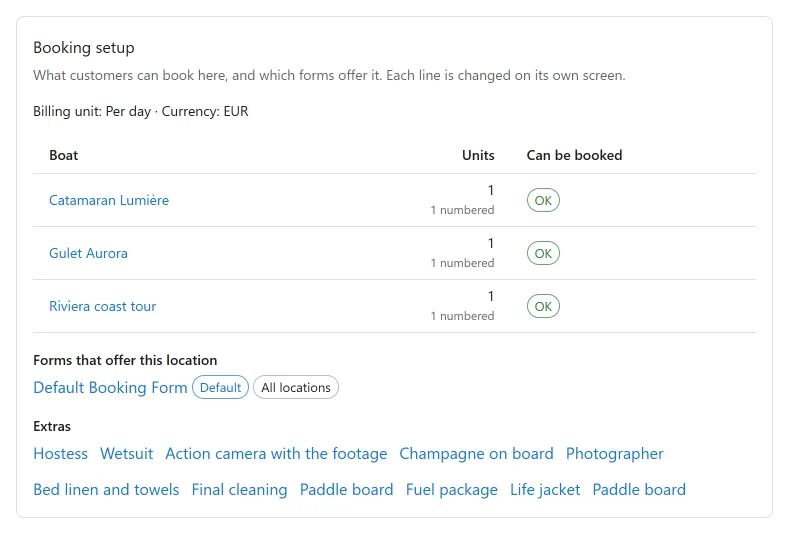
The first panel on a location’s edit page sums up whether customers can book there. Its first line gives the location’s billing unit and currency. Then, for each boat kept at the location:
| Column | What it shows |
|---|---|
| Boat | The boat’s name. |
| Units | How many units of it the location has. With Pro, how many of them are numbered. |
| Can be booked | OK, Boat switched off, or a warning that the boat has no price for its unit, so customers cannot book it. |
Under the boats, Forms that offer this location lists each booking form that books here, with Default and All locations chips, and “(switched off)” beside a form that is inactive. If no form offers the location: “No form offers this location, so customers cannot choose it.”
If the location has no boats yet: “No boats yet, so nothing can be booked here.” A boat belongs to a location through its Marina field, see Boats.
Opening hours
“A booking can only start and end while the location is open. A location with no opening hours is open around the clock, every day.”
- Open around the clock: switch it on to store no hours at all. Bookings are then accepted at any time of any day. Closures still apply.
- With the switch off, each day has an Open or Closed switch, and Opens and Closes times. A closing time must be after the opening time.
The hours are saved with the location, when you press Save.
Closures and special days
Dated exceptions to the week, such as a public holiday or a regatta. Click Add dates:
| Field | Notes |
|---|---|
| Type | Closed: no booking can start or end on these dates. Special hours: on these dates the hours below replace the usual week. |
| First day, Last day | The dates it covers. The last day must be on or after the first. |
| Opens, Closes | For special hours. Left empty, there is no earliest or no latest time. |
| Note | For your own reference, such as the name of the holiday. |
A closure applies whether or not the location has weekly hours. The list shows the Dates, Type, Hours and Note of each, with buttons to edit or delete.
Pro panels on a location
With Pro, apps can add panels to the location form. The deposit and the monthly payment plan are set per location: see Deposits, balance schedule, monthly payments and security holds PRO. A location’s coordinates are also what the Weather app PRO uses.
The marina map
Locations that are active and have a latitude and longitude appear on the map drawn by the
[plugixa_boat_rental_map] shortcode or the Marina Map block. It needs no API key. The
visitor’s browser loads the map images from OpenStreetMap, on pages that show the map only.
See Shortcodes and blocks.
Trash and switching off
A location with upcoming bookings cannot be moved to the trash: “1 upcoming booking still uses it. Move or cancel it first, or switch this off instead of trashing it.” Set its Status to Inactive to stop new bookings while the existing ones go ahead.
A location in the trash can be restored from the list’s trash view.
Quick Links
Share