

Contents
On this page
Shortcodes and blocks - Plugixa Boat Rental
The plugin puts its public pages on your site through shortcodes, blocks and, if you use Elementor, widgets. The same code draws all three, so a page looks the same whichever you use.
| What | Shortcode | Block | Elementor widget |
|---|---|---|---|
| Booking form | [plugixa_boat_rental] |
Boat Rental Booking Form | Boat Booking Form |
| Search form and results | [plugixa_boat_rental_search] |
Boat Search | Boat Search |
| Boat grid | [plugixa_boat_rental_boats] |
Boat Grid | Boat Grid |
| One boat | [plugixa_boat_rental_boat] |
Single Boat | Single Boat |
| Marina map | [plugixa_boat_rental_map] |
Marina Map | none |
| Booking summary | [plugixa_boat_rental_summary] |
none | none |
| Customer account | [plugixa_boat_rental_account] |
none | none |
The blocks are in the block inserter’s Widgets category. For the Elementor widgets see Elementor widgets.
The booking form: [plugixa_boat_rental]
The step-by-step booking form. See Booking forms for what it shows.
| Attribute | Value | Default |
|---|---|---|
form |
A booking form’s slug. | The default form |
location |
A location’s slug or id. The form starts on it. | The form’s first location |
boat |
A boat’s id. The form books only that boat, at its marina. | Any boat |
design |
classic, split or minimal. |
The form’s own design |
[plugixa_boat_rental]
[plugixa_boat_rental form="default" location="main-marina"]
[plugixa_boat_rental boat="3" design="minimal"]
The Shortcode box on a form’s edit page writes the code for you, with the form’s slug and, if you choose one, the location to start on.
A form set to one boat with boat asks for what that boat’s mode needs: a day and a
departure for a boat on fixed departures, the day alone for a full-day boat. See
Booking modes. A boat that is inactive
or unknown is ignored, and the form offers every boat.
The Boat Rental Booking Form block
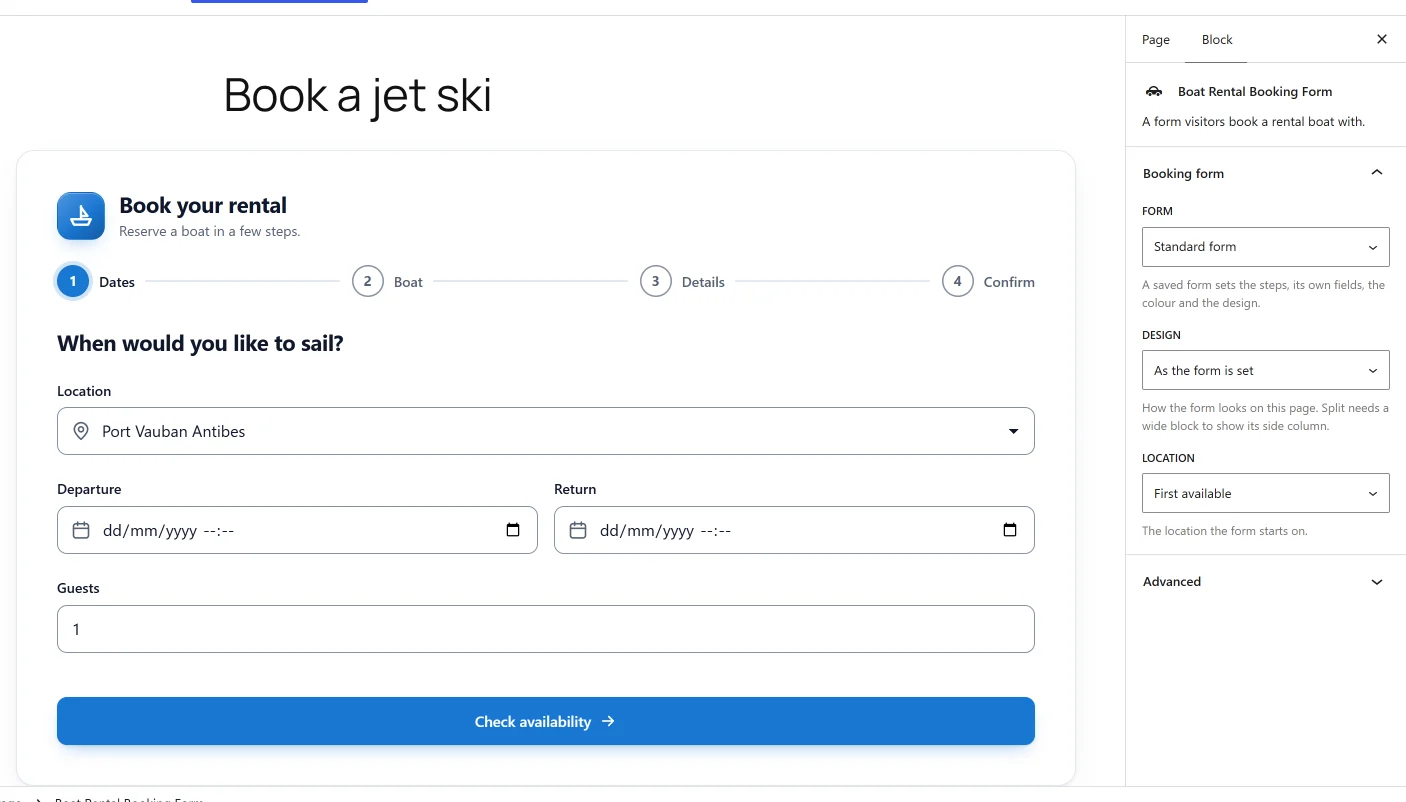
The block’s sidebar has a Booking form panel:
| Setting | Notes |
|---|---|
| Form | “A saved form sets the steps, its own fields, the colour and the design.” Standard form uses the default form. |
| Design | As the form is set, Classic, Split or Minimal. “Split needs a wide block to show its side column.” |
| Location | The location the form starts on. First available leaves it to the form. Only the locations the chosen form books at are offered. |
The block can be set to wide or full width, so a theme with a narrow content column can
still give the Split design its side column. It has no boat setting: use the shortcode’s
boat attribute, the Single Boat block or the Elementor widget for one boat.
Search: [plugixa_boat_rental_search]
A search form and the boats it finds, under it. It takes no attributes. The visitor narrows by Marina, Type, Guests, Date, Price from, Price to and Skipper, then clicks Search boats. The search is a plain form that writes its choices into the page address, so a set of results can be linked to or bookmarked.
It offers the active locations and the active boat categories. See Boat pages, search and the boat grid.
Boat grid: [plugixa_boat_rental_boats]
A grid of boats, each with its photo, facts, lowest price and a View and book button to its page.
| Attribute | Value | Default |
|---|---|---|
location |
A location’s id. Only boats kept there. | All locations |
type |
A boat category’s slug, such as jet_ski. |
All categories |
guests |
Only boats carrying at least this many. | 0, no limit |
limit |
How many boats to show. | 24 |
date |
A date as YYYY-MM-DD. Only boats with a free time that day. |
Any day |
price_min, price_max |
Only boats whose lowest price is in this range. | No limit |
skipper |
with or without. |
Either |
[plugixa_boat_rental_boats type="jet_ski" limit="6"]
[plugixa_boat_rental_boats location="2" guests="8"]
Note that location here takes the id, not the slug. The grid lists active boats in their
Order. With no match: “No boats match your search.” The Boat Grid block shows the
whole grid with the default settings.
One boat: [plugixa_boat_rental_boat]
The boat’s photo, name, facts, lowest price and description, with its booking form under it.
| Attribute | Value | Default |
|---|---|---|
id |
A boat’s id. | The boat whose page is being shown |
booking |
yes adds the booking form under the boat, no leaves it out. |
yes |
An inactive, trashed or unknown boat shows “That boat is not available.”
The Single Boat block has a Which boat setting, where The boat whose page this is suits a template used on boat pages, and Show the booking form under the boat.
Marina map: [plugixa_boat_rental_map]
Your active locations on a map, one pin each. It takes no attributes and needs no API key. Only a location with a latitude and longitude gets a pin, and with none the shortcode shows nothing. The Marina Map block shows the same map.
The visitor’s browser loads the map images from OpenStreetMap (tile.openstreetmap.org),
so OpenStreetMap receives the visitor’s IP address, browser details and the area viewed.
This happens on pages that show the map and on no others, and no booking or customer data
is sent. See Privacy and uninstall.
Booking summary: [plugixa_boat_rental_summary]
The page a customer’s booking link opens: their booking, a way to pay when something is owed, and a print button. It needs no sign-in, because the link carries the booking’s reference and a secret token; without them the page shows a notice and nothing else.
Put it on its own page and choose that page as Booking summary page under Settings ->
Bookings -> Pages. Emails link to it, and without it no link is sent. It takes one
attribute, design, with the same values as the booking form.
Customer account: [plugixa_boat_rental_account]
My bookings for a signed-in customer. A visitor who is not signed in can Find your
booking with the booking reference and the email address they booked with. It takes one
attribute, design. See
The customer’s account for what a
customer can do there, including cancelling and rescheduling with Pro.
Pro shortcodes and blocks
Pro apps add pages of their own. Each needs its app switched on in the App manager, and each is off by default.
| Shortcode | Block | What it is | See |
|---|---|---|---|
[plugixa_boat_rental_gift_card] PRO |
Boat Rental Gift Card Shop | A form visitors buy a gift card with. Takes product. |
Gift cards |
[plugixa_boat_rental_agent_portal] PRO |
none | The page agents book from. Takes form. |
Agent sales and commissions |
[plugixa_boat_rental_membership] PRO |
none | A boat club member’s page. | Boat clubs and memberships |
[plugixa_boat_rental_owner_portal] PRO |
none | A boat owner’s page. | Boat owners and payouts |
Boat clubs and boat owners need a Pro licence for unlimited sites.
Finding an id
A boat’s id and a location’s id are the number in the address of its edit page in the
admin app, for example #/boats/3/edit is boat 3.
Quick Links
Share