

Contents
Elementor widgets - Plugixa Boat Rental
If your site is built with Elementor, the plugin adds four widgets to its panel. They are in the free plugin. Each widget draws exactly what the matching shortcode draws, so a page looks the same whether you build it with Elementor, blocks or shortcodes.
Elementor is optional. With it active, a Boat Rental category appears in the Elementor panel. Without it, nothing of this runs.
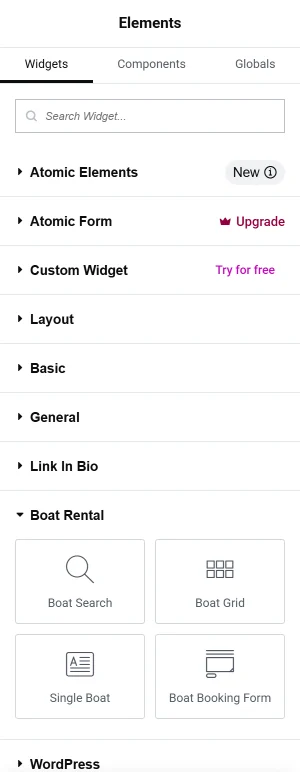
| Widget | Same as | Settings |
|---|---|---|
| Boat Booking Form | [plugixa_boat_rental] |
Form, Marina, Boat, Design |
| Boat Search | [plugixa_boat_rental_search] |
none |
| Boat Grid | [plugixa_boat_rental_boats] |
Marina, Type, Guests, Boats shown |
| Single Boat | [plugixa_boat_rental_boat] |
Boat, Show the booking form |
Each widget’s settings are on its Content tab. There is no widget for the marina map, the booking summary or the customer account: use their shortcodes in Elementor’s Shortcode widget. See Shortcodes and blocks.
Boat Booking Form
The step-by-step booking form.
| Setting | Default | Notes |
|---|---|---|
| Form | The default form | Any active booking form. See Booking forms. |
| Marina | Let the customer choose | The location the form starts on. |
| Boat | Let the customer choose | One boat. The form then books only that boat, at its marina. |
| Design | As the form is set | Classic, Split or Minimal. |
Unlike the block, the widget can be set to one boat, which suits a landing page for a single boat or trip.
Boat Search
The search form and the boats it finds. It has no settings. See Boat pages, search and the boat grid.
Boat Grid
| Setting | Default | Notes |
|---|---|---|
| Marina | All marinas | Only boats kept at that location. |
| Type | All types | Only boats of that category. |
| Guests | 0 | Only boats carrying at least this many. 0 shows all. |
| Boats shown | 24 | How many boats the grid shows. |
Single Boat
| Setting | Default | Notes |
|---|---|---|
| Boat | The boat of the current page | “The default is for a template used on boat pages.” Choose a boat to show that one anywhere. |
| Show the booking form | On | Adds the boat’s booking form under it. |
In a boat page template
Each boat has its own page at /boats/(slug)/. If you design those pages with Elementor’s Theme
Builder, make a single template for boat pages and add the Single Boat widget with
Boat left on The boat of the current page. The widget then shows whichever boat’s
page is open.
Styling
The widgets use the plugin’s own stylesheet, loaded only on pages that show them. The form’s colour and design come from the booking form, and the light, dark or automatic look from Settings -> General -> Appearance. See Settings.
The lists in the settings are read when the Elementor editor opens. A form, location or boat you have just added appears after you reload the editor.
Quick Links
Share