

Contents
On this page
WooCommerce checkout - Plugixa Boat Rental
The WooCommerce checkout PRO sends a booking to your WooCommerce cart at the payment step, so the customer pays at your shop’s checkout with any payment method WooCommerce offers: a local card gateway, bank transfer, cash on delivery, and so on. The plugin stays in charge of the booking: it prices it, holds the boat, and records the payment when the order is paid. WooCommerce only collects the money.
It needs a Pro licence for unlimited sites. You do not need WooCommerce for anything else: the plugin has its own bookings, payments and emails.
Switching it on
- Install and activate WooCommerce, and switch on at least one payment method in WooCommerce -> Settings -> Payments.
- Make sure your shop sells in the same currency as your bookings.
- In the App manager, switch on WooCommerce checkout. It is off by default. While WooCommerce is not active, the card cannot be switched on and says “Install and activate WooCommerce to use this.”
- Open Plugixa Boat Rental -> Settings -> WooCommerce and switch on Offer the WooCommerce checkout.
The App manager card shows what is missing: “WooCommerce is not active on this site”, “Agency licence needed for new checkouts”, or “Not offered yet: switch it on in Settings”.
Settings
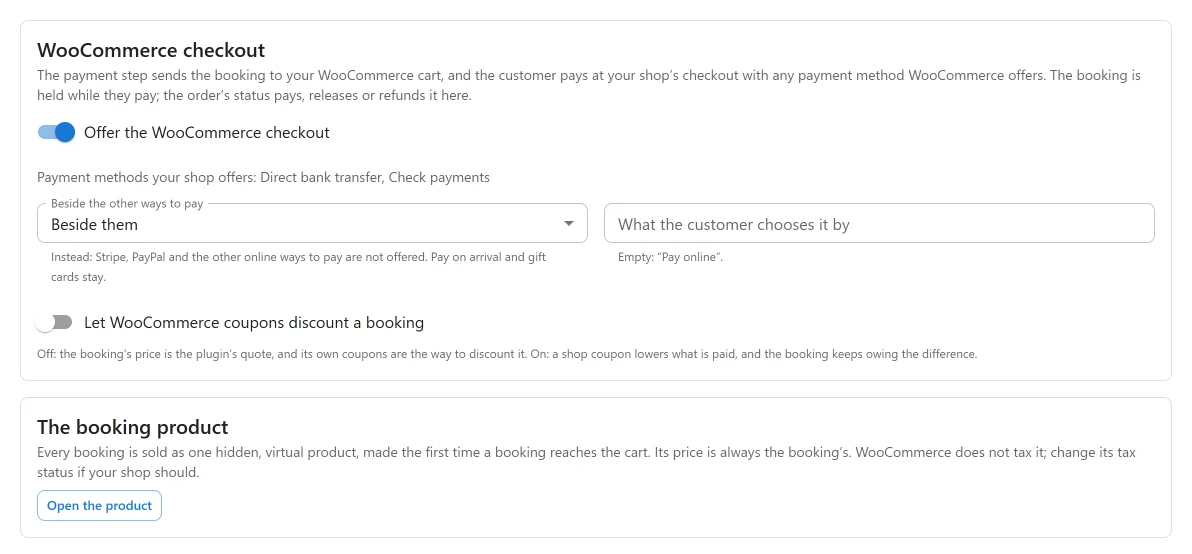
“The payment step sends the booking to your WooCommerce cart, and the customer pays at your shop’s checkout with any payment method WooCommerce offers.”
| Setting | Default | What it does |
|---|---|---|
| Offer the WooCommerce checkout | Off | “It is offered once WooCommerce is active.” |
| Beside the other ways to pay | Beside them | Beside them, or Instead of the online ways to pay: “Stripe, PayPal and the other online ways to pay are not offered. Pay on arrival and gift cards stay.” |
| What the customer chooses it by | Empty | The label on the booking form. Empty shows Pay online. Customers rarely know the word WooCommerce, so it is not the default. |
| Let WooCommerce coupons discount a booking | Off | “Off: the booking’s price is the plugin’s quote, and its own coupons are the way to discount it. On: a shop coupon lowers what is paid, and the booking keeps owing the difference.” |
The tab also shows the state of your shop:
- WooCommerce not active, with Install WooCommerce;
- a licence that is not for unlimited sites;
- no payment method switched on in WooCommerce, with Open WooCommerce payments;
- a shop currency different from your bookings’ currency;
- Payment methods your shop offers, listed;
- The booking product, with Open the product, or “Not made yet: it appears with the first booking sent to the cart.”
What the customer does
- They book on your booking form as usual. The booking is saved as pending and the boat is held.
- On the payment step they choose Pay online (or your own label).
- They land in your WooCommerce cart with the booking in it and their billing details filled in. The cart line is named after the boat and lists Booking, Boat, Marina, Dates, Guests and Extras, and for a part payment Paying: “The amount due now” or “The rest of the booking”.
- They pay at your checkout, classic or block checkout alike.
- On the order received page: “Your boat booking is BOAT-…”, with View your booking when you have a booking summary page.
What is charged
The payment step decides the amount exactly as for any other way to pay: what is owed, or the deposit due now, or the rest. The cart can never change it: the price and quantity of the booking line are reset to the signed amount on every cart calculation, and a line that has been tampered with is removed. Monthly payments cannot be made at this checkout.
Gift cards and store credit stay in the plugin’s own payment step, and the shop’s checkout is never offered to buy a gift card.
One booking per cart
A cart holds one booking and nothing else. The cart is emptied when a booking arrives, a second booking replaces the first, and nothing can be added beside it: “Your cart holds a boat booking, which is paid on its own. Pay for it first, or remove it from the cart.” So one order is always exactly one booking’s payment, and a shop refund is a refund of that booking.
The link that brings the booking to the cart is signed and expires after 2 hours.
When the checkout is refused
At checkout, a booking is refused while any of these is true. The customer sees the reason:
| Case | The customer is told |
|---|---|
| The boat’s hold ran out | “The time your boat was held for has run out, so this booking can no longer be paid.” |
| The booking is already paid | “This boat booking is already paid. Remove it from the cart.” |
| The booking was cancelled | “This boat booking has been cancelled. Remove it from the cart.” |
| The price changed since it reached the cart | “The price of this boat booking has changed since it was added to the cart.” |
| The shop’s currency differs | “This boat booking is priced in another currency than this shop, so it cannot be paid here.” |
| The app is off, the licence is no longer for unlimited sites, or WooCommerce is gone | “Boat bookings can no longer be paid at this checkout.” |
| A booking request not yet accepted | Its own reason |
A shop order still Pending payment is cancelled when its booking no longer needs it: paid another way, or cancelled by the customer. An order On hold is left alone.
What an order does to its booking
| Order status | The booking |
|---|---|
| Processing or Completed | One payment is recorded on the booking, under WooCommerce, with the order number as its reference. Processing then completed, or a status reported twice, still pays once. The order gets a note naming the booking |
| On hold (for example a bank transfer) | A pending, unpaid booking stops expiring, so the boat stays held while you wait for the money. Nothing is paid yet. The order note says to cancel the order to free the boat |
| Cancelled or Failed | A pending booking with nothing paid becomes Expired and the boat is free again. A booking with money in is never touched |
| Refunded, in full or in part | One refund per shop refund is recorded on the booking, never more than the order paid |
The amount recorded is the amount the booking asked for, or less when a shop coupon took part. The shop’s own tax is never added to it. The emails to the customer and to you are the plugin’s own, sent when the payment is recorded.
A payment that arrives after the boat’s hold ran out follows the same rule as any late payment: the booking is confirmed if the boat is still free, otherwise it stays expired with a notice for you to sort out.
Refunding from the booking
A refund made on the booking’s payments panel goes through WooCommerce. If the shop’s payment method can refund automatically, the money goes back through it; otherwise the refund is recorded in WooCommerce for you to hand back, as WooCommerce does for any manual refund. It is recorded on the booking once.
Links both ways
- On the WooCommerce order screen, a Boat booking box shows the booking’s reference and status, with Open the booking.
- On the booking’s page, a Shop orders panel lists each order that paid for it: the order number (linked to the order), status, method, date and total. It shows only when there is one.

The booking product
Every booking is sold as one hidden, virtual product called “Boat rental”, not one product per boat. It is made the first time a booking reaches the cart, and made again if you delete it. Its price is always the booking’s, it cannot be added to the cart from the shop (“A boat booking is added from the booking form, not from the shop.”), and it is removed when you uninstall the plugin.
“WooCommerce does not tax it; change its tax status if your shop should.” The plugin’s own tax rates are already in the booking’s price.
When the app is off or the licence drops
A cart or an order that already holds a booking keeps working: at checkout the cart is refused, and orders already placed keep updating their bookings and can still be refunded. Only new checkouts stop. Without the unlimited sites licence the settings tab says: “Selling bookings through WooCommerce is part of the Agency licence. New checkouts are not offered; orders already placed keep updating their bookings.”
Compatibility and limits
- Works with WooCommerce’s High-Performance Order Storage (HPOS) and with the block cart and checkout.
- A shop currency different from the booking’s is refused, not converted. Multi-currency switchers are not supported.
- A WooCommerce coupon, when you allow it, leaves the booking owing the difference. It does not become a plugin discount.
- In the block cart, the line’s name stays “Boat rental”; the boat’s name is in the details rows.
Quick Links
Share