

Contents
On this page
Deposits, balance schedule, monthly payments and security holds - Plugixa Boat Rental
Deposits, monthly payments and security holds PRO change when and how a booking’s money is taken. None of them changes what a booking costs.
| What it is | Counts as paid? | Set on | |
|---|---|---|---|
| Deposit | Part of the price, paid when booking. The rest is the balance | Yes | The location |
| Monthly payments | The whole price cut into monthly card payments before departure | Yes, month by month | The location |
| Security hold | An amount reserved on the customer’s card against damage, shortly before departure | No | The boat |
Each is an app in the App manager, all on by default in Pro: Deposits, Monthly payments (which needs the Stripe app) and the security hold, which is part of the Stripe app.
Deposits
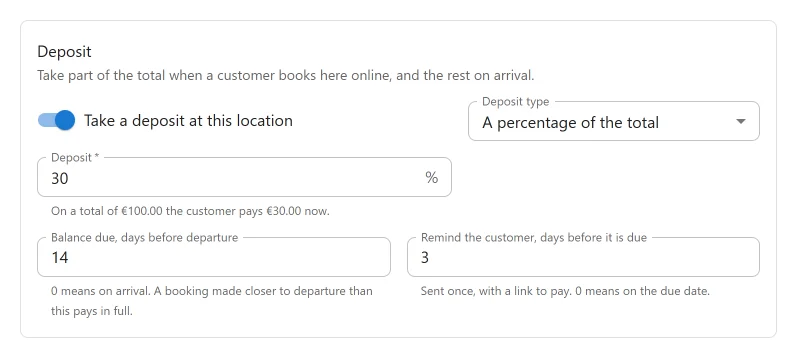
A deposit is part of the total, paid now when the customer pays online. It is each location’s own choice: open the location under Plugixa Boat Rental -> Locations and find the Deposit panel on its form.
| Setting | Default | What it does |
|---|---|---|
| Take a deposit at this location | Off | “Take part of the total when a customer books here online, and the rest on arrival.” |
| Deposit type | A percentage of the total | Or A fixed amount. |
| Deposit (percentage) | Empty | “The share of the total paid when booking.” Above 0 and below 100. The panel shows a worked example: “On a total of … the customer pays … now.” |
| Deposit amount (fixed) | Empty | “A booking that costs this much or less is paid in full.” |
| Balance due, days before departure | 0 | “0 means on arrival. A booking made closer to departure than this pays in full.” |
| Remind the customer, days before it is due | 3 | “Sent once, with a link to pay. 0 means on the due date.” Shown only when the balance is due before departure: there is no reminder of a balance due on arrival. |
What the customer sees
On the payment step, when they choose a way to pay online, the customer sees Amount to pay now with two choices: Deposit: … and Full amount: …. The deposit is offered only for online payment. If you also offer pay on arrival, the title reads “Amount to pay now, when paying online”.
A deposit is taken only through a way to pay that takes money online, such as Stripe, PayPal, Mollie, Adyen or Klarna or the WooCommerce checkout.
Once the deposit is paid, the booking is Confirmed and its payment status reads Deposit paid. When the rest is paid, it becomes Paid.
On the booking’s page in the admin, a Deposit panel shows what the deposit came to and whether it has been paid.
The balance schedule
The due date is worked out from the location’s setting and the departure each time it is shown, so it is never out of date:
- a booking moved to other dates takes its due date with it;
- changing the setting changes the due date of bookings already made;
- a booking made after its balance would already be due takes no deposit and is paid in full.
An hourly job looks at part-paid bookings, pending or confirmed, that have not departed yet:
| When | Sent | How often |
|---|---|---|
| The reminder’s lead time is reached | The customer: the amount, the due date and a link to pay. Subject: “Your balance is due soon: {booking_ref}” | Once per booking |
| The due date has passed | The customer: “Your balance is overdue: {booking_ref}”. You: “Balance overdue” with the booking reference | Once per booking |
Nothing is cancelled. Whether the customer keeps the boat is your decision. The admin email says so: the booking and its boat stay as they are.
The link to pay is the booking’s summary page, so choose one under Settings -> Bookings -> Pages. Without one, the email asks the customer to get in touch instead. The same link can be copied or emailed by hand from the booking’s payments panel; see Payments.
The job leaves alone a booking with a completed refund (somebody has already decided something about it), one whose balance a provider is still holding, and one that has paid nothing. While the Notifications app is off, nothing is sent and nothing is marked as sent, so switching it back on still reminds.
Your email templates can use {due_date}, the day the rest is due, and {amount_due}.
Monthly payments
A customer who books far enough ahead can spread the price over the months before departure, paid by card through Stripe. Turn it on per location, in the Monthly payments panel on the location’s form: Offer monthly payments at this location.
The panel explains: “Let customers who book a month or more ahead spread the price over the months before departure, by card through Stripe. The first payment is taken when booking; the rest are charged automatically on the same day each month, the last before departure.”
Two things to know before you switch it on:
- A location that offers monthly payments takes no deposit.
- Stripe must be set up, with the webhook subscribed to
invoice.paid,invoice.payment_failedandcustomer.subscription.deleted. These events are in the list on the Stripe settings tab.
How a plan is made
- The first payment is taken now. Then one payment is taken for each whole calendar month that ends before departure, so the last is always taken before the customer sails. A departure two and a half months away is three payments.
- A plan has 2 payments at least and 12 at most. A departure under a month away is simply paid.
- Every month after the first is the same amount. The booking’s one-off fee and the odd cents go with the first payment. For example, 1,000.00 over three months is 333.34, then 333.33 twice.
- Each payment is rounded to what the currency can charge, so a yen plan is in whole yen.
On the payment step the customer chooses under How would you like to pay?: Pay in full now: … or Pay monthly: … now, then … a month for … more months. The form adds: “Monthly payments are taken by card, automatically, on the same day each month.”
Following a plan
On the booking’s page, the Monthly payments panel shows the plan’s state (Running, Overdue or Ended), the First payment, Each month after, Months paid and the Last payment.
- A month that fails. Stripe tries the card again. The booking’s payment status reads Payment overdue until a payment goes through. You are emailed (“A monthly payment for booking … failed”) and so is the customer (“Your monthly payment for booking {booking_ref} did not go through”).
- A new card. The customer’s booking page offers Change the card for monthly payments, which opens Stripe’s billing page.
- The end. The plan stops by itself when the booking is paid in full, when every payment agreed has been taken, or when the booking is cancelled. If Stripe ends it early, for example after giving up on a failed payment, you are emailed that the plan stopped early.
- Stopping it yourself. Stop the payments on the panel ends the plan at Stripe after you confirm: “No more months will be charged. Whatever is still owed has to be collected another way.”
Monthly payments cannot be paid through PayPal, Mollie, Adyen, Klarna or the WooCommerce checkout.
Security holds
A security hold is not a payment. It reserves an amount on the customer’s card against damage, does not count towards what the booking has been paid, and is charged only if you capture part of it. It works through Stripe only.
Why it is taken shortly before departure
Card networks release an uncaptured authorisation after about seven days (five for some Visa cards). A hold taken when booking months ahead would be gone by departure. So the customer is asked to authorise it a few days before.
Setting it up
- On the boat’s form, find the Security hold panel and set Amount to hold: “An amount reserved on the customer’s card against damage, through Stripe, shortly before departure. It is not charged unless you capture part of it. Leave blank for no hold.”
- Under Settings -> Stripe, in the Security hold card, set Days before departure the hold can be authorised: from 1 to 6, 2 on a new site.
What happens
- When the window opens, the customer is emailed a link: “Please authorise the security hold for booking {booking_ref}”. The same action, Authorise the security hold, appears on their booking’s summary page if you have chosen one under Settings -> Bookings -> Pages.
- They authorise the amount on Stripe’s page. Nothing is charged.
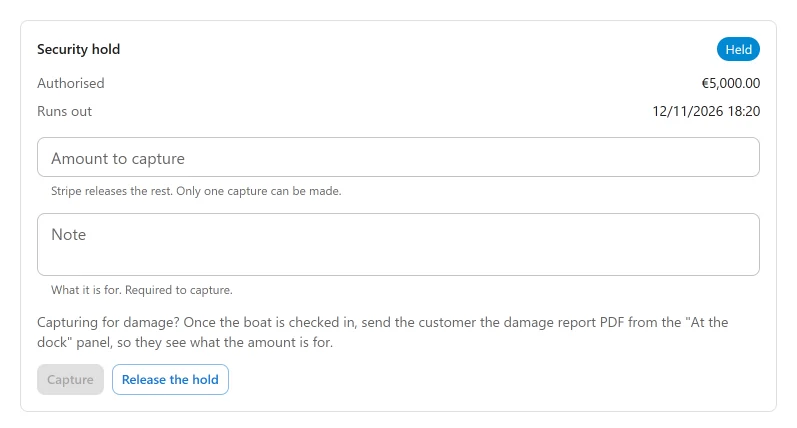
- On the booking’s page, the Security hold panel shows This boat holds and Customer can authorise from until the customer authorises. After that it shows Authorised, Runs out (the exact expiry Stripe reports, while the hold is held) and its status: Held, Released, Captured or Expired.
- When the boat is back, either press Release the hold, or enter an Amount to capture and a Note (“What it is for. Required to capture.”) and press Capture. Stripe releases the rest. Only one capture can be made.
If you capture for damage, send the customer the damage report PDF from the “At the dock” panel once the boat is checked in, so they see what the amount is for. See Walk-up sales and damage reports.
Things to know
- The customer does not have to authorise. Nothing stops the booking if they do not. Check the booking’s page before you hand over the boat.
- A hold runs out. You are emailed a day before: “The security hold of booking … runs out within a day”. After that the card network gives the money back and nothing can be captured. An expired hold can be authorised again by the customer.
- Long charters. A charter longer than the authorisation outlives its hold. Capture before the expiry, or ask the customer to authorise again after it has lapsed.
- Cancelling or expiry releases it. Cancelling a booking releases its hold, and so does a booking expiring. A second hold authorised from another tab, or one authorised on a booking cancelled meanwhile, is let go as soon as Stripe reports it, so a card is held once.
- A captured amount is not booking revenue. It is recorded on the hold, not in what the booking has been paid. A refund of it is made in the Stripe dashboard.
- Stripe cannot be switched off in the App manager while a booking has a hold on a card.
Quick Links
Share