

Contents
On this page
PayPal - Plugixa Boat Rental
PayPal PRO is a way to pay that sends the customer to PayPal to approve the payment, then brings them back to their booking, where the payment is taken. Customers see it as PayPal.
Set it up under Plugixa Boat Rental -> Settings -> PayPal. PayPal is an app in the App manager, on by default in Pro. Everything on Payments about the payments panel and refunds applies to PayPal payments too.
Setting it up
You need a REST app in the PayPal developer dashboard. It gives you a client ID and a secret, and it is where you add the webhook. A sandbox app and a live app have different credentials.
1. Credentials
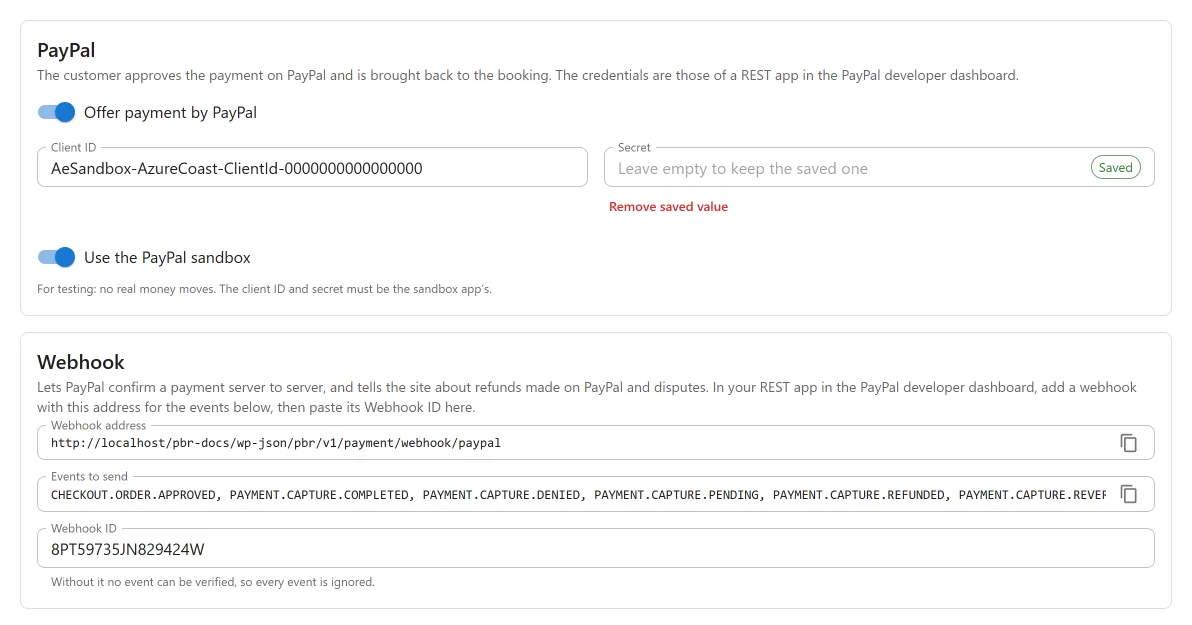
The first card is PayPal: “The customer approves the payment on PayPal and is brought back to the booking. The credentials are those of a REST app in the PayPal developer dashboard.”
| Setting | Default | What it does |
|---|---|---|
| Offer payment by PayPal | Off | Offers PayPal to customers. |
| Client ID | Empty | Your REST app’s client ID. |
| Secret | Empty | Your REST app’s secret. Stored, never shown again. |
| Use the PayPal sandbox | On | “For testing: no real money moves. The client ID and secret must be the sandbox app’s.” Switch it off with live credentials to take real money. |
With the switch on and a credential missing, the card warns: “PayPal is switched on but needs both a client ID and a secret before a payment can start.”
2. Webhook
The second card is Webhook: “Lets PayPal confirm a payment server to server, and tells the site about refunds made on PayPal and disputes.”
-
Copy the Webhook address. It looks like this:
https://example.com/wp-json/pbr/v1/payment/webhook/paypalCopy it from the screen rather than typing it: the address depends on your permalink settings.
-
In your REST app in the PayPal developer dashboard, add a webhook with that address.
-
Subscribe it to the events listed under Events to send:
Event What the plugin does CHECKOUT.ORDER.APPROVEDThe customer approved but never came back (tab closed, connection dropped): the plugin takes the payment itself PAYMENT.CAPTURE.COMPLETEDRecords the payment PAYMENT.CAPTURE.DENIEDRecords a failed payment; the booking stays unpaid PAYMENT.CAPTURE.PENDINGPayPal has the money but has not released it: noted as processing, not yet paid PAYMENT.CAPTURE.REFUNDED,PAYMENT.CAPTURE.REVERSEDRecords a refund made on PayPal CUSTOMER.DISPUTE.CREATED,CUSTOMER.DISPUTE.RESOLVEDNothing recorded; announced through plugixa_boatrental_payment_notice -
PayPal shows the new webhook’s ID. Paste it into Webhook ID and press Save.
The Webhook ID is what lets the plugin check each event: it asks PayPal to verify the event’s signature before believing it. “Without it no event can be verified, so every event is ignored.” Payments are then confirmed only when the customer comes back to your site.
What the customer sees
- On the payment step the customer chooses PayPal. The booking is saved as pending and the boat is held for it.
- They are sent to PayPal. The order shows “Boat booking” and the booking reference, for the amount due now.
- They approve, and PayPal sends them back. The plugin takes the payment at that moment and the booking shows as paid.
If they cancel on PayPal, they come back with nothing charged, and the booking stays pending until its hold runs out.
Payments PayPal holds back
Sometimes PayPal completes an order but keeps the money pending: an eCheck, a payment under review, or a currency your PayPal account must accept first. The customer has paid, so it is not a failure, but it is not your money yet either. The booking shows the payment as processing.
The plugin asks PayPal how such a payment stands on an hourly job, so it is confirmed even if you have no webhook or a webhook was missed. Once PayPal releases it, it is recorded as paid; if PayPal refuses it, it is marked failed.
Two approvals for one booking
PayPal cannot close an order once it is open. If the customer approves a second order from another tab after the booking is already paid, the plugin does not take the second payment: the customer is not charged and there is nothing to refund.
Refunds
A refund made from the booking’s payments panel is sent to PayPal first. If PayPal refuses it, nothing is recorded and “PayPal did not make the refund.” is shown. A refund made on PayPal is reported by the webhook and recorded on the booking.
What PayPal cannot do here
- Monthly payments. Only Stripe runs a monthly plan. A customer who chose to pay monthly is told “Paying by the month is only possible by card.”
- Security holds. These go through Stripe only.
Amounts and currencies
The booking’s currency is sent to PayPal. HUF, JPY and TWD are sent without decimals, as PayPal requires. The currency must be one your PayPal account accepts.
What is sent to PayPal
The plugin talks to api-m.paypal.com (or api-m.sandbox.paypal.com with the sandbox switch on)
from your server, and the customer’s browser visits PayPal’s own pages. Nothing is sent until you
have saved credentials and switched PayPal on.
When a payment starts, PayPal receives the amount, the currency, a description with the booking reference, the booking reference and payment type as the order’s reference, and the return and cancel addresses on your site. The plugin sends no name, email address or phone number. PayPal’s terms and privacy policy apply.
Quick Links
Share