

Contents
On this page
Webhooks - Plugixa Boat Rental
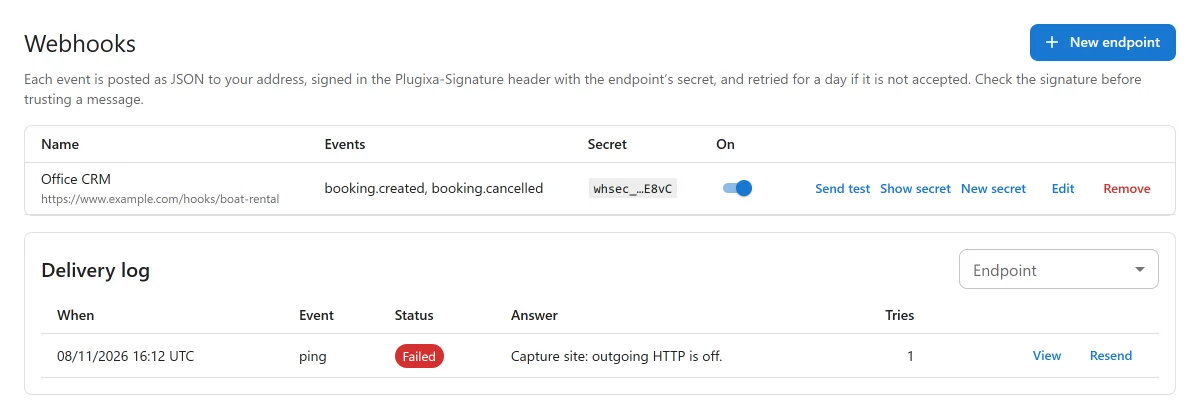
Webhooks PRO send a message to another system each time something happens to a booking: made, confirmed, moved, cancelled, paid, refunded, checked out or checked in at the dock. Each message is JSON, posted to an address you give, signed with a secret so the receiver can check it came from your site, and retried for a day if it is not accepted.
Use it to connect Zapier, Make, n8n or your own system. It is an app, off by default: switch it on in the App manager. The screen is Plugixa Boat Rental -> Webhooks, in the Configuration menu group.
Adding an endpoint
Press New endpoint.
| Field | What it does |
|---|---|
| Name | For you, for example “Zapier: new bookings”. |
| Address (https) | The address your receiver gives you. It must start with https://. |
| Events | The events this endpoint wants. |
| On | Switch the endpoint off to stop sending to it. |
Press Save. The endpoint gets a signing secret, starting with whsec_. Show secret
shows it, to copy into your receiver. New secret replaces it: update your receiver at once,
because messages are signed with the new one from then on.
Send test posts a ping event to that endpoint straight away, whether it is switched on or
not. A test is never retried and never counts as a failure.
Which addresses are allowed
The address must be https, with no user name or password in it. Addresses on your own server
or private network are refused (localhost, private, loopback and link-local ranges), when you
save and again before every delivery.
Events
| Event | Sent when |
|---|---|
booking.created |
A booking is made, on the site or in the office. |
booking.confirmed |
A booking’s status becomes confirmed. |
booking.updated |
A booking’s dates, boat, unit, marina or guests change, or it is repriced. |
booking.cancelled |
A booking is cancelled, by the customer or the office. |
payment.captured |
A payment is recorded on a booking. |
payment.refunded |
A refund is recorded on a booking. |
checkout.completed |
A boat is checked out in the dock app. |
checkin.completed |
A boat is checked in in the dock app. |
request.created |
A customer’s request to book is waiting for your answer. |
request.approved |
You approve a request. |
request.declined |
You decline a request. |
request.closed |
A request ends another way: nobody answered in time, or it was closed before an answer. |
access_code.released |
A self check-in code is given to the customer. |
ping |
You press Send test. |
The list also has access_code.with_code. It is not an event: it is a flag. Tick it with
access_code.released and that endpoint’s messages carry the code itself. Without it, they say
only that a code was released.
A booking sends each event at most once per change, even when several things happen to it at the same moment.
The message
Every message has the same envelope:
{
  "id": "evt_3f2a9c6e1b7d4e0a8c5b2d1f6e9a7c4b",
  "type": "booking.created",
  "created": 1794300000,
  "api_version": "2026-11",
  "data": {
    "booking": {
      "id": 412,
      "reference": "PBR-7Q4K2",
      "status": "confirmed",
      "location_id": 2,
      "boat_id": 5,
      "unit_id": 9,
      "start": "2026-11-14 10:00:00",
      "end": "2026-11-14 14:00:00",
      "start_utc": "2026-11-14 09:00:00",
      "end_utc": "2026-11-14 13:00:00",
      "guests": 4,
      "quantity": 1,
      "currency": "EUR",
      "total": 380,
      "amount_paid": 0,
      "source": "web",
      "created_at": "2026-11-08 16:20:00",
      "customer": {
        "name": "Ana Torres",
        "email": "ana@example.com",
        "phone": "+34600000000"
      }
    }
  }
}
createdis a Unix timestamp.startandendare on the marina’s clock;start_utcandend_utcare in UTC.unit_idisnullwhile no unit is assigned.sourceis where the booking came from:web,admin,walkuporimport.customeris left out when Leave the customer’s name, email and phone out of messages is on (below).
Some events add to data:
| Event | Adds |
|---|---|
payment.captured, payment.refunded |
payment (id, gateway, type, amount, currency, status, created_at) and total_paid |
checkout.completed, checkin.completed |
report (id, flagged, created_at) |
request.declined, request.closed |
state: why the request ended |
access_code.released |
access_code (unit_id, released_at, and code only with the access_code.with_code flag) |
ping |
Only message, no booking |
Card details are never sent: the plugin holds none.
Headers
| Header | Holds |
|---|---|
Content-Type |
application/json |
Plugixa-Event |
The event, for example booking.created |
Plugixa-Event-Id |
The event’s id, the same as id in the body. A retry or a resend carries the same id, so use it to ignore duplicates. |
Plugixa-Signature |
The signature (below) |
Checking the signature
The Plugixa-Signature header looks like this:
Plugixa-Signature: t=1794300000,v1=5f2b8c...e91a
t is the Unix time the message was sent. v1 is a hex HMAC-SHA256, keyed with the endpoint’s
secret, of the text t, a dot, and the raw body.
To check a message:
- Read the raw body before any JSON parsing.
- Work out the HMAC-SHA256 of
t + "." + raw bodywith your secret. - Compare it with
v1in constant time. - Refuse a message whose
tis more than 5 minutes from now, so a captured message cannot be replayed later.
In PHP:
$secret = 'whsec_your_secret';
$body   = file_get_contents( 'php://input' );
$header = $_SERVER['HTTP_PLUGIXA_SIGNATURE'] ?? '';

preg_match( '/t=(\d+)/', $header, $t );
preg_match_all( '/v1=([0-9a-f]{64})/', $header, $v1 );
$expected = hash_hmac( 'sha256', ( $t[1] ?? '' ) . '.' . $body, $secret );
$valid    = isset( $t[1] ) && abs( time() - (int) $t[1] ) <= 300
	&& array_filter( $v1[1], fn( $sig ) => hash_equals( $expected, $sig ) );

if ( ! $valid ) {
	http_response_code( 400 );
	exit;
}

$event = json_decode( $body, true ); // Ignore an $event['id'] you have already handled.
http_response_code( 200 );
In Node, with Express:
const crypto = require('crypto');

app.post('/hook', express.raw({ type: 'application/json' }), (req, res) => {
  const header = req.get('Plugixa-Signature') || '';
  const t = (header.match(/t=(\d+)/) || [])[1];
  const sigs = [...header.matchAll(/v1=([0-9a-f]{64})/g)].map((m) => m[1]);
  const expected = crypto
    .createHmac('sha256', process.env.PLUGIXA_SECRET)
    .update(`${t}.${req.body}`)
    .digest('hex');
  const fresh = t && Math.abs(Date.now() / 1000 - Number(t)) <= 300;
  const ok = fresh && sigs.some((s) => crypto.timingSafeEqual(Buffer.from(s), Buffer.from(expected)));

  if (!ok) return res.sendStatus(400);

  const event = JSON.parse(req.body); // Ignore an event.id you have already handled.
  res.sendStatus(200);
});
Delivery and retries
Messages are sent within a minute of the event, by WordPress’s scheduled tasks. On a site with little traffic, a real server cron job keeps them on time.
- Any
2xxanswer counts as delivered. Redirects are not followed. The request times out after 10 seconds. - After a failure, the message is tried again after 1 minute, 5 minutes, 30 minutes, 2 hours, 6 hours and 24 hours: 7 tries in all. Then it is marked failed.
- Each endpoint is tried on its own, so one failing never holds up another.
- When 20 events in a row could not be delivered to an endpoint, it is switched off and the office is emailed. Switching it back on starts the count again.
The delivery log
Delivery log lists every message with its Event, Endpoint, Status (Delivered, Waiting to retry, Failed or Not tried yet), Tries and When. View shows the Message sent and the first part of the Answer received, with the HTTP code or error. Resend sends it again from the first try.
The log is kept for 30 days.
Settings
Under Plugixa Boat Rental -> Settings -> Webhooks:
| Setting | Default | What it does |
|---|---|---|
| Leave the customer’s name, email and phone out of messages | Off | For receivers that only need the booking’s dates, boat and amounts. |
Who can do what
The Webhooks screen has its own permissions: read to see endpoints and the log, create to add an endpoint, edit to change one, show or replace its secret, send a test or resend a message, and delete to remove one. See Roles and staff access.
For pulling data on demand rather than receiving it, see REST API and API keys.
Quick Links
Share