

Contents
On this page
Roles and staff access - Plugixa Boat Rental
Roles and staff access PRO let you give each member of staff the part of the booking admin they need: a dock hand who checks boats out at one marina, a skipper who sees only their own trips, an accountant who reads payments and changes nothing.
Two apps work together, and both are on by default when Pro is installed:
| App | Screen | What it decides |
|---|---|---|
| Staff access | Plugixa Boat Rental -> Configuration -> Staff access | Which WordPress roles may open the app, and with which of its capabilities. The doors. |
| Roles and permissions | Plugixa Boat Rental -> Configuration -> Roles and permissions | Which kinds of record a person may see and change, whose records, and at which marinas. The rooms behind the doors. |
Only administrators see these two screens. Administrators can always do everything, so no role can lock you out.
Staff access
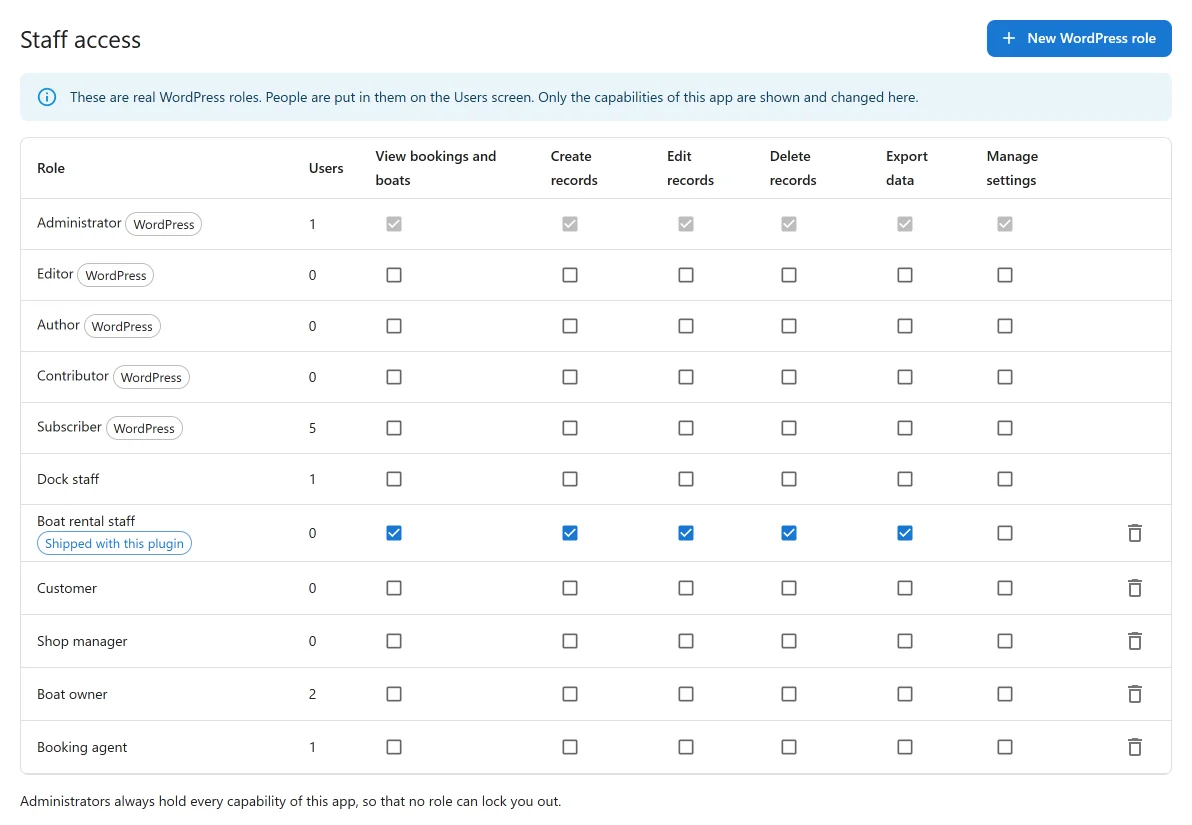
Staff access edits real WordPress roles. You put people in them on the WordPress Users screen; here you choose which of the plugin’s capabilities each role holds. Only the plugin’s own capabilities are shown and changed.
| Capability | What it allows |
|---|---|
| View bookings and boats | Open the app and read bookings, payments, boats and reports. |
| Create records | Add bookings, payments, boats, marinas and the rest. |
| Edit records | Change existing records, check boats out and in, and refund. |
| Delete records | Move records to trash, restore them and purge them. |
| Export data | Download lists and reports as CSV. |
| Manage settings | Change the settings that apply to everybody. |
The plugin adds one role, Boat rental staff. It holds every capability except Manage settings. It is created once: if you delete it, it does not come back with an update.
Use New WordPress role to make another role. WordPress’s own roles, the role new users are given when they register, your own role and the dock app’s role cannot be deleted. Deleting a role moves the people in it to the site’s default role, so they can still sign in.
Roles and permissions
Nothing changes until the first role
Until a role exists, everybody who can open the app can do everything in it, exactly as without the app. That is why it is safe to have it on from the start.
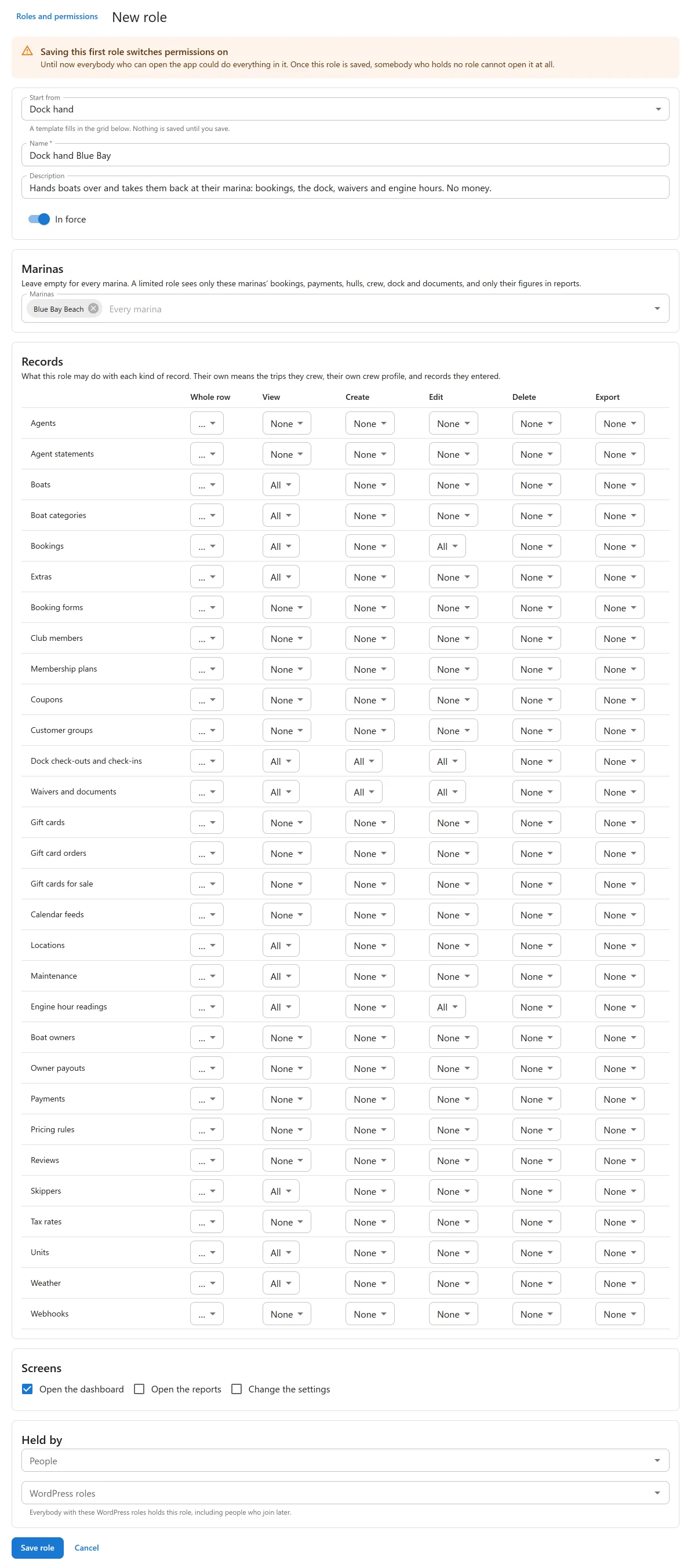
Saving the first role switches permissions on. From then on, somebody who holds no role cannot open the app at all. Before you save it, the form warns you with Saving this first role switches permissions on and names the people who would lose access. Give everybody a role in the same save, or add them to one straight after.
Deleting the last role switches permissions off again.
Making a role
Click New role on the Roles and permissions screen and fill in:
| Field | What it does |
|---|---|
| Name, Description | How you recognise the role. |
| Start from | A template that fills in the grid below. Nothing is saved until you save. Nothing: every cell None starts from scratch. |
| Records | A grid: for each kind of record (bookings, payments, boats, marinas, crew, extras and the rest) and each action (View, Create, Edit, Delete, Export) a level: All, Their own or None. Whole row sets one record type at once. |
| Screens | Open the dashboard, Open the reports, Change the settings. |
| Marinas | Leave empty for every marina. A limited role sees only those marinas’ bookings, payments, hulls, crew, dock and documents, and only their figures in reports. |
| Held by | People (WordPress users) and WordPress roles. Everybody with a chosen WordPress role holds this role, including people who join later. A person can be limited to fewer marinas than the role. |
| Status | In force or Switched off. A switched-off role gives nobody anything. |
Their own means the trips a person crews, their own crew profile, and records they entered themselves, with the payments, dock reports and documents of those bookings.
A role only ever narrows what Staff access allows. Somebody whose WordPress role cannot edit records cannot edit them through a role either.
The ready-made templates
| Template | What it is for |
|---|---|
| Office manager | Runs the office: every booking, payment, boat and report. Not the settings. |
| Dock hand | Hands boats over and takes them back at their marina: bookings, the dock, waivers and engine hours. No money. Meant to be limited to a marina. |
| Skipper | Sees only the trips they are crewing, and their own profile. |
| Accountant | Reads payments, bookings and reports, and exports them. Changes nothing. |
The usual setup: put every member of staff in Boat rental staff on the Users screen, then give each person a role here, for example Dock hand at one marina.
When a person holds several roles
The most generous answer wins. Two roles that each reach one marina reach both. A record is visible when any role the person holds covers it.
What a marina limit covers
A marina limit narrows bookings and their payments, hulls, marinas, crew, dock reports and photos, waivers and documents, maintenance and weather. It applies to every list, the search box, the CSV exports, the dashboard figures and every report. A request for a record at another marina is refused, even when somebody types its address.
The catalogue belongs to every marina and is not narrowed: boats, boat categories, extras, coupons, tax rates, pricing rules, booking forms and gift cards. Shared trip departures and gift card orders are not narrowed by marina either.
People who work only on the dock with the dock app’s own WordPress role keep the dock app whatever their roles say. See The dock app.
What needs the unlimited sites licence
Most of this works with either Pro licence: Staff access, the grid, Their own, the templates and up to four roles. Two things need a Pro licence for unlimited sites:
- Marina limits, on a role or on one person who holds it.
- More than four roles. The four templates fit within the limit.
Below that licence nothing you set up earlier is lifted. Every role and every marina limit keeps being enforced, so a dock hand never sees another marina’s bookings because a payment lapsed. You can keep a limit as it is or clear it, but not add or change one, and the form says Limiting a role to some marinas comes with the unlimited-sites licence.
Switching the apps off
With Roles and permissions off in the App manager, nothing is narrowed: everybody who can open the app can do everything in it. The roles stay stored and apply again when you switch it back on.
Boat owners and travel agents are not staff and never get a role here. They have their own read-only pages, closed by default: see Boat owners and payouts and Agent sales.
Quick Links
Share