

Contents
On this page
White label and multisite - Plugixa Boat Rental
This page is for agencies and businesses that run the plugin for clients or on several sites. White label PRO shows the booking admin under your own name. On a WordPress network, every site keeps its own bookings and settings, and the Network sites page PRO lists them all in one place.
White label PRO
White label needs a Pro licence for unlimited sites. It is the White label app in the App manager, on by default. It changes nothing until you fill in its settings.
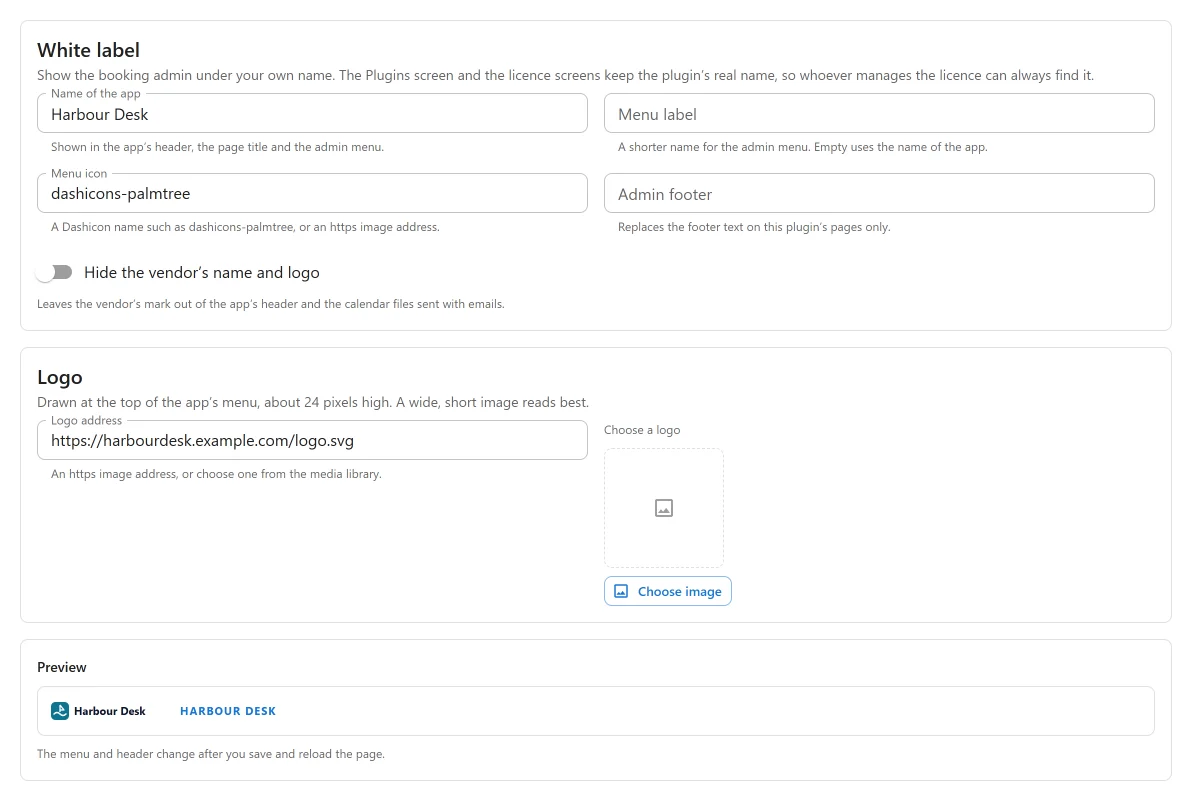
Open Plugixa Boat Rental -> Settings -> White label:
| Setting | What it does |
|---|---|
| Name of the app | Shown in the app’s header, the browser tab’s title and the admin menu. |
| Menu label | A shorter name for the admin menu. Empty uses the name of the app. |
| Menu icon | A Dashicon name such as dashicons-palmtree, or an https image address. |
| Logo | An https image address, or Choose a logo from the media library. It is drawn at the top of the app’s menu, about 24 pixels high, so a wide, short image reads best. |
| Hide the vendor’s name and logo | Leaves the vendor’s mark out of the app’s header and out of the calendar files sent with emails. |
| Admin footer | Replaces the footer text on this plugin’s pages only. |
The Preview shows the result. The menu and header change after you save and reload the page.
What white label never changes
The Plugins screen and the licence and account screens keep the plugin’s real name, so whoever manages the licence can always find it. The address of the admin page never changes either.
The business name printed on a customer’s booking summary is a separate setting under Settings -> General. On a fresh install it says “Plugixa Boat Rental”, so set it to your client’s name there.
Below the unlimited sites licence
Branding you set earlier stays in force. The section shows a notice, White label comes with the unlimited-sites licence, and a Clear branding button. You can clear a value, but not set a new one.
Setting the branding in code
For an agency that sets up every client site the same way, the
plugixa_boatrental_white_label filter has the last word over the settings:
add_filter( 'plugixa_boatrental_white_label', function ( array $brand ): array {
	$brand['name']        = 'Harbour Desk';
	$brand['menu']        = 'Bookings';
	$brand['icon']        = 'dashicons-palmtree';
	$brand['hide_vendor'] = true;

	return $brand;
} );
The keys are name, menu, icon, logo, hide_vendor and footer. Leave out any you do
not want to change. See Hooks.
WordPress networks (multisite)
The plugin works on a WordPress network in the free and Pro editions.
- Every site is separate. Each site has its own tables, settings, scheduled jobs, staff and capabilities. A booking, a boat or an API key made on one site is unknown on another.
- Network activation sets the plugin up on every site of the network. On a very large network, only the current site is set up straight away, and every other site sets itself up on its first visit.
- A site added later is set up automatically while the plugin is network-active.
- A site deleted from the network loses the plugin’s tables with it.
- Uninstalling on a network follows each site’s own “erase on uninstall” switch: a site with the switch on is erased, the others keep their data. See Privacy and uninstall.
The Network sites page PRO
The Network sites app in the App manager is on by default and only does something on a network. It adds a Plugixa Boat Rental page to the Network Admin menu, for network administrators.
The page lists every site with the plugin’s state on it (Off, On, for this site or On, for the whole network), its bookings, its upcoming bookings, and an Open link to its booking admin. The list works with either Pro licence.
Copy settings to another site sets up a new site like an existing one: choose From and To, then Copy settings. It copies the settings and the App manager’s choices of apps. It never copies:
- bookings, customers, boats or any other record,
- API keys, payment credentials or message credentials,
- the pages each site uses (booking summary, owners’ page and so on),
- the “erase on uninstall” switch.
Those stay as they were on the target site. Copying settings needs a Pro licence for unlimited sites: below it the list still shows and the copy form is disabled.
Related pages
- Roles and staff access: what each member of a client’s staff may see.
- REST API and API keys: keys are per site on a network.
- Free vs Pro.
Quick Links
Share