

Contents
On this page
Boats - Plugixa Boat Rental
A boat is what a customer books: a jet ski, a RIB, a catamaran, a yacht. Each boat has its own facts, photos, booking rules and prices, and its own public page. The screens are Boats and Boat categories, in the Marinas section of the app’s sidebar.
Boats are part of the core of the plugin and cannot be switched off.
The Boats list
The list shows each boat’s icon and Name, its Size (beam and length), its Order and its Status. Search with “Search boats…”, and use Filters to narrow the list, for example by category. Tick rows to change the status of several boats at once or move them to the trash. Click New boat to add one.
The boat form
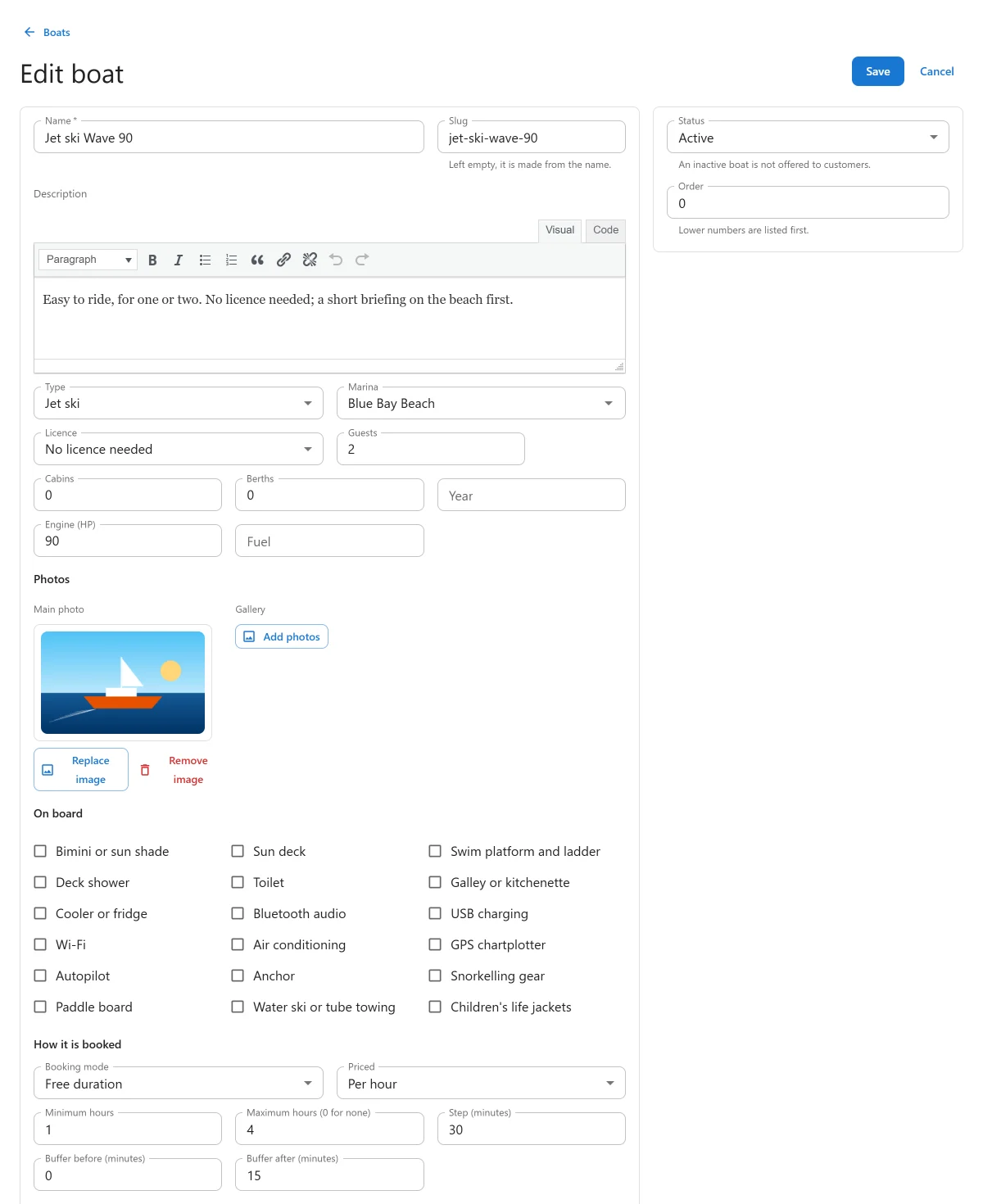
Side column
| Field | Default | Notes |
|---|---|---|
| Status | Active | “An inactive boat is not offered to customers.” |
| Order | 0 | Lower numbers are listed first. |
The boat
| Field | Default | Notes |
|---|---|---|
| Name | Required. What customers see. | |
| Slug | Left empty, it is made from the name. It is the address of the boat’s public page. | |
| Description | Rich text, shown on the boat’s page. | |
| Type | Required. One of your boat categories. | |
| Marina | none | The location that keeps the boat. A boat can only be booked at its marina, and a boat with no marina cannot be booked. |
| Licence | No licence needed | No licence needed, Licence required or Skipper mandatory. Shown to customers. |
| Guests | 6 | The most people aboard. A booking for more guests is refused: “This boat carries at most 6 guests.” |
| Cabins, Berths | 0 | Whole numbers. |
| Year | Optional. | |
| Engine (HP) | Optional. Also decides whether the licence note shows on the boat’s page, see Boat pages, search and the boat grid. | |
| Fuel | Optional text. |
Photos and On board
- Main photo: chosen from the media library. Shown on the boat grid and the boat’s page.
- Gallery: more photos, in the order you put them.
- On board: a checklist of amenities, such as Sun deck, Toilet, Bluetooth audio or Snorkelling gear. The ticked ones are listed on the boat’s page.
How it is booked
| Field | Default | Notes |
|---|---|---|
| Booking mode | Free duration | Free duration, Fixed departures or Full day. Pro adds Multi-day charter and Sold by the seat. See Booking modes. |
| Priced | Per hour | The unit the boat is charged in: Per hour, Per half day, Per day, Per week or Per seat. The boat needs a price for this unit. |
| Minimum hours | 1 | Free duration only. |
| Maximum hours (0 for none) | 0 | Free duration only. |
| Step (minutes) | 60 | Free duration only. |
| Buffer before (minutes) | 0 | See Buffers. |
| Buffer after (minutes) | 0 | See Buffers. |
Appearance and Size
- Icon and Colour: how the boat is marked in admin lists and on the booking form.
Pick a swatch or type a hex code such as
#2271b1. - Beam and Length, with Measured in set to Metres or Feet. A new boat starts in the Length unit chosen in Settings -> General.
Prices and the departure timetable can be set once the boat is saved: “Save the boat to set its prices.”
Prices
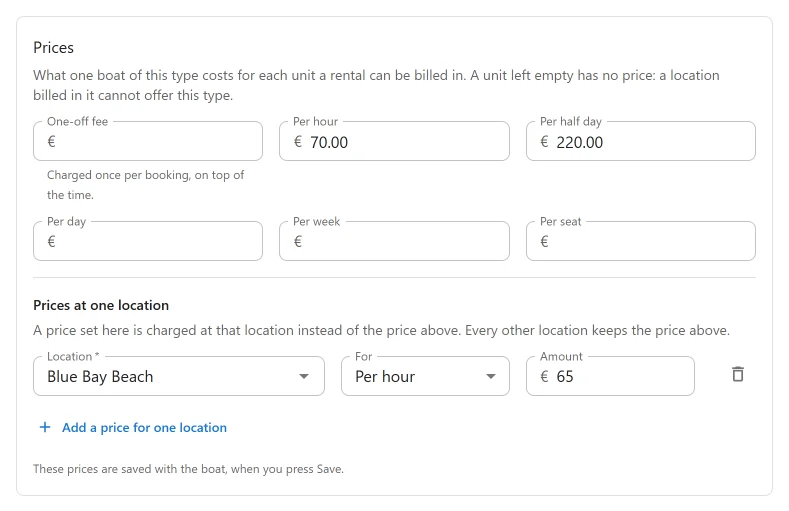
The Prices panel holds what one boat costs for each unit a rental can be billed in:
| Price | What it is |
|---|---|
| One-off fee | Charged once per booking, on top of the time. |
| Per hour, Per half day, Per day, Per week | The price of one unit of time. |
| Per seat | The price per guest. |
A unit left empty has no price. A boat with no price for the unit it is Priced in cannot be booked, and the panel warns you: “No day price for Harbour Lights Marina: customers can’t book this type there.” An amount can have up to four decimals.
The prices are saved with the boat, when you press Save.
Prices at one location
Under the base prices, Add a price for one location sets a different price at one marina: choose the Location, what the price is For and the Amount. A location price replaces the base price for that unit at that location. Each location can have one price per unit.
How a rental is counted
- The length is divided by the unit and rounded up, with a minimum of one unit. A 90-minute rental priced per hour is charged as two hours.
- A half day is 6 hours. A day is 24 hours, so a four-hour trip priced per day is one day.
- Per seat is charged by the number of guests, whatever the length.
- A departure in the timetable with its own price replaces the time charge for that departure. See Booking modes.
- The one-off fee is added once per booking.
With Pro, pricing rules PRO adjust these prices by rule, and extras PRO add lines to a booking.
Buffers
Buffer before and Buffer after are minutes kept free around each booking of the boat, for refuelling, cleaning or the handover. A booking blocks the boat from its departure minus the buffer before, until its return plus the buffer after. Two bookings’ blocked times cannot overlap, so their buffers cannot share the same minutes either.
For example, with a 15-minute buffer after, a jet ski back at 11:00 can go out again at 11:15.
No double bookings
Availability is checked a second time, under a lock, at the moment a booking is written. If two customers ask for the last free boat at the same moment, the second is refused.
The boat’s public page
Saving an active boat publishes its page at /boats/(slug)/, with the booking form under
the description. An inactive boat’s page is kept as a draft and the boat is not offered to
customers. Deleting a boat permanently also deletes its page. See
Boat pages, search and the boat grid.
Pro panels on the boat form
With Pro, apps that are switched on add panels to the boat form:
| Panel | See |
|---|---|
| Units PRO: the hulls of the boat | Units |
| Charter PRO | Multi-day charters |
| Cancellation policy PRO | The customer’s account |
| Security hold PRO | Deposits, balance schedule, monthly payments and security holds |
| Self check-in PRO | Self check-in codes |
| Fuel PRO | Extras and fuel |
| How this boat is booked PRO: request to book | Request to book |
| Sold by the seat PRO | Shared trips sold by the seat |
| Skipper PRO | Skippers |
| Owner PRO: needs a Pro licence for unlimited sites to give a boat to an owner | Boat owners and payouts |
| Tracking links PRO | The dock app |
Trash
A boat with upcoming bookings cannot be moved to the trash: “1 upcoming booking still uses it. Move or cancel it first, or switch this off instead of trashing it.” Set its Status to Inactive to stop new bookings while the existing ones go ahead.
Boat categories
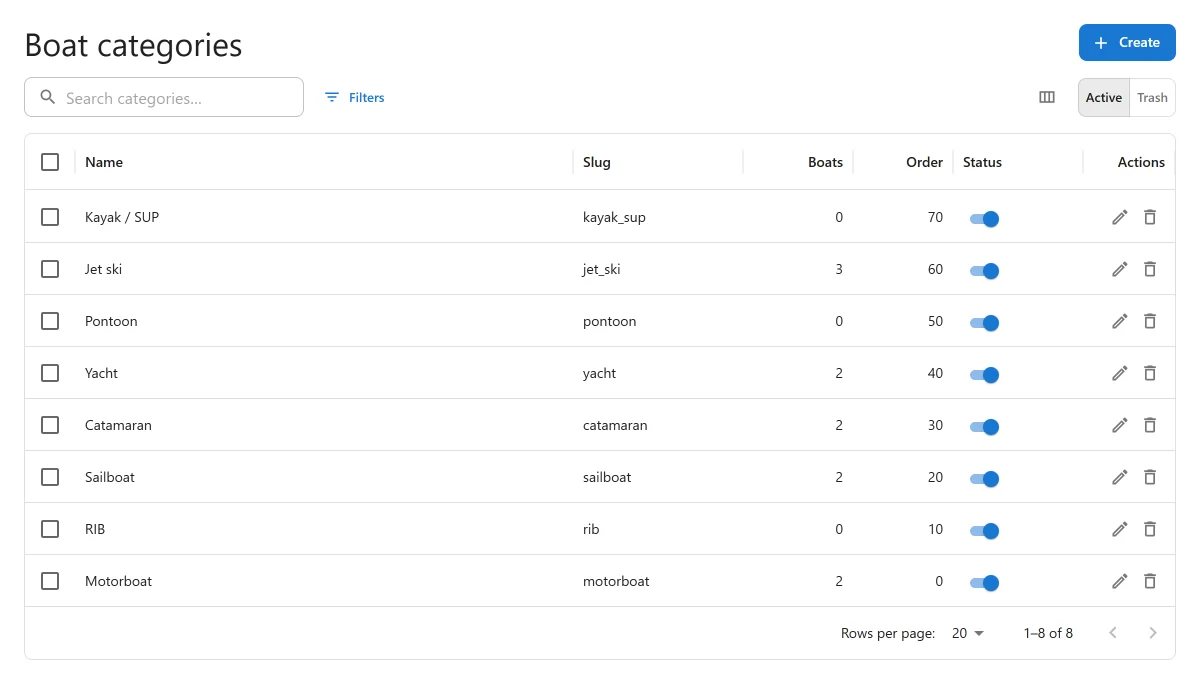
Boat categories is the list a boat’s Type is chosen from. The boat form, the filter on the Boats list, the public search form and the boat grid all read it. A new site starts with eight: Motorboat, RIB, Sailboat, Catamaran, Yacht, Pontoon, Jet ski and Kayak / SUP.
The list shows each category’s Name, Slug, how many Boats use it, its Order and its Status. Click New category to add one.
| Field | Notes |
|---|---|
| Name | What people see. It can be changed at any time. |
| Slug | What a boat stores. Left empty, it is made from the name. At most 30 characters. “It cannot be changed later.” |
| Order | Lower numbers are listed first. |
| Status | An inactive category is no longer offered for new boats or in the public search form. Boats that have it keep it and go on showing it. |
The slug is what a shortcode names a category by, as in
[plugixa_boat_rental_boats type="jet_ski"].
A category cannot be deleted while any boat uses it, counting boats in the trash. Move those boats to another category first, or switch the category off. A deleted category goes to the trash, where it can be restored or deleted for good. Removed categories do not come back on an update.
A starter category whose name you have not changed follows the plugin’s translation of that name. Once renamed, it is your text, translated through WPML or Polylang. See Multilingual.
Quick Links
Share