

Contents
On this page
Settings - Plugixa Boat Rental
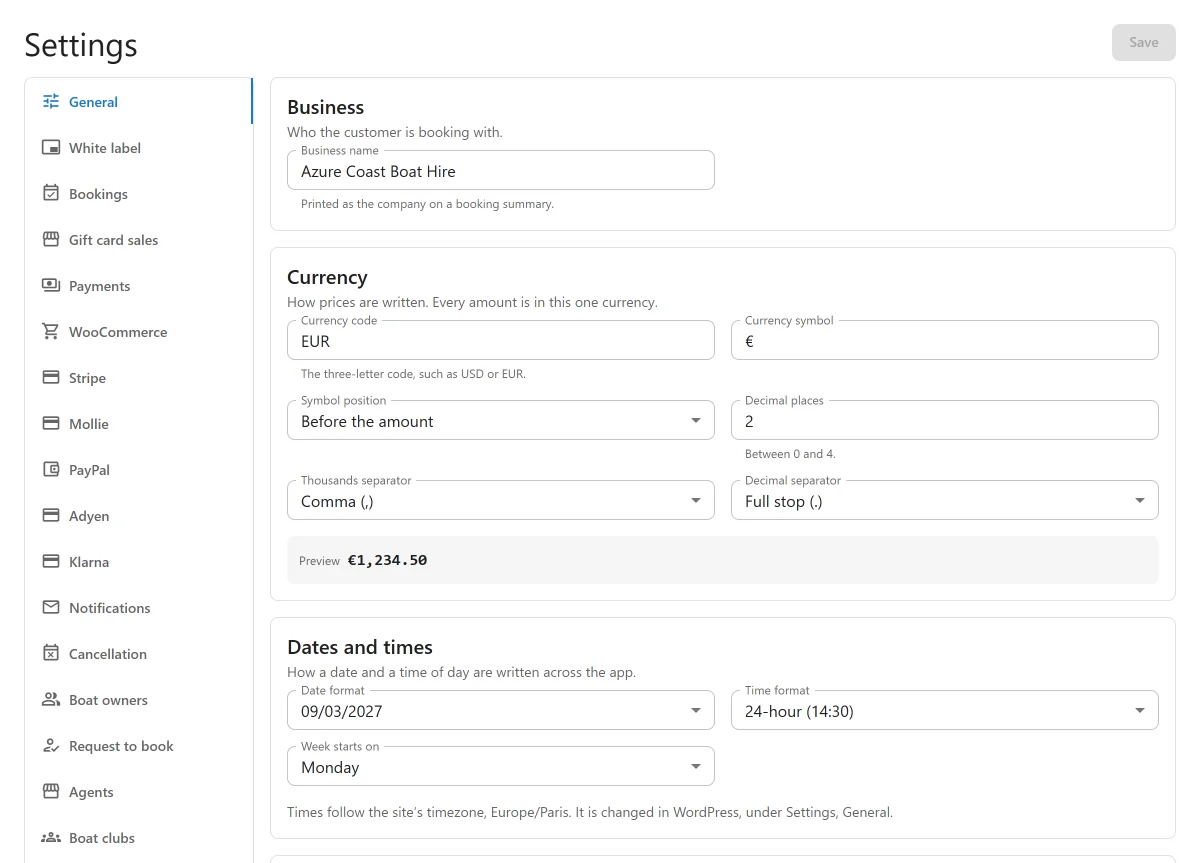
Plugixa Boat Rental -> Settings, in the Configuration group of the sidebar, holds the site-wide options. Each tab is short; where a feature has a page of its own, the tab below links to it.
Only people allowed to manage settings see this screen. The Advanced tab is shown to site administrators only.
How saving works
The tabs with a Save button are one form split across tabs. Move between them freely: nothing is lost, and Unsaved changes shows until you click Save, which saves every tab at once. If you try to leave the page with changes pending, the browser asks first.
A tab with no Save button saves each change the moment you make it.
The address of each tab ends in ?tab= and the tab’s name, so you can bookmark one. A link
to the settings of an app that is switched off says so instead of opening another tab.
General
Business
| Setting | Default | What it does |
|---|---|---|
| Business name | Plugixa Boat Rental | Printed as the company on a booking summary. |
Currency
| Setting | Default | What it does |
|---|---|---|
| Currency code | USD | The three-letter code, such as USD or EUR. |
| Currency symbol | $ | The symbol written with amounts. |
| Symbol position | Before the amount | Or After the amount. |
| Decimal places | 2 | 0 to 4. |
| Thousands separator | Comma (,) | Or full stop, space, apostrophe or none. |
| Decimal separator | Full stop (.) | Or comma. |
A Preview shows an amount as it will be written. The two separators cannot be the same. Set the currency before you enter prices: changing it later does not convert amounts. Each marina can also have a currency of its own; see Marinas.
Dates and times
| Setting | Default | What it does |
|---|---|---|
| Date format | 2027-03-09 | How dates are written across the app and in emails. |
| Time format | 24-hour (14:30) | Or 12-hour (2:30 pm). |
| Week starts on | Monday | The first day of the week in date pickers and the calendar. |
The card names the site’s timezone, which is changed in WordPress under Settings -> General. Bookings are on each marina’s own clock; see Troubleshooting.
Appearance
| Setting | Default | What it does |
|---|---|---|
| Colour mode | Light | Dark, or Auto: follow the visitor’s device. Applies to the booking pages, the boat pages and every other public page of the plugin. |
| Brand colour | Empty (the plugin’s own blue) | Buttons, links and highlights on every public page. A booking form with a colour of its own keeps it. Text on it is made readable for you. |
Two sample cards preview the result in light and dark.
Units
| Setting | Default | What it does |
|---|---|---|
| Length unit | Metres | The unit a new boat’s dimensions start in. Or feet. |
Licence note
| Setting | Default | What it does |
|---|---|---|
| Show the note over (HP) | 0 | Boats with more engine power than this show the note. 0 shows it on none. |
| Note | Empty | Left empty, a standard licence note is used. {hp} is replaced by the figure above. |
See Boat pages, search and the boat grid.
Bookings
New bookings
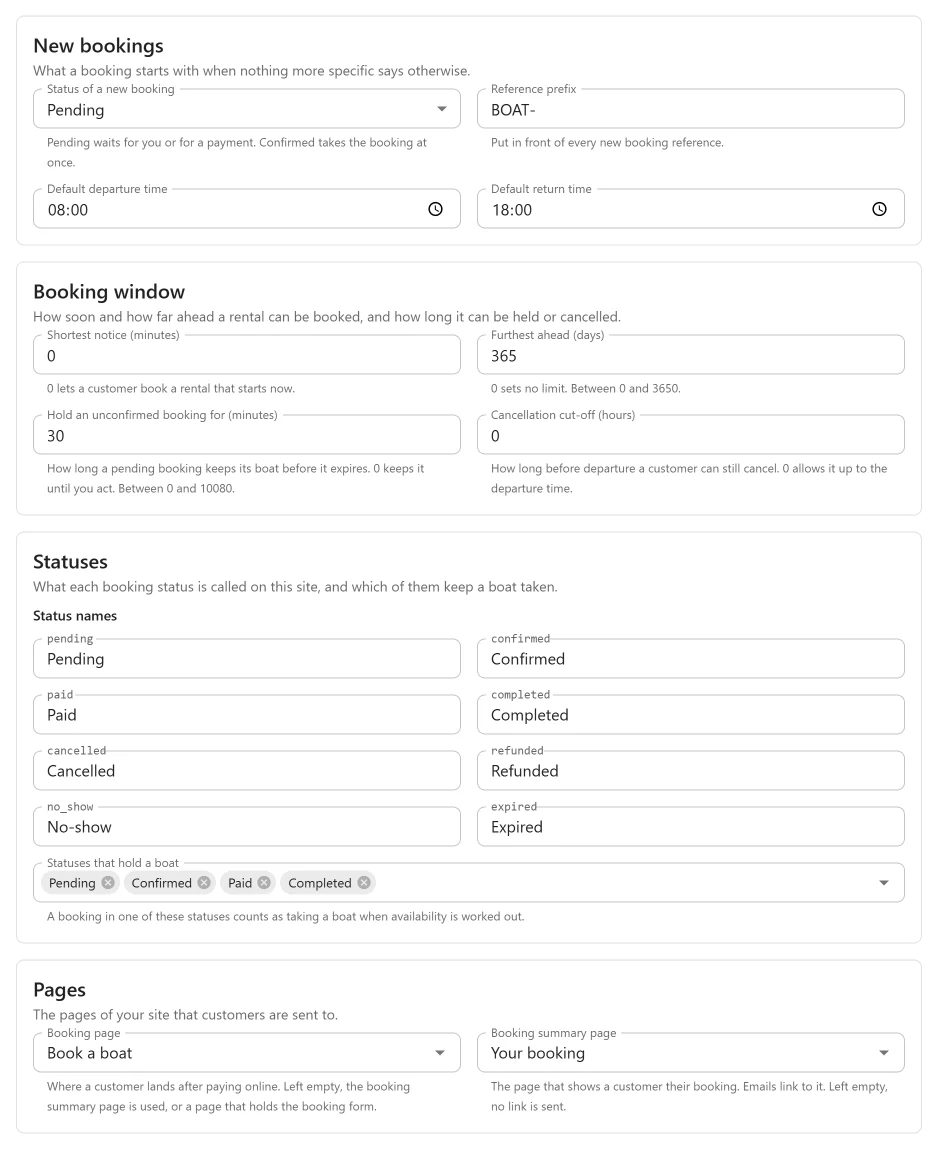
| Setting | Default | What it does |
|---|---|---|
| Status of a new booking | Pending | Pending waits for you or for a payment. Confirmed takes the booking at once. |
| Reference prefix | BOAT- |
Put in front of every new booking reference. |
| Default departure time | 08:00 | When a full-day booking starts. |
| Default return time | 18:00 | When a full-day booking ends. |
Booking window
| Setting | Default | What it does |
|---|---|---|
| Shortest notice (minutes) | 0 | How soon a trip can start. 0 lets a customer book a rental that starts now. |
| Furthest ahead (days) | 365 | How far ahead a trip can be booked. 0 sets no limit. |
| Hold an unconfirmed booking for (minutes) | 30 | How long a pending booking keeps its boat before it expires. 0 keeps it until you act. |
| Cancellation cut-off (hours) | 0 | How long before departure a customer can still cancel. 0 allows it up to the departure time. |
The notice and the furthest-ahead limits apply to bookings your team enters too. See The customer’s account for cancelling.
Statuses
| Setting | Default | What it does |
|---|---|---|
| Status names | Pending, Confirmed, Paid, Completed, Cancelled, Refunded, No-show, Expired | What each status is called on this site. You can rename them, not add or remove them. |
| Statuses that hold a boat | Pending, Confirmed, Paid, Completed | A booking in one of these counts as taking a boat when availability is worked out. |
See Bookings for what each status means.
Pages
| Setting | Default | What it does |
|---|---|---|
| Booking page | None | Where a customer lands after paying online. Left empty, the booking summary page is used, or a page that holds the booking form. |
| Booking summary page | None | The page that shows a customer their booking. Emails link to it. Left empty, no link is sent. |
Choose at least one. With neither, a customer who pays online is sent back to a page with
the booking form, or to the home page, where nothing tells them how the payment went. The
summary page needs the [plugixa_boat_rental_summary] shortcode; see
Payments.
Payments
| Setting | Default | What it does |
|---|---|---|
| Let customers pay on arrival | On | The customer books now and pays at the marina. |
| Instructions for the customer | “Please pay on arrival at the marina.” | Shown once a booking is placed, and on its summary. |
See Payments. Each Pro payment app adds a tab of its own (below).
Notifications
Who the emails come from, who is told about new bookings, and the three email templates. The tab is there while the Notifications app is on. See Emails and alerts.
Advanced
| Setting | Default | What it does |
|---|---|---|
| Erase all data when the plugin is deleted | Off | Off, deleting the plugin keeps your bookings, so installing it again picks up where you left off. |
Turning it on shows a warning before you save: deleting the plugin will then permanently erase every booking, payment, location, form and setting. Only site administrators see this tab. See Privacy and uninstall.
Tabs added by Pro PRO
Each Pro app with options adds a tab while it is switched on in the App manager. In the order they appear:
| Tab | Covered in |
|---|---|
| White label | White label and multisite |
| Gift card sales | Gift cards |
| WooCommerce | WooCommerce checkout |
| Stripe | Stripe |
| Mollie, Adyen, Klarna | Mollie, Adyen and Klarna |
| PayPal | PayPal |
| Cancellation | The customer’s account |
| Boat owners | Boat owners and payouts |
| Agents | Agent sales |
| Request to book | Request to book |
| Boat clubs | Boat clubs |
| Skippers | Skippers |
| Waivers and documents | Waivers and documents |
| Calendar sync | Calendar sync |
| Dock app | The dock app |
| Self check-in | Self check-in codes |
| Maintenance | Maintenance |
| Reviews | Verified reviews |
| Weather | Weather |
| Unfinished bookings, SMS, WhatsApp, Telegram, Reminders and reports | SMS, Telegram, WhatsApp and the unfinished booking follow-up |
| Browser alerts | Emails and alerts |
| Webhooks | Webhooks |
| Demo | Demo data |
Quick Links
Share