

Contents
On this page
Units - Plugixa Boat Rental
A unit is one boat that a booking holds. Bookings are counted against units: a boat with one unit can be out with one customer at a time, a boat with three units with three. Units are what makes sure a boat is never sold twice for the same time.
Units are part of the core of the plugin, listed in the App manager as Fleet counts, and cannot be switched off.
The unit every boat gets
You do not create a boat’s first unit yourself. Saving a boat with a Marina creates it automatically, at that marina, with the boat’s name as its label.
- A boat with no marina has no unit and cannot be booked.
- If a boat with a single unit is moved to another marina, its unit moves with it.
In the free plugin every boat has this one unit. To rent out several identical boats at the same time, such as three jet skis of the same model, add each one as a boat of its own, or use numbered units with Pro.
How units are counted
When a customer asks for a boat and a time, the plugin looks for a unit of that boat, at that marina, that no other booking holds at any moment of the rental, including the buffers before and after.
A booking holds its unit while it is in one of the statuses listed under Statuses that hold a boat in Settings -> Bookings: by default Pending, Confirmed, Paid and Completed. A pending booking holds its unit for Hold an unconfirmed booking for (minutes), 30 by default, and then expires. Cancelled, refunded, no-show and expired bookings hold nothing.
The location’s Booking setup panel lists each boat with its number of units, see Locations. The dashboard’s occupancy figures are counted in units, see Dashboard.
Numbered units PRO
The Numbered units app PRO lets one boat have several hulls, each booked on its own and each known by its own label. It is on by default in Pro.
The Units panel
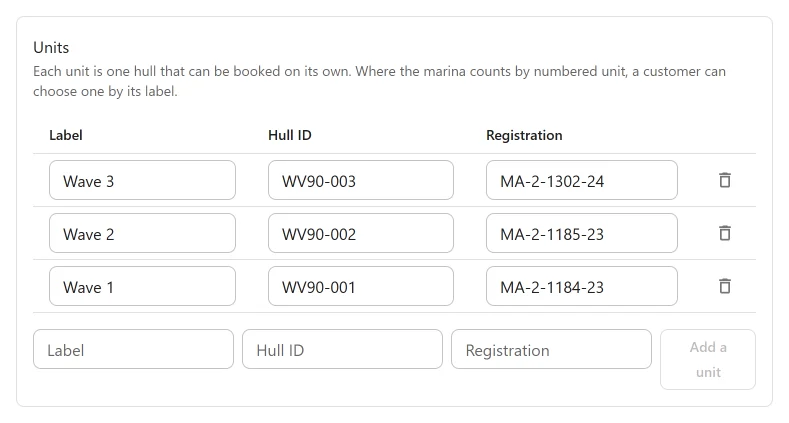
With the app on, the boat form has a Units panel: “Each unit is one hull that can be booked on its own. Where the marina counts by numbered unit, a customer can choose one by its label.”
| Column | Notes |
|---|---|
| Label | What the hull is called, such as “Wave 2”. The first unit starts with the boat’s name. |
| Hull ID | For your records. |
| Registration | Shown to the customer after the label, as “Wave 2 (PT-1234)”. |
Fill in the bottom row and click Add a unit to add a hull. Remove this unit takes one away. Changes in this panel are saved at once, without pressing the form’s Save, because a unit is a record of its own and a booking may already hold it.
New units are added at the boat’s marina.
A boat with three units can be booked three times for the same hour. Each booking holds one of the units.
Units are counted
Each location then has a Units are counted choice in the side column of its form:
| Choice | What the customer gets |
|---|---|
| Any free unit | The plugin gives the booking a free unit. The customer does not choose. This is the default. |
| By numbered unit: the customer can choose one | On the Choose a boat step, a Pick a boat list shows the free units of the chosen boat by label and registration, with Any available first. Leaving it on Any available lets the plugin choose. |
The Booking setup panel shows how many of a boat’s units are numbered.
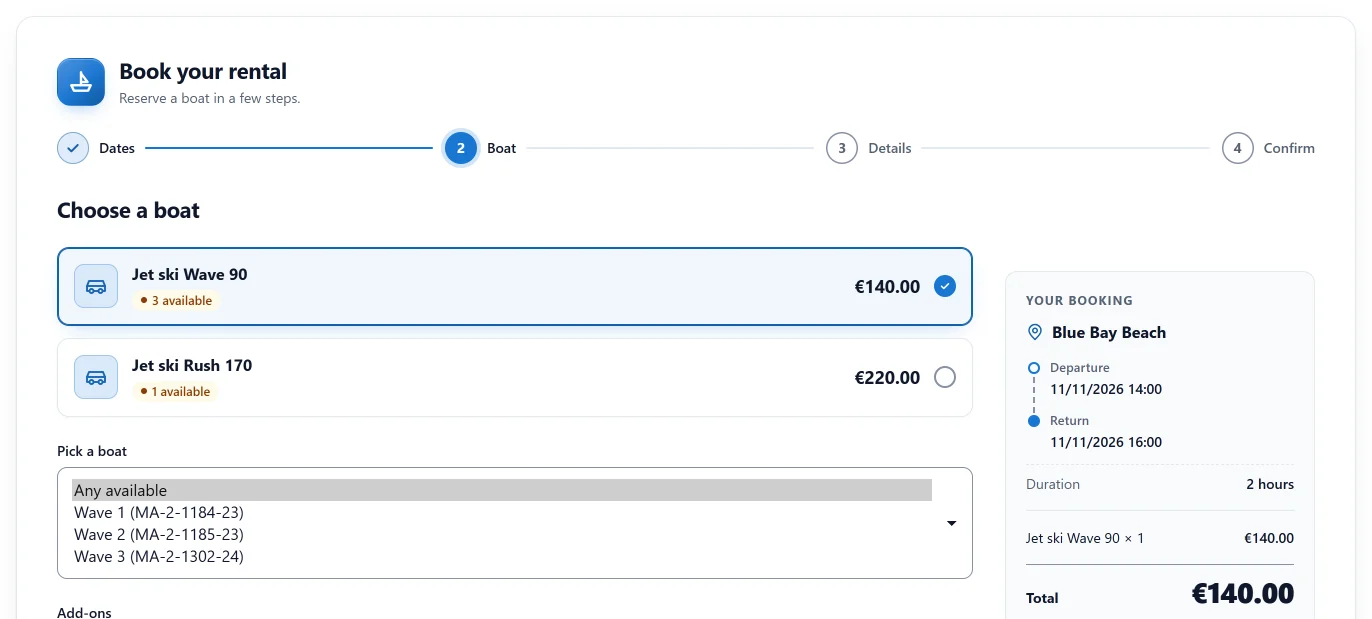
Switching the app off
The Numbered units app cannot be switched off while a location counts by numbered unit: “1 location counts its boats by numbered unit. Change how it counts them, then switch this off.” Set those locations back to Any free unit first.
Trash
A unit with upcoming bookings cannot be removed: “1 upcoming booking still uses it. Move or cancel it first, or switch this off instead of trashing it.”
Quick Links
Share