

Contents
On this page
Booking modes - Plugixa Boat Rental
Each boat is sold in one booking mode, chosen in Booking mode under How it is booked on its form. The mode decides what the customer picks on the booking form and which rentals the plugin accepts.
| Mode | Good for | The customer picks |
|---|---|---|
| Free duration | Jet skis, RIBs, small motorboats by the hour | A departure and a return time |
| Fixed departures | Sunset cruises, scheduled trips | A day, then one of the boat’s departures that day (on the boat’s page) |
| Full day | Day boats | A day (on the boat’s page) |
| Multi-day charter PRO | Weekly yacht charter | A check-in and a check-out day |
| Sold by the seat PRO | Shared trips | A departure and a number of seats |
All modes use the same availability check, buffers and protection against double bookings. The three demo boats of a new site show one free mode each.
Free duration
The customer picks a departure and a return. Three fields on the boat form set the rules:
| Field | New boat | What it does | 0 means |
|---|---|---|---|
| Minimum hours | 1 | The rental is at least this long. | no minimum |
| Maximum hours (0 for none) | 0 | The rental is at most this long. | no maximum |
| Step (minutes) | 60 | The length is a multiple of this. | no step |
A rental that breaks a rule is refused with the reason:
- “The minimum rental for this boat is 1 hours.”
- “The maximum rental for this boat is 4 hours.”
- “This boat is rented in steps of 30 minutes.”
Hours can have decimals, so a minimum of 1.5 is 90 minutes. The step is counted on the
length of the rental, so with a 30-minute step a rental of 1 hour 30 is accepted and 1 hour
45 is not.
Example: the demo Jet Ski 1100 has a minimum of 1 hour, a maximum of 4 and a 30-minute step, priced per hour.
Fixed departures
The boat has a weekly Departure timetable, a panel on its form: “The fixed departures a customer can choose, on the marina’s clock.”
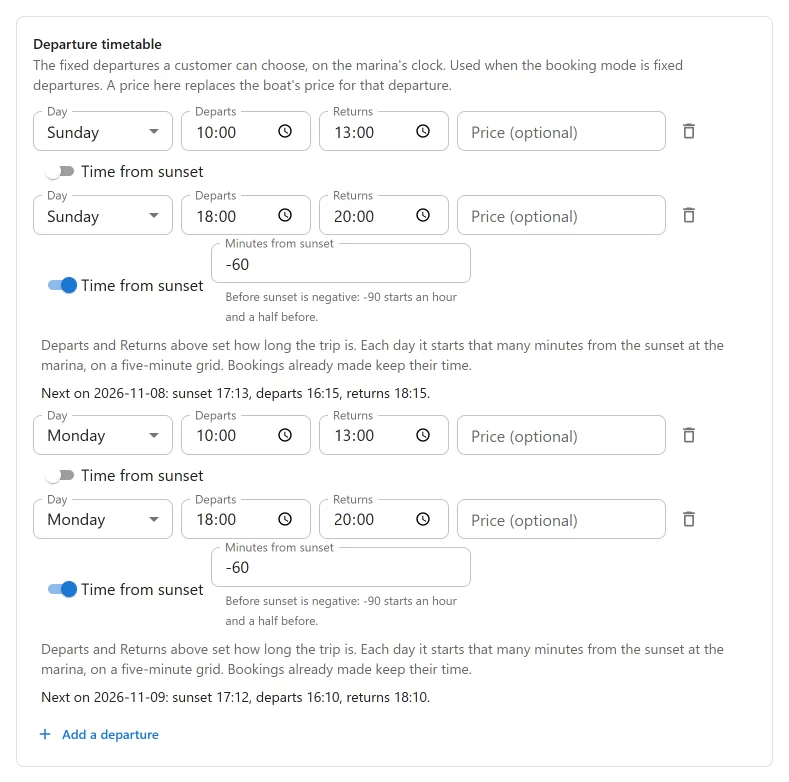
Click Add a departure for each one:
| Field | Notes |
|---|---|
| Day | Sunday to Saturday. Add the same times on several days to run them every day. |
| Departs, Returns | The times on the marina’s clock. Each departure needs a start time before its end time. |
| Price (optional) | A price for this departure, which replaces the boat’s price for it. The boat’s one-off fee is still added. |
Remove this departure takes one away. The timetable is kept whatever the boat’s mode, so you can switch a boat to fixed departures and back without losing it.
On the boat’s own page, or any form set to one boat with the boat attribute, the customer
picks a day, then one of that day’s departures. With none that day: “No departures on this
day. Please choose another.”
On a general booking form the customer types a departure and a return, so a fixed-departure boat is offered only when both match one of its departures. A booking must match a departure on that day exactly, or it is refused: “That is not one of this boat’s departure times.” For boats sold this way, link customers to the boat’s page.
Without a price of its own, a departure is charged like any rental: by the boat’s Priced unit and the departure’s length. A 09:00 to 13:00 trip on a boat priced per day is one day.
Example: the demo Sunset Cruise Catamaran departs at 09:00 to 13:00 and 17:00 to 20:00 every day, priced at 450 per day.
Full day
One day at a time: the departure and the return must be on the same date. A rental that does not fit is refused: “This boat is rented for one full day at a time.”
On the boat’s own page, or any form set to one boat, the form asks only for the day. The times come from Default departure time and Default return time in Settings -> Bookings, 08:00 and 18:00 unless you change them. On a general booking form the customer picks both times, and a full-day boat is offered when they fall on the same date.
Example: the demo Day Boat 6m is rented by the full day at 220 per day.
Rules that apply to every mode
- Guests: a booking for more guests than the boat’s Guests is refused: “This boat carries at most 6 guests.”
- Opening hours: a booking can only start and end while the marina is open, and not on a day it is closed. A closure applies whether or not weekly hours are set. See Locations.
- The marina’s clock: every time is the marina’s wall-clock time.
- Notice and range: the departure must be at least Shortest notice (minutes) away and no more than Furthest ahead (days), both under Settings -> Bookings.
On the general booking form, a boat that cannot be sold for the chosen time is left out, and the form lists it under the boats it offers with the reason in these same words. A customer looking for a particular boat is never left to guess why it is missing.
Multi-day charter PRO
Pro adds Multi-day charter, for boats rented by the night or the week: a check-in weekday, check-in and check-out times, a minimum number of nights that seasons can raise, and selling by the whole week. It is set in the Charter panel of the boat form. See Multi-day charters.
Sold by the seat PRO
Pro also adds Sold by the seat, for shared trips where each guest buys a place on a departure. See Shared trips sold by the seat.
Quick Links
Share