

Contents
On this page
Gift cards and credit - Plugixa Boat Rental
Gift cards and credit PRO hold an amount a customer spends on bookings until it runs out. You can issue cards yourself, give credit for a cancelled trip, and sell cards on your site.
| App in the App manager | What it does | On by default |
|---|---|---|
| Gift cards | Cards and credit, and spending them on bookings | Yes |
| Gift card sales | Selling cards online, paid through your online ways to pay. Needs Gift cards | No |
A card is money, not a discount
Spending a card records a payment on the booking, like a card payment would. The price of the booking and the tax on it do not change. What the card does not cover is owed like any other balance, and can be paid with another card or any other way to pay.
A coupon is the other thing: it lowers the price.
Kinds of card
| Kind | Code | Made by | Counts as income when spent? |
|---|---|---|---|
| Gift card | GIFT- followed by groups of letters and digits |
You, on the Gift cards screen, or a sale in the gift card shop | Yes |
| Credit | CREDIT- and the same |
A weather cancellation | No: you already hold that money, on the cancelled booking |
Customers pay with them as Gift card or Store credit. The dashboard and reports leave store credit out of revenue, so the same money is not counted twice.
Issuing a card
Open Plugixa Boat Rental -> Gift cards, in the Sales group of the menu, and press New gift card.
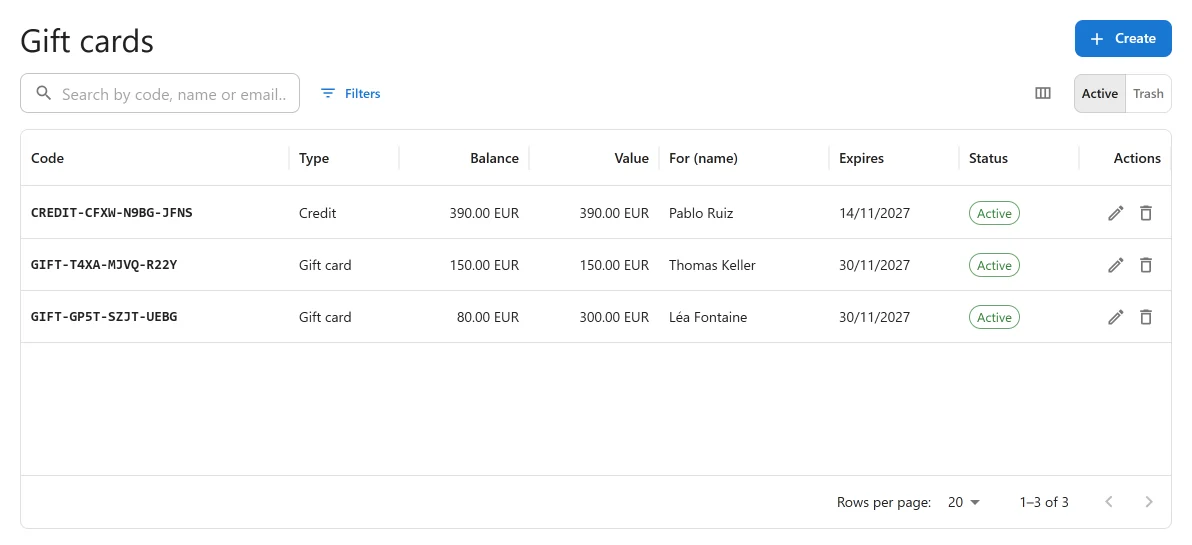
| Field | What it does |
|---|---|
| Amount | The card’s value. “Fixed once issued. Change a balance afterwards with an adjustment.” |
| Currency | “A card pays only for bookings in this currency. Empty uses the site’s.” |
| Status | Active, or switched off. A switched-off card cannot be spent. |
| Expires | “A date, or empty for never. Check the rules on gift card expiry where you trade.” Some countries restrict gift card expiry. |
| For (name), For (email) | Who it is for. Optional. |
| Note | “For staff. How it was paid for, for example. Issuing a card records no money received.” |
The code is made by the plugin when you save. The card’s code, value and kind never change.
Issuing a card records no money. The money side of the plugin is about bookings. If you sell a card at the counter, take the money as you normally would and write it in the Note.
On a saved card, Email to recipient sends the card to the For (email) address.
Balance and history
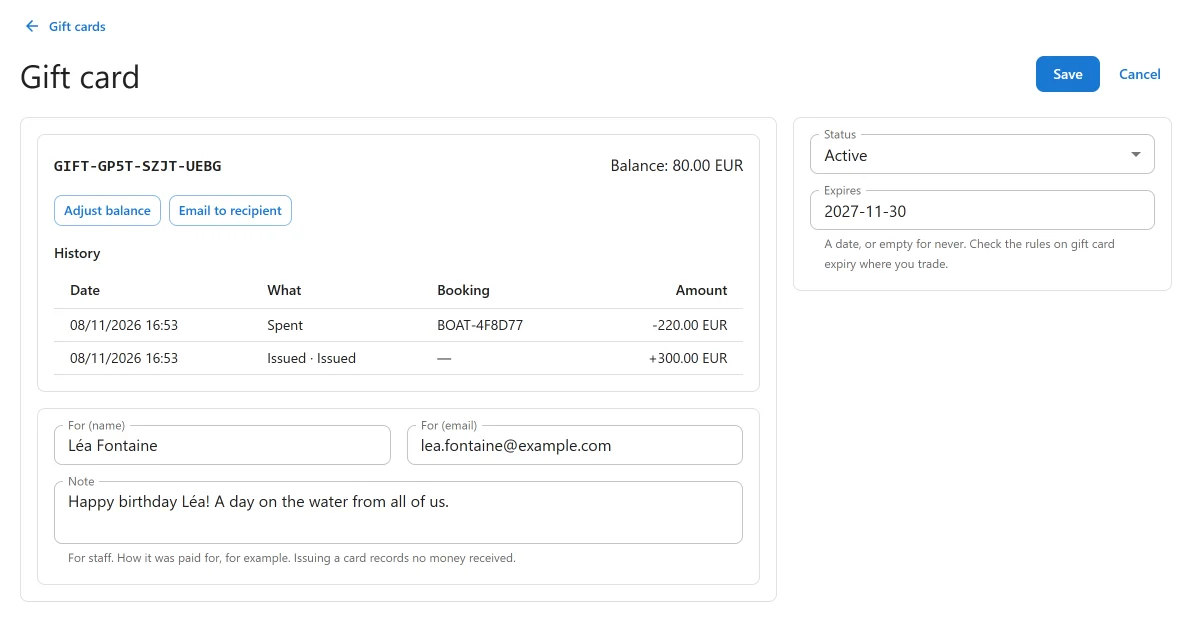
Nothing edits a balance directly. Every change is a line in the card’s History: Issued, Spent (with the booking), Refunded to the card, Adjusted, or Taken off (when a card bought online is refunded).
To change a balance, use Adjust balance: enter Add or take off (“Use a minus sign to take off.”), say Why, and press Apply. A balance cannot go below nothing.
A card that has been spent cannot be moved to the trash. Switch it off instead.
Spending a card
The customer types the code in Gift card code and presses Apply:
- On the booking form, below the choice of boat. “It will be applied when you confirm.” The card is spent the moment the booking is made, before any payment page. A card that covers everything leaves nothing to pay.
- On the booking’s summary page, in the payment section. It is spent at once: “Your gift card paid … of this booking.” and, if needed, “There is still … to pay.”
A code that fails on the booking form leaves the booking made and says so: “Your booking is made, but the gift card could not be used on it:” with the reason.
A card that is unknown, switched off, expired, used up, in the trash or in another currency all get the same answer, “That code cannot be used on this booking.”, so the answer says nothing about which codes exist. A visitor can try 10 codes in 10 minutes.
Two tabs cannot spend the same money: the balance is taken in one step that checks there is enough.
Money cannot be recorded by hand as paid by gift card or store credit on a booking’s payments panel, as that would say a card was spent without spending it.
Refunds to a card
A refund of a gift card payment, from the booking’s payments panel or when the customer cancels, goes back on the card. This works even for a card that has since expired or been switched off.
Selling gift cards online
With the Gift card sales app on, customers can buy a card on your site, pay online, and have it emailed to the person it is for.
1. Add a card for sale
Open Plugixa Boat Rental -> Gift card shop and add a New card for sale.
| Field | What it does |
|---|---|
| Name | Required. Shown on the shop. |
| Description | “Shown on the shop above the amounts. Optional.” |
| Amounts | “The amounts a customer picks from, separated by commas, such as 25, 50, 100.” |
| Let the customer choose an amount | Adds an Other amount field, between Lowest and Highest (100 000 at most). |
| Currency | “Empty sells in the site’s currency. A card pays only for bookings in its own.” |
| Valid for, in months | “From the day it is issued. 0 for never.” Up to 120. |
| Status | Only an active card is on sale. |
| Order on the page | Where it is listed. |
Offer at least one amount, or let the customer choose one. An amount cannot have more decimals than the currency has.
2. Put the shop on a page
Use the shortcode or the Boat Rental Gift Card Shop block:
[plugixa_boat_rental_gift_card]
[plugixa_boat_rental_gift_card product="3"]
product shows one card for sale only, by its id.
Then choose the page under Settings -> Gift card sales -> Gift card page. A buyer comes back there after paying, or to the page they bought on.
What the buyer does
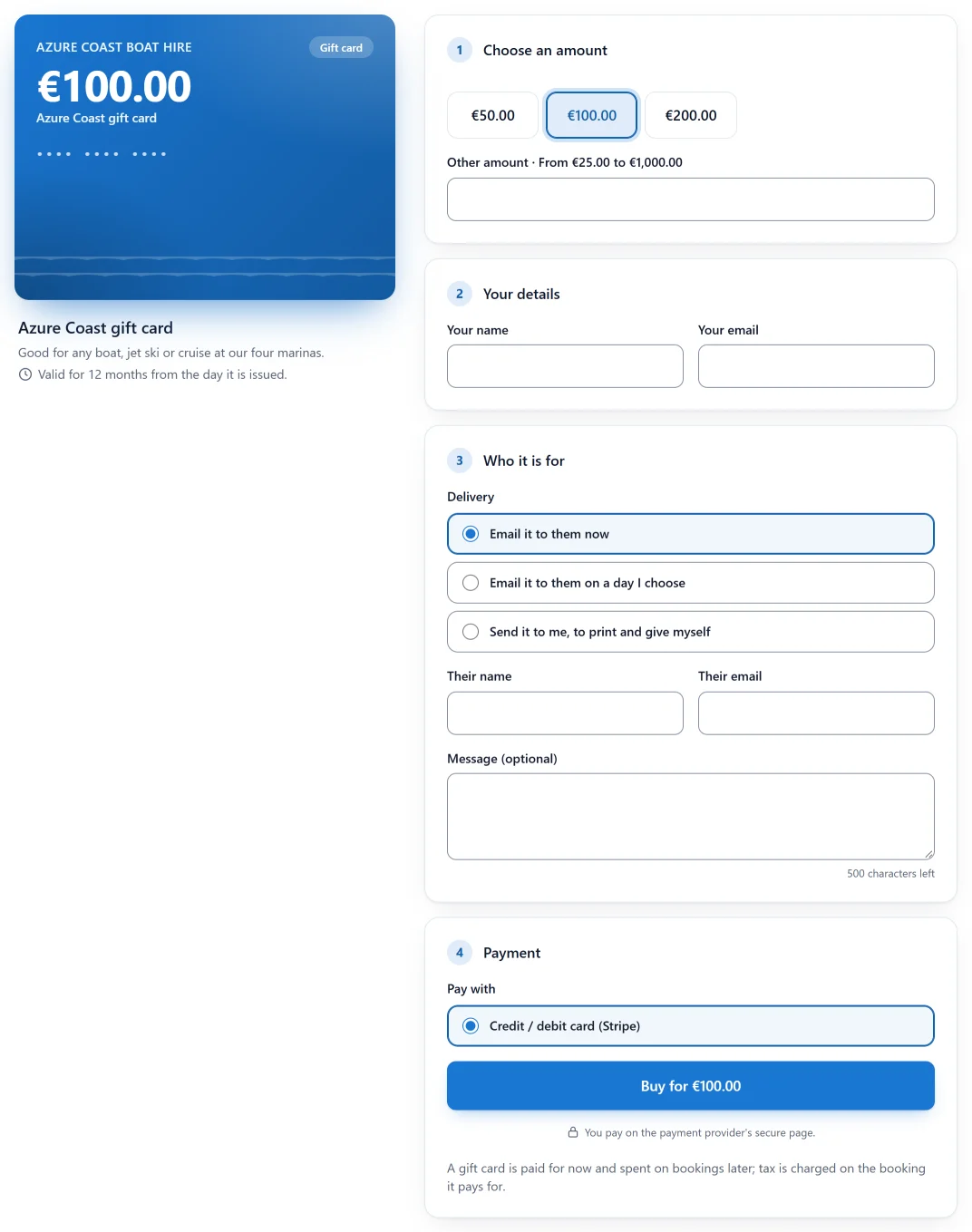
A live preview of the card sits beside four steps:
- Choose an amount: one of yours, or Other amount.
- Your details: Your name, Your email.
- Who it is for: the Delivery (Email it to them now, Email it to them on a day I choose, or Send it to me, to print and give myself), Their name, Their email and an optional message of up to 500 characters.
- Payment: Pay with one of your online ways to pay, then Buy for ….
The buyer can try 5 purchases an hour. The shop says: “A gift card is paid for now and spent on bookings later; tax is charged on the booking it pays for.”
Ways to pay: every online way to pay you have switched on and set up, such as Stripe, PayPal, Mollie and Adyen. Klarna is never offered (buying stored value on credit and spending it at once would turn Klarna’s instalments into cash), and neither are the WooCommerce checkout, pay on arrival or gift cards themselves.
After payment
- Paid: the card is issued and the buyer gets a receipt. You get a “sold” email. The page shows “Your gift card of … is paid.” with the last characters of the code, and Print the card when the buyer chose to print it.
- Payment processing: the provider has the money but has not released it. The buyer is told “Your payment is being confirmed”. No card yet; it is issued as soon as the provider confirms.
- Cancelled or not completed: “Nothing was charged. You can try again below.”
The full code is never shown on a public page. It is in the recipient’s email, or in the buyer’s receipt and printable card when they print it themselves.
Delivery
| Delivery | What happens |
|---|---|
| Email it to them now | The card is emailed to the recipient as soon as it is issued |
| Email it to them on a day I choose | Sent on that day (today to a year ahead), from 09:00 site time. The buyer is told when it has gone |
| Send it to me, to print and give myself | The buyer’s receipt carries the whole code and a link to the printable card. Nobody else is emailed |
The recipient’s email carries the card as a PDF. A send that fails is tried again on each hourly run, three times in all, then the order is flagged and you are emailed.
Emails
The plugin sends, whatever your automatic emails are set to: the buyer’s receipt, “being processed”, the recipient’s card, “delivered” for dated cards, “refunded”, and to you, “sold” and “needs your attention”. Each goes in the language the card was bought in.
Under Settings -> Gift card sales -> Gift card emails you can reword two of them: the card
email (Card email: subject, Card email: text) and the receipt (Receipt: subject,
Receipt: text). Empty uses the standard wording. How the card is delivered is added below the
receipt’s text. Placeholders: {card_code} {card_amount} {card_expires} {buyer_name} {recipient_name} {message} {print_url} {order_ref} {site_name}. In the receipt, {card_code}
shows only its last characters unless the buyer prints the card.
“A receipt, not an invoice: no tax is charged on a card when it is sold.” There is no setting for tax on a sale.
Gift card orders
Plugixa Boat Rental -> Gift card orders lists every sale, with a reference starting GCO-.
An order shows the amount, Bought by, For, Message, Delivery, its Payments and
its Card (linked). A card bought online says Bought online: with a link back to its order.
| State | Means |
|---|---|
| Waiting for payment | The buyer is at the payment page |
| Payment processing | The provider has not released the money |
| Paid, card issued | Done |
| Not paid | The payment failed |
| Abandoned | Nobody paid within 2 hours |
| Refunded | Refunded; the card is switched off |
| Disputed | The buyer disputed the payment; the card is off until it is closed |
From an order: Send the card again, Send it to the buyer, and Refund.
Refund refunds what is left on the card, never more, through the way the buyer paid, then switches the card off. A card spent in full has nothing to refund. A refund made at the provider is taken off the card as far as it still holds it.
An order that needs you is flagged, and you are emailed once:
- “Paid twice: refund the second payment at the provider if asked.” Nothing is refunded by itself, and no second card is issued.
- “The payment does not cover the card. No card was issued.”
- “Refunded at the provider for more than the card still held.”
- “The card could not be emailed. Send it again.”
- “The payment is disputed. The card is off until it is closed.”
A payment that arrives after an order was abandoned still issues the card: the money was taken. An abandoned or unpaid order’s buyer, recipient and message are wiped after 30 days.
Sales are not revenue
A sale is never a booking and never booking revenue. The card’s money is counted once, when it is spent on a booking. The dashboard widget Gift cards sold shows, beside the revenue figures and never added to them: Sold in 30 days, Still to be spent on cards and how many orders need your attention.
The Gift card sales app cannot be switched off while a sale is waiting for its payment or a sold card has not been emailed yet.
Personal data
A card can name a person, and a sale names a buyer and a recipient. WordPress’s personal data export includes them, and its eraser removes the names, email addresses and message. The card, its balance and the payments stay. A card not yet emailed is then no longer emailed: its delivery becomes the buyer’s. See Privacy and uninstall.
Quick Links
Share