

Contents
On this page
Sunset departures - Plugixa Boat Rental
Sunset departures PRO let a row of a boat’s departure timetable start at a set distance from sunset instead of at a fixed clock time. A sunset cruise set to “60 minutes before sunset” leaves at 19:40 in June and at 17:10 in November, without you changing the timetable.
It is an app, on by default in Pro, and does nothing until a timetable row uses it. It works on boats with fixed departures and on shared trips sold by the seat.
Before you start
The marina needs coordinates. Open it under Plugixa Boat Rental -> Locations and fill in Latitude and Longitude. See Marinas. The sunset is worked out on your server from those coordinates, on the marina’s own time zone. No outside service is contacted.
The marina used is the boat’s base marina, or, with none, the marina of its first unit.
Timing a departure from sunset
- Open the boat and go to its Departure timetable panel.
- Under the row you want, switch on Time from sunset.
- Enter Minutes from sunset. Before sunset is negative:
-90starts an hour and a half before. Whole minutes, at most 720 either way. - Keep the row’s Departs and Returns times: they now only set how long the trip is. A row from 18:00 to 20:00 is a two-hour trip.
- Save the boat.
Each day, the departure starts that many minutes from that day’s sunset, rounded to the nearest five minutes.
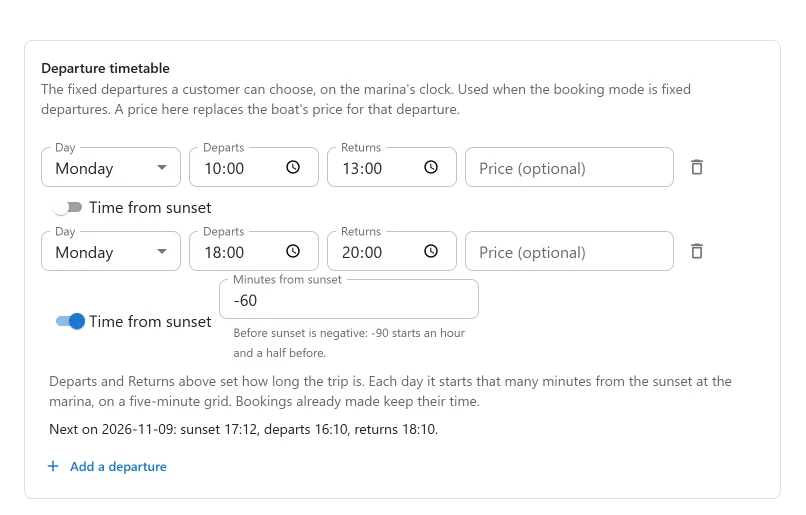
Under the row, the panel shows the next day’s sunset and the times it gives, for example “Next on 2026-11-09: sunset 17:12, departs 16:10, returns 18:10.” If you have not saved the boat yet, it asks you to save it first.
When a sunset departure is not offered
The departure is left out on a day when:
- the boat has no marina, or the marina has no coordinates (0, 0 counts as none);
- the sun does not set at the marina that day, which happens near the poles;
- the trip would run past midnight.
The timetable row warns about each of these. For the polar case it says on how many days in the next two months the sun does not set.
What customers and staff see
- Booking form: the departure is listed with its times followed by the sunset, for example “Sunset 17:12”.
- Departures screen for shared trips: the same note.
- Calendar: a line under the booking with the sunset.
- Emails:
{start_datetime}is followed by “(Sunset 19:42)”, and the placeholder{sunset}gives the sunset time on its own.
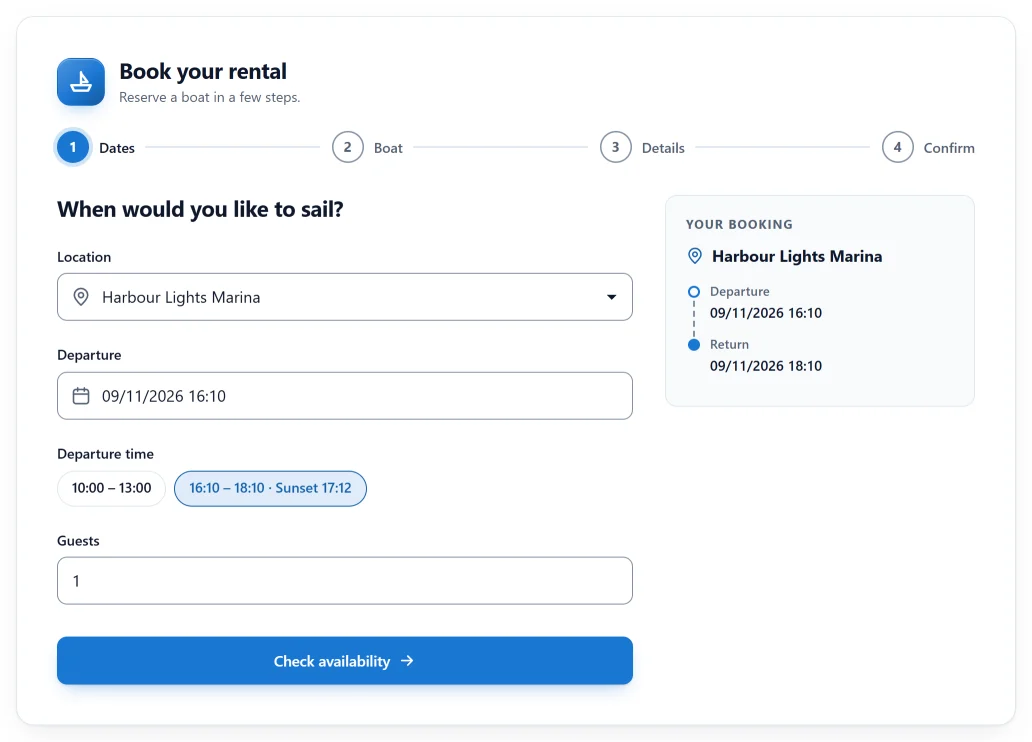
Bookings keep their time
A booking keeps the start time it was sold with. Each booking also remembers the sunset it was sold against, so the calendar and emails always name the right sunset.
If you change a row’s offset later, the departure moves from then on. Bookings already made do not move. A booking moved by hand to another day loses its sunset note.
If you switch the app off, sunset rows run at the times typed in Departs and Returns. The offsets are kept for when you switch it back on.
Current limits
- Only weekly timetable rows can be timed from sunset. A one-off date on a shared trip cannot.
Quick Links
Share