

Contents
On this page
Weather - Plugixa Boat Rental
Weather PRO fetches a wind, gust and wave forecast for each marina, judges every day and every booking against limits you set, and lets you cancel the affected bookings with a full refund or a credit when the weather turns.
It is an app, on by default in Pro, but nothing is fetched until you choose a forecast provider and enter your own key. The screen is Plugixa Boat Rental -> Weather, in the Bookings menu group. Its settings are under Settings -> Weather.
A forecast is not a safety guarantee. It can be wrong, especially close to shore, and is not for navigation. Nothing here stops a sale or a hand-over: the decision is yours.
Choosing a provider
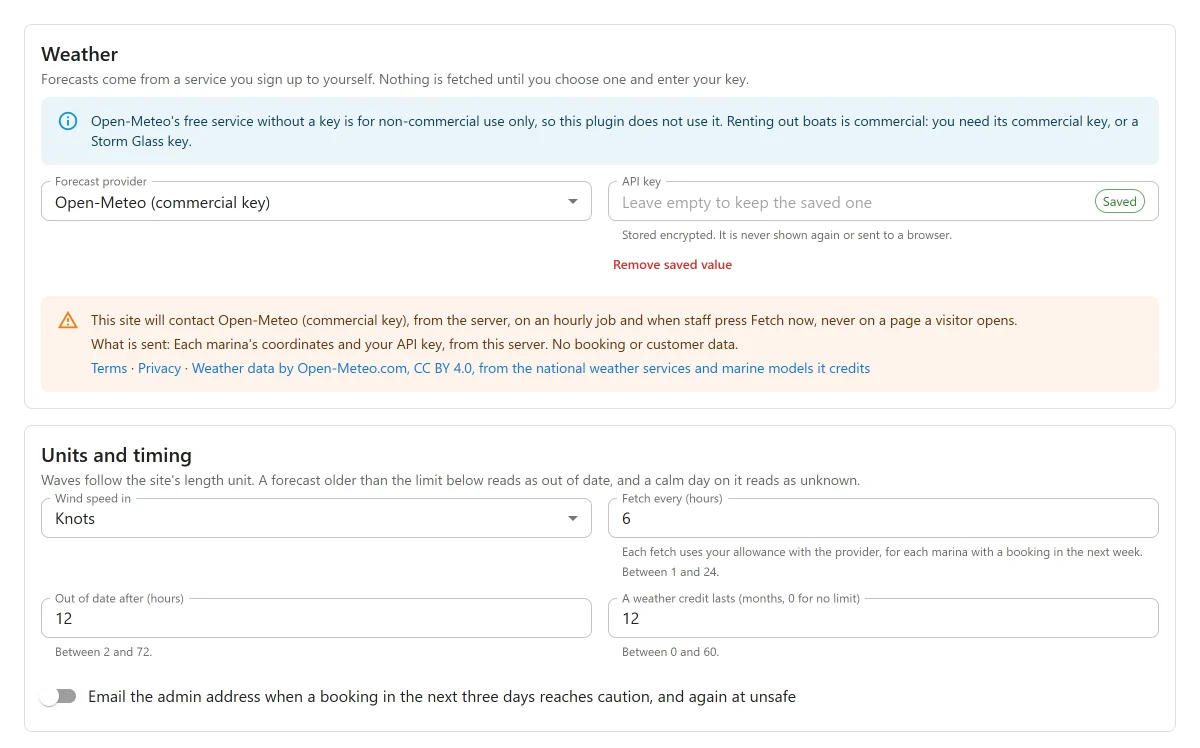
Forecasts come from a service you sign up to yourself. Under Settings -> Weather, choose a Forecast provider and enter its API key.
| Provider | What you need |
|---|---|
| Open-Meteo | A commercial API key. Its data is licensed CC BY 4.0, and the plugin shows the attribution beside the forecast. |
| Storm Glass | An API key. Storm Glass’s daily request allowance is small, and it updates about every 4 hours. |
| None: fetch nothing | The default. |
Open-Meteo’s free service without a key is for non-commercial use only, so this plugin does not use it. Renting out boats is commercial: you need Open-Meteo’s commercial key, or a Storm Glass key.
The key is stored encrypted. It is never shown again or sent to a browser.
What is sent, and when
The settings card says which service your site will contact. Your server contacts it on an hourly job and when staff press Fetch now, never on a page a visitor opens. It sends each marina’s coordinates and your key, and no booking or customer data.
- Open-Meteo: terms and licence.
- Storm Glass: terms and privacy policy, which Storm Glass publishes on one page.
Units and timing
| Setting | Default | What it does |
|---|---|---|
| Wind speed in | Knots | Or Kilometres an hour, Miles an hour, Metres a second. Wave heights follow the site’s length unit. |
| Fetch every (hours) | 6 | Each fetch uses your allowance with the provider, for each marina with a booking in the next week. |
| Out of date after (hours) | 12 | An older forecast reads as unknown. |
| Email the admin address when a booking in the next three days reaches caution, and again at unsafe | Off | At most one email at caution and one at unsafe per booking, however the forecast swings. |
| A weather credit lasts (months, 0 for no limit) | 12 | For credits given when cancelling. |
How fetching works
- Only marinas with coordinates and an active booking in the next 7 days are fetched, up to 20 a run. Add coordinates on each marina’s form. See Marinas.
- After an error, the next try waits longer each time, up to 24 hours. A refused key waits 24 hours, and a used-up daily allowance waits until the next day.
- Fetch now respects that wait, and a 10 minute gap between presses.
- A failed fetch keeps the last forecast. Its age is always shown beside it, for example “Fetched 3 h ago”.
Limits
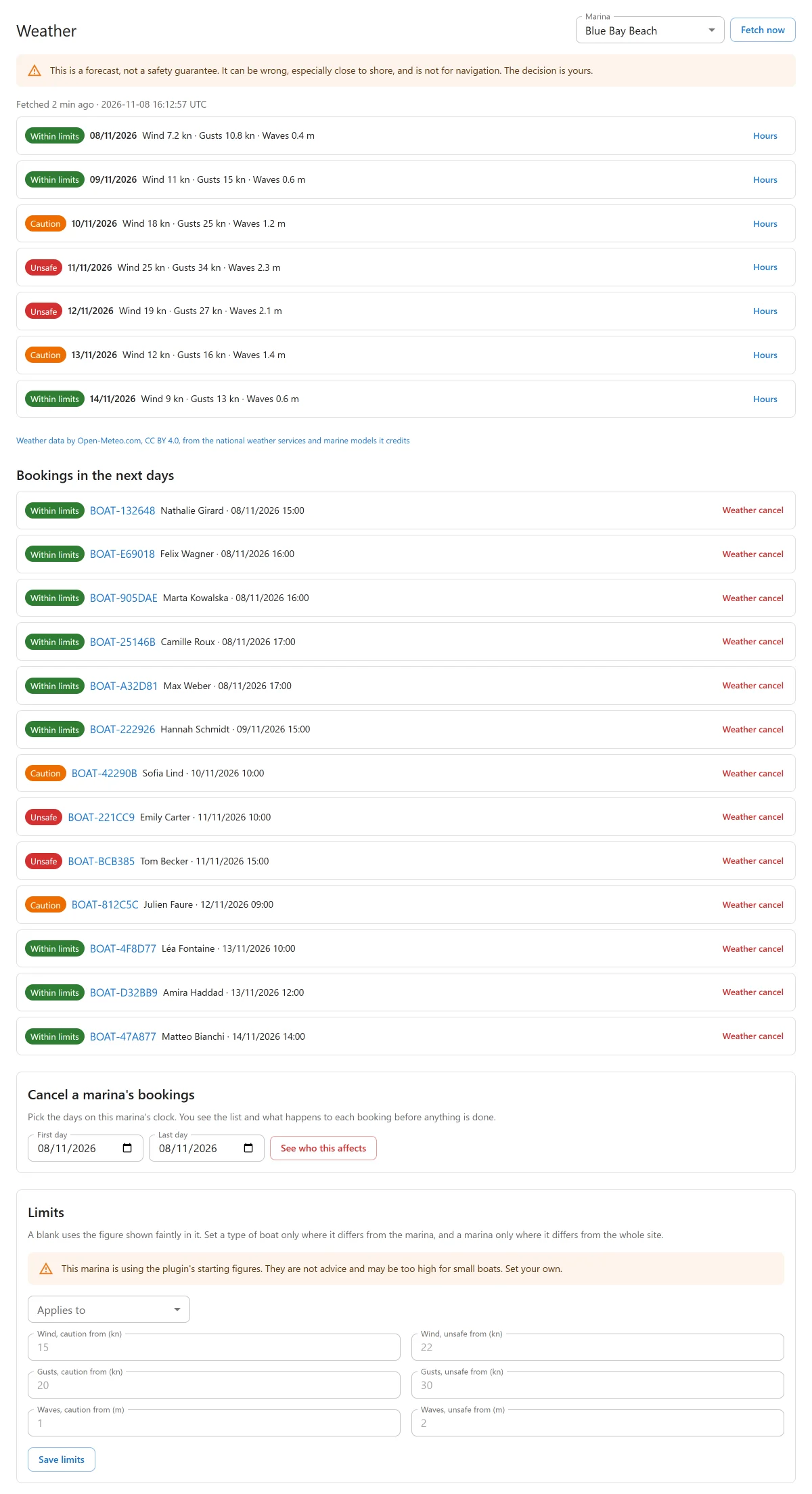
On the Weather screen, the Limits card sets when wind, gusts and waves read as caution and unsafe:
- Wind, caution from and Wind, unsafe from;
- Gusts, caution from and Gusts, unsafe from;
- Waves, caution from and Waves, unsafe from.
Applies to chooses Every marina on this site, one marina (Every boat at this marina), or one type of boat at one marina. Set a type of boat only where it differs from the marina, and a marina only where it differs from the whole site. A blank uses the figure shown faintly in it. Press Save limits.
The plugin ships with starting figures. They are not advice, and the screen warns while a marina uses them.
Reading the forecast
Each day and each booking has a status:
| Status | Means |
|---|---|
| Within limits | Every hour is below the caution figures. |
| Caution | A figure reached a caution limit. |
| Unsafe | A figure reached an unsafe limit. |
| Unknown | The forecast is out of date, a figure is missing, or the forecast does not cover the hours. That does not mean the weather is fine. |
A day is judged by its worst hour on the marina’s clock, night included. A booking is judged over its own remaining hours, with its boat’s type. A marina on a lake has no wave figures, so its days read as unknown.
The Weather screen shows, per marina, the days with their status, Hours for the hour-by-hour figures, the forecast’s age, and Bookings in the next days.
The forecast also shows:
- on the Timeline: a strip of day chips above the grid, and a dot on a day at caution or unsafe;
- on a booking’s page: the side panel Weather, with the booking’s status;
- in the dock app: a line on the booking and on the last step, to read, with no answer needed.
Cancelling for the weather
From the Weather screen (or Weather cancel on one booking):
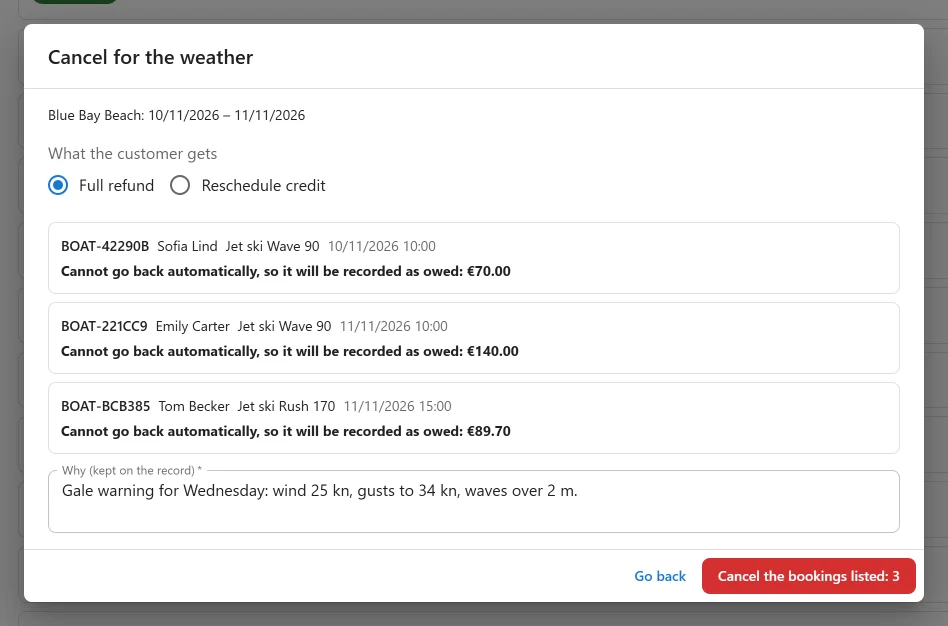
- Choose the marina at the top, then in the card Cancel a marina’s bookings pick the days (First day, Last day) and press See who this affects.
- The window Cancel for the weather lists each booking and what it would get. Choose What the customer gets: Full refund or Reschedule credit.
- Enter Why (kept on the record).
- Press Cancel the bookings listed, which shows how many there are.
Each booking is cancelled on its own. One failing stops nothing else. The customer’s own cancellation policy does not apply: a storm is not their choice.
You need permission to edit payments and to edit bookings.
Full refund
A payment made online is refunded through its payment method. Money that cannot go back automatically, such as cash, is recorded as owed: the result says “Still OWED to the customer”. Record the refund on the booking once you have handed it back.
If a refund fails, the booking stays cancelled and reads failed until you try again. Trying again only refunds what is still held, with the outcome first chosen.
Reschedule credit
The customer gets a single-use code for what they paid, valid for the months set in settings. The money stays with you. Any part above the price of the next booking is not kept, which the window and the customer’s email both say. Credit needs the Coupons app.
What the customer is told
The email says only what is true at that moment: refund sent, still owed, not completed yet, or the credit code. With the Notifications app off, nothing is sent and the result says “The customer was not emailed. Tell them yourself.”
A booking cancelled for the weather says so on its page, with who did it and why. A boat already out at the dock cannot be cancelled.
Switching it off
With the app off, nothing is fetched and the Timeline and dock show no forecast. Forecasts, limits and the cancellation record are kept.
Current limits
- No customer-facing forecast.
- A day is judged over all its hours, not only your opening hours.
Quick Links
Share