

Contents
On this page
Emails and alerts - Plugixa Boat Rental
The plugin emails the customer when they book and when they have paid, and emails you about every new booking. Every message is logged against its booking, with the reason when one could not be sent. With Pro, browser alerts PRO can also tell you about new bookings and payments while the admin is open.
Emails are the Notifications app, part of the free plugin and on by default.
Sending settings
Open Plugixa Boat Rental -> Settings -> Notifications.
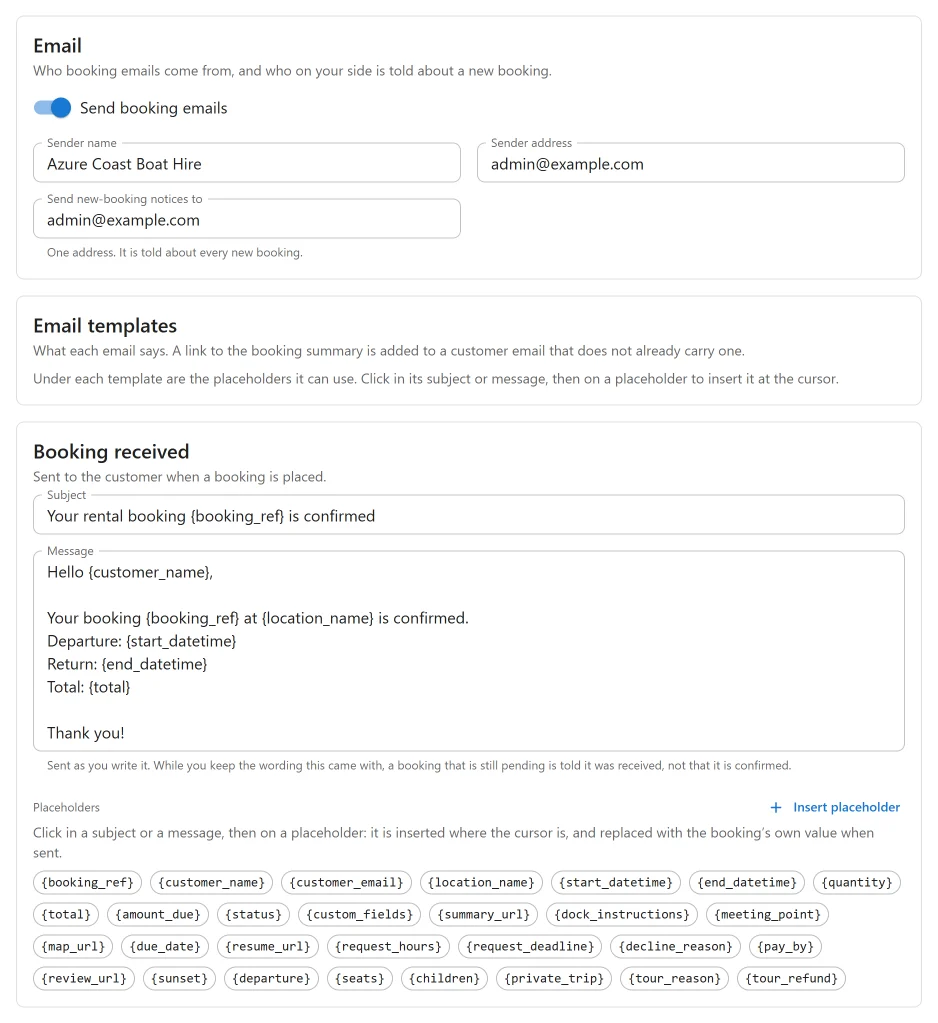
The Email card says who the emails come from and who on your side is told about new bookings:
| Setting | Default | What it does |
|---|---|---|
| Send booking emails | On | Off, no email below is sent, to customers or to you. |
| Sender name | Your site’s title | The name the emails come from. |
| Sender address | The WordPress admin email | The address the emails come from. |
| Send new-booking notices to | The WordPress admin email | One address, told about every new booking. |
Emails are plain text and are sent through WordPress (wp_mail()), so an SMTP plugin you
use for the rest of the site sends them too. Use a sender address on your own domain: many
mail providers drop mail that claims to come from a domain the server does not send for.
The three emails
| Sent to | When | |
|---|---|---|
| Booking received | The customer | A booking is placed, on your site or by your team. |
| New booking notice | Send new-booking notices to | A booking is placed. |
| Payment received | The customer | A booking becomes paid in full. |
Each has a Subject and a Message you can rewrite. The defaults are:
Booking received
Subject: Your rental booking {booking_ref} is confirmed

Hello {customer_name},

Your booking {booking_ref} at {location_name} is confirmed.
Departure: {start_datetime}
Return: {end_datetime}
Total: {total}

Thank you!
New booking notice
Subject: New rental booking {booking_ref}

A new booking {booking_ref} was placed by {customer_name} at {location_name}.
Payment received
Subject: Payment received for {booking_ref}

Hello {customer_name},

We've received your payment for booking {booking_ref}. Total: {total}.

Thank you!
Booking received is sent as you write it. While you keep the wording it came with, a booking that is still Pending is told it was received and is awaiting confirmation, not that it is confirmed.
The free plugin sends no email when you later confirm, cancel or complete a booking yourself. Reminders before a trip and other scheduled emails come with Pro: see SMS, Telegram, WhatsApp and the unfinished booking follow-up PRO.
What is added to customer emails
- A link to the booking. When a booking summary page is chosen (Settings -> Bookings
-> Pages), every customer email ends with “View or manage your booking:” and the link,
unless your template already carries
{summary_url}. Without a summary page, no link is sent. - A calendar file. Each customer email carries a
.icsfile with the departure and return, so the trip lands in the customer’s calendar at the right time wherever they open it.
Placeholders
Under each template are the placeholders it can use. Click in the subject or the message, then click a placeholder to insert it at the cursor. Every template can use every placeholder:
| Placeholder | Stands for |
|---|---|
{booking_ref} |
The booking reference |
{customer_name} |
The customer’s name |
{customer_email} |
The customer’s email address |
{location_name} |
The location booked |
{start_datetime} |
When the rental starts |
{end_datetime} |
When the rental ends |
{quantity} |
How many boats were booked |
{total} |
The total, with the currency symbol |
{amount_due} |
What is still to pay, with the currency symbol |
{status} |
The booking’s status |
{custom_fields} |
What the customer answered in the fields your booking form adds, one to a line |
{summary_url} |
A link to the booking summary |
{dock_instructions} |
The location’s dock instructions: where to go and what to bring |
{meeting_point} |
Where to meet: the location’s meeting point, or else its address |
{map_url} |
A map link to the meeting point, from the location’s coordinates or its address |
Dates and times are written in your date and time formats, on the marina’s clock. A
placeholder the booking has no value for is left empty. Pro apps add their own, such as
{review_url} for the review invitation
PRO.
Emails you send yourself
Email to customer on a booking’s Payments panel sends the customer a link to pay what is due. It goes whenever you click it, even with Send booking emails off. See Payments.
Notices about money
Some events need somebody to act, so the plugin emails Send new-booking notices to about them whatever the email settings say:
| Subject | Sent when |
|---|---|
| Late payment needs attention | A payment arrived after the booking’s hold ran out, and its boat has since been booked by someone else. |
| Overpayment to refund | A booking received more than it owed. |
| A refund failed | A payment provider could not complete a refund PRO. |
| Payment waiting at your provider | A provider took the payment but has not released it to you PRO. |
| Held payment refused | A provider refused a payment it had been holding PRO. |
| A payment was disputed | A customer’s bank opened a dispute or chargeback PRO. |
Each names the booking reference and says what to do next.
The message log
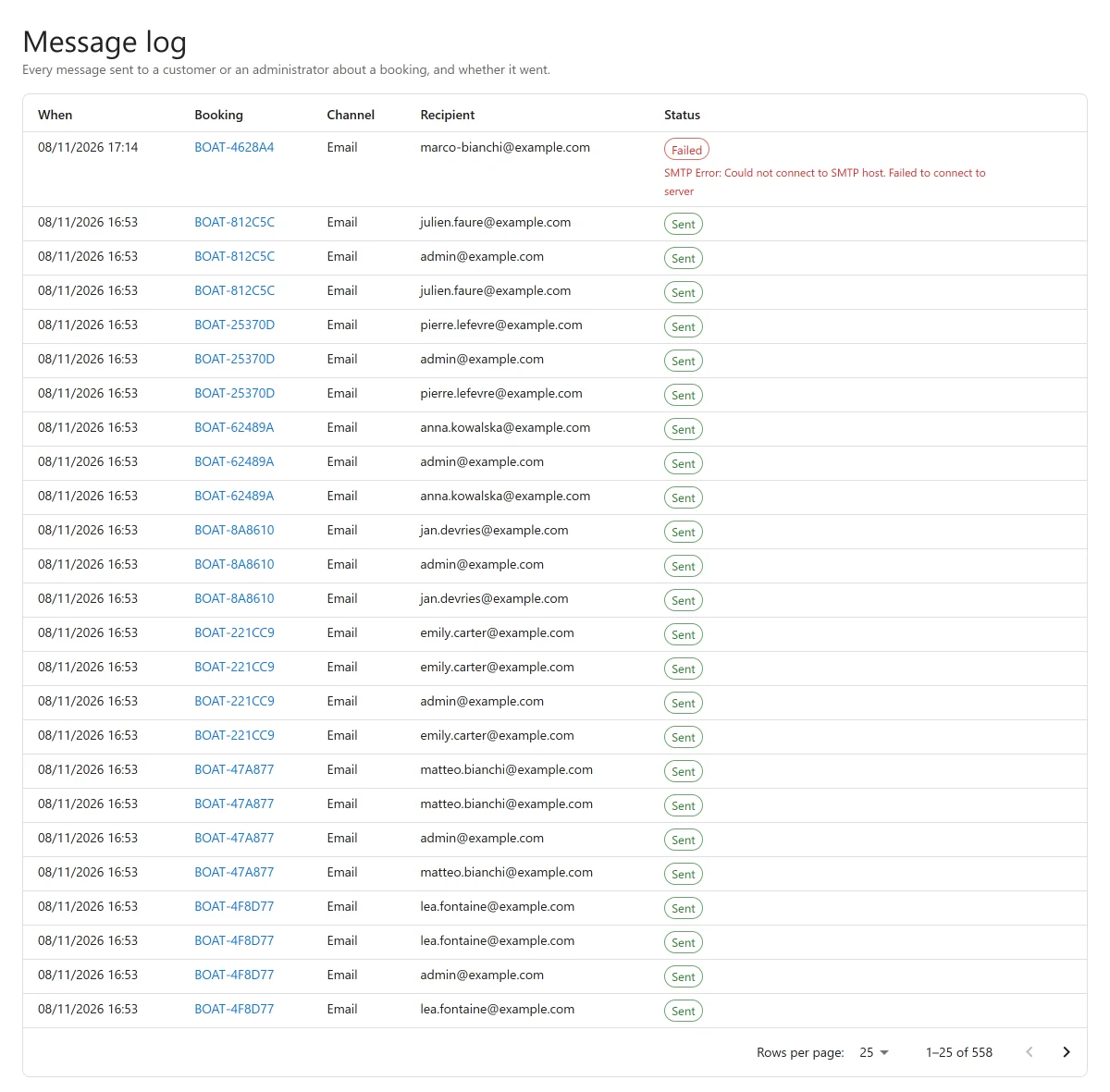
Every message sent about a booking is recorded: emails to the customer and to you, and with Pro also texts and chat messages PRO. Each row has When, Channel, Recipient and Status. When a message could not be sent, the status is Failed and the reason WordPress gave is shown under it.
- On a booking’s page, the Message log panel lists that booking’s messages. “No message has been sent about this booking yet.” means nothing was attempted.
- View all opens the whole log: every message, newest first, with the booking each one is about.
Switching emails off
There are two switches, and they do different things:
- Send booking emails, in Settings -> Notifications, stops the three emails above. The notices about money and the payment link still go.
- The Notifications app, in the App manager, stops the emails above, the notices about money, the payment link and the messages Pro apps send, and hides the Notifications settings and the message log. Pro apps that send messages, such as reminders, SMS, reviews or the unfinished booking follow-up, need it on.
Browser alerts PRO
Browser alerts PRO show a desktop notification when a booking, a request to book or a payment comes in while the admin is open in a tab, even one you are not looking at.
It is the Browser alerts app of Pro, off by default. Switch it on in the App manager, then open Plugixa Boat Rental -> Settings -> Browser alerts.
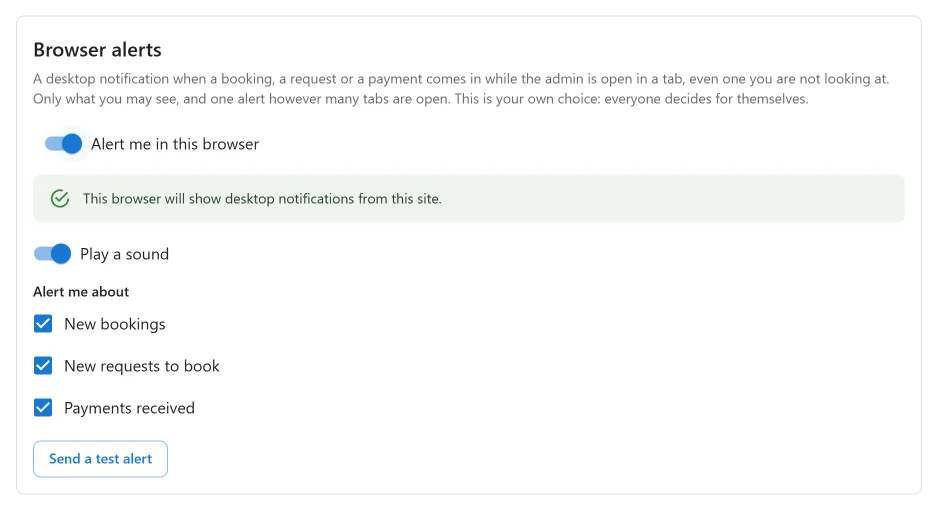
| Setting | What it does |
|---|---|
| Alert me in this browser | Turns alerts on for you. |
| Alert me about | New bookings, New requests to book, Payments received. |
| Play a sound | A short two-note chime with each alert. |
| Send a test alert | Shows “Alerts are working” so you can check the browser allows it. |
These are your own choices: everyone on your team decides for themselves, and alerts are off for each person until they switch them on.
How it behaves:
- The tab you are looking at shows an on-page message with Open. A tab in the background raises a desktop notification; clicking it opens the booking.
- With several admin tabs open, you get one alert, not one per tab.
- Opening the admin does not announce what came in before. Only new bookings and payments from then on are told.
- You hear only about what you may see: a person limited to some marinas is told only about theirs, and payments only reach those who may read payments.
- Bookings brought in by an import are never announced.
Browsers show desktop notifications only on sites served over HTTPS, and only once you allow them. The settings say when this browser cannot show them, has blocked them, or the site is not on HTTPS. In each case alerts still appear on the page while it is open.
Quick Links
Share