

Contents
On this page
App manager - Plugixa Boat Rental
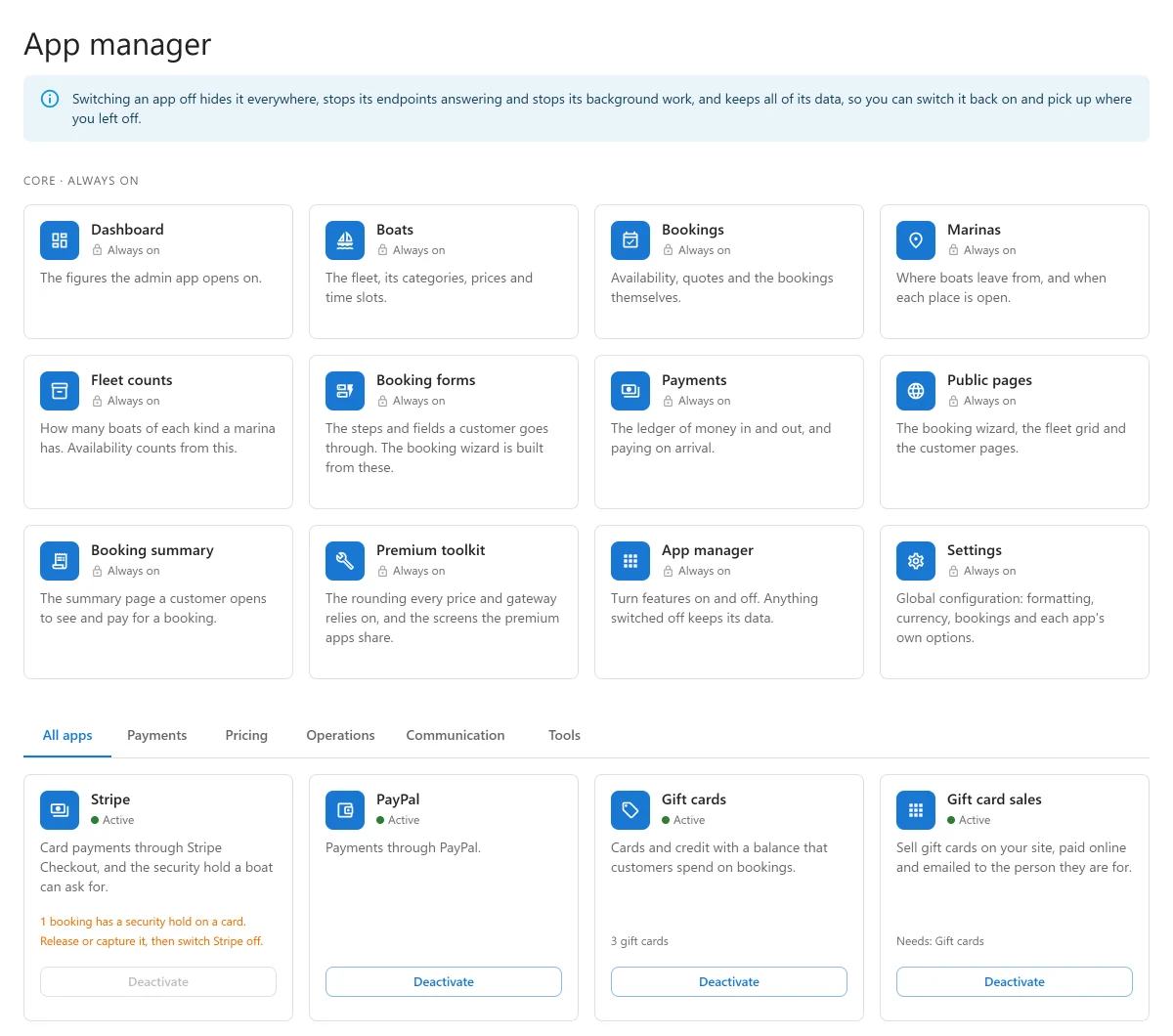
The plugin is built from apps: one for the calendar, one for emails, one for each payment provider, and so on. The App manager is where you switch the optional ones on and off, so the admin shows only what your business uses.
Open Plugixa Boat Rental -> App manager, the last item of the Configuration group. It needs permission to manage settings; a WordPress administrator always has it.
What “off” means
The note at the top of the screen says it: switching an app off hides it everywhere, stops its endpoints answering and stops its background work, and keeps all of its data, so you can switch it back on and pick up where you left off.
In practice, an app that is off:
- disappears from the sidebar, the settings tabs and a booking’s page;
- stops answering its part of the REST API, so nothing outside the admin can use it either;
- stops its scheduled jobs, such as hourly reminders;
- keeps its records and its settings. Nothing in the App manager deletes anything.
A link to the screen of an app that is off says the app is switched off, with the way to switch it back on.
After you switch an app, the page reloads so the sidebar matches.
Switching off a pricing or tax app does not change bookings already made: their totals were fixed when they were saved. A booking moved to other dates while the app is off is priced again without it.
Core apps
The first row, Core · always on, is what the plugin is made of. These cards say Always on and have no button.
| App | What it is |
|---|---|
| Dashboard | The figures the admin app opens on. See Dashboard. |
| Boats | The fleet, its categories, prices and time slots. See Boats. |
| Bookings | Availability, quotes and the bookings themselves. See Bookings. |
| Marinas | Where boats leave from, and when each place is open. See Marinas. |
| Fleet counts | How many boats of each kind a marina has. See Units. |
| Booking forms | The steps and fields a customer goes through. See Booking forms. |
| Payments | The ledger of money in and out, and paying on arrival. See Payments. |
| Public pages | The booking wizard, the fleet grid and the customer pages. |
| Booking summary | The summary page a customer opens to see and pay for a booking. |
| App manager | This screen. |
| Settings | Formatting, currency, bookings and each app’s options. See Settings. |
| Premium toolkit PRO | The rounding every price and payment relies on, and the screens the Pro apps share. |
Optional apps
Below the core row, tabs sort the optional apps by what they are for. All apps lists every one. Each card shows Active or Inactive and a button: Deactivate or Activate.
Free apps
| App | Default | What it does |
|---|---|---|
| Calendar | On | Every booking on a month or week calendar. See Booking calendar. |
| Notifications | On | The booking emails and the log of every message. See Emails and alerts. |
| Import | Off | Bring marinas, boats and bookings in from a CSV file. See Import and export. |
| Export | On | Download bookings, customers, payments and boats as CSV files. See Import and export. |
Import is off by default because moving to the plugin happens once. Switch it on for the move, and off again afterwards if you like.
In the free plugin the screen also says “More apps come with Pro.” with a link to what Pro adds.
Pro apps PRO
Payments
| App | Default | Needs | See |
|---|---|---|---|
| Stripe | On | Stripe | |
| PayPal | On | PayPal | |
| Mollie, Adyen, Klarna | On | Mollie, Adyen and Klarna | |
| Deposits | On | Deposits and balance | |
| Monthly payments | On | Stripe | Deposits and balance |
| Gift cards | On | Gift cards | |
| Gift card sales | Off | Gift cards | Gift cards |
| Boat owners and payouts | Off | Boat owners | |
| WooCommerce checkout | Off | WooCommerce | WooCommerce checkout |
Pricing
| App | Default | See |
|---|---|---|
| Pricing rules | On | Pricing rules |
| Coupons | On | Coupons |
| Extras | On | Extras and fuel |
| Tax rates | On | Tax and PDF invoices |
| Fuel | On | Extras and fuel |
| Customer groups | On | Pricing rules |
Operations
| App | Default | See |
|---|---|---|
| Charters | On | Multi-day charters |
| Shared trips by the seat | On | Shared trips |
| Sunset departures | On | Sunset departures |
| Timeline | On | Booking calendar |
| Skippers and crew | On | Skippers |
| Waivers and documents | On | Waivers and documents |
| Dock app | On | The dock app |
| Maintenance | On | Maintenance |
| Weather | On | Weather |
| Numbered units | On | Units |
| Cancellation and account | On | The customer’s account |
| Reschedule | On | The customer’s account |
| Request to book | On | Request to book |
| Invoice PDF | On | Tax and PDF invoices |
| Calendar sync (iCal) | Off | Calendar sync |
| Boat tracking link | Off | The dock app |
| Self check-in codes | Off | Self check-in codes |
Communication
| App | Default | Needs | See |
|---|---|---|---|
| Reminders and reports | On | Notifications | Messaging |
| SMS | On | Notifications | Messaging |
| Telegram | On | Notifications | Messaging |
| Off | Notifications | Messaging | |
| Browser alerts | Off | Emails and alerts |
Sales and marketing
| App | Default | Needs | See |
|---|---|---|---|
| Verified reviews | Off | Notifications | Verified reviews |
| Unfinished booking follow-up | Off | Notifications | Messaging |
| Agent sales | Off | Agent sales | |
| Boat clubs | Off | Boat clubs |
Staff and tools
| App | Default | See |
|---|---|---|
| Roles and permissions | On | Roles and staff access |
| Staff access | On | Roles and staff access |
| Reports | On | Reports |
| Dark appearance | On | A dark look for the admin app. |
| White label | On | White label and multisite |
| Network sites | On | White label and multisite |
| Demo data | On | Demo data |
| Webhooks | Off | Webhooks |
| API keys | Off | REST API and API keys |
Features that need the unlimited-sites licence
Some Pro apps, or parts of them, need a Pro licence for unlimited sites: Boat owners and payouts, Boat clubs, WooCommerce checkout, White label, API keys, copying settings between sites in Network sites, and limiting a role to some marinas in Roles and permissions. On a single-site licence, anything set up earlier keeps working; only new use is refused. See Free vs Pro.
Apps that depend on others
An app marked Needs runs only while what it needs is on. If you switch off Notifications, the apps that need it stop too, and their cards say “Off because something it needs is off.” Their own switch keeps its position, so they come back when Notifications does.
When an app cannot be switched off
Some Pro apps refuse to be switched off while something is in progress that would break without them. The card says why and what to do first. For example:
| App | Refused while |
|---|---|
| Stripe | A booking has a security hold on a card, is being paid by the month, or has a payment still waiting for an answer. |
| PayPal, Mollie, Adyen, Klarna | A payment is still waiting for an answer. |
| Monthly payments | A booking is still being paid by the month. |
| Charters | An active boat is rented as a charter. |
| Shared trips by the seat | An active boat is sold by the seat. |
| Numbered units | A marina counts its boats by numbered unit. |
| Skippers and crew | A booking still to come has a skipper or crew, or an active boat must have a skipper. |
| Waivers and documents | A booking still to come has documents or a passenger list. |
| Timeline | A block has not ended. |
| Dock app | A boat is out and has not been checked in. |
| Request to book | A booking request is waiting for your answer. |
| Gift card sales | A gift card order is waiting for its payment, or a sold card has not been emailed yet. |
| Boat owners and payouts, Agent sales | A payout or statement is still a draft. |
| Boat clubs | A membership fee is still open. |
A refusal only stands in the way of switching off. An app that is off can always be switched back on.
If your licence ends
The switches of Pro apps are kept when a licence lapses, so a renewed licence brings back the same set of apps.
Quick Links
Share