

Contents
On this page
The customer's account - Plugixa Boat Rental
The customer’s account PRO turns the free bookings list into a place where customers look after their own bookings: pay the balance, cancel with the refund shown first, move a booking to other dates, and book the same boat again. This page also covers the reminder email before departure and the daily report to staff.
| App in the App manager | What it adds | On by default |
|---|---|---|
| Cancellation and account | Cancellation policies and refunds, Pay balance, Book again | Yes |
| Reschedule | Reschedule | Yes |
| Reminders and reports | The reminder before departure, the daily report | Yes, but both emails are off until you switch them on |
The account page
Put [plugixa_boat_rental_account] on a page (see
Shortcodes and blocks). In every
edition it shows:
- a signed-in customer’s bookings;
- for a guest, a Find your booking form: “Enter the reference from your confirmation and the email address you booked with.”
The free plugin already lets a customer cancel a pending, confirmed or paid booking there, up to the Cancellation cut-off (hours) under Settings -> Bookings: “How long before departure a customer can still cancel.” Past it, a customer cannot cancel at all, in any edition.
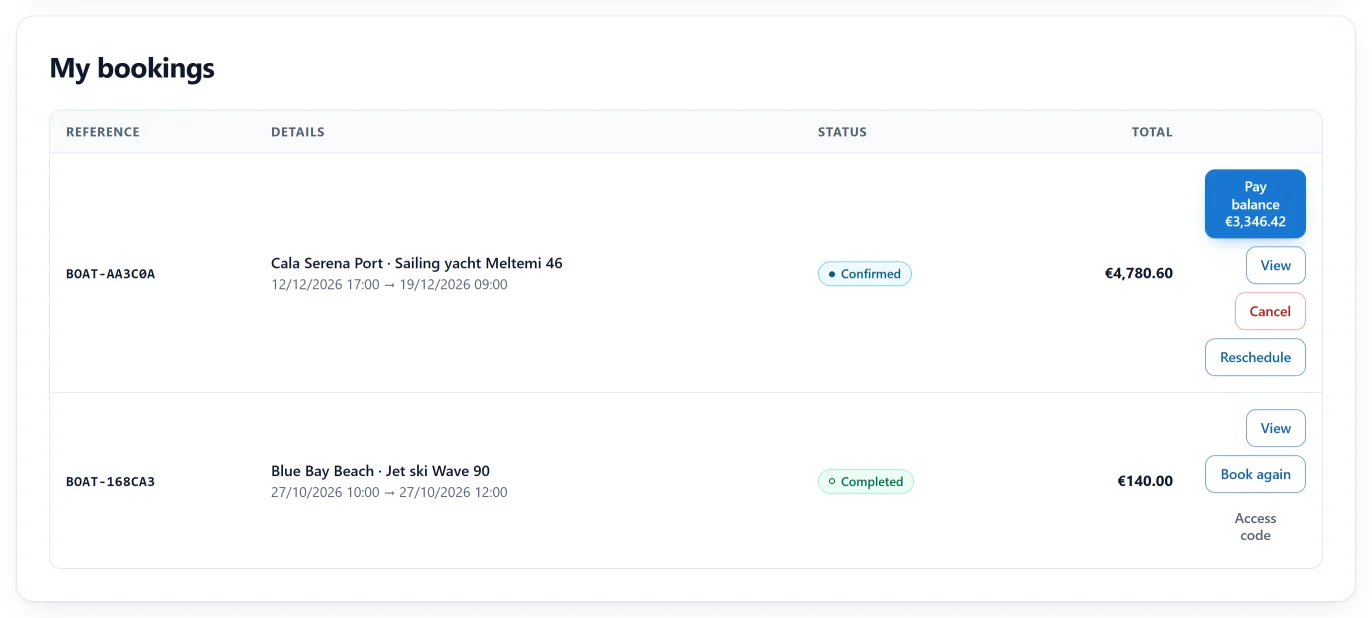
Pro adds these buttons to each booking:
| Button | Shown when |
|---|---|
| Pay balance … | The booking is pending, confirmed or paid, still owes money, and you have chosen a booking summary page under Settings -> Bookings -> Pages. It opens that page, where the customer chooses how to pay |
| Cancel | The booking can still be cancelled. The refund is shown before the customer confirms with Cancel booking |
| Reschedule | The booking is pending, confirmed or paid |
| Book again | The booking can no longer be cancelled, for example a past trip. It opens the boat’s own page, or your booking page |
Cancellation policies
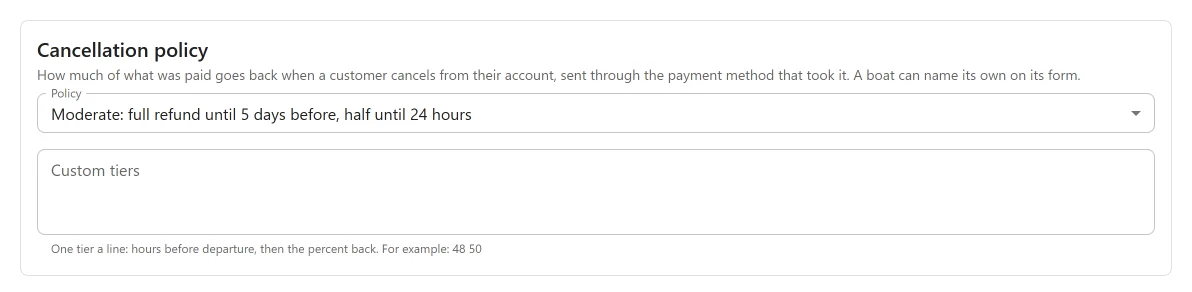
The policy decides how much of what the customer has paid goes back when they cancel from their account. Set the site’s policy under Plugixa Boat Rental -> Settings -> Cancellation: “How much of what was paid goes back when a customer cancels from their account, sent through the payment method that took it. A boat can name its own on its form.”
| Policy | Refund |
|---|---|
| Flexible | Full refund until 24 hours before departure |
| Moderate (the default) | Full refund until 5 days before, half until 24 hours before |
| Strict | Full refund until 14 days before, half until 7 days before |
| Custom | The tiers you write under Custom tiers |
After the last tier, nothing goes back.
Custom tiers: one tier a line, hours before departure, then the percent back. For example:
168 100
48 50
That is a full refund up to a week before, half up to 48 hours before, and nothing after.
To give one boat a different policy, open the boat’s form and choose in its Cancellation policy panel. The site’s policy follows the setting above.
What the customer sees
Pressing Cancel first shows what they will get back: “Under this booking’s cancellation policy, …% of what you have paid goes back. You have paid …, so … will be refunded.” With nothing paid yet: “You have not paid anything yet, so there is nothing to refund.” They choose Cancel booking again or Keep booking.
After cancelling: “Your booking has been cancelled. Refund: …”. The booking then shows Refunded …, or Refund due … if part of the refund could not be made.
How the refund is made
- The amount is worked out by the server at the moment of cancelling, from the hours left to departure.
- It is sent back through the way the customer paid, newest payment first: to the card through Stripe, to PayPal, back onto a gift card, and so on.
- Money taken in person is only recorded as refunded. Hand it back yourself.
- If a provider refuses, the booking stays cancelled and what is still owed is kept on the booking. Its Cancellation panel in the admin says “The refund did not go through in full. Refund the rest from the payments below.”
The booking’s Cancellation panel shows what happened: the percentage, what was due back and what was refunded.
The policy runs only when the customer cancels. When you cancel a booking yourself in the admin, you decide any refund by hand from its payments panel.
Rescheduling
The customer presses Reschedule and sees Choose new dates for this booking, with New departure and New return. They press Save new dates.
- The new dates must suit the boat exactly as a new booking would: availability, buffers, a fixed departure from the timetable, a charter’s check-in day and minimum nights.
- If the new dates cost a different amount, the customer is asked first: “These dates cost …. Your booking is … now. Confirm to move it at the new price.” and presses Confirm new dates and price. If the price moves again before they confirm, the change is stopped rather than made at a price they did not see.
- When it is done: “Your booking has been rescheduled.”
The booking is priced again for the new dates, with today’s pricing rules, and keeps its coupon. A higher price leaves the difference owing, which the customer can pay with Pay balance. A lower price is not refunded by itself: refund the difference from the booking’s payments panel if you want to.
The Cancellation cut-off does not apply to rescheduling. A booking request not yet accepted cannot be rescheduled.
Reminder before departure
Under Plugixa Boat Rental -> Settings -> Reminders and reports, the Reminders card sends each customer an email shortly before their trip.
| Setting | Default | What it does |
|---|---|---|
| Send a reminder before arrival | Off | Switches the reminder on. |
| Hours before arrival | 24 | “24 sends it a day ahead.” From 1 to 720. |
| Email subject | Empty | “Left empty, a standard subject is used”: “Reminder: your rental booking {booking_ref}”. |
| Email message | Empty | “Left empty, a standard message is sent”, with the location, departure and return, meeting point, map link and the location’s dock instructions. |
The subject and message take the same placeholders as your other emails. See Emails and alerts.
An hourly job sends it once per booking, to bookings in a status that keeps the boat taken (see Settings -> Bookings -> Statuses). A booking request not yet accepted is not reminded until it is accepted. The Notifications app must be on.
The daily report
The Daily report card on the same tab emails staff a short summary once a day.
| Setting | Default | What it does |
|---|---|---|
| Email a daily report | Off | Switches the report on. |
| Send it to | Empty | One or more email addresses, separated by commas. |
The report gives the number of bookings made in the last 24 hours and their booked value, leaving out bookings that are cancelled, refunded or expired. For more, see Reports.
Quick Links
Share