

Contents
On this page
Reports - Plugixa Boat Rental
Reports PRO show what your boats earned and how busy they were, for any dates you choose. Every table has its own CSV download. Nothing is stored for the reports: every figure is worked out from your bookings and payments when you open the screen, so a booking you change today shows in today’s figures.
Before you start
Reports is the Reports app in the App manager. It is on by default when Pro is installed. Open it from Plugixa Boat Rental -> Sales -> Reports.
To see the screen a person needs to be able to view both bookings and payments. The CSV buttons are shown only to people who may also export them. With Roles and permissions on, a role also needs the Open the reports screen, and a role limited to some marinas sees only those marinas’ figures.
Choosing the dates
One row of controls at the top decides what every tab counts:
| Control | What it does |
|---|---|
| From, To | The first and last day, both included. |
| Presets | Last 30 days, This month, Last month, Next 30 days, This year. They use your browser’s date. |
| Count bookings by | Trip date: bookings whose departure is in the dates. Date booked: bookings made in the dates. |
| Marina | One marina, or every marina. |
A window longer than 366 days keeps its last day and is cut to 366 days. If a date cannot be read, the report falls back to the last 30 days.
Money received, security holds and gift cards sold always go by the day they were recorded, whatever you choose under Count bookings by. How busy the boats were and skipper hours always go by the time on the water.
What counts as a booking
The figures count honoured bookings: not cancelled, refunded or expired, and not an unpaid hold whose time has run out. A no-show is honoured, because the customer paid for the boat.
Each currency is kept apart. If you take bookings in more than one currency, every figure and every chart has one line per currency. Amounts in different currencies are never added together.
Revenue
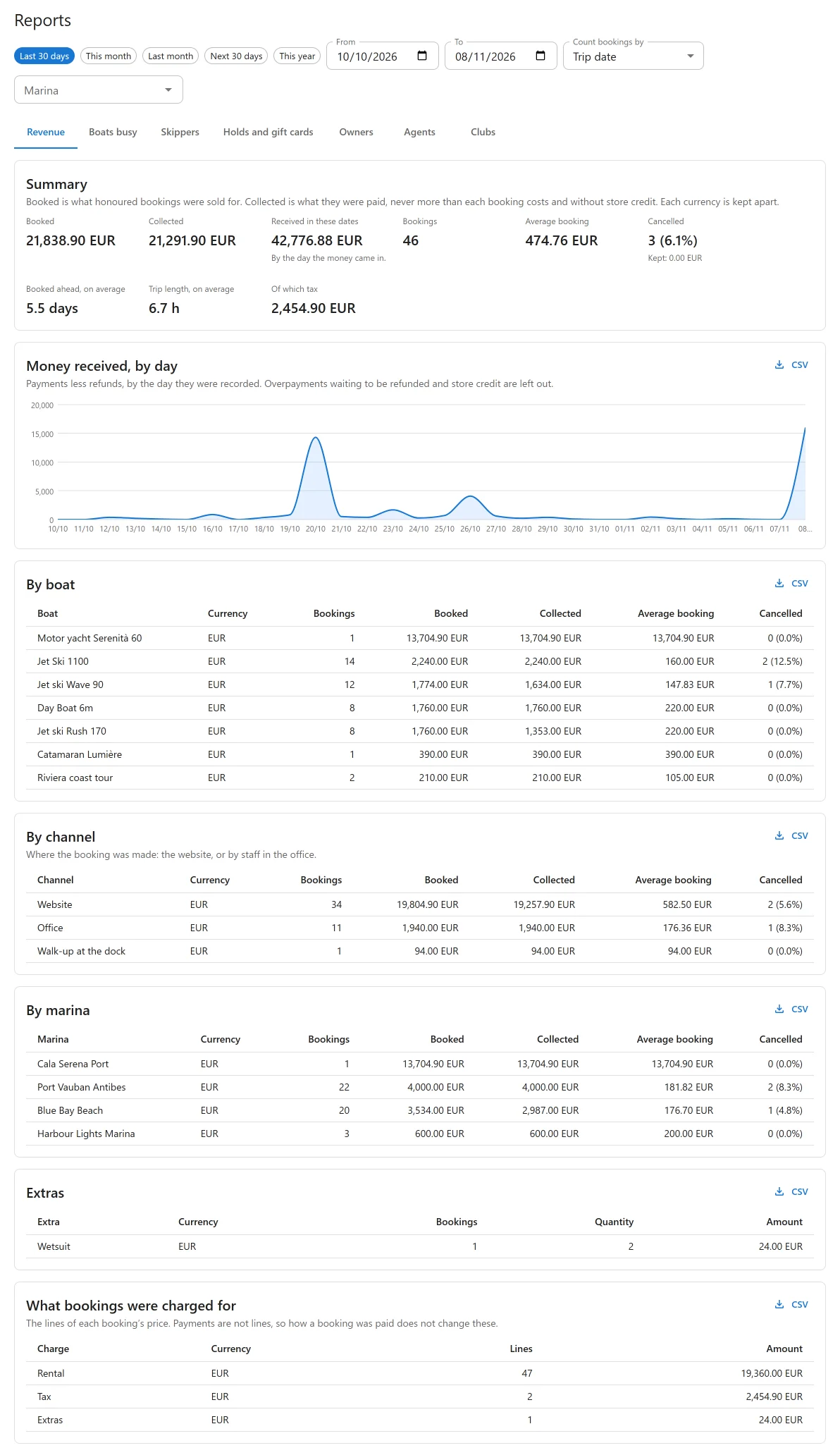
The Revenue tab starts with a Summary per currency:
| Figure | What it means |
|---|---|
| Bookings, Booked | How many honoured bookings, and what they were sold for. |
| Of which tax | The tax inside the booked amount. |
| Collected | What those bookings were paid, never more than each booking costs. Store credit from an earlier cancelled booking is left out: it was money you already held. |
| Cancelled | Cancelled bookings, their value, and what you kept from them. |
| Average booking, Booked ahead, on average, Trip length, on average | Per honoured booking. |
| Received in these dates | Payments less refunds, by the day they were recorded. |
Below it, Money received, by day charts the same received figure day by day. An overpayment waiting to be refunded is not counted as income.
Then the revenue tables:
- By boat, By marina and By channel: the same figures for each boat, each marina and each channel. The channel is where the booking was made: Website, Office or Walk-up at the dock.
- Extras: each extra sold on honoured bookings.
- What bookings were charged for: the lines of each booking’s price, such as Rental, Extras, Skipper, Fees, Fuel, Tax and Discounts. How a booking was paid does not change these.
Boats busy
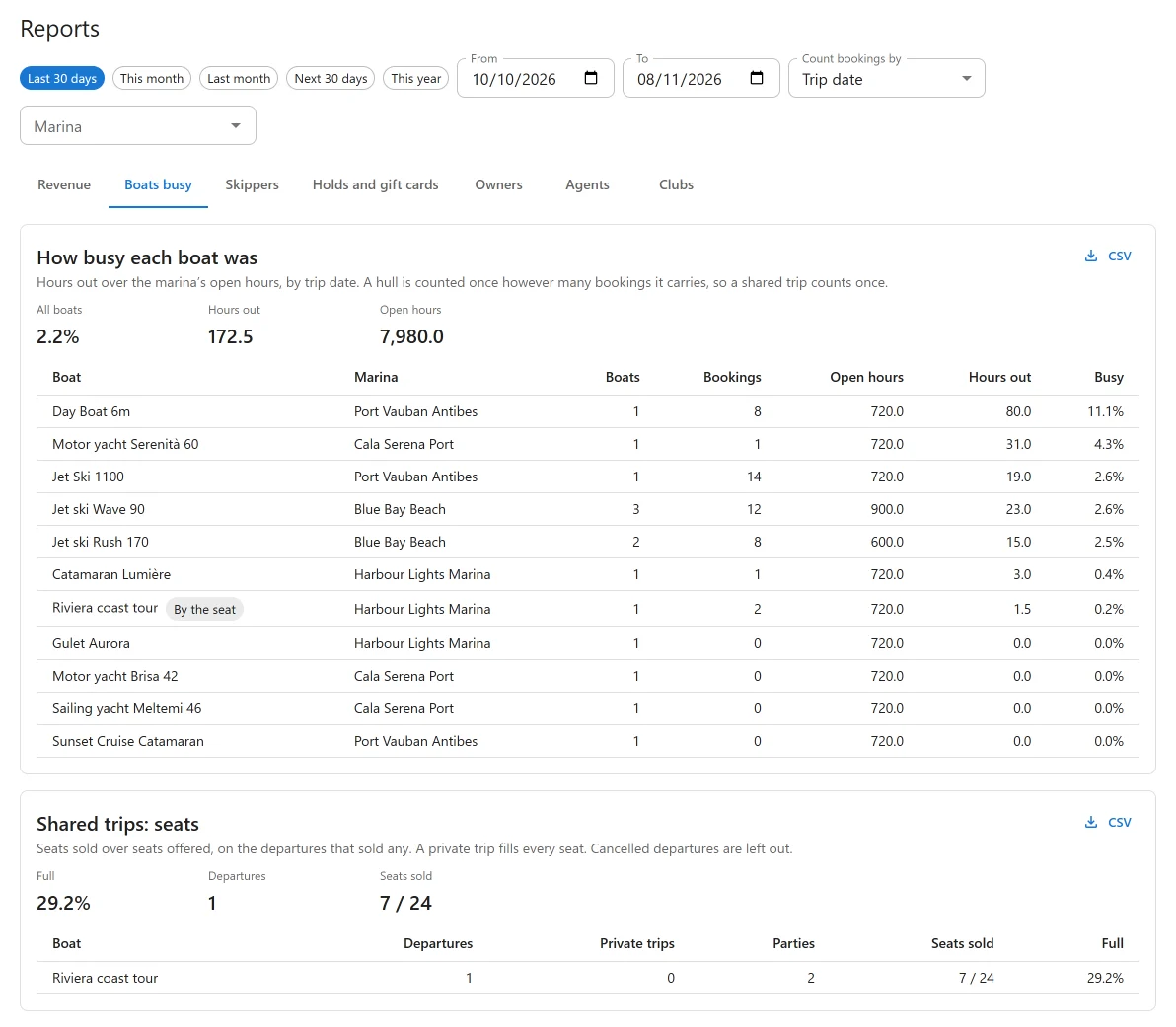
How busy each boat was compares the hours each boat was out with the hours its marina was open in those dates, by trip date.
- Open hours are each marina’s opening hours for each day, with its closures and dated exceptions, times the number of units it has now. A marina with no hours set counts the whole day.
- A hull is counted once however many bookings it carries at the same time. A shared trip with ten parties on one boat counts once, for its length.
- A charter over several days counts the open hours of each day, not its nights.
With the Shared trips app on, Shared trips: seats shows how full each departure was: seats sold over seats offered, on the departures that sold any. A private trip fills every seat, and cancelled departures are left out.
Skippers
Skipper hours lists each skipper and crew member with their hours, trips and days on honoured bookings in the dates. No-shows are left out, and two overlapping bookings, such as two parties of one shared trip, count once. A line under the table says how many bookings in those dates still need a skipper. This tab needs the Skippers app; while it is off the tab says so.
Holds and gift cards
| Section | What it shows |
|---|---|
| Security holds | Amounts authorised on customers’ cards against damage: On cards now, whatever the dates, and Taken in these dates, with how each ended (Still held, Captured, Released, Ran out). A hold is not part of any price and is not revenue until captured. |
| Paid ahead for trips still to come | Today, whatever the dates: what customers have paid on trips not yet sailed (Paid ahead), and what they still owe (Still to pay). |
| Gift cards | Gift cards sold in the dates, Outstanding gift card balance, Paid with gift cards and Store credit held. |
A gift card sold is not revenue. It counts as income when it is spent on a booking, and that is already in the Revenue tab. What cards still hold is money owed to customers.
Security holds come with Stripe, and gift cards with Gift cards.
Tabs added by other apps
Three more tabs appear when their app is on:
- Owners, with Boat owners and payouts: Revenue by owner, with each owner’s share, and Owner payouts, paid in the dates and owed today. The site’s own boats show as The site’s own boats.
- Agents, with Agent sales: Revenue by agent, with commission and what is owed on account, and Agent statements, settled in the dates and open today. Bookings with no agent show as No agent.
- Clubs, with Boat clubs: Membership and rental revenue side by side, and Utilization by members per plan. Membership fees belong to no marina, so a marina picked at the top narrows only the rental column.
CSV downloads
Each table has a CSV button that downloads what the table shows, for the same dates, basis and marina. A cell that starts like a spreadsheet formula is written as text, so opening the file in a spreadsheet never runs anything.
Limits to know
- Units are counted as they are now. A hull added or retired during the dates counts for the whole window.
- Maintenance and timeline blocks do not lower the open hours.
- On a day the clocks change, hours are one hour off.
- A skipper’s pay rate is not turned into a cost.
- If the dates hold more than 50,000 bookings, the busy figures stop counting and the screen says Too many bookings to count them all: choose fewer days.
Quick Links
Share