

Contents
On this page
Agent sales and commissions - Plugixa Boat Rental
Agent sales PRO let travel agents, hotels and concierges sell your trips on commission. Each agent gets a referral link, and with a login, a page on your site where they book for their customers at their agent rate. Every month you send each agent a statement: the commission you owe them, less what they owe you for bookings sold on account.
Agent sales work with either Pro licence.
Switching it on
Agent sales is the Agent sales app in the App manager. It is off by default. Once it is on you get:
- Plugixa Boat Rental -> Sales -> Agents: your agents, their links and balances.
- Plugixa Boat Rental -> Sales -> Agent statements: drafts and settled statements.
- An Agent panel on each booking’s page.
- Plugixa Boat Rental -> Settings -> Agents: commission, the referral cookie and the agents’ page.
- An Agent filter on the bookings list and an Agents tab in Reports.
Settings
Plugixa Boat Rental -> Settings -> Agents:
| Setting | Default | What it does |
|---|---|---|
| A new agent’s commission (%) | 10 | Filled in for each new agent. |
| Remember a referral link for (days) | 30 | A booking made within these days of following an agent’s link is theirs. The cookie only names the agent. |
| Draft every agent’s statement on the first of each month | On | Drafts every agent’s statement up to the last day of the month before. You check each one, send it and mark it settled. |
| Agents’ page | None | The page that holds the agents’ page shortcode. Emails to agents link to it. |
Adding an agent
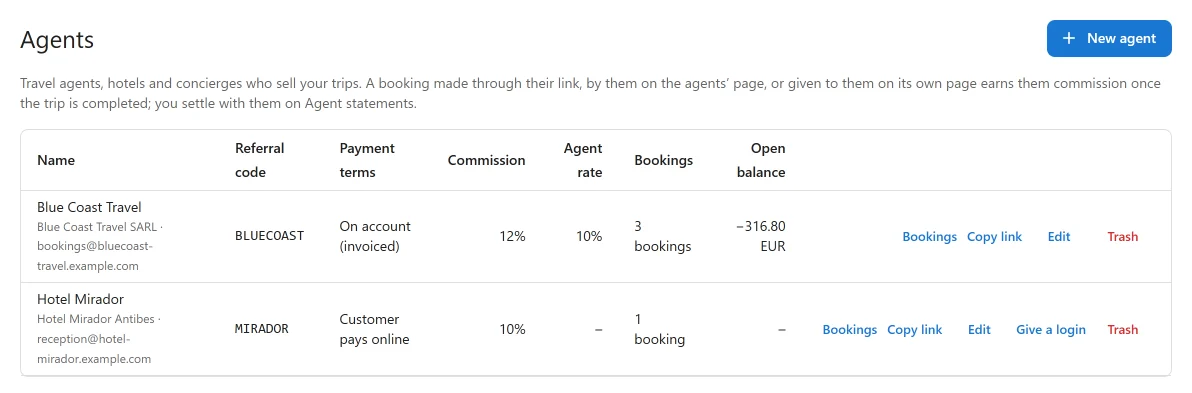
On Agents, click New agent:
| Field | What it does |
|---|---|
| Name, Agency, hotel or company, Email, Phone, Notes | Who they are. |
| Referral code | In their link. Empty: one is made from the name. It cannot change once a booking came through it. |
| Commission | A percentage of what each booking is paid before tax, or An amount a booking. |
| Agent rate (% off) | Taken off the bookings they make themselves on the agents’ page. Empty: none. |
| Payment terms | Customer pays online: their customers pay you as anybody else does, and you pay the agent their commission. On account (invoiced): their bookings are confirmed without payment, and they are invoiced on the monthly statement, less their commission. |
| Status | Active or Paused. A paused agent’s link earns nothing. |
| Portal login | An existing WordPress account, or click Give a login to make one for the agent’s email and send them a link to set its password. |
A change of terms applies to bookings made from then on. Bookings already made keep the terms they were made with.
How a booking gets its agent
| Way | What happens |
|---|---|
| Through their link | The agent shares their link, which ends in ?pbr_agent= and their code. It works on any page of your site. A booking made on the public booking form within the cookie days is theirs. The customer pays the normal price. |
| Booked by the agent | The agent, signed in, books on their page. The price shows a line such as “Agent rate (10% off)”, and the form has a field for the agent’s own reference. |
| On account | An agent with On account (invoiced) terms picks On account (invoiced to your agency) as the way to pay. The booking is confirmed at once, the form ends on “Booked on account”, and the customer is never asked to pay: their booking summary says it is paid through their agent. |
| Set by the office | On a booking’s page, the Agent panel: Set an agent, Change or remove it, on account or not, with Their reference. The new agent earns on the terms they have today; the price of the booking does not change. |
Only bookings made on the public booking form get an agent from a link or a signed-in agent. A booking keyed in by the office, sold at the dock or imported does not, whatever the browser carries. Once a statement has settled any of a booking’s commission, its agent can no longer be changed.
Page caching. The referral cookie is set when the page is built on the server. A page
served whole from a page cache never sets it, so exclude addresses with ?pbr_agent= from your
cache.
How commission is worked out
- Before tax. Commission is taken from the booking’s price before tax, after any discount, the agent rate included.
- From money collected. For customers who pay you, it counts what the booking was really paid, never more than it costs, with refunds off and store credit out. A booking paid half earns half; a refunded one earns nothing. For bookings on account, it counts the whole total, because the agent owes it.
- What the agent owes. For bookings on account: the total, less anything the customer paid you directly.
- Earned when the trip is completed. Before that it is never on a statement. Cancelled, refunded and expired bookings earn and owe nothing.
- A settled line is never changed. A refund after a settled statement is a negative line, carried into the next statement.
- Each currency is settled apart.
Statements
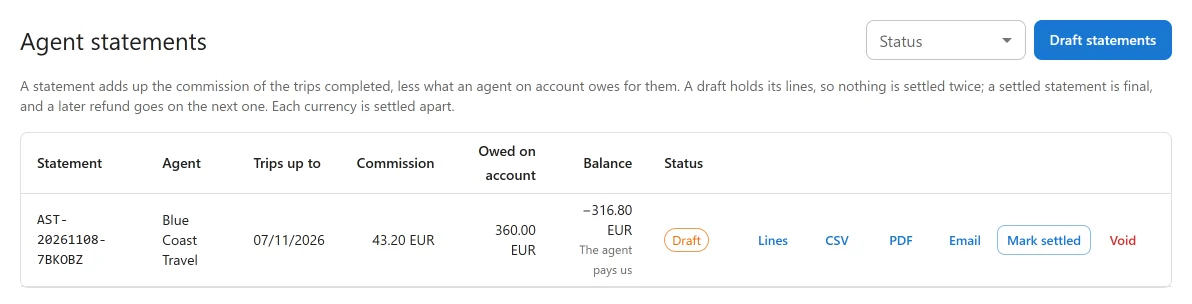
On Agent statements, click Draft statements, choose an agent (or Every agent) and Trips completed up to and including a day, then Make drafts. You get one draft per agent and currency, from every completed trip not yet on a statement. A statement’s balance is commission less what is owed on account: We pay the agent or The agent pays us.
For each draft:
- Email: send it to the agent to check. For an agent on account, this is their invoice.
- Mark settled: enter the payment’s Reference and a note, whichever way the money went. A settled statement is final. With Email the agent their statement ticked, they are emailed the statement.
- Void: its lines go back to waiting for the next statement.
- CSV and PDF: download it. Customers who came through the agent’s link, or were given to them by the office, are shown by first name only. Customers the agent booked themselves show the name they typed. No email, phone or address is on a statement.
Settling a statement on account does not record payments on the bookings, so the customers are not emailed “payment received” for money they paid the agent. Those bookings stay unpaid in their payments panel; the statement is the record.
The App manager will not switch the app off while a draft is waiting.
The agents’ page
Put this shortcode on a page and choose that page under Agents’ page in the settings:
[plugixa_boat_rental_agent_portal]
Add form="your-form-slug" to choose the booking form agents book with.
| Who opens it | What they see |
|---|---|
| Somebody signed out | A login form with a lost password link. |
| A login that is not an agent | “Not an agent login”, with a link to sign in with another account. |
| A paused agent | “Your agent account is paused”. |
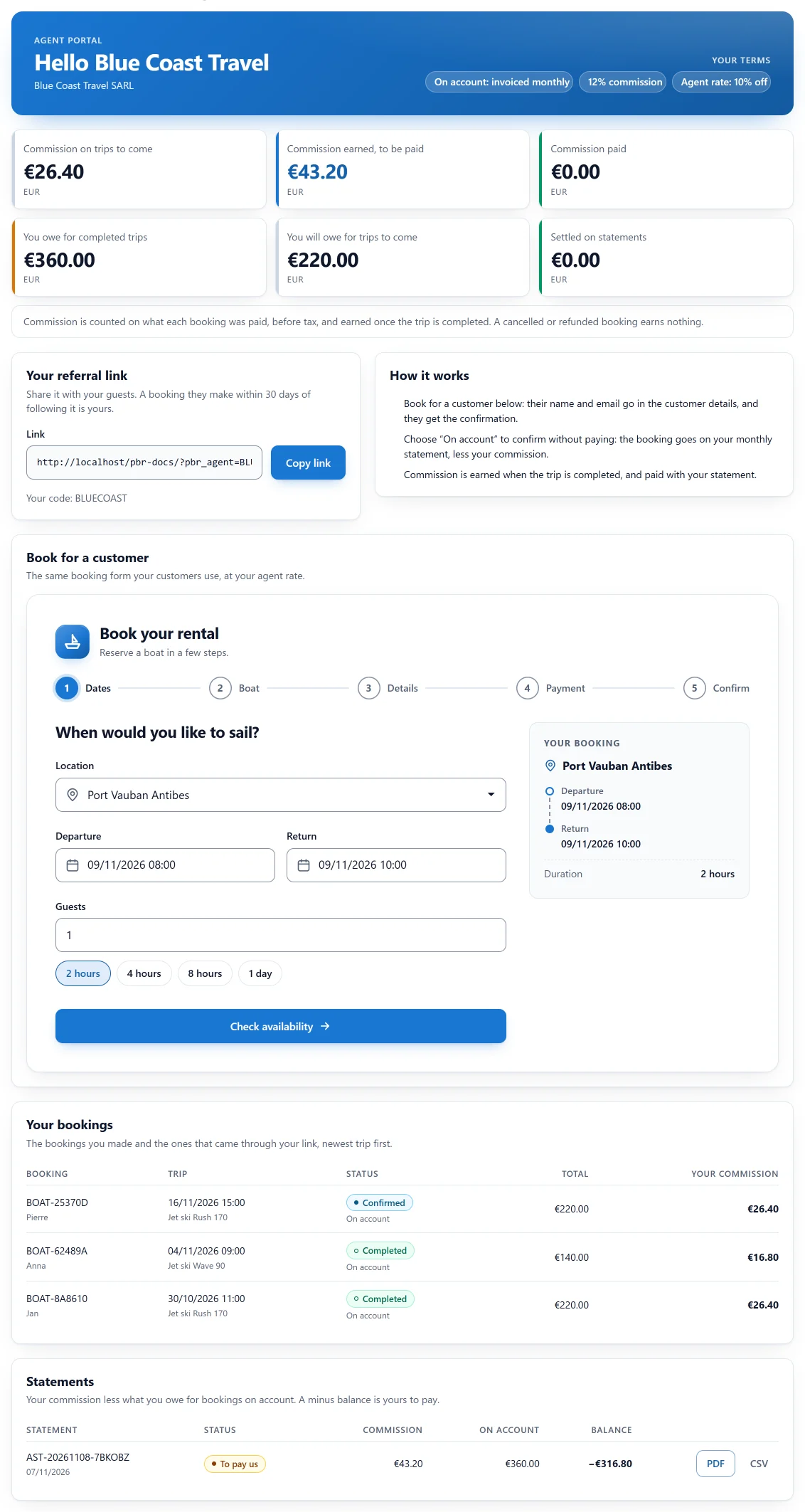
| An agent | Their terms, commission per currency (to come, earned to be paid, paid, and for agents on account what they owe), their referral link with a copy button, the booking form, their bookings with commission, and their statements with PDF and CSV downloads. |
Agents have no access to the booking admin. A login that is only an agent is sent from the WordPress dashboard to the agents’ page and shown no admin bar. An administrator linked to an agent to try the page keeps their dashboard.
Good to know
- The agent rate applies only to bookings the agent makes signed in. A customer who follows a link pays the normal price.
- A booking the agent makes is filed under the agent’s login, and the customer gets the confirmation email at the address typed in the form.
- There are no commission tiers or per-boat rates, and no block for the agents’ page: use the shortcode.
- An agent any booking came through cannot be deleted for good: move them to the trash. Their code then earns nothing.
Quick Links
Share