

Contents
On this page
Mollie, Adyen and Klarna - Plugixa Boat Rental
Mollie, Adyen and Klarna PRO are three more ways to pay online, beside Stripe and PayPal. Each sends the customer to the provider’s own hosted page and brings them back to their booking, so card and bank details never reach your site.
Each has its own tab under Plugixa Boat Rental -> Settings: Mollie, Adyen and Klarna. Each is an app in the App manager, on by default in Pro, and each has its own Offer payment by … switch, off on a new site. Everything on Payments about the payments panel and refunds applies to them too.
At a glance
| Mollie | Adyen | Klarna | |
|---|---|---|---|
| Customers see it as | Online payment (Mollie) | Online payment (Adyen) | Pay with Klarna |
| Webhook to add in the provider’s dashboard | No | Yes, a Standard webhook | No |
| Confirms a payment by | Reading it back from Mollie | A signed webhook (HMAC) | Reading it back from Klarna |
| Test mode | The key decides (test_ or live_) |
Use Adyen’s test environment, on by default | Use Klarna’s playground, on by default |
| Refunds from the booking | Yes | Yes | Yes |
| Refunds made in the provider’s dashboard reach the booking | Yes | Yes | No |
| Monthly payments, security holds | No | No | No |
Monthly payments and security holds go through Stripe only. A customer who chose to pay monthly is told “This kind of payment cannot be made with …” the provider’s name.
Mollie
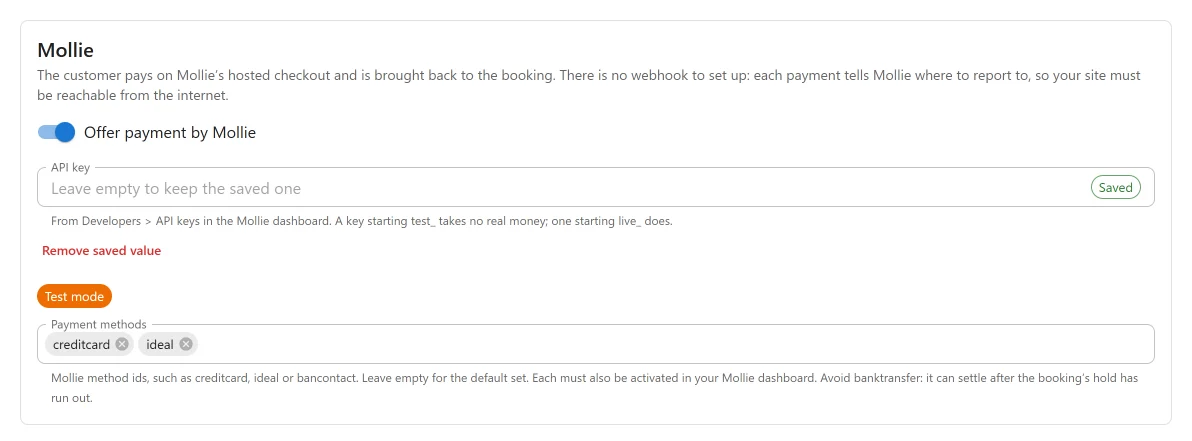
“The customer pays on Mollie’s hosted checkout and is brought back to the booking. There is no webhook to set up: each payment tells Mollie where to report to, so your site must be reachable from the internet.”
| Setting | Default | What it does |
|---|---|---|
| Offer payment by Mollie | Off | Offers Mollie to customers. |
| API key | Empty | “From Developers > API keys in the Mollie dashboard. A key starting test_ takes no real money; one starting live_ does.” A Test mode or Live mode chip beside it says which you have. |
| Payment methods | Empty | Mollie method ids, such as creditcard, ideal or bancontact. Empty offers creditcard, ideal and bancontact. Each must also be activated in your Mollie dashboard. |
Avoid banktransfer: it can settle days later, after the booking’s hold has run out and the boat
may have been booked by somebody else.
How Mollie payments are confirmed
Each payment carries its own report address, so there is nothing to add in Mollie:
https://example.com/wp-json/pbr/v1/payment/webhook/mollie
Mollie signs nothing and only sends a payment id. The plugin therefore reads the payment back from Mollie with your key every time, and acts on what Mollie says: paid, failed, cancelled or expired, and any refunds and chargebacks on it. A forged call can say nothing about money.
When the customer comes back, the payment is read the same way. A payment that is still open or pending shows as processing, and the report from Mollie settles it.
What Mollie receives
The amount and currency, a description with the booking reference (“Boat booking” and the
reference), the booking reference and payment type, the methods to offer, and the return, cancel
and report addresses on your site. The plugin sends no name, email address or phone number. It
talks to api.mollie.com. Mollie’s terms and
privacy policy apply.
ISK and JPY are sent without decimals.
Adyen
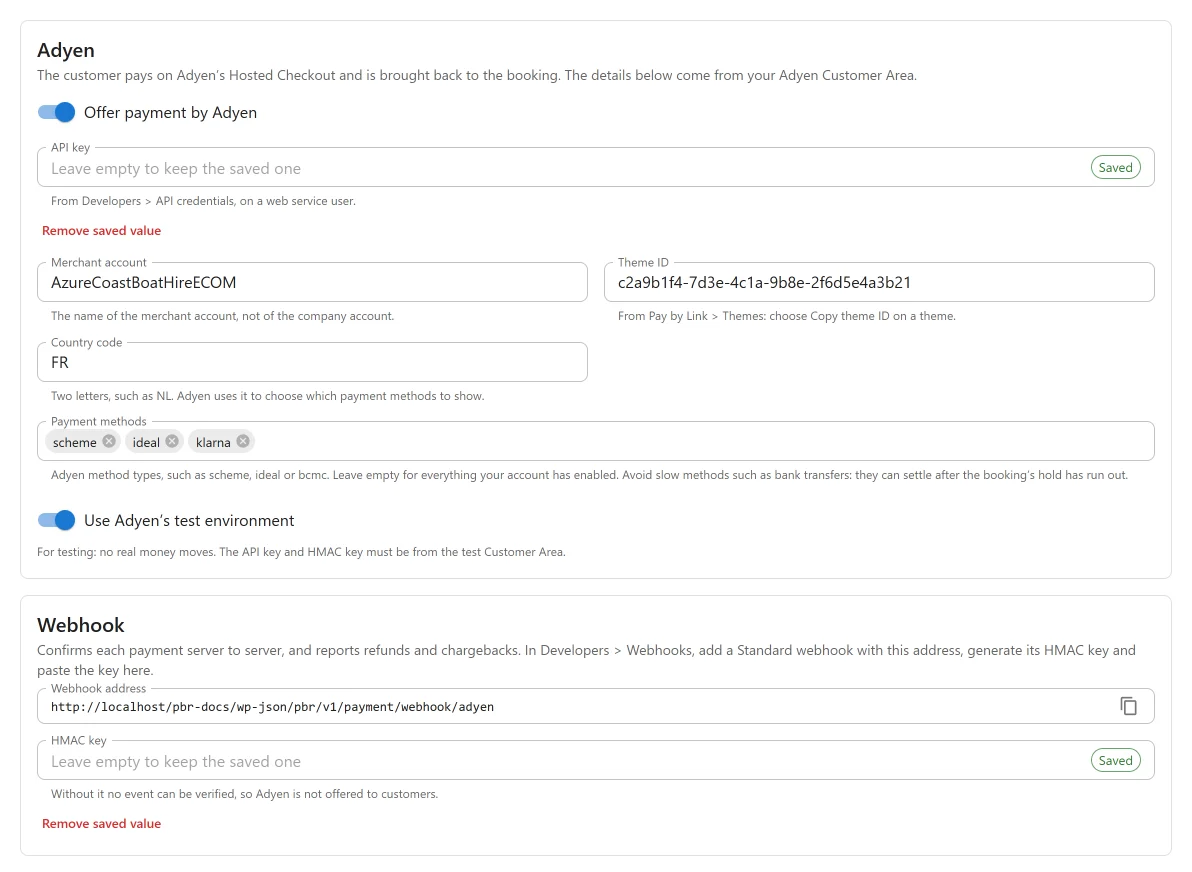
“The customer pays on Adyen’s Hosted Checkout and is brought back to the booking. The details below come from your Adyen Customer Area.”
| Setting | Default | What it does |
|---|---|---|
| Offer payment by Adyen | Off | Offers Adyen to customers. |
| API key | Empty | “From Developers > API credentials, on a web service user.” |
| Merchant account | Empty | “The name of the merchant account, not of the company account.” |
| Theme ID | Empty | “From Pay by Link > Themes: choose Copy theme ID on a theme.” |
| Country code | Empty | “Two letters, such as NL. Adyen uses it to choose which payment methods to show.” |
| Payment methods | Empty | Adyen method types, such as scheme, ideal or bcmc. Empty offers everything your account has enabled. Avoid slow methods such as bank transfers. |
| Use Adyen’s test environment | On | “For testing: no real money moves. The API key and HMAC key must be from the test Customer Area.” |
| Live URL prefix | Empty | Shown when the test environment is off. “From Developers > API URLs in the live Customer Area.” |
| HMAC key | Empty | On the webhook card, see below. |
Adyen is not offered to customers until every field is filled in, including the HMAC key and, in live mode, the live URL prefix. The tab says so: “Adyen is switched on but is not offered to customers until every field below is filled in, including the HMAC key.”
The Adyen webhook
The Webhook card: “Confirms each payment server to server, and reports refunds and chargebacks.”
-
Copy the Webhook address:
https://example.com/wp-json/pbr/v1/payment/webhook/adyen -
In your Customer Area, go to Developers > Webhooks and add a Standard webhook with that address.
-
Generate its HMAC key in Adyen and paste it into HMAC key. Press Save.
Each event is believed only when it carries the signature of your HMAC key, is for your merchant account, and comes from the environment you are in (test or live). Anything else is acknowledged and passed over, so one merchant account can serve several sites. The plugin acts on these event codes:
| Event code | What the plugin does |
|---|---|
AUTHORISATION |
Records the payment, or a failed payment when Adyen says it did not succeed |
REFUND |
Records a refund, including one made in the Customer Area |
REFUND_FAILED, REFUNDED_REVERSED |
Announces that a refund did not go through |
OFFER_CLOSED |
Nothing recorded; announced as an expired checkout |
NOTIFICATION_OF_CHARGEBACK, CHARGEBACK, CHARGEBACK_REVERSED |
Nothing recorded; announced as a dispute opened or closed |
The payment is taken at once, whatever capture delay your merchant account is set to, because a booking counts as paid once it is authorised.
Adyen in practice
- When the customer comes back, the plugin asks Adyen how the session ended. If it cannot tell yet, the booking shows the payment as processing, and the webhook gives the final word.
- A customer who starts paying again for the same amount within the session’s life is sent back to the same Adyen page, not a new one.
- A refund from the booking is accepted by Adyen first; its outcome arrives on the
REFUNDwebhook.
What Adyen receives
Your merchant account, the amount and currency, the booking reference (with the payment type for
a deposit or a balance), your country code, the return address on your site, a shopper reference
made from the booking reference (Adyen requires one and forbids personal data in it), and the
customer’s email address when the booking has one, for Adyen’s risk checks and 3D Secure. The
plugin talks to checkout-test.adyen.com in test mode and to
<your prefix>-checkout-live.adyenpayments.com in live mode. Adyen’s
terms and
privacy policy apply.
Klarna
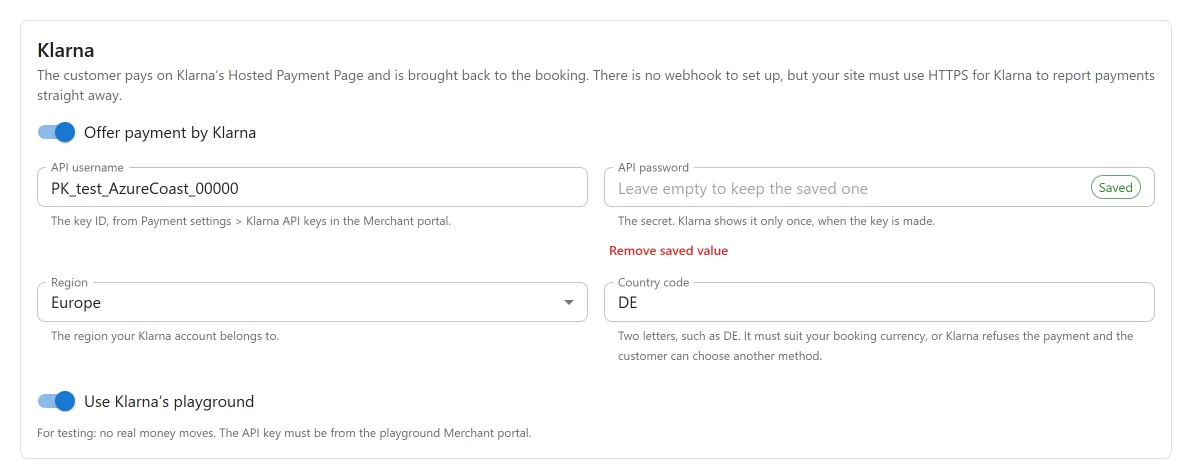
“The customer pays on Klarna’s Hosted Payment Page and is brought back to the booking. There is no webhook to set up, but your site must use HTTPS for Klarna to report payments straight away.”
| Setting | Default | What it does |
|---|---|---|
| Offer payment by Klarna | Off | Offers Klarna to customers. |
| API username | Empty | “The key ID, from Payment settings > Klarna API keys in the Merchant portal.” |
| API password | Empty | “The secret. Klarna shows it only once, when the key is made.” |
| Region | Europe | Europe, North America or Oceania: “The region your Klarna account belongs to.” |
| Country code | Empty | “Two letters, such as DE. It must suit your booking currency, or Klarna refuses the payment and the customer can choose another method.” |
| Use Klarna’s playground | On | “For testing: no real money moves. The API key must be from the playground Merchant portal.” |
Klarna is not offered until the username, password and country are filled in.
How Klarna payments are confirmed
Klarna does not sign what it sends. Each payment page is given a status address on your site, with a token only your site can make:
https://example.com/wp-json/pbr/v1/payment/webhook/klarna?booking_ref=...&token=...
When Klarna calls it, or when the customer comes back, the plugin reads the session and the order from Klarna, checks that the order carries this booking’s reference, captures the order, and only then records the payment.
Klarna calls HTTPS addresses only, and gives up after a few tries. So for every payment page the plugin also checks with Klarna on its own three times, 30 minutes apart. A customer who paid and closed the tab is still recorded, even on a site without HTTPS.
Klarna sends nothing about refunds made in its Merchant portal, so such a refund does not appear on the booking. Refund from the booking’s payments panel instead.
What Klarna receives
Klarna receives more than the other providers, because it asks for it:
- the amount, currency, purchase country and a locale made from your site’s language and the
country (for example
de-DE); - one order line, “Boat booking” and the booking reference, for the amount of this payment, with its share of the booking’s tax;
- the booking reference and the payment type;
- the customer’s email address, first and last name and phone number, when the booking has an email address, so Klarna need not ask them again;
- the return and status addresses on your site.
The plugin talks to api.klarna.com, api-na.klarna.com or api-oc.klarna.com for your region,
or the matching playground host in test mode. Klarna’s
terms and
privacy policy apply.
Klarna is never offered to buy a gift card: buying stored value on credit and spending it at once would turn Klarna’s instalments into cash.
When the customer returns
For all three, the booking page tells the customer how the payment went. When the provider cannot say yet, the payment shows as processing rather than failed: the customer may well have paid, and the provider’s report settles it. A Klarna page still open for a booking is closed once nothing is owed or the customer cancels.
Quick Links
Share