

Contents
On this page
Boat clubs and memberships - Plugixa Boat Rental
Boat clubs PRO turn your fleet into a membership. A member pays a fee each month or each year, and books the club’s boats out of the hours or days their plan includes, on your ordinary booking form. What the plan covers costs them nothing; what goes past it is charged or refused, as you choose. Fees are raised and emailed with a link to pay before each period.
This feature needs a Pro licence for unlimited sites. See What needs the unlimited sites licence below.
Switching it on
Boat clubs is the Boat clubs app in the App manager. It is off by default. Once it is on you get:
- Plugixa Boat Rental -> Sales -> Club members: members, their usage and their fees.
- Plugixa Boat Rental -> Sales -> Membership plans: the plans you sell.
- A Membership panel on the page of a member’s booking.
- Plugixa Boat Rental -> Settings -> Boat clubs: the members’ page, renewals and cancellations.
- A Clubs tab in Reports.
Settings
Plugixa Boat Rental -> Settings -> Boat clubs:
| Setting | Default | What it does |
|---|---|---|
| Members’ page | None | The page that holds the membership card. Renewal emails link to it. |
| Send the renewal link (days before) | 7 | How many days before a period ends the next fee is raised and its link emailed. |
| Grace on an unpaid fee (days) | 7 | Past these days the member is overdue and cannot book the plan’s boats until the fee is paid. |
| Give the usage back up to (hours before departure) | 48 | A member who cancels earlier gets the hours or days back. Later, the trip stays counted against the plan. |
Making a plan
On Membership plans, click New plan, for example “Weekday sailor: 8 hours a month”.
| Field | What it does |
|---|---|
| Name, Description | The description is shown to visitors on the members’ page. |
| Fee, Currency, Charged | What a member pays, Every month or Every year. |
| Counted in, Included | Hours or Days, and how many each period. |
| Trips booked at a time | Trips booked and not yet over. Empty: no cap. |
| Weekend days a period | Saturdays and Sundays a member may use. Empty: no cap. |
| Book up to (days ahead) | Empty: as far ahead as anybody can. |
| Boats it covers, Boat types it covers | Empty in both: every boat. A shared trip sold by the seat is never covered. |
| Past the included time | Charge the member, at the Member price an hour or Member price a day (empty: the boat’s own price), or Refuse the booking. |
| Status | Offered or Not offered. A plan no longer offered keeps its members. |
Changes apply from now: a member’s next booking is counted by the plan as it is then, and a fee already raised keeps its amount. Extras and fuel are always charged.

Adding members
A member is a WordPress login on a plan: the customer’s account on your site. On Club members, click New member:
| Field | What it does |
|---|---|
| Login | The customer’s account. They book signed in with it. |
| Plan | The plan they pay for. |
| First period starts | The first day of their first period. |
| First fee | Email the member a link to pay it, Paid already (cash, transfer, card terminal), or Leave it open for now. |
A login can hold one membership at a time. The members list shows each member’s plan, status (Active, Fee overdue, Cancelled), what they have used this period and their current fee.
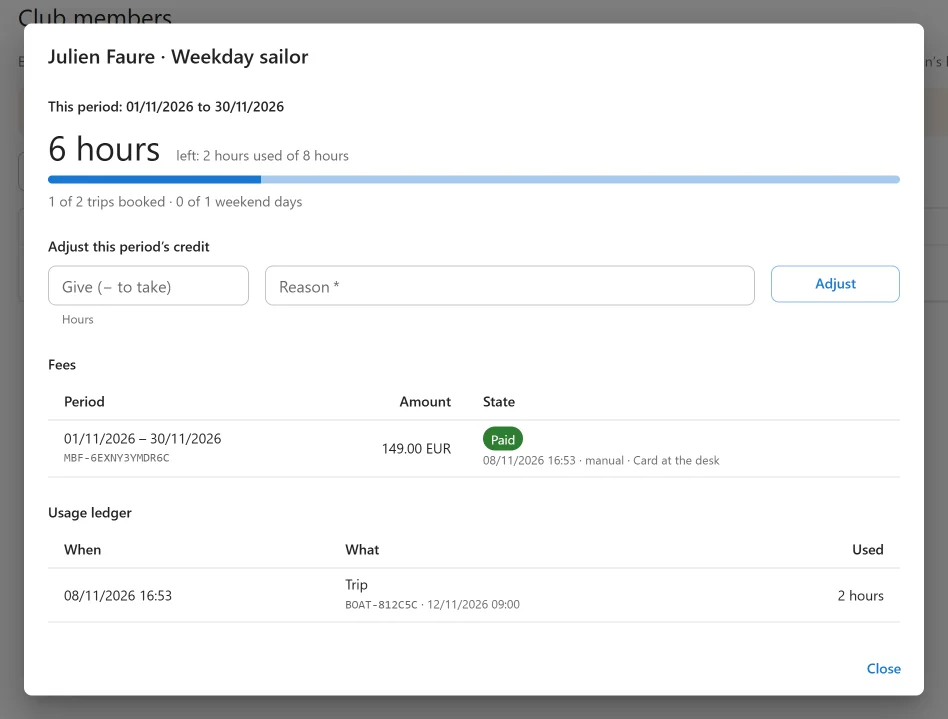
Click a member to open their details: this period’s usage and caps, their fees, and the Usage ledger of every trip, change and adjustment. Adjust gives credit (or takes it, with a negative number) for this period, and always asks for a Reason, which the member and your colleagues read.
Cancelling a membership voids the fees still open. Trips already booked stay booked.
How members book
A member books on your normal booking form while signed in.
- What the plan covers costs nothing. The price shows a line naming the hours or days taken from the plan, and the booking fee is waived. Extras, fuel and tax are charged as for anybody. A booking that costs nothing is confirmed at once.
- Past the included time, the plan’s member price is charged, or the boat’s own price, or the booking is refused, as the plan says.
- Caps are checked when the booking is made, not only when it is priced. Two bookings by the same member from two browser tabs are decided one after the other, so the last hour of credit can only be spent once. A refused booking leaves no usage behind.
- An overdue member cannot book the plan’s boats until the fee is paid. Other boats are ordinary bookings.
The booking form shows a member what is left before they choose, and ends on “nothing to pay” for a booking the plan covers in full.
Only the public booking form books on a membership. A booking the office makes for a member is an ordinary booking. To give a member a trip from the office, book it and adjust their credit by hand with the reason.
Cancelling. Cancelled at least the refund hours before departure, the usage goes back to the plan. Later, it is kept. A booking whose hold ran out always gives the usage back.
Fees and renewals
Each period’s fee is a one-off payment through your own payment methods, never a subscription at the payment provider. No card is kept on file, and the fee is never counted as rental revenue.
- A few days before a period ends (the renewal days), the next fee is raised and the member is emailed a link to pay it. The link opens the members’ page.
- If the fee is still open the grace days after the period began, the member becomes Fee overdue and is told so. Paying makes them Active again.
- In a member’s details you can Mark paid a fee paid in person (Cash, Card terminal or Bank transfer, with a reference), Email link, Copy link, or Void it.
If no online payment method is switched on, members cannot pay online: record fees paid in person with Mark paid. The App manager will not switch the app off while a fee is open.
Hours or days not used in a period do not roll over to the next one, and changing a member’s plan mid-period is not prorated.
The members’ page
The membership card shows on the customer account page, above the bookings, and on its own with this shortcode:
[plugixa_boat_rental_membership]
Choose the page under Members’ page in the settings, so fee links lead there.
| Who opens it | What they see |
|---|---|
| Somebody signed out | A sign-in link and the plans on offer. |
| A signed-in customer who is not a member | The plans on offer. |
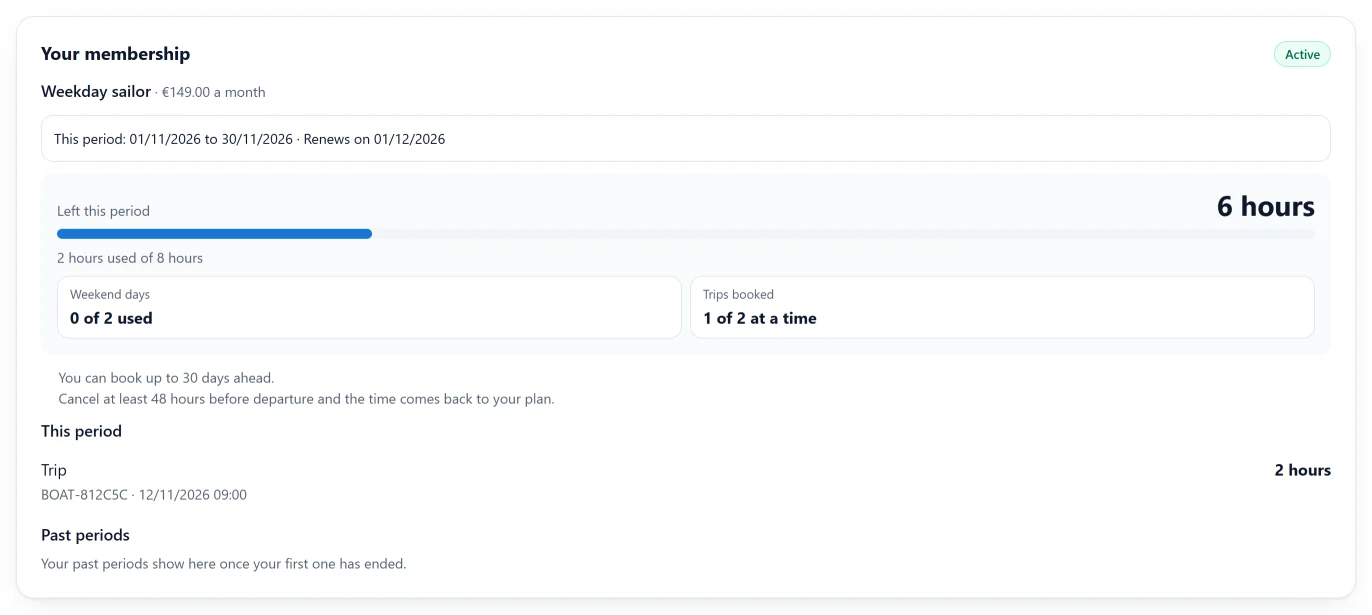
| An active member | Their plan, period and renewal day, the hours or days left with a meter, weekend days and trips at a time, and their history. |
| An overdue member | A warning and the fee to pay. |
| Somebody opening a fee link from an email | The fee, with a button for each way to pay. |
The card shows the current period only. A trip booked into a later period takes that period’s credit, and shows on the card once that period starts.
What needs the unlimited sites licence
Boat clubs are sold with the Pro licence for unlimited sites. Below that licence nothing is hidden or changed: plans and members keep working, fees keep being raised and paid, and members keep booking. What is refused is new use: a new plan and a new member. The screens say Boat clubs come with the unlimited-sites licence.
Quick Links
Share