

Contents
On this page
Skippers - Plugixa Boat Rental
Skippers and crew PRO keeps the people who take your boats out: their qualifications, their weekly hours and their days off. A boat that must have a skipper is sold only when a qualified skipper is free, and one is put on the booking when it is made. A boat that offers a skipper lets the customer choose, at the skipper’s rate.
It is an app called Skippers and crew, on by default in Pro. The screens are under Plugixa Boat Rental -> Skippers and crew and Run sheet, both in the Bookings menu group.
Adding people
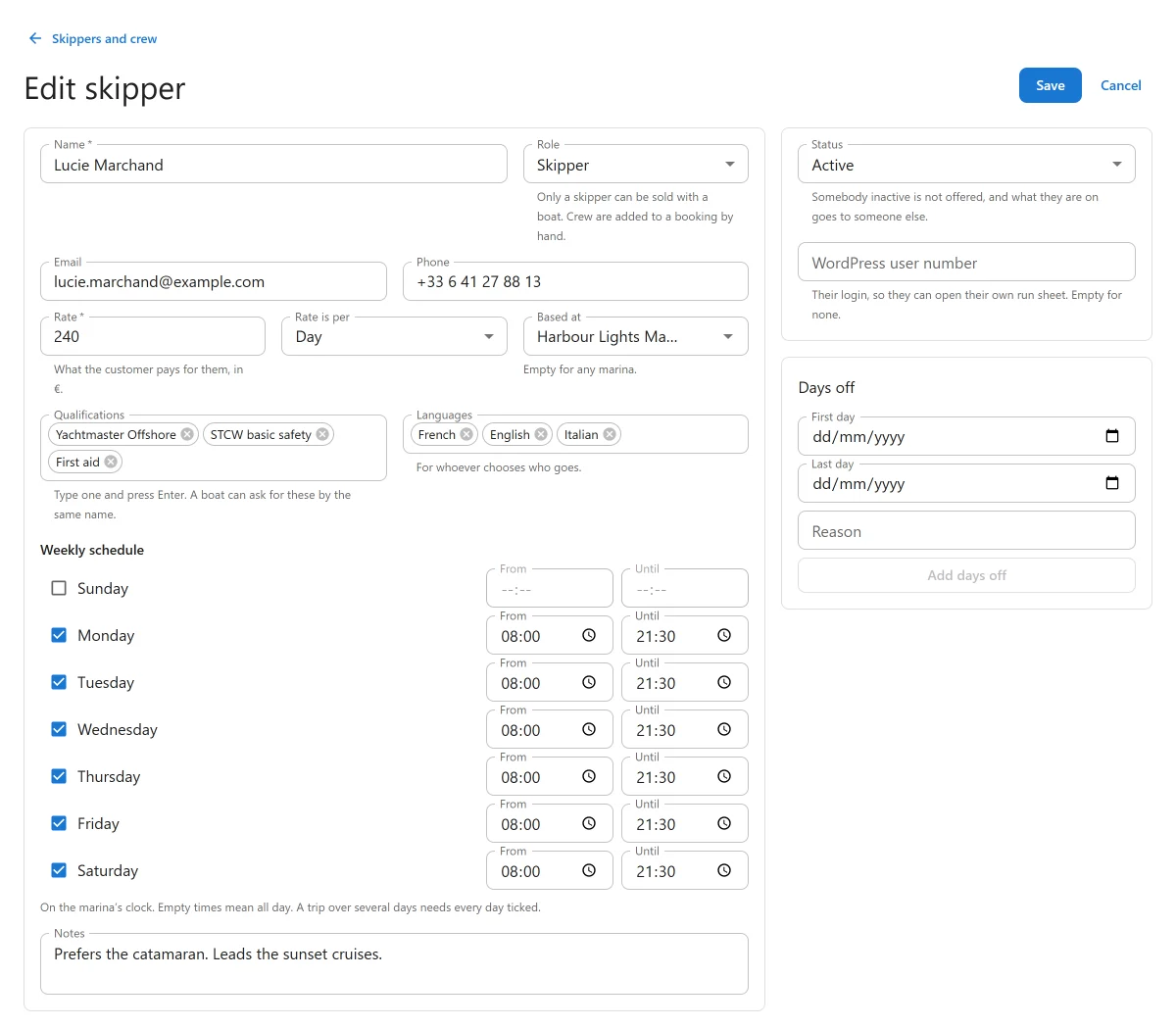
Go to Skippers and crew and press New skipper.
| Field | What it does |
|---|---|
| Name | Required. |
| Role | Skipper or Crew. Only a skipper can be sold with a boat. Crew are added to a booking by hand. |
| Status | Somebody inactive is not offered, and the trips they were on go to someone else. |
| Email, Phone | Contact details for your staff. |
| Based at | Their marina. Empty for any marina. |
| Rate and Rate is per | What the customer pays for them, per Hour or per Day, in your currency. |
| Qualifications | Type one and press Enter. A boat can ask for these by the same name. |
| Languages | For whoever chooses who goes. |
| WordPress user number | Their login, so they can open their own run sheet. Empty for none. |
| Notes | For your staff. |
| Weekly schedule | Working hours per day, on the marina’s clock. Empty times mean all day. A trip over several days needs every day ticked. |
| Days off | Add days off with a First day, a Last day and a Reason. |
When you give somebody days off, or make them inactive, the trips they can no longer do are given to another free, qualified skipper at the price already agreed. If nobody can take over, those bookings are marked as needing a skipper and the screen lists them. A customer’s booking is never cancelled or repriced because of a change of skipper.
Setting up a boat
On the boat’s form, the Skipper panel has:
| Setting | What it does |
|---|---|
| A skipper on this boat | None: sold bare, Optional: the customer chooses, or Required: the boat is not sold without one. |
| Charge the skipper’s rate on top | Adds the skipper’s rate to the price as a line of its own. |
| Qualifications required | A skipper must hold all of these. Empty for any skipper. |
Required is the same as the boat’s licence rule Skipper mandatory: setting one sets the other. See Boats.
If a boat must have a skipper and nobody on the roster qualifies, the Skippers and crew screen warns that the boat cannot be sold.
What the customer sees
- Required: the form says “A skipper comes with this boat.” The boat is offered only at times when a qualified skipper is free. When nobody is, it is not offered.
- Optional: the form offers Book with a skipper. If nobody is free at that time it says so, and the customer can book without one or choose another time.
The skipper’s charge is a line on the price, added before any discount, so a coupon or tax treats it like the boat. If the skipper the customer was quoted is booked by someone else before they finish, and the next one free costs more, they are asked to check the new price.
Between two trips a skipper needs their own gap, set under Plugixa Boat Rental -> Settings -> Skippers as Minutes between two trips. A boat’s own buffers do not apply to its skipper: somebody else can clean the boat while they walk to the next one.
On a booking
The side panel Skipper and crew on a booking shows who is on it. You can:
- Put a skipper on it: Assign a named skipper, or Choose for me to take the best one free;
- Remove the skipper. On a boat that must have one, or a booking charged for one, the booking is then marked as needing a skipper;
- Add crew. Crew must be free at that time, but crew never stop a sale.
Changing who goes does not change the agreed price. Whether you tell the customer, or charge differently, is up to you.
When you make a booking in the office, the booking form has a skipper field. On a boat that must have one it says “This boat must have a skipper. One is put on the booking when it is saved.”
The run sheet
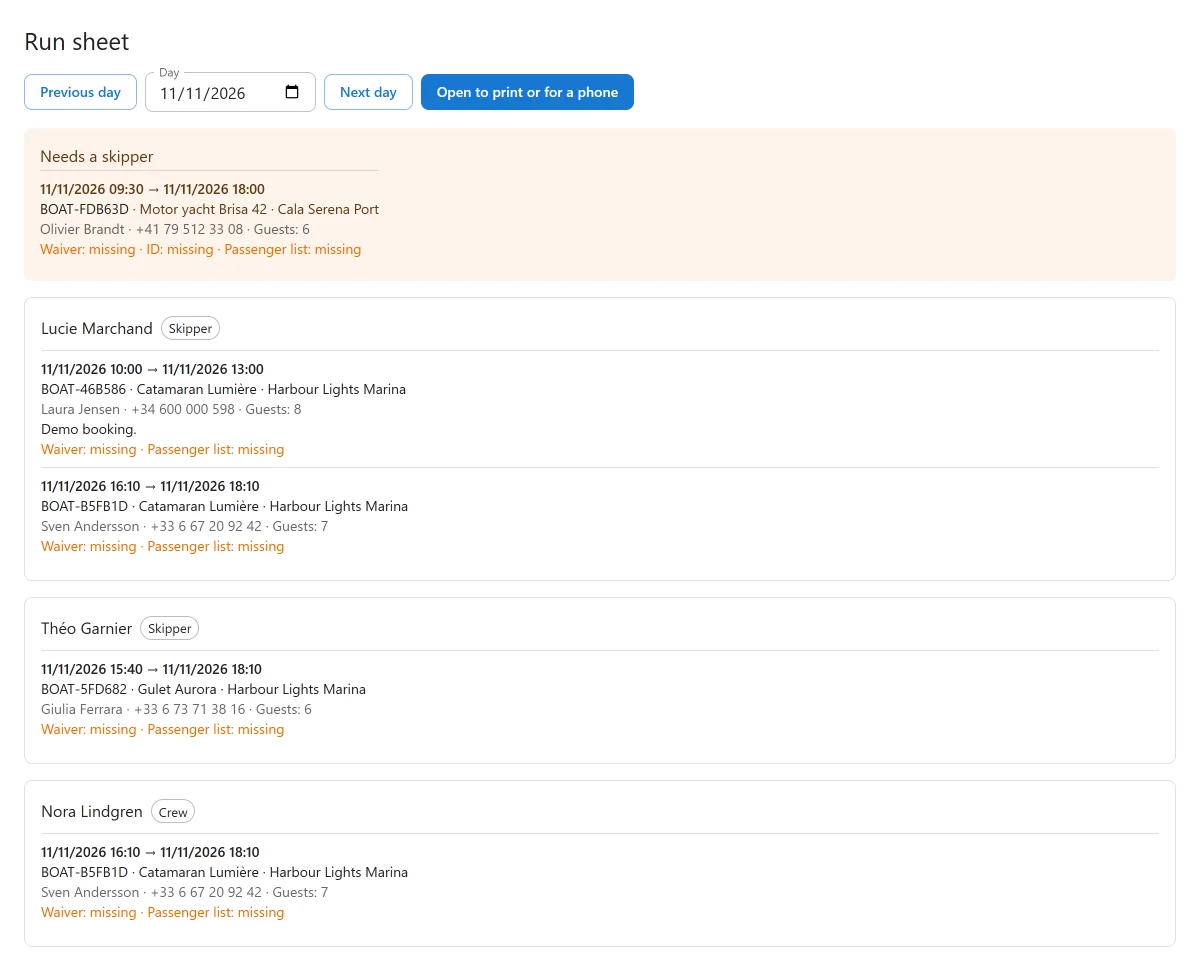
Run sheet lists one day’s trips by person: who takes out which boat, when, and with how many guests. Trips that still need a skipper are listed apart. Use Previous day and Next day to move through the week.
Open to print or for a phone opens the same day as a plain page, for printing or for a skipper’s phone. That page needs a login and changes nothing. A skipper linked to a WordPress user sees only their own day there, even without access to the admin app.
With other apps
- Waivers and documents: a booking with a skipper does not need a boating licence, whatever the boat’s licence rule.
- Shared trips sold by the seat: one skipper per departure. A party joining a departure that already has its skipper needs nobody of its own.
- Walk-up sales: a boat that needs a skipper is offered at the dock only when one is free.
Quick Links
Share