

Contents
On this page
Verified reviews - Plugixa Boat Rental
Verified reviews PRO let the guests who actually sailed rate the boat they took. After each trip the guest is emailed one link; the review they leave appears on the boat’s page, and the stars appear on its card in the boat grid and in search results.
Only a guest whose trip took place can review, and only once per booking. Nobody, you included, can write, import or change a review. That is what makes them verified.
Switching it on
Verified reviews is the Verified reviews app of Pro. It is off by default, and it needs the Notifications app, because the invitation is an email.
- Open the App manager and click Activate on Verified reviews.
- Check the options under Plugixa Boat Rental -> Settings -> Reviews.
Guests are asked only about trips that ended in the last 30 days, so switching the app on does not email last year’s customers.
Settings
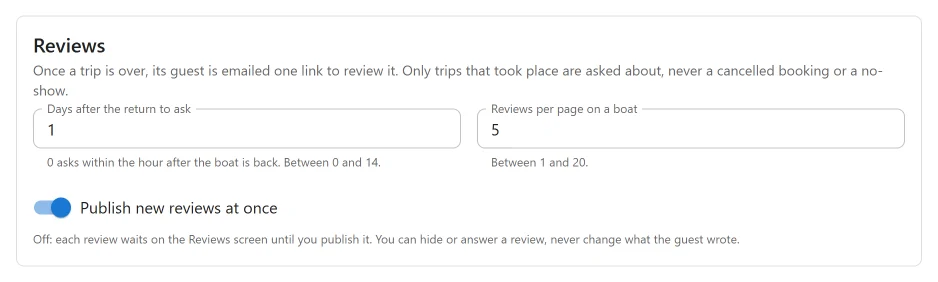
| Setting | Default | What it does |
|---|---|---|
| Publish new reviews at once | On | Off: each review waits on the Reviews screen until you publish it. |
| Days after the return to ask | 1 | 0 to 14. 0 asks within the hour after the boat is back. |
| Reviews per page on a boat | 5 | 1 to 20. How many reviews a boat’s page lists at a time. |
Who is asked
An hourly job looks for bookings whose return was at least the chosen number of days ago, and no more than 30 days. A booking is asked about when:
- its status is Confirmed, Paid or Completed,
- it is for a boat and has not been deleted,
- and its return time has passed.
Cancelled, refunded, expired, pending and no-show bookings are never asked, and a review from one is refused even with a link.
Each booking is asked once. The invitation goes through the same email system as your other booking emails: the same sender, the same message log, and the link to the booking summary added at the end. While the Notifications app is off nothing is sent, and nobody is marked as asked, so switching it back on still sends the invitations.
The invitation
Subject: How was your trip from {location_name}?

Hello {customer_name},

Thank you for sailing with us on {start_datetime}. We hope you had a wonderful time.

Would you tell other sailors how it went? It takes a minute: choose from one to five stars
and, if you like, add a few words.
{review_url}

Only guests who have been out on the boat are asked, and only once. Your first name and the
initial of your last name are shown with your review.

Thank you!
The wording follows the plugin’s translations. The {review_url} placeholder is also
available to any other email template.
What the guest sees
The link opens a page of its own, titled “How was your trip?”. The guest gives:
- Rating: one to five stars, required.
- A title, optional, up to 150 characters.
- A review, optional, up to 4,000 characters.
The page tells the guest how they will be named: by their first name and the initial of their last name, for example “Maria L.”. Their full name and email address are never shown or stored with the review.
After sending, the guest reads “Thank you for your review”, and either that it is now on the boat’s page or that it will appear once you have read it.
The link works once. Opened again after a review, it says “This trip has already been reviewed. Thank you!” A link that was changed or copied incompletely does not work. A trip that is not over yet says “This trip is not over yet. You can review it once the boat is back.”
The review page is kept out of search engines and is never cached.
Moderating reviews
Open Plugixa Boat Rental -> Reviews, in the Sales group.
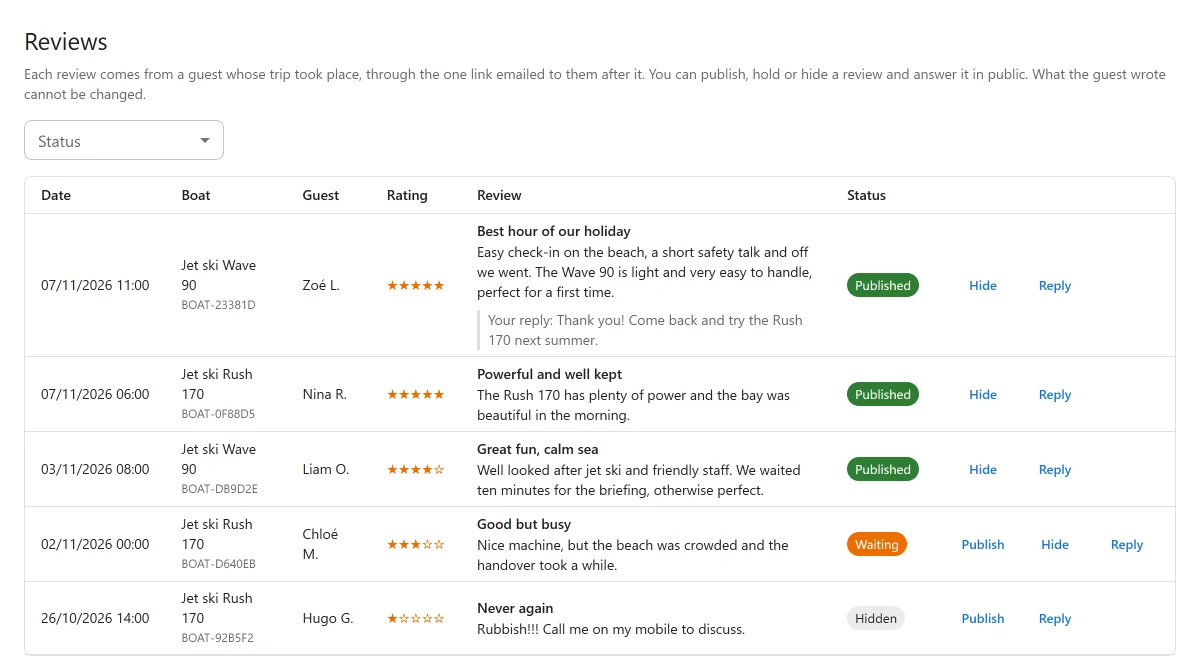
Each row shows Date, Boat, Guest, Rating, Review and Status (Published, Waiting or Hidden). Filter by status with Status, or see All reviews.
| Action | What it does |
|---|---|
| Publish | Shows the review on the boat’s page. |
| Hide | Takes it off the site. A hidden review is not shown, counted or averaged. |
| Reply | Reply in public: your answer, shown under the review as “Reply from” and your site’s name. Leave it empty and Save reply to take a reply down. |
What the guest wrote cannot be changed, by anyone. You can publish, hold, hide or answer a review, and that is all. There is no way to add a review by hand.
On your boat pages
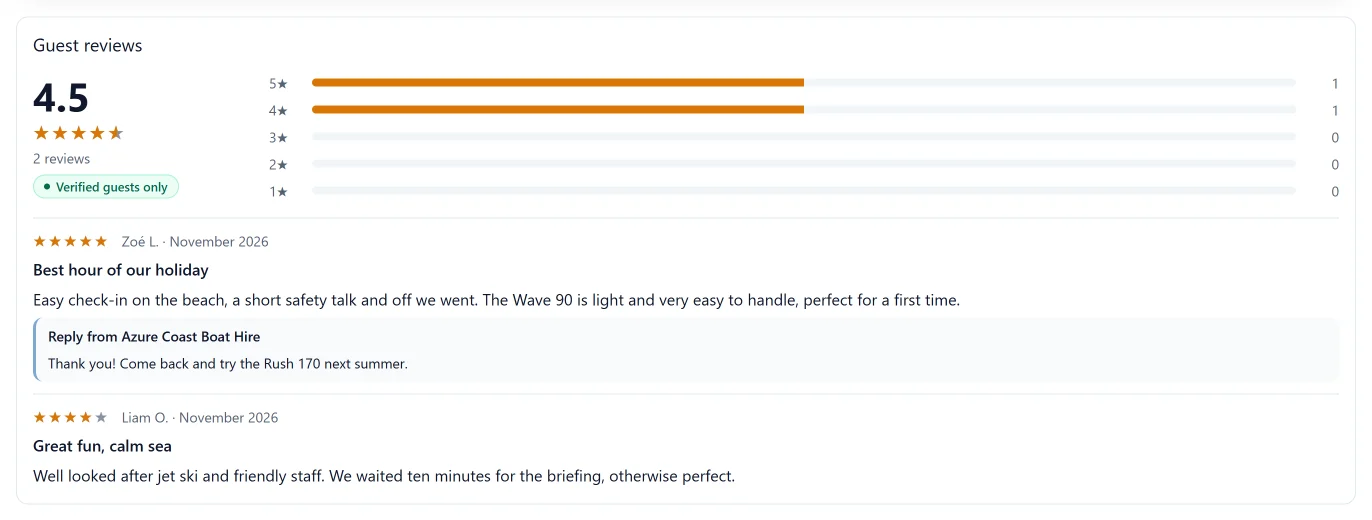
On a boat’s own page, and under the Single Boat block, a Guest reviews section follows the booking form. It shows:
- the average rating, the stars and the number of reviews,
- a Verified guests only label,
- how many reviews gave each number of stars, as bars,
- the reviews themselves, newest first, with page links when there are more than Reviews per page on a boat.
In the boat grid and search, a reviewed boat’s card shows its stars, average and number of reviews.
Only Published reviews are ever shown, counted or averaged. A boat with no published review shows no reviews section and no stars.
Ratings for search engines
While the app is on, each boat’s own page also carries schema.org data that search engines read:
- the boat as a
Product, with its name, description, web address and main photo, - its price as an offer: the lowest price it lists, in its marina’s currency,
- and, only when the boat has at least one published review, its average rating and number of reviews, with the latest five reviews.
A boat with no published review gets no rating at all, never a made-up one. A boat with neither a price nor a review gets no data.
The free plugin adds no schema.org data.
Quick Links
Share