

Contents
On this page
- Before you start: what Meta requires
- Connect your Facebook Page
- Import reviews
- Facebook has recommendations, not stars
- Import automatically once a day
- Facebook reviews and schema
- Troubleshooting
- Connected, but no reviews are found
- Connect is greyed out
- The App ID or secret disappeared after saving
- The Facebook Page is not in the list
- REST API
- Related
Facebook Reviews Import - Plugixa Testimonial
Import the reviews of your Facebook Page into Plugixa Testimonial and show them in the same layouts as your own testimonials. This is a Pro feature. It uses your own Meta app, so your site talks to Facebook directly.
Before you start: what Meta requires
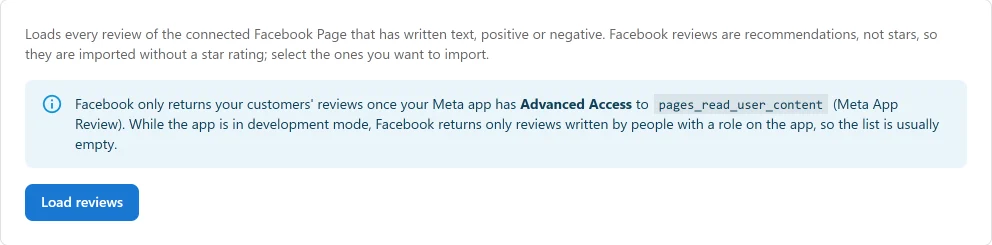
Facebook only returns your customers’ reviews once your Meta app has Advanced Access to the pages_read_user_content permission, which you request through Meta App Review. While the app is in development mode, Facebook returns only reviews written by people with a role on the app, so the list is usually empty. Allow for this step before you plan around the import.
Connect your Facebook Page
- In Meta for Developers, create an app of type Business, with the use case for managing a Page and the
pages_read_user_contentpermission. A Consumer app cannot request Page permissions. - In Testimonials → Settings → Facebook Reviews, enter the App ID and App secret.
- In the Graph API Explorer, generate a user token for that app with the
pages_show_listandpages_read_user_contentpermissions. - Paste it into User access token and click Connect.
- Choose your Facebook Page.
The user token is exchanged once for a Page token that does not expire, and the user token itself is not stored. Disconnect removes the Page tokens and returns the import mode to manual.
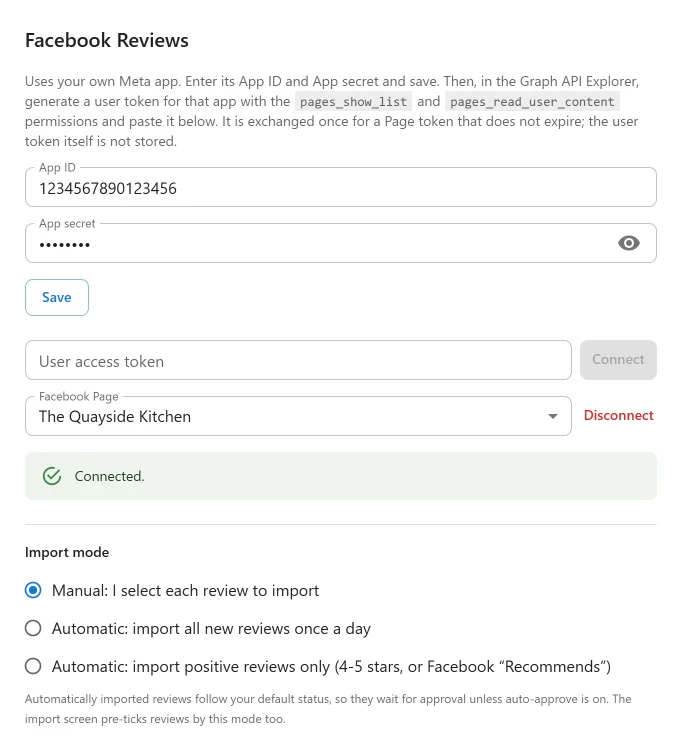
This panel saves on its own, with its Save button, and Connect saves it for you first. The main Save Settings button does not store these fields.
Import reviews
- On the Testimonials list, click Import Facebook Reviews.
- Click Load reviews.
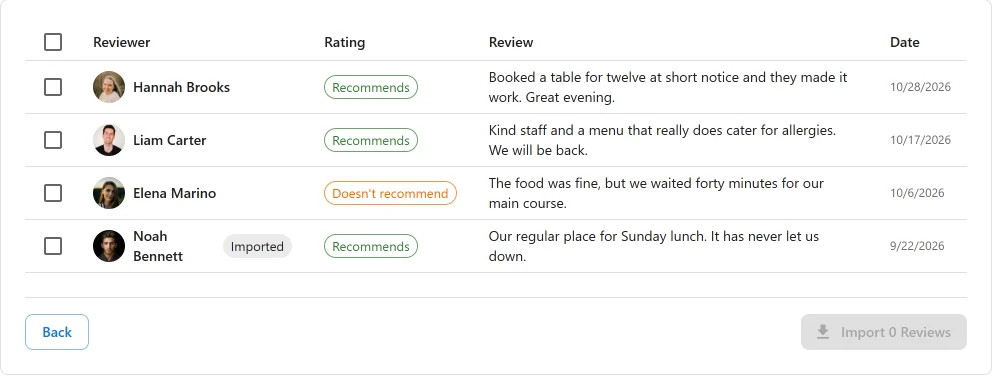
- Tick the reviews you want and click Import.
Reviews you already imported are labelled Imported, and importing them again creates no duplicates. Reviews with no written text are not listed.
Facebook has recommendations, not stars
Facebook reviews say Recommends or Doesn’t recommend. The import screen shows this label, but it is never turned into stars: a rating nobody gave would be invented content. A Facebook review is imported with no star rating, and the card shows no stars. Only older reviews that really have a numeric rating keep it.
Import automatically once a day
| Mode | What happens |
|---|---|
| Manual (default) | Nothing runs by itself. You select each review on the import screen. |
| Automatic: all new reviews | Once a day, every new review is imported. The import screen pre-ticks every new review too. |
| Automatic: positive reviews only | Once a day, only positive reviews are imported: 4-5 stars, or a Facebook “Recommends”. The import screen pre-ticks the same ones. |
For Facebook, positive means a review marked Recommends.
Imported reviews follow your default status, so they wait for approval unless auto-approve is on. You stay in control of what goes live.
Facebook reviews and schema
Imported Facebook reviews are displayed, but they are not included in your Review and AggregateRating JSON-LD, because Google does not allow markup for reviews taken from other sites. See Schema settings.
Troubleshooting
Connected, but no reviews are found
This is usually Meta’s access rule, not a fault. A development-mode app with standard access sees only reviews by people with a role on the app. Request Advanced Access to pages_read_user_content through Meta App Review.
Connect is greyed out
Enter the App ID, the App secret and a user token first. The button stays disabled until all three are filled in.
The App ID or secret disappeared after saving
Use the Save button inside the Facebook panel. The main Save Settings button does not store these fields.
The Facebook Page is not in the list
The token must come from an account that manages the Page, with the pages_show_list permission. Generate a new token and connect again.
REST API
| Method | Endpoint | Description |
|---|---|---|
POST |
/wp-json/plugixatestimonial/v1/facebook-reviews/connect |
Exchange a user token. The Page tokens are stored and never returned. |
GET |
/wp-json/plugixatestimonial/v1/facebook-reviews/pages |
Page ids and names. |
POST |
/wp-json/plugixatestimonial/v1/facebook-reviews/disconnect |
Remove the Page tokens and set the import mode to manual. |
POST |
/wp-json/plugixatestimonial/v1/review-sources/facebook-reviews/fetch |
Load reviews. |
POST |
/wp-json/plugixatestimonial/v1/review-sources/facebook-reviews/import |
Import the selected reviews. |
All of them require manage_options and the Pro plugin.
Related
Quick Links
Share