

Contents
Google Reviews Import - Plugixa Testimonial
Import reviews from your Google Business Profile using the Google Places API. Reviews are stored as regular testimonials with source='google-reviews', so they flow through the normal approval workflow and display system.
Setup
1 · Enable the Google Places API
- Go to Google Cloud Console.
- Create a project (or select an existing one).
- Enable Places API under APIs & Services → Library.
- Create an API key under APIs & Services → Credentials.
- Restrict the key to your site’s IP or HTTP referrer for security.
2 · Configure the plugin
- Go to Plugixa Testimonial → Settings → General.
- Paste the API key into Google Places API key.
- Save.
3 · Test the connection
- Go to Plugixa Testimonial → Google Reviews.
- Click Test API connection.
- A success / error message appears.
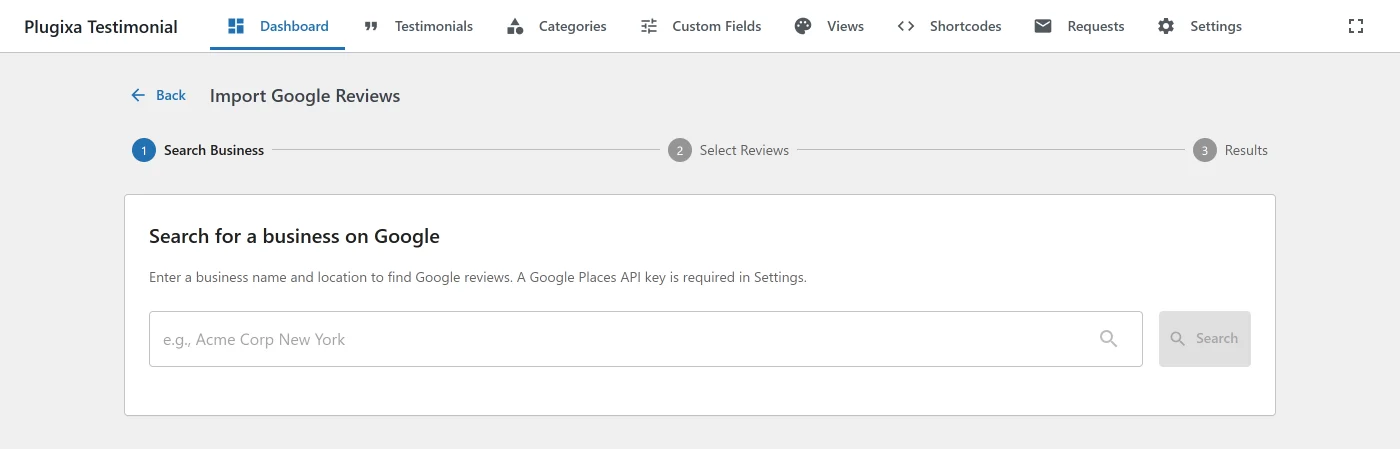
Import flow
1 · Search for your business
Enter your business name in the search box. The plugin queries Google’s Find Place From Text endpoint.
Results show:
- Place name.
- Formatted address.
- Rating.
- Total user ratings.
- Place photo thumbnail.
Pick the correct match.
2 · Fetch reviews
The plugin calls Google’s Place Details endpoint with fields=reviews,name. Google’s API returns up to 5 reviews per place - this is a Google API limit, not a plugin limit.
3 · Select reviews
A table shows each review with:
- Reviewer name + photo.
- Star rating.
- Review text (truncated preview).
- Review date.
- Checkbox to select.
Select the ones you want to import. Use the header checkbox to select all.
4 · Import
Click Import Selected. The plugin creates testimonials with the following mapping:
| Google field | Testimonial field |
|---|---|
author_name |
client_name |
text |
testimonial_text |
rating |
rating |
time |
created_at |
profile_photo_url |
client_photo_id (downloaded via media_handle_sideload) |
author_url |
website_url |
| Place name | client_company |
| - | source = google-reviews |
| - | status = from Settings → Submission → Default status (or auto-approve based on settings) |
Duplicate detection
On import, the plugin skips reviews where client_name + testimonial_text + source='google-reviews' already exists - so you can re-run the import safely without creating duplicates.
Managing imported reviews
Imported reviews appear in the Testimonials list with source = google-reviews. You can filter by source to see only imported reviews:
Testimonials → Filter → Source → google-reviews
From here, treat them like any other testimonial - edit, approve, categorize, feature, reorder, translate.
Recommended workflow
- Import with
status = pending(default). - Review in Testimonials → Pending and edit as needed (fix formatting, assign categories, add company if missing).
- Approve the ones you want live.
- Feature the strongest ones with the Featured flag.
API key security
The Google Places API key is stored in the plugixatestimonial_settings option (WordPress options table, plaintext).
Restrict the key in Google Cloud Console to:
- HTTP referrers (websites): your site’s domain(s).
- OR IP addresses: your server’s IP.
This prevents anyone who obtains the key from using it for their own projects on your quota.
Cost & quota
Google Places API pricing (as of documentation date):
- Find Place From Text - $0.017 per request.
- Place Details - $0.017 per request.
Typical import run uses ~2 requests (search + details). Check the Google Maps Platform pricing page for current rates.
Google also provides a monthly free quota - for most small businesses, imports fit entirely within the free tier.
REST API
| Method | Endpoint | Description |
|---|---|---|
GET |
/wp-json/plugixatestimonial/v1/google-reviews/search |
Search places by text query. |
GET |
/wp-json/plugixatestimonial/v1/google-reviews/reviews |
Get reviews for a place_id. |
POST |
/wp-json/plugixatestimonial/v1/google-reviews/import |
Import selected reviews as testimonials. |
POST |
/wp-json/plugixatestimonial/v1/google-reviews/test |
Test the API key. |
All endpoints require manage_options + Pro license.
Hooks
There are no Google Reviews import hooks. The plugin fires eight filters in total and no actions; see the Hooks Reference for the full list and what each one can change.
Troubleshooting
“API key is invalid”
- The key hasn’t been enabled for Places API in Google Cloud Console.
- The referrer / IP restriction is blocking the request.
- Test with a temporary unrestricted key to confirm.
“No reviews found”
- The place has fewer than 5 reviews total.
- You selected the wrong business - try a more specific search (“Acme Coffee Seattle” instead of “Acme”).
- Google’s review data can lag - very recent reviews may not yet be in the Places API response.
Reviewer photos not downloading
- The
media_handle_sideload()call depends on the uploads directory being writable. - Check WordPress file permissions (typically 755 for dirs, 644 for files).
- Google’s profile photo URLs occasionally return 403 if rate-limited - retry the import.
Only 5 reviews imported: I have more on Google
This is a Google API limit. The Places API returns the 5 “most relevant” reviews as selected by Google. There is no way to fetch more through the standard API.
Workaround: use a different third-party service (beyond this plugin’s scope), or manually copy/paste additional reviews via Testimonials → Add New.
Related
- Testimonials Management
- Settings → General - Google Places API key
- Free vs Pro
- Hooks Reference