

Contents
AI Testimonial Generator — Plugixa Testimonial
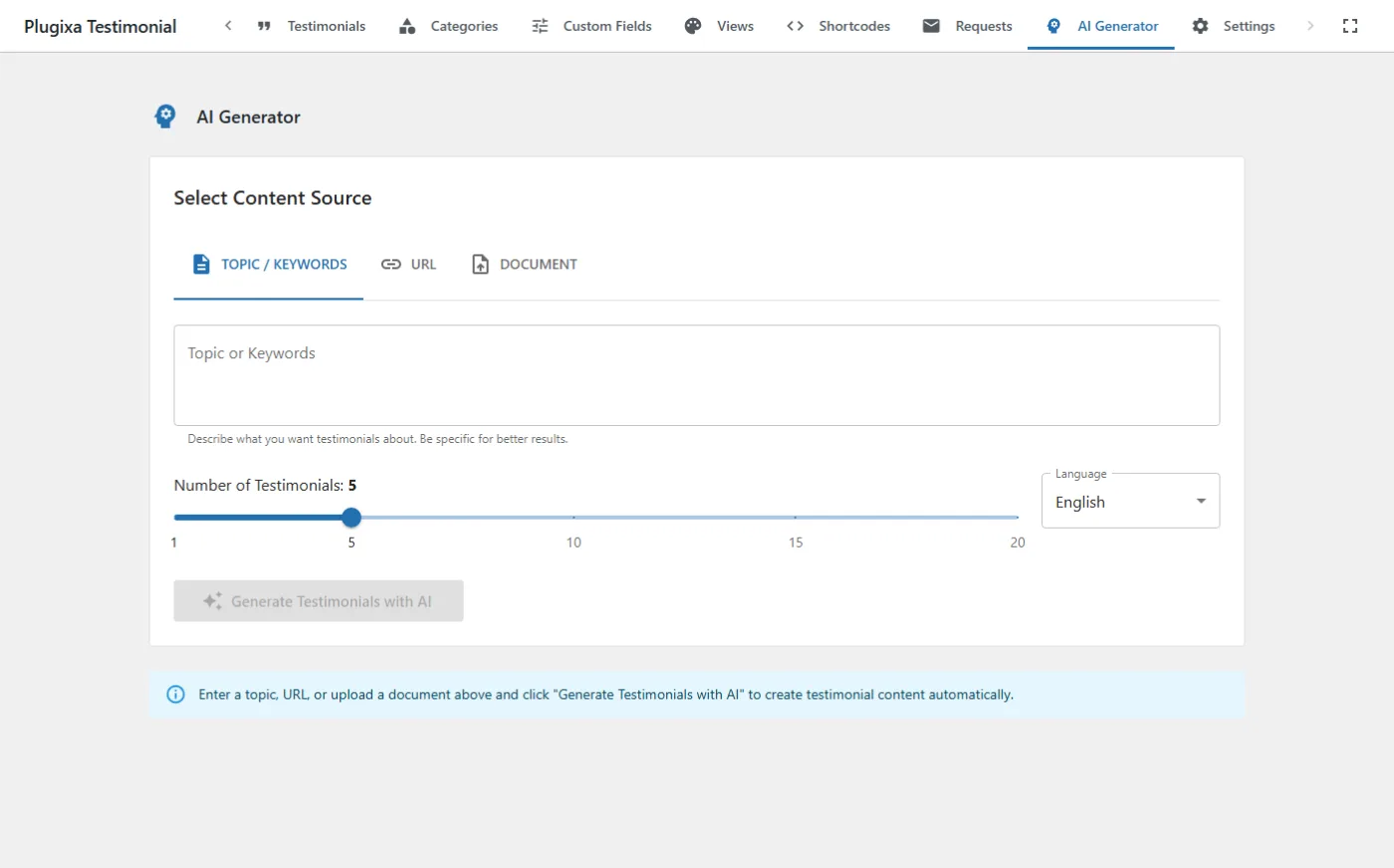
Generate testimonials automatically from a topic, a URL, or a PDF/document. Uses OpenAI or Google Gemini behind the scenes.
Setup
1 · Get an API key
Pick a provider:
- OpenAI — sign up at platform.openai.com, generate an API key.
- Google Gemini — get a key at aistudio.google.com.
2 · Configure the plugin
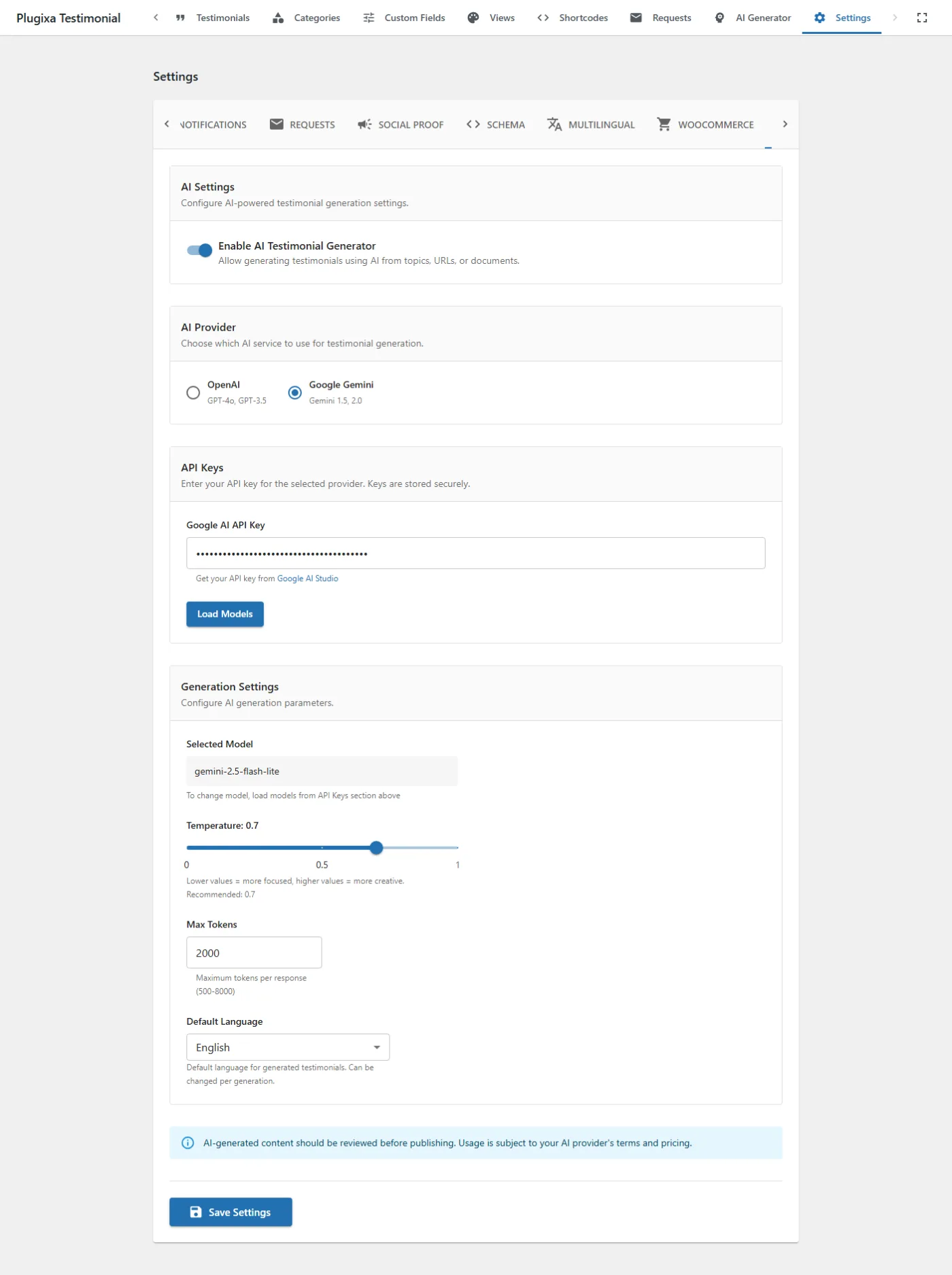
Go to Plugixa Testimonial → Settings → AI.
| Field | Notes |
|---|---|
| Enable AI Generator | Master toggle (immediate save + DOM menu toggle). |
| Provider | openai or google. |
| API key | Stored in the options table. |
| Model | See Models. |
| Temperature | 0.0 (deterministic) to 1.0 (creative). 0.7 is a good default. |
| Max tokens | Response length cap. 2000 is typical. |
| Default language | Target language for generated content (e.g., “English”, “French”). |
3 · Test the connection
Click Test connection. The plugin makes a minimal request and reports success, API error, or rate-limit.
Models
OpenAI
| Model | Cost | Speed | Quality | Recommended use |
|---|---|---|---|---|
gpt-4o-mini |
$ | Fast | Good | Default — bulk generation |
gpt-4o |
$$ | Fast | Excellent | Flagship content |
gpt-4-turbo |
$$ | Medium | Excellent | Legacy — prefer 4o |
gpt-3.5-turbo |
$ | Fast | OK | Low-budget draft |
Models can be loaded dynamically from the provider’s API via Load Models in Settings → AI.
Google Gemini
| Model | Cost | Speed | Quality | Notes |
|---|---|---|---|---|
gemini-2.0-flash |
$ | Fast | Good | Default |
gemini-1.5-pro |
$$ | Medium | Excellent | Long context |
gemini-1.5-flash |
$ | Fast | Good |
Four ways to generate
From a topic
Enter a topic (e.g., “remote-team collaboration software”) and a count, then click Generate. The AI produces N testimonials with client name, role, company, text, and rating.
Topic: "SaaS project management tool for remote teams"
Count: 8
Tone: Professional, enthusiastic
Target audience: Small businesses with 10-50 employees
The more specific the topic, the more realistic the testimonials.
From a URL
Paste a URL. The plugin:
- Fetches the page (via
UrlScraperclass). - Strips HTML and boilerplate, extracting up to 15,000 characters of main content.
- Sends the content to the AI with instructions to generate grounded testimonials.
Best for: turning an existing product page, landing page, or About page into testimonials that reference real features.
The scraper extracts visible text only — it does not execute JavaScript, so SPAs may not scrape well.
From a PDF or document
Upload a PDF, DOCX, or TXT. The plugin:
- Parses text from the document:
- PDF — via
smalot/pdfparser. Scanned/image-only PDFs fail. - DOCX — via PhpWord (transitive via LLPhant).
- TXT — encoding detection and pass-through.
- PDF — via
- Sends the extracted text to the AI.
File size limit: 5 MB.
Good sources: product briefs, marketing documents, feature lists, customer research summaries, company descriptions.
Category generation
Generate a category name and description from a short prompt. Useful when seeding a new site.
- In the category form, click Generate with AI.
- Enter a short hint (e.g., “reviews from SMB customers”).
- The AI returns a name and description — accept or re-roll.
Review and import
After generation, the testimonials appear in a preview table.
For each row:
- Edit inline — click any field (name, role, company, text) to edit.
- Rating stars — clickable 1–5 stars.
- Regenerate name — rewrite just the client name from the testimonial text.
- Regenerate content — rewrite just the testimonial text.
- Suggest category — AI suggests the best-matching existing category.
- Select / Deselect — checkbox to include or exclude.
- Remove — drop from the batch.
Category assignment modes
Before importing, choose how to assign categories:
| Mode | Behavior |
|---|---|
| Specific | Assign one category to all imported testimonials. |
| Auto-assign with AI | For each testimonial, AI picks the best-matching category. |
| Individual per-testimonial | Each row has its own category dropdown. |
Import
Click Import Selected. Selected testimonials are saved to the database with:
status=draft(or chosen import status).source=ai-generated.language_code= from the Language setting in the generator.translation_group= new UUID per row.
No testimonials are saved until you explicitly import them.
Multilingual generation
If Multilingual is active, the Target language field appears. The plugin generates in the specified language and sets language_code on the imported testimonials.
For translation of existing testimonials: the current release generates fresh testimonials; full AI translation of existing content is on the roadmap.
REST API
All endpoints require Pro license + manage_options:
| Method | Endpoint | Description |
|---|---|---|
POST |
/wp-json/plugixatestimonial/v1/ai-generator/generate-testimonial |
Single testimonial from a topic. |
POST |
/wp-json/plugixatestimonial/v1/ai-generator/generate-testimonials |
Batch 1–20 testimonials from a topic. |
POST |
/wp-json/plugixatestimonial/v1/ai-generator/generate-from-url |
Scrape URL + generate. |
POST |
/wp-json/plugixatestimonial/v1/ai-generator/generate-from-file |
Parse document + generate (multipart). |
POST |
/wp-json/plugixatestimonial/v1/ai-generator/generate-category |
Category name + description. |
POST |
/wp-json/plugixatestimonial/v1/ai-generator/regenerate-name |
Rewrite a single client name. |
POST |
/wp-json/plugixatestimonial/v1/ai-generator/regenerate-content |
Rewrite a single testimonial text. |
POST |
/wp-json/plugixatestimonial/v1/ai-generator/suggest-category |
AI suggests the best-matching category. |
POST |
/wp-json/plugixatestimonial/v1/ai-generator/bulk-import |
Import generated testimonials to DB. |
POST |
/wp-json/plugixatestimonial/v1/ai-generator/test-connection |
Test API key validity. |
GET |
/wp-json/plugixatestimonial/v1/ai-generator/models |
Get default model lists. |
POST |
/wp-json/plugixatestimonial/v1/ai-generator/load-models |
Load models from provider API. |
Free installs return 403 with an upgrade_url on all these endpoints.
Hooks
| Hook | Type | Description |
|---|---|---|
plugixatestimonial_before_ai_generate |
action | Before a generation request. Args: topic, provider, count. |
plugixatestimonial_after_ai_generate |
action | After a successful generation. Args: testimonials, topic, provider. |
plugixatestimonial_ai_generated_testimonial |
filter | Modify a single generated item. |
plugixatestimonial_ai_generated_testimonials |
filter | Modify the whole batch. |
plugixatestimonial_ai_provider_config |
filter | Override provider settings at runtime. |
plugixatestimonial_ai_prompt |
filter | Modify the prompt sent to the AI. |
plugixatestimonial_ai_max_file_size |
filter | Override the 5 MB PDF/doc upload size limit. |
Cost estimation
Rough costs per batch of 10 testimonials with gpt-4o-mini at default settings:
- ~3,000 input tokens (topic + instructions).
- ~2,000 output tokens (10 testimonials).
- Cost: ~$0.002 USD.
The URL / PDF flows add input tokens proportional to document length.
Tips
- Be specific with the topic. “SaaS invoicing tool for freelancers” beats “software.”
- Use URLs for existing products. The scraper pulls real product info that grounds the testimonials.
- Adjust tone and temperature. Professional tone + lower temperature for B2B; casual + higher temperature for consumer products.
- Review and edit. AI content should always be reviewed before publishing.
- Import as Draft first. Set
statustodraftorpendingso you can review in the standard approval workflow.
Troubleshooting
“API error 401”
API key is wrong or revoked. Regenerate in the provider dashboard and re-save.
“API error 429”
Rate-limited. Wait, or upgrade your provider plan.
Generated testimonials are generic
- Raise topic specificity.
- Provide more context in the prompt.
- Lower temperature to
0.5for less variation, or raise to0.9for more.
URL scraping returned nothing
Some sites block scrapers. Try saving the page as PDF and uploading instead.
“File too large”
The 5 MB limit is enforced. Split a large PDF, or filter with plugixatestimonial_ai_max_file_size.
Related
- Testimonials Management
- Categories
- Settings → AI — AI configuration
- Multilingual
- Import / Export — bulk import from external sources
- Free vs Pro