

Contents
Shortcodes - Plugixa Testimonial
Two shortcodes ship with Plugixa Testimonial:
[plugixa_testimonials]- displays testimonials on any page, post, widget, or template file.[plugixa_testimonial_form]- renders the frontend submission form (see Submission Form).
Quick start
[plugixa_testimonials]
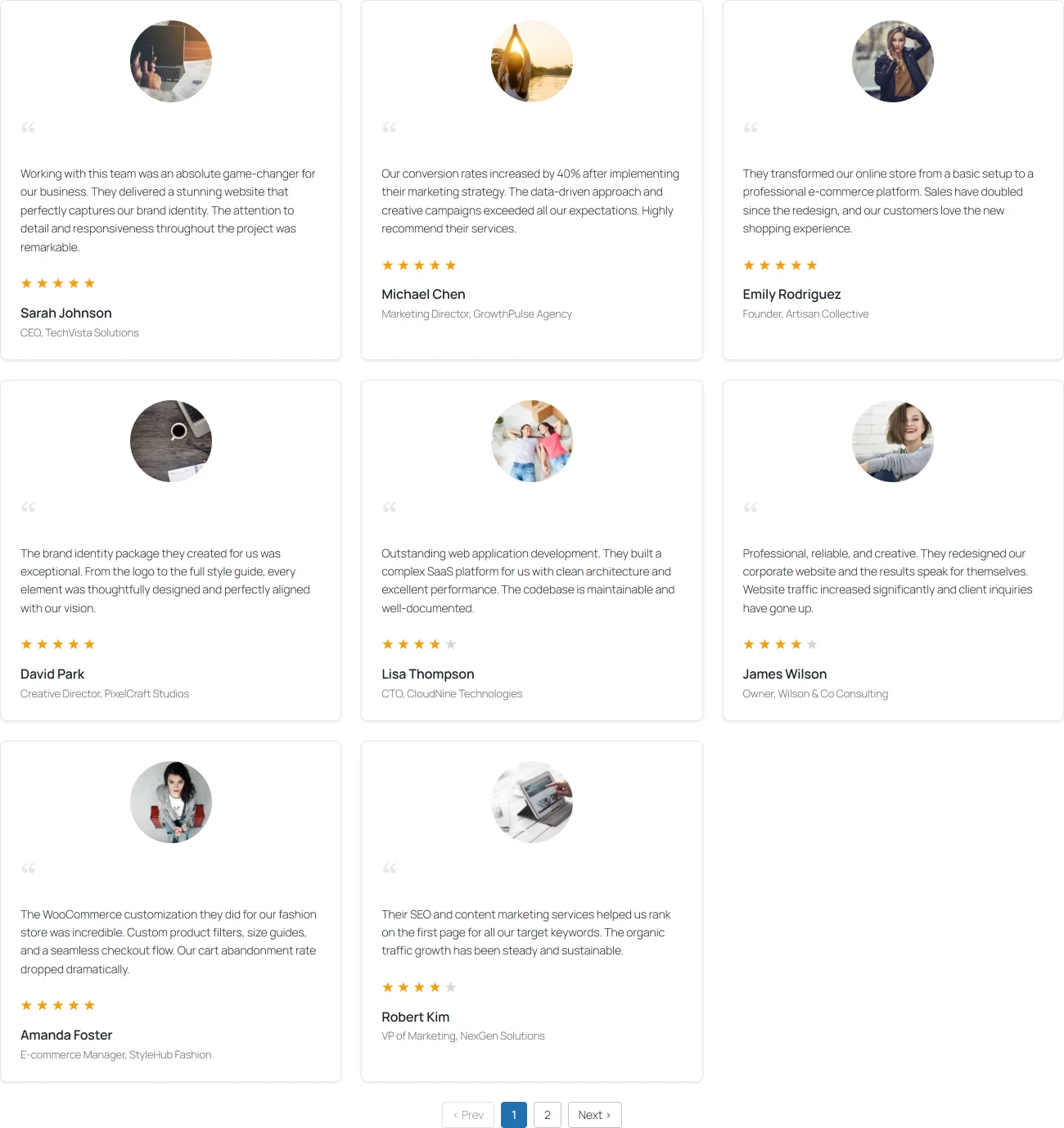
Displays all approved testimonials using the default view.
[plugixa_testimonials] attributes
Defaults are the plugin-wide defaults - they can be changed globally in Settings, or per-instance via the attributes below.
Content filtering
| Attribute | Default | Values | Description |
|---|---|---|---|
id |
0 |
int | Load a saved shortcode configuration by ID. |
view_id |
0 |
int | Visual preset - see Views. 0 = use the default view. |
category |
"" |
IDs or uncategorized/0 |
Comma-separated category IDs to include. "uncategorized" / "0" returns testimonials with no category. |
limit |
-1 |
int | Max testimonials to fetch from the database (-1 = all). Distinct from per_page - this is the pool size, not the page size. |
orderby |
display_order |
display_order, created_at, rating, client_name, random |
Sort field. |
order |
ASC |
ASC, DESC |
Sort direction. |
featured |
0 |
0 / 1 |
1 = show only featured testimonials. |
min_rating |
0 |
0–5 | Minimum star rating (0 = no filter). |
language |
auto | language code | Force a language (overrides WPML/Polylang detection). |
Display toggles
These moved from Views to Shortcodes - each shortcode controls its own display toggles.
| Attribute | Default | Values | Description |
|---|---|---|---|
show_photo |
from config | 0 / 1 / "" |
Show client photo. Empty = use saved config. |
show_rating |
from config | 0 / 1 / "" |
Show star rating. |
show_role |
from config | 0 / 1 / "" |
Show client role / position. |
show_company |
from config | 0 / 1 / "" |
Show company name. |
show_date |
from config | 0 / 1 / "" |
Show the testimonial creation date. |
show_website |
from config | 0 / 1 / "" |
Show a link to the client’s website. |
show_quote_icon |
from config | 0 / 1 / "" |
Show the decorative quote icon. |
show_video |
from config | 0 / 1 / "" |
Show video embed (Pro). |
show_custom_fields |
from config | 0 / 1 / "" |
Show custom field values (Pro). |
Dark mode
| Attribute | Default | Values | Description |
|---|---|---|---|
dark_mode |
disabled |
disabled, enabled, auto |
Override the view’s dark mode. auto follows prefers-color-scheme. |
Pagination
| Attribute | Default | Values | Description |
|---|---|---|---|
pagination_enabled |
1 |
0 / 1 |
Master toggle. |
pagination_style |
from view | numbers, load_more, infinite_scroll |
Override the view’s pagination style. |
per_page |
8 |
int | Items shown per page (display-level control). |
load_more_label |
Load More |
string | Custom button label. |
Schema (SEO)
| Attribute | Default | Values | Description |
|---|---|---|---|
schema |
1 |
0 / 1 |
Emit JSON-LD Review + AggregateRating on the page. Respects the global enable_schema setting. |
Examples
Filter by category
[plugixa_testimonials category="3"]
[plugixa_testimonials category="1,3,5"]
[plugixa_testimonials category="uncategorized"]
Specific view
[plugixa_testimonials view_id="3"]
Featured only, limited to 6
[plugixa_testimonials featured="1" limit="6"]
Minimum 4 stars, highest first
[plugixa_testimonials min_rating="4" orderby="rating" order="DESC"]
Load more pagination, 4 per page, custom label
[plugixa_testimonials pagination_style="load_more" per_page="4" load_more_label="Show more reviews"]
Force dark mode
[plugixa_testimonials view_id="2" dark_mode="enabled"]
Auto dark mode (system preference)
[plugixa_testimonials dark_mode="auto"]
Hide photos and quote icon
[plugixa_testimonials show_photo="0" show_quote_icon="0"]
Full example
[plugixa_testimonials
  category="3,5"
  view_id="2"
  limit="-1"
  orderby="rating"
  order="DESC"
  min_rating="4"
  featured="1"
  pagination_style="load_more"
  per_page="6"
  dark_mode="auto"
  show_video="1"
  show_custom_fields="1"
  schema="1"
]
The visual Shortcode Builder
Instead of memorizing attributes, use the builder at Plugixa Testimonial → Shortcodes → Add New.
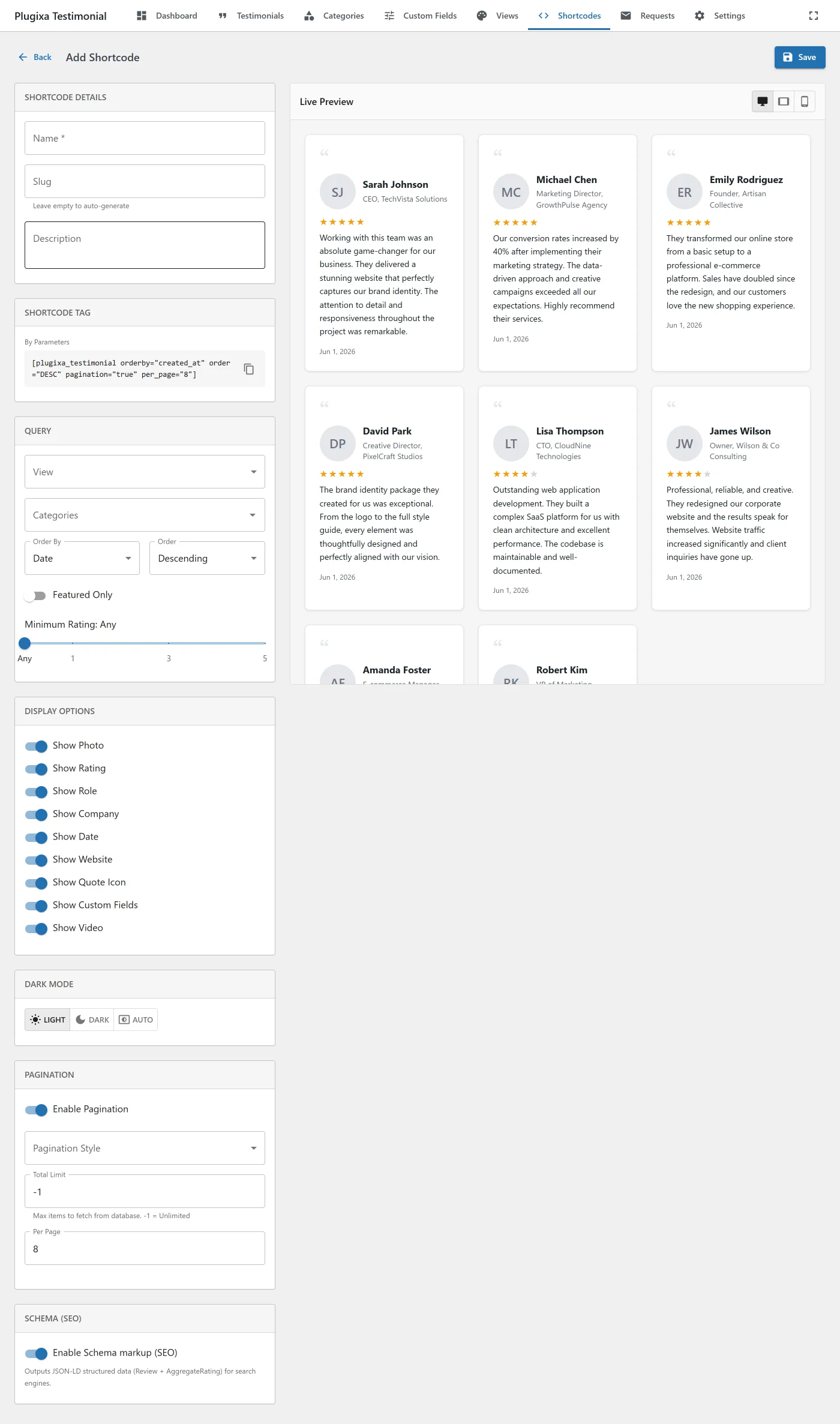
Configure through grouped sections
- Shortcode Details - name, slug, description.
- Query - view, categories, ordering, featured, min rating.
- Display Options - 9 show/hide toggles (photo, rating, role, company, date, website, quote icon, video, custom fields).
- Dark Mode -
Light/Dark/AutoToggleButtonGroup. - Pagination - enable, style, per-page, limit, load more label.
- Schema (SEO) - toggle + description.
Live preview
Real-time preview using actual approved testimonials matching the shortcode filters. Falls back to 12 sample testimonials if no real data matches.
Changes to any setting update the preview instantly - no save needed until you’re ready.
Save and reuse
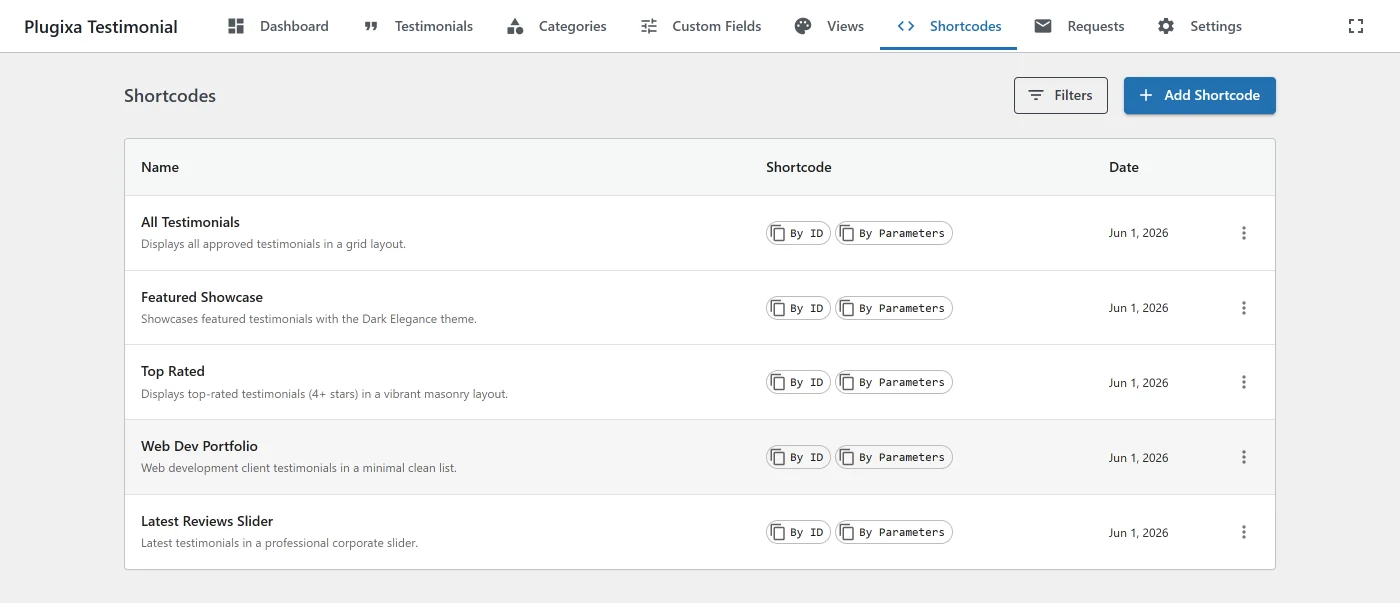
Click Save to store the shortcode under a name. The shortcode list shows two formats for each saved config:
- ID-based -
[plugixa_testimonials id="7"]- references the saved config; changes to the config propagate to all pages. - Parametric -
[plugixa_testimonials view_id="2" category="3,5" limit="6" ...]- inlines all settings; immune to config edits.
Click any shortcode chip to copy it to the clipboard (icon swaps to a green checkmark + “Copied!” for 1.5 seconds).
The Gutenberg block
See Blocks - the block exposes the same options through a visual sidebar, no shortcode typing required.
Settings cascade
When a setting appears in multiple places, this is the priority order (highest wins):
- Shortcode attribute - e.g.,
[plugixa_testimonials show_video="0"]. - Saved shortcode config - if loaded via
id. - View config - the view selected via
view_id. - Global settings -
Plugixa Testimonial → Settings.
Use in PHP / template files
<?php echo do_shortcode( '[plugixa_testimonials category="3" limit="5"]' ); ?>
Use in widgets
- Appearance → Widgets → add a Shortcode widget.
- Paste
[plugixa_testimonials].
[plugixa_testimonial_form] attributes
The submission form shortcode - see Submission Form for the full setup guide.
| Attribute | Default | Values | Description |
|---|---|---|---|
form_style |
from settings | inline, modal |
inline renders the form directly on the page; modal renders a trigger button that opens a modal dialog. |
button_text |
Submit Testimonial |
string | Text for the modal trigger button. Only applies when form_style="modal". |
[plugixa_testimonial_form]
[plugixa_testimonial_form form_style="modal" button_text="Share Your Experience"]
Troubleshooting
The shortcode is printed as text
- Confirm the plugin is active.
- Check that quotes are straight (
") not curly (""). The WP visual editor sometimes converts them - paste from a plain-text editor. - If using a page builder, use the builder’s Shortcode widget, not a raw HTML block.
“No testimonials found”
- Check the category IDs - typos are the #1 cause.
- Confirm testimonials are
approved, notpending/draft. - If multilingual, check the current language matches the testimonial’s language.
Design looks different from the view preview
- The shortcode attribute overrides the view. Check whether you’ve accidentally set a conflicting
show_*ordark_mode. - CSS conflicts from the theme - use browser DevTools to find the overriding rule. Add overrides in Settings → General → Custom CSS.
Related
- Views - styling
- Blocks - Gutenberg block
- Submission Form -
[plugixa_testimonial_form] - Settings - global defaults