

Plugixa Testimonial 1.1.0: Import Google and Facebook Reviews to WordPress
Plugixa Testimonial 1.1.0 is out, and its headline is review import PRO: bring your existing reviews from Google, Facebook and WooCommerce into WordPress, and show them in the same layouts as your own testimonials. The release also changes which reviews appear in your schema, and it now needs PHP 8.2.
Three new review sources
Customers have often already said something good about you somewhere else. Each source now has its own button above the Testimonials list. Imported reviews become ordinary testimonials, so you can edit them, put them in categories and feature them.

Every import works the same way: load the reviews, tick the ones you want, and import them. A review you already imported is labelled and left unticked, so running an import again creates no duplicates.
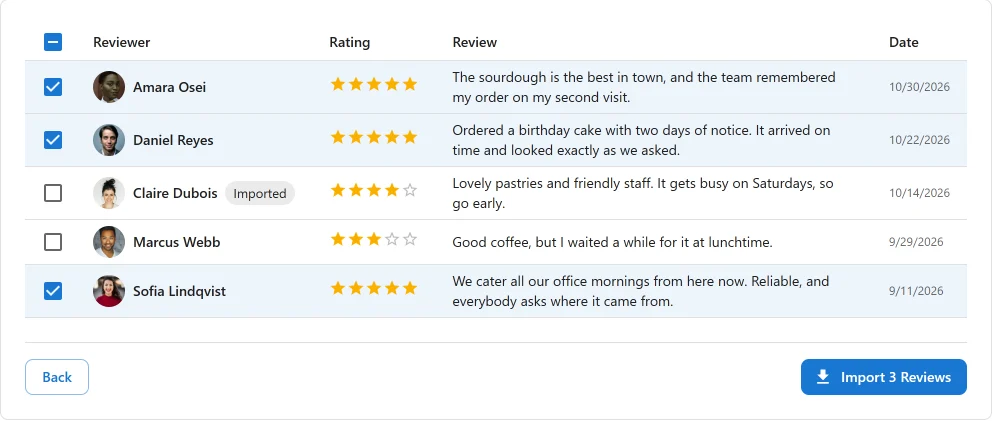
Import Google reviews to WordPress
There are two routes. Google Business Profile reads every review of a business you manage, and can run automatically. It uses your own OAuth client, and Google has to approve your Business Profile API access first. The Places search needs only an API key and finds any business on Google Maps, but Google returns at most five reviews and the import is always manual.
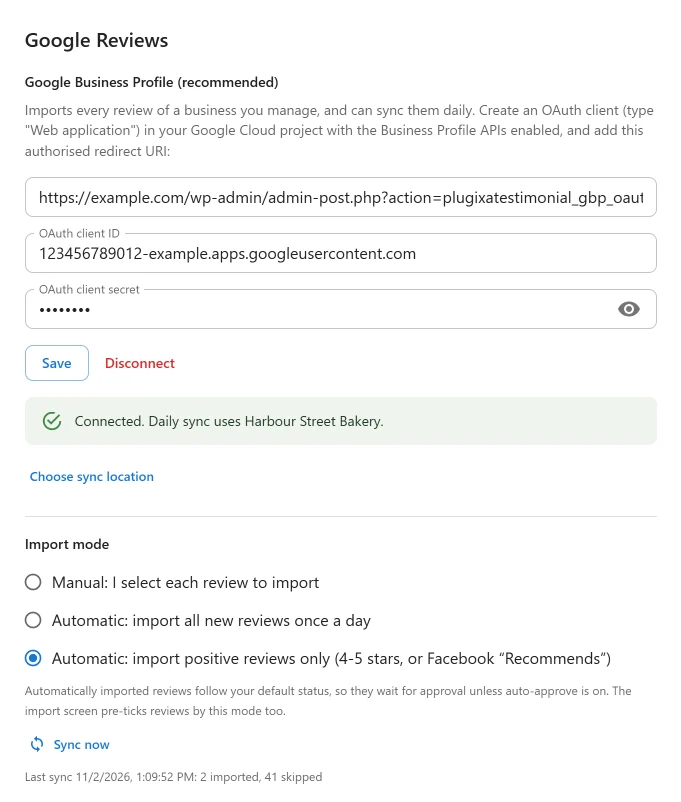
The Google Reviews guide covers both setups. The Places search now uses Places API (New), because Google no longer lets new projects enable the old one.
Import Facebook reviews
Connect a Facebook Page through your own Meta app and load its reviews. Facebook reviews are recommendations rather than stars, so the import screen shows Recommends or Doesn’t recommend, and the review arrives with no star rating. We never turn a recommendation into stars, because a rating nobody gave would be invented content.
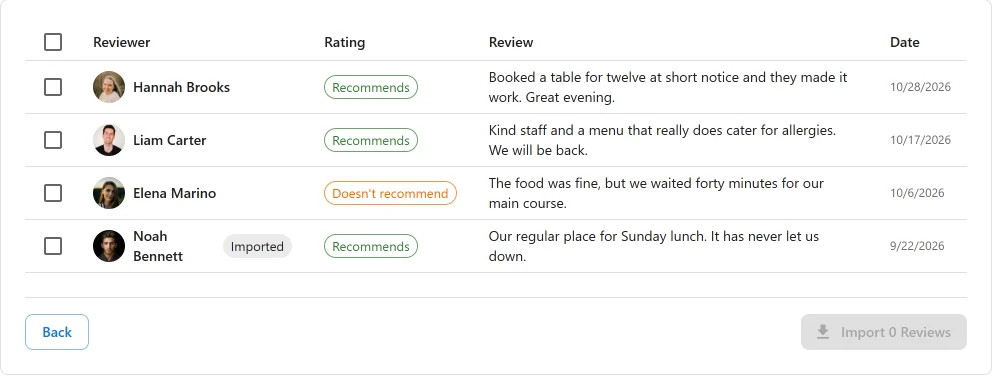
One requirement to plan for: Facebook only returns your customers’ reviews once your Meta app has Advanced Access to pages_read_user_content, which you request through Meta App Review. Until then the list is usually empty. The Facebook Reviews guide walks through it.
Turn WooCommerce product reviews into testimonials
Product reviews are already on your site, so there is nothing to connect. Filter by product category, minimum rating or verified owners, then pick the ones to show beyond the product page.

In an automatic mode, a review usually arrives as soon as you approve it. The WooCommerce Reviews guide has the details.
Choose how each source imports
Each source has its own import mode:
- Manual: you select every review. This is the default.
- Automatic, all new reviews: new reviews are imported once a day.
- Automatic, positive reviews only: only 4-5 star reviews or a Facebook “Recommends” are imported.
Imported reviews follow your default status, so they wait for your approval unless auto-approve is on. Sync now runs an import straight away. The Places search stays manual in every case.
Review schema now covers your own reviews only
This change affects every site, including the free plugin. Google’s review snippet rules do not allow markup for reviews taken from other sites, so Review and AggregateRating JSON-LD now covers only reviews collected on your own site: testimonials you add, your submission form, your CSV or JSON imports, and WooCommerce product reviews.
Google and Facebook reviews still display normally, but they stay out of the markup. The Schema settings page explains this.
Before you update
Plugixa Testimonial 1.1.0 requires PHP 8.2 or higher. If you are not sure which version you run, here is how to check your PHP version in WordPress.
And one fix
The Featured star showed on every testimonial in the list and in the edit form, whatever its real setting. It now shows the real value.
Review import is part of Plugixa Testimonial Pro, and the Free vs Pro page shows what each edition includes. Every change is in the 1.1.0 changelog.