

Contents
On this page
WooCommerce Reviews Import - Plugixa Testimonial
Turn your WooCommerce product reviews into testimonials and show them anywhere on your site, not only on the product page. This is a Pro feature. There is nothing to connect, because the reviews are already in your own database. It only appears when WooCommerce is active.
This is separate from the free Testimonials tab on product pages, which works in the other direction.
Import reviews
- On the Testimonials list, click Import WooCommerce Reviews.
- Choose a Product category, a Minimum rating, and whether to show Verified owners only.
- Click Load reviews.
- Tick the reviews you want and click Import.

Only approved reviews with written text are listed, up to the newest 500. Reviews you already imported are labelled Imported, and importing them again creates no duplicates.
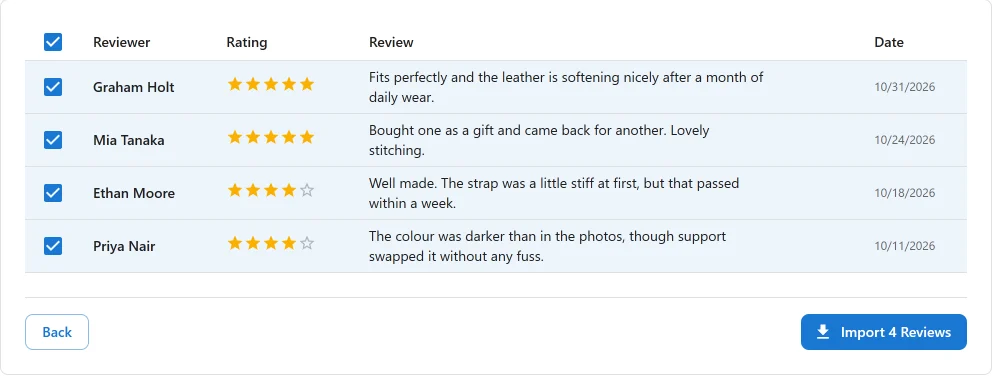
The customer’s name, the review text, the star rating and the date are kept. A product review has no photo, so the card shows the initials placeholder until you add one.
Import automatically
Set the filters and the import mode in Testimonials → Settings → WooCommerce Reviews. Click Save to store the filters. The import mode saves as soon as you choose it.
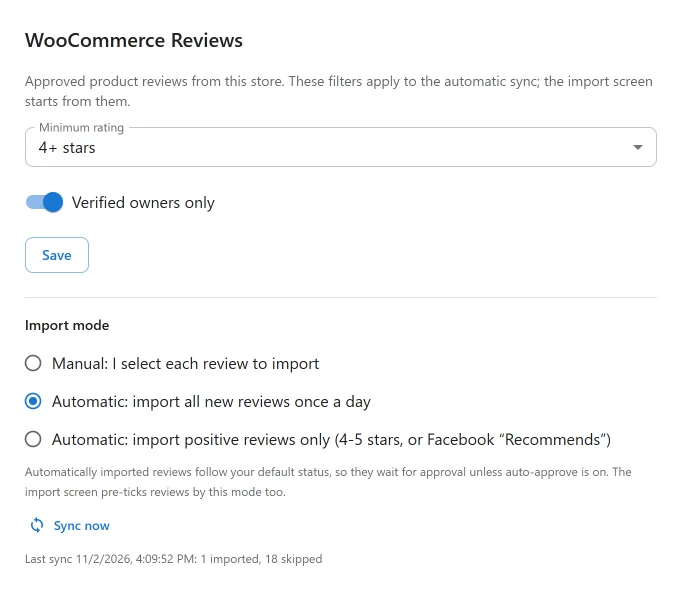
| Mode | What happens |
|---|---|
| Manual (default) | Nothing runs by itself. You select each review on the import screen. |
| Automatic: all new reviews | Once a day, every new review is imported. The import screen pre-ticks every new review too. |
| Automatic: positive reviews only | Once a day, only positive reviews are imported: 4-5 stars, or a Facebook “Recommends”. The import screen pre-ticks the same ones. |
In an automatic mode, a review usually arrives as soon as it is approved, as long as it passes your filters. The daily run catches anything that missed this, including a review published straight away without moderation.
Imported reviews follow your default status, so they wait for approval unless auto-approve is on. You stay in control of what goes live.
WooCommerce reviews and schema
Unlike Google and Facebook reviews, product reviews are collected on your own site, so they are included in your Review and AggregateRating JSON-LD. See Schema settings.
Troubleshooting
“WooCommerce is not active on this site”
Activate WooCommerce. The import works on approved review comments of WooCommerce products.
A review is missing from the list
- It is still waiting for moderation in WooCommerce.
- It has no written text.
- Its rating is below your Minimum rating, or it is not from a verified owner while Verified owners only is on.
A new review did not arrive immediately
If it was published without moderation, it arrives with the next daily run. Click Sync now to import it straight away. The site’s WP-Cron must be running for the daily run.
REST API
| Method | Endpoint | Description |
|---|---|---|
POST |
/wp-json/plugixatestimonial/v1/review-sources/woocommerce-reviews/fetch |
Load reviews, with category_id, min_rating and verified_only. |
POST |
/wp-json/plugixatestimonial/v1/review-sources/woocommerce-reviews/import |
Import the selected reviews. |
POST |
/wp-json/plugixatestimonial/v1/review-sources/woocommerce-reviews/sync-now |
Run the automatic import now. |
All of them require manage_options and the Pro plugin.
Related
Quick Links
Share