

Contents
On this page
Adyen Payments - Plugixa Car Parking
Adyen PRO is a payment method that sends the customer to Adyen’s Hosted Checkout and brings them back to your site. Customers see it as Online payment (Adyen).
Set it up under Plugixa Car Parking -> Settings -> Adyen. Everything on Payments about the ledger, refunds and booking statuses applies to Adyen payments too.
Setting it up
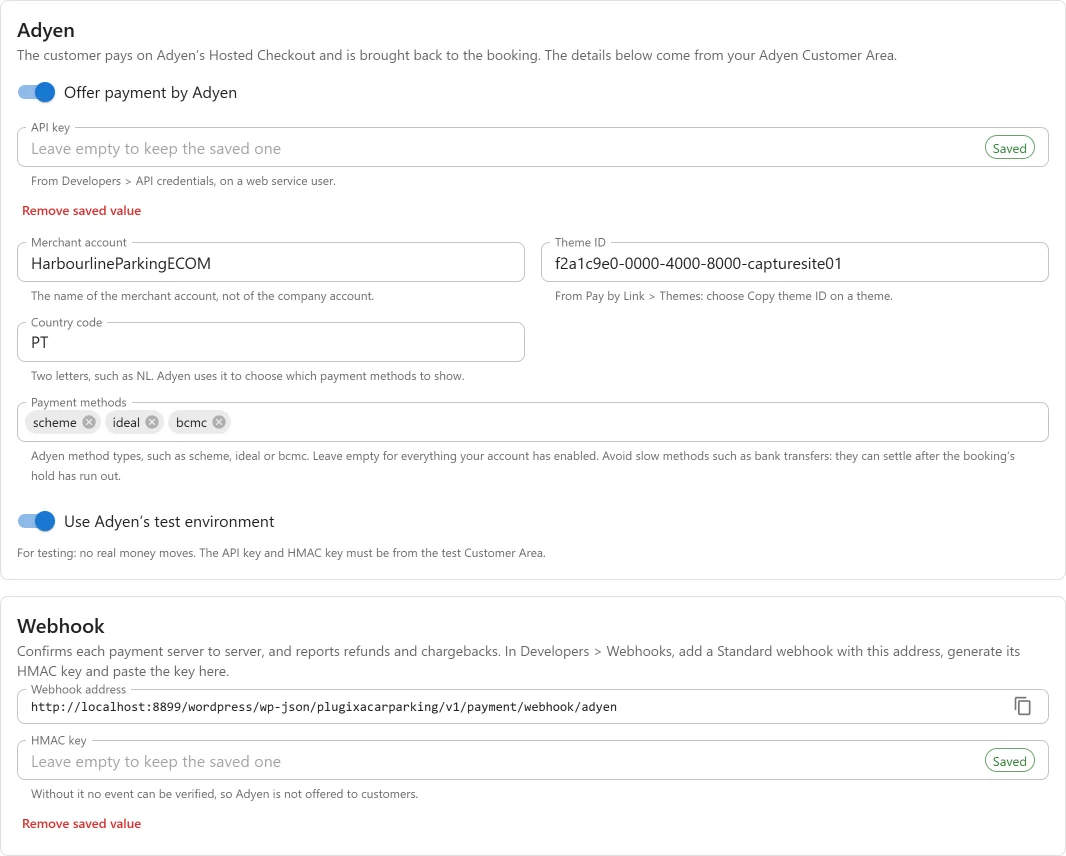
You need an Adyen merchant account with payment methods enabled. Adyen opens accounts through its sales team.
| Field | Key | Default | Where it comes from |
|---|---|---|---|
| Offer payment by Adyen | adyen in enabled_gateways |
Off | The switch that offers Adyen to customers. |
| API key | adyen_api_key |
Empty | Developers -> API credentials, on a web service user. Stored encrypted. |
| Merchant account | adyen_merchant_account |
Empty | The merchant account’s name, not the company account’s. |
| Theme ID | adyen_theme_id |
Empty | Pay by Link -> Themes: choose Copy theme ID on a theme. |
| Country code | adyen_country |
Empty | Two letters, such as NL. Adyen uses it to choose the methods to show. |
| Payment methods | adyen_methods |
Empty | Adyen method types, such as scheme, ideal, bcmc. Empty shows everything enabled on the account. |
| Use Adyen’s test environment | adyen_test_mode |
On | Off takes real money. |
| Live URL prefix | adyen_live_prefix |
Empty | Developers -> API URLs in the live Customer Area. Live only. |
| HMAC key | adyen_hmac_key |
Empty | From the webhook, below. Stored encrypted. |
Adyen is offered to customers only when the switch is on and every field is filled in, including the HMAC key.
Avoid slow methods such as bank transfers. They can settle after the booking’s hold has run out and its space may have been sold to someone else.
The plugin records a payment when Adyen authorises it, and asks Adyen to capture it at once, whatever capture delay the merchant account is set to.
Adding the webhook
-
Copy the Webhook address shown on the settings screen. It has this form:
https://example.com/wp-json/plugixacarparking/v1/payment/webhook/adyen -
In the Customer Area, open Developers -> Webhooks and add a Standard webhook with that address.
-
Generate its HMAC key and paste it into HMAC key. Adyen shows the key once, and the test and live environments each have their own.
-
Optionally, enable
OFFER_CLOSEDon the webhook, to hear about checkouts left to expire.
| Event | What the plugin does |
|---|---|
AUTHORISATION, success |
Records the payment, with its type (whole, deposit or balance) |
AUTHORISATION, failure |
Records a Failed row; the booking stays unpaid |
REFUND, success |
Records the refund, once |
REFUND, failure, REFUND_FAILED, REFUNDED_REVERSED |
Nothing recorded; announced as refund_failed |
NOTIFICATION_OF_CHARGEBACK, CHARGEBACK |
Nothing recorded; announced as dispute_opened and the site is emailed |
CHARGEBACK_REVERSED |
Nothing recorded; announced as dispute_closed |
OFFER_CLOSED |
Nothing recorded; announced as checkout_expired |
“Announced” means the action plugixa_carparking_payment_notice fires, so an
add-on or a snippet can email you about it.
Each event’s HMAC signature is checked. An event with a wrong signature, from the other environment or for another merchant account is acknowledged and ignored. An event the plugin accepted but could not write at that moment is answered 503, and Adyen sends it again.
Coming back from the checkout
The customer returns with a session id and result. The plugin confirms these with Adyen, and only for the session it opened for that booking. If the payment is authorised they see Payment received. Otherwise they see Confirming your payment, and the webhook reports how it ended.
Refunds
A refund made from the booking’s Payments panel is sent to Adyen first and recorded with Adyen’s reference. If Adyen refuses the request, nothing is recorded and the error is shown.
Adyen only accepts the request at that point. If it fails later (for example the
account has too little money in process), the refund is marked Failed, the
booking holds the money again, refund_failed is announced and the site is
emailed. Refund again once the problem is solved.
Amounts and currencies
The currency is the booking’s own. Amounts are sent in minor units, following
Adyen’s table: for example JPY has no decimals, KWD has three, and ISK and
CLP have two.
What is sent to Adyen
The plugin talks to Adyen from your server. There is no Adyen script on your pages.
| Sent | |
|---|---|
| API key | To sign in |
| Amount and currency | The amount due now |
| Booking reference and payment type | As the payment’s reference |
| Shopper reference | pcp- followed by the booking reference |
| Country | The country code you set |
| Customer’s email | For Adyen’s risk checks and 3D Secure |
| Allowed methods, theme, merchant account | To build the checkout |
| Return address | On your site |
If Pro is removed
The settings and encrypted keys stay, and are live again when Pro is reinstalled.
Adyen is no longer offered to customers, and existing rows stay in the ledger with
adyen shown as their method.
Quick Links
Share