

Contents
Klarna Payments - Plugixa Car Parking
Klarna PRO is a payment method that sends the customer to Klarna’s Hosted Payment Page and brings them back to your site. Customers see it as Pay with Klarna.
Set it up under Plugixa Car Parking -> Settings -> Klarna. Everything on Payments about the ledger, refunds and booking statuses applies to Klarna payments too.
Setting it up
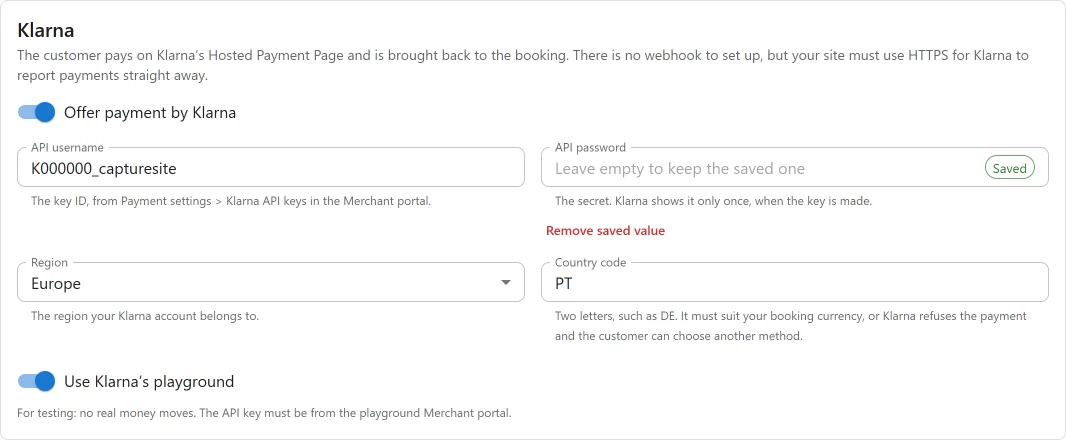
- In Klarna’s Merchant portal, open Payment settings -> Klarna API keys and generate a key. Klarna shows the password only once.
- Open Plugixa Car Parking -> Settings -> Klarna and fill in the fields below.
- Press Save.
| Field | Key | Default | Notes |
|---|---|---|---|
| API username | klarna_username |
empty | The key ID |
| API password | klarna_password |
empty | The secret, stored encrypted |
| Region | klarna_region |
Europe | The region of your Klarna account |
| Country code | klarna_country |
empty | Two letters, such as DE. Must suit your booking currency |
| Use Klarna’s playground | klarna_test_mode |
on | Playground keys work only in the playground, live keys only outside it |
There is no webhook to set up. Klarna is told where to report each payment when the payment starts.
How a payment is confirmed
Klarna does not sign what it sends, so the plugin never believes a return or a notification by itself. It reads the session and the order from Klarna, and an order counts only when it carries that booking’s reference.
A booking counts as paid at once, so the order is captured before it is recorded. Klarna’s page is asked to capture; if an order comes back uncaptured, the plugin captures it.
Klarna reports only to HTTPS addresses and gives up after four tries, so the plugin also checks each payment itself: 30, 60 and 90 minutes after it starts, using WP-Cron. A site on plain HTTP depends on the customer’s return and on these checks.
Refunds
A refund from the booking’s Payments panel is sent to Klarna and recorded with Klarna’s refund id.
What it does not do
- Monthly plans: refused, because they need a recurring charge.
- Refunds made in Klarna’s portal and disputes are not reported back. Handle them in the portal, and record such a refund on the booking yourself.
- One country per site. A location whose currency does not suit that country has its Klarna payments refused, and the customer can choose another method.
- The tax of a payment is sent inside its one order line. Klarna’s rules for separate US sales tax lines are not applied.
Testing
Use a key from the playground Merchant portal with Use Klarna’s playground on,
and Klarna’s sample customer data for your country. No real money moves, and any
six-digit code passes the phone check except 999999.
A customer Klarna refuses sees that on Klarna’s own page and can choose another
method there, so they do not come back with a failed payment. Nothing is recorded
unless they pay. Germany’s refused sample customer is customer+de+denied@klarna.com
with +4917610927312. The browser stays signed in as the last customer, so clear
its cookies before you switch.
Quick Links
Share